⚡ FLASH SALE: Get 60% OFF All Premium 3D & STL Models! ⚡

The world of 3D visualization is constantly evolving, and at its heart lies the demand for impeccable detail and realism. For automotive enthusiasts, designers, game developers, and visualization professionals, high-quality 3D car models are not just assets; they are the fundamental building blocks for stunning renders, immersive experiences, and compelling product showcases. From the gleam of a meticulously crafted paint job to the intricate details of an engine bay, a truly excellent 3D car model requires a masterful blend of artistic vision and technical precision.
This comprehensive guide will take you on an in-depth journey through the technical intricacies of creating, optimizing, and utilizing premium 3D car models. We’ll explore the foundational principles of topology, delve into the nuances of PBR material creation, unravel the complexities of UV mapping, and navigate the specialized requirements for rendering, game development, AR/VR, and even 3D printing. Whether you’re a seasoned 3D artist aiming to refine your craft, a game developer seeking to optimize performance without sacrificing visual fidelity, or an automotive designer looking for the perfect visualization tool, understanding these technical pillars is crucial. Prepare to unlock the full potential of your automotive projects as we dissect the elements that define true 3D excellence.
The underlying structure of any 3D model, its topology, is paramount, especially for complex, highly reflective surfaces like those found on cars. Good topology ensures smooth deformations, clean reflections, and efficient rendering. For automotive models, which are often characterized by sweeping curves and sharp creases, maintaining impeccable edge flow is a non-negotiable requirement. Sub-optimal topology can lead to pinching, unwanted artifacts, and a loss of visual fidelity, undermining even the most sophisticated texturing and lighting efforts.
The industry standard for high-quality automotive models is overwhelmingly quad-based geometry. Triangles should be avoided in areas that need to deform or have smooth surfaces, as they can cause pinching and triangulation artifacts, particularly when subdivision surface modifiers are applied. N-gons (polygons with more than four sides) are an absolute no-go in production-ready meshes, as they are unpredictable during deformation and can cause rendering issues. A clean mesh typically adheres to strict quad-only rules, facilitating predictable behavior under subdivision and easier mesh editing. When sourcing models from marketplaces such as 88cars3d.com, artists prioritize models with meticulously maintained quad topology, knowing it forms a robust base for any project.
Quad-based geometry consists solely of four-sided polygons. This uniformity allows for predictable subdivision, a technique where algorithms smoothly interpolate new geometry between existing edges, effectively “smoothing” the model. Software like 3ds Max, Blender, and Maya utilize subdivision surface modifiers (e.g., Turbosmooth, Subdivision Surface) that interpret quad meshes beautifully, creating smooth, organic surfaces from a relatively low-polygon base. For automotive bodies, this is critical for achieving the high-fidelity curves and reflections seen in real vehicles. A common workflow involves modeling a low-poly cage with perfect quads, then applying subdivision to achieve the desired smoothness. This allows for flexibility – the model can be rendered at high subdivision levels for cinematic quality or at lower levels for real-time applications, all from the same base mesh. Polygon counts for high-detail rendered car bodies can range from 100,000 to over a million triangles post-subdivision, while a game-ready base mesh might start around 20,000-50,000 quads.
Edge flow refers to the direction and continuity of edges on a mesh. For automotive models, precise edge flow is crucial for two main reasons: maintaining crisp reflections and enabling realistic deformation. Edges should follow the natural contours and creases of the car’s design. Loops of edges should run parallel to curves, allowing them to tighten or loosen the subdivision effect where needed. For instance, around wheel wells, window frames, or body panel gaps, tight edge loops are required to maintain sharp definition when subdivided, preventing them from becoming overly soft. Conversely, broad, evenly spaced loops on flat panels ensure smooth, undistorted reflections.
Poor edge flow, characterized by irregular quads, sudden changes in edge direction, or T-junctions, will manifest as visible ripples, bumps, or “pinching” when subdivided, particularly noticeable in specular highlights on reflective car paint. When a model needs to be animated (e.g., doors opening, suspension compression), proper edge flow around hinges and deformation zones is essential for smooth, artifact-free movement. Artists often spend significant time meticulously adjusting vertices and edges to ensure optimal flow, sometimes even incorporating techniques like adding “support loops” or “holding edges” to control the sharpness of subdivided corners without adding excessive geometry to flatter areas.
Once the geometric foundation is solid, the next crucial step in creating realistic 3D car models is material definition. Physically Based Rendering (PBR) has revolutionized this process, providing a robust, intuitive, and physically accurate way to define how light interacts with surfaces. PBR materials ensure consistency across different lighting conditions and render engines, making models look realistic regardless of the environment they are placed in. Understanding PBR principles and mastering texture creation are vital for achieving the photorealistic quality expected in modern 3D visualization.
PBR workflows rely on a set of standardized texture maps that describe various surface properties, such as color, reflectivity, and roughness. These maps are interpreted by PBR shaders in render engines (like Corona, V-Ray, Cycles, Arnold) and real-time engines (Unity, Unreal Engine) to simulate how light would behave in the real world. This approach contrasts sharply with older, more artistic “specular/gloss” workflows, which often required manual tweaking of values per lighting setup to achieve desired results. PBR offers a more predictable and physically grounded outcome, allowing artists to focus on the artistic expression rather than fighting lighting inconsistencies.
The core of PBR lies in its distinct texture maps, each contributing to the final look of the material:
* Albedo (or Base Color): This map defines the pure color of the surface, stripped of any lighting or shading information. It should ideally be flat and uniform in lighting. For car paint, this would be the base color of the paint before any metallic flakes or clear coat.
* Normal Map: This map simulates high-frequency surface details (like scratches, panel lines, or subtle dents) without adding actual geometry. It uses RGB values to encode surface normals, making a low-polygon model appear highly detailed. This is crucial for adding intricate details to car bodies, interiors, and tires without inflating poly counts.
* Roughness Map: Dictates the microscopic surface irregularities that scatter light. A value of 0 (black) indicates a perfectly smooth, mirror-like surface, while 1 (white) indicates a completely rough, diffuse surface. Car paint, chrome, and rubber all have distinct roughness values that contribute significantly to their realism.
* Metallic Map: A grayscale map distinguishing between metallic (white) and non-metallic (black) surfaces. Metallic surfaces use the albedo map as their reflective color, while non-metallic surfaces rely on a fixed F0 (fresnel reflectance at normal incidence) value. This map is vital for chrome, brushed metal, and metallic car paints.
* Ambient Occlusion (AO) Map: Simulates the darkening effect in crevices and corners where ambient light is blocked. While often baked into the albedo or used as an extra multiplier, it adds depth and realism to contact points and shadowed areas.
Texture resolutions for high-quality automotive models typically range from 2K to 8K, with critical parts like the car body often using 4K or 8K maps to capture minute details. Tire textures might use 2K or 4K, while interior elements could be a mix of 1K and 2K. These maps are often created using software like Substance Painter, Photoshop, or baked from high-poly models in tools like Marmoset Toolbag or XNormal.
Beyond the basic PBR maps, advanced shader networks and layering techniques elevate realism further. For instance, realistic car paint is rarely a single material; it’s a complex stack of layers. A typical car paint shader in renderers like V-Ray or Corona might involve:
1. Base Coat: The primary color, often with a metallic flake layer (simulated through procedural noise or a specific texture map affecting reflectivity).
2. Clear Coat: A transparent, highly reflective layer on top, often with its own roughness and fresnel properties, simulating the glossy protective layer of automotive paint. This layer dictates the sharp reflections and highlights.
3. Dirt/Dust Layers: Procedural noise or texture maps can be layered on top, affecting roughness and color, to simulate subtle accumulation of grime, especially in crevices or on horizontal surfaces.
4. Wear and Tear: Edge wear, scratches, or chipped paint can be achieved by blending different PBR materials using masks generated procedurally or painted manually.
Furthermore, material blending is crucial for details like headlights (glass, chrome reflectors, intricate internal structures), tires (rubber, dirt, sidewall lettering), and interior elements (leather, plastics, fabrics). Shader networks in Blender’s Cycles, 3ds Max’s Slate Material Editor, or Maya’s Hypershade allow artists to combine multiple textures, procedural nodes, and utility maps (e.g., curvature maps, thickness maps) to create incredibly nuanced and believable surfaces. The meticulous combination of these elements is what elevates a good model to an outstanding one, allowing it to shine in any rendering scenario.
UV mapping is the unsung hero of 3D texturing. It’s the process of unfolding a 3D mesh into a 2D space, creating a set of coordinates (UVs) that tell the renderer how to apply a 2D texture image onto the 3D surface. For complex objects like cars, with their intricate shapes, curved panels, and numerous distinct components, efficient and clean UV mapping is an art form in itself. Poor UVs can lead to stretched textures, visible seams, or inefficient texture memory usage, severely impacting the model’s visual quality and performance.
The goal of UV mapping is to create a seamless, non-overlapping, and uniformly scaled layout of UV shells (the unwrapped pieces of the mesh). This ensures that textures appear consistent across the model, without distortions or pixelation due to uneven texel density. Car models, with their high-detail requirements for paint, decals, and interior elements, demand meticulous attention to UV layout. Imagine trying to paint a complex decal onto a car door if the UVs were stretched or overlapping – it would be an impossible task. The quality of UV maps directly impacts the detail and realism that can be achieved with textures.
A strategic UV layout for a car model involves several key considerations:
* **Minimizing Distortion:** UV shells should be unwrapped as flatly as possible to prevent stretching or squashing of textures. Tools like Blender’s Smart UV Project, 3ds Max’s Unwrap UVW modifier, and Maya’s UV Editor provide various projection methods (planar, cylindrical, spherical, box) to achieve this.
* **Seam Placement:** UV seams define where the 3D model is “cut” to be flattened. For cars, seams are strategically placed in less visible areas, such as along sharp edges, under trim, or in areas that will be covered by other parts, to hide them from the viewer. For example, a car door’s UV seams might follow the door’s perimeter and be hidden by weather stripping.
* **Texel Density Uniformity:** Texel density refers to the number of pixels per unit of surface area. Maintaining a consistent texel density across all UV shells ensures that all parts of the model receive the same level of texture detail. This prevents one part from looking blurry while another looks crisp, especially when using a shared texture atlas.
* **Maximizing UV Space:** The 0-1 UV space (the square area where textures are placed) should be utilized efficiently, minimizing wasted empty space. Larger, more important components (like the car body or hood) should receive more UV space, and thus more texture resolution, than smaller, less critical parts (like bolts or interior buttons).
For high-end 3D car models, it’s common to divide the model into logical groups for UV mapping. For example, the car body might have its own UV layout, the interior might have another, and the wheels yet another. This modular approach allows for targeted texture resolution and easier management.
When a single 0-1 UV space isn’t enough to provide the required texture resolution for extremely detailed models, UDIMs (U-Dimension) or multi-tile texturing comes into play. UDIMs extend the traditional 0-1 UV space into multiple adjacent tiles, allowing artists to assign separate texture maps to different parts of the model while still maintaining a single material. For instance, a car body could have one UDIM tile for the hood, another for the roof, another for the side panels, and so on.
This technique is invaluable for cinematic quality automotive rendering, where an 8K texture for an entire car body might still not be enough to capture microscopic details like paint imperfections or intricate decals. By using UDIMs, each panel could potentially have its own 4K or 8K texture, dramatically increasing the overall texel density and visual fidelity. Software like Mari, Substance Painter, and ZBrush fully support UDIM workflows, allowing artists to paint seamlessly across multiple texture tiles. Render engines like V-Ray, Corona, Cycles, and Arnold are also fully compatible, automatically loading the correct texture for each UDIM tile. This approach allows for truly photorealistic levels of detail, where even the smallest imperfections on a car’s surface can be rendered with stunning clarity. However, it does increase the complexity of texture management and memory footprint, requiring careful planning.
Having a perfectly modeled and textured 3D car is only half the battle; bringing it to life through photorealistic rendering is where the magic truly happens. Rendering involves simulating how light behaves in a virtual environment, interacting with materials, and ultimately generating a 2D image. High-fidelity automotive rendering demands meticulous attention to lighting, camera angles, environment setup, and render engine settings to achieve results indistinguishable from real-world photography.
Modern render engines employ advanced algorithms like path tracing and global illumination to accurately simulate light bounces, refractions, and reflections. The choice of render engine often depends on the software ecosystem, project requirements, and desired level of realism and speed. Whether it’s the raw power of V-Ray and Corona, the versatility of Cycles, or the industry standard Arnold, each engine offers unique strengths that can be leveraged to create breathtaking automotive visuals. The objective is always to tell a story with light and shadow, highlighting the car’s design and features in the most compelling way possible.
Lighting is arguably the most critical component of a photorealistic render. For cars, which are inherently reflective, the environment setup plays a crucial role in dictating the quality of reflections and overall mood.
* HDRI (High Dynamic Range Image) Lighting: HDRIs are spherical photographic images that capture the full range of light information from a real-world environment. They are the go-to solution for automotive rendering, providing realistic ambient light, reflections, and even basic shadows from a single source. A high-quality HDRI (e.g., 16K or 32K resolution) can instantly place a car model into a convincing environment, from a sunny parking lot to an overcast studio.
* Physical Lights: While HDRIs provide global illumination, targeted physical lights (like area lights, spotlights, or IES lights) are often used to accentuate specific details, create dramatic highlights, or simulate studio lighting setups. For instance, long, narrow area lights are commonly used in studio renders to create elegant reflections along the car’s body panels, emphasizing its curves.
* Camera Setup: Emulating real-world photography principles is key. Using physically accurate camera settings (aperture for depth of field, shutter speed, ISO) helps achieve a cinematic look. Automotive renders often benefit from slightly wider focal lengths (e.g., 35-50mm) to capture the car’s form without extreme distortion, along with careful composition rules like the rule of thirds.
A typical workflow involves starting with a strong HDRI, then incrementally adding physical lights to refine reflections, define contours, and add visual interest. Background elements, whether 3D models or backplate images, are integrated seamlessly, often with careful attention to matching perspective and lighting.
Each render engine brings its own philosophy and feature set to the table:
* Corona Renderer (3ds Max, Cinema 4D): Renowned for its ease of use, speed, and photorealistic results, especially for architectural visualization and product rendering. Its unbiased approach delivers natural light and excellent caustics without complex setups. Iterative rendering provides instant feedback, making material and lighting adjustments intuitive.
* V-Ray (3ds Max, Maya, SketchUp, Rhino, Blender): A long-standing industry standard, V-Ray is incredibly powerful and versatile. It offers a hybrid rendering approach (CPU/GPU) and a vast array of features for advanced light linking, volumetrics, and complex material definitions. V-Ray is known for its robust production capabilities and ability to handle massive scenes.
* Cycles (Blender): Blender’s integrated, physically based path tracer. Cycles offers GPU rendering, a flexible node-based shader system, and continuous development with features like adaptive sampling and denoising. Its integration within Blender makes it a powerful choice for artists using the open-source platform for car modeling and rendering.
* Arnold (Maya, 3ds Max, Houdini, Cinema 4D): Autodesk’s flagship renderer, known for its unbiased, physically-based approach and high-quality results in feature films and visual effects. Arnold excels at handling complex geometry, detailed shaders, and large scenes with predictable results. Its robust sampling controls allow for fine-tuning quality and render times.
Each engine has its own set of render settings (sampling, global illumination bounces, denoising thresholds) that need to be carefully balanced to achieve the desired image quality within acceptable render times. For complex car models with multiple layers of paint, clear coats, and reflective surfaces, efficient render settings are crucial to avoid excessively long render times while still achieving crisp, noise-free images. Post-processing in tools like Adobe Photoshop or Blackmagic Fusion is then used to add final touches, color grading, lens effects, and compositing of render passes to achieve the final polished image.
While cinematic renders prioritize absolute visual fidelity, game development demands a delicate balance between stunning visuals and real-time performance. 3D car models for games must be highly optimized to ensure smooth frame rates, minimize draw calls, and fit within strict memory budgets without sacrificing too much detail. The process of taking a high-poly automotive model and transforming it into a game-ready asset involves a comprehensive suite of optimization techniques, from polygon reduction to clever texture management.
Game engines like Unity and Unreal Engine are incredibly powerful, but they operate under real-time constraints. Every polygon, every draw call, and every texture map contributes to the computational load. For open-world games with many vehicles, or racing simulations demanding 60 FPS+, aggressive optimization is not just a recommendation, it’s a necessity. This means a shift from raw polygon counts to intelligent use of LODs, efficient UV layouts, and baking high-detail information into normal maps. When searching for game assets, developers frequently turn to platforms like 88cars3d.com for models that are already optimized for performance.
* Levels of Detail (LODs): LODs are different versions of the same 3D model, each with progressively fewer polygons. As the player camera moves further away from the car, the game engine automatically switches to a lower-detail LOD, saving computational resources. A typical game car might have 3-5 LOD levels:
* LOD0 (High Detail): Visible up close, 30,000-80,000 polygons (triangles), full interior, detailed exterior.
* LOD1 (Medium Detail): Visible at mid-range, 10,000-25,000 polygons, simplified interior, main exterior shapes.
* LOD2 (Low Detail): Visible far away, 2,000-8,000 polygons, basic exterior shape, no interior.
* LOD3 (Very Low/Billboard): For extreme distances or crowds, 500-2,000 polygons, or even a simple billboard plane.
Creating LODs involves careful manual reduction in tools like Blender or Maya, or using automated tools like Simplygon, ensuring visual integrity is maintained at each transition point.
* Draw Calls: A draw call is a command issued by the CPU to the GPU to draw a batch of triangles. Each material, mesh, or separate object typically generates at least one draw call. Too many draw calls can bottleneck the CPU, leading to poor performance. For car models, this means combining meshes where possible and using fewer materials. Instead of separate materials for each car part, texture atlasing is often used.
* Texture Atlasing: This technique combines multiple smaller textures (e.g., textures for the car body, wheels, interior elements) into a single, larger texture map (an “atlas”). All the UVs for these separate components are then packed into this single atlas. This dramatically reduces the number of materials and, consequently, draw calls, as the entire car can be rendered with just one or two materials, improving performance.
Beyond visual optimization, game-ready car models also require functional components:
* Collision Meshes: These are simplified, often invisible, meshes used by the physics engine to detect collisions. Unlike the visual mesh, collision meshes prioritize accuracy and low polygon count over visual detail. A common approach is to use multiple convex hull colliders for complex shapes, or simpler box/sphere colliders for individual parts like wheels. Using the high-poly visual mesh for collisions is highly inefficient and should be avoided.
* Performance Budgets: Game developers operate within strict performance budgets defined by the target platform and game type. These budgets dictate the maximum polygon count for vehicles, the number of draw calls, and the total texture memory allowed. A car in a mobile racing game might have a budget of 15,000 triangles, while a car in a high-end PC simulation might be allowed 100,000 triangles or more. Adhering to these budgets from the outset of asset creation is crucial.
* Baking High-Detail to Low-Poly: A common workflow involves creating a very high-polygon (millions of polys) “sculpt” of the car with all micro-details (panel lines, screws, fabric weaves). This detail is then “baked” onto the normal maps, ambient occlusion maps, and curvature maps of the much lower-polygon game mesh. This allows the low-poly model to *appear* highly detailed without incurring the performance cost of actual geometry. Tools like Substance Painter, Marmoset Toolbag, and xNormal are essential for this process.
Ultimately, crafting game-ready 3D car models is a continuous balance between artistic vision and technical constraints, pushing for maximum visual quality while maintaining optimal real-time performance.
The utility of high-quality 3D car models extends far beyond traditional rendering and game development. With the rise of immersive technologies like Augmented Reality (AR) and Virtual Reality (VR), alongside advancements in 3D printing and interactive visualization, the demands on 3D assets are diversifying. Each application presents its own unique set of technical requirements and optimization challenges, transforming how we interact with and experience digital automotive designs.
Whether it’s placing a virtual car in your driveway via AR, exploring a future concept in a VR showroom, or holding a physical prototype created through 3D printing, the underlying 3D model needs to be purpose-built for its intended use. This often means re-thinking polygon counts, material setups, and even mesh integrity to ensure a seamless and functional experience across these diverse platforms. The versatility of a well-crafted 3D car model is truly showcased in its adaptability to these emerging and established applications.
AR and VR environments are characterized by their need for extremely high frame rates (typically 90+ FPS for VR to prevent motion sickness) and low latency. This translates to even stricter optimization requirements than traditional games:
* Aggressive Polycount Reduction: AR/VR models usually need to be at the lower end of the game-ready polygon spectrum, often targeting under 50,000 triangles for an entire vehicle, and significantly less for mobile AR. Every component must be scrutinized for unnecessary geometry.
* Draw Call Minimization: Single-pass rendering and stereoscopic rendering in VR double the rendering workload. Consolidating materials and textures through atlasing is crucial to keep draw calls to a minimum (ideally under 10-20 per car).
* PBR Material Simplification: While PBR is used, complex shader networks with multiple layers and heavy texture loads can impact performance. Simplifying materials to essential maps (Albedo, Normal, Metallic, Roughness) and potentially reducing texture resolutions (e.g., 1K-2K for most parts) helps. Baking complex lighting into lightmaps or vertex colors is also common for static elements.
* Occlusion Culling and Batching: Efficient use of culling techniques (frustum culling, occlusion culling) and mesh batching (combining similar meshes to reduce draw calls) within game engines like Unity or Unreal Engine is paramount for performance.
* File Formats: Formats like GLB/glTF (for web-based AR/VR and general real-time use) and USDZ (for Apple’s ARKit) are becoming standard due to their efficiency and inclusion of PBR material definitions.
3D printing transforms digital models into physical objects, but this process has very specific geometric requirements that differ significantly from rendering:
* Watertight (Manifold) Meshes: For a 3D model to be printable, it must be “watertight” or “manifold.” This means every edge must connect exactly two faces, forming a completely enclosed volume with no holes, inverted normals, or self-intersecting geometry. A render model can have open edges or disconnected parts, but a print model cannot.
* Wall Thickness: All parts of the model must have a minimum wall thickness to be physically robust enough to print and handle. This thickness varies depending on the printing technology and material (e.g., 1mm for plastics, more for fragile materials). Thin details like antenna, mirrors, or small spoilers on a digital car model may need to be thickened or simplified for printing.
* Mesh Resolution: While too many polygons can make a print file unnecessarily large, too few can result in a “faceted” appearance. A balance must be struck, often requiring converting subdivision surfaces to actual geometry and ensuring a uniform tessellation.
* Boolean Operations: Often, parts of a complex car model need to be joined into a single mesh for printing. Boolean operations can be used, but they require clean input geometry to avoid errors. Mesh repair tools (like Blender’s 3D Print Toolbox, MeshMixer, or online services) are frequently used to identify and fix non-manifold geometry, fill holes, and ensure printability.
* File Formats: The most common file formats for 3D printing are STL (Stereolithography) and OBJ, though others like 3MF are gaining traction. These formats primarily store geometric information without extensive material data.
Interactive visualization, such as online car configurators or showroom kiosks, often falls somewhere between game optimization and high-fidelity rendering. These applications require:
* Moderate Polycounts and LODs: While not as aggressive as AR/VR, models need to perform well in real-time. LODs are crucial for smoothly transitioning between detailed views and overall scene views.
* Modular Design: Car configurators thrive on modularity. Wheels, interiors, paint colors, and accessories must be easily swappable. This means individual components are modeled, UV mapped, and textured separately, allowing for dynamic assembly.
* PBR Material Switching: The ability to change paint colors, interior trim materials, and wheel finishes instantly requires well-defined PBR materials that can be easily manipulated through parameters or texture swaps within the interactive application.
* Efficient Asset Loading: For web-based configurators, asset size is critical for quick loading times. This necessitates optimized meshes, compressed textures, and efficient streaming strategies.
Whether for immersive experiences, physical prototypes, or dynamic online showcasing, the underlying quality and thoughtful preparation of a 3D car model from platforms like 88cars3d.com directly determine its success across these diverse and demanding applications.
In the interconnected world of 3D production, assets rarely stay confined to a single software environment. A 3D car model might be modeled in Blender, textured in Substance Painter, rendered in Corona for a marketing campaign, and then optimized for Unreal Engine for a game. This multi-tool pipeline necessitates a thorough understanding of various 3D file formats, their capabilities, and their limitations, ensuring seamless asset transfer and maximum compatibility across different software and platforms. The choice of format can significantly impact data integrity, transfer speed, and the overall success of a project.
Each file format is designed with specific intentions, carrying different types of data (geometry, UVs, materials, animations, cameras, lights) and supporting varying levels of complexity. Knowing which format to use for which purpose is a critical skill for any 3D professional. Mischoosing a format can lead to lost data, corrupted meshes, or cumbersome re-work, undermining the efficiency of the entire workflow.
Here’s a breakdown of common 3D file formats and their primary use cases:
* FBX (Filmbox): Developed by Autodesk, FBX is the de facto industry standard for exchanging 3D data between different software applications (3ds Max, Maya, Blender, Unity, Unreal Engine). It’s incredibly versatile, supporting geometry, UVs, PBR materials, textures, animations, cameras, and lights. Its comprehensive nature makes it ideal for full scene transfers, especially where animation is involved. However, its proprietary nature can sometimes lead to compatibility quirks between different software versions.
* OBJ (Object): One of the oldest and most widely supported formats, OBJ is excellent for static mesh data. It stores geometry (vertices, faces, normals, UVs) and can reference external material definition files (.MTL). While it’s reliable for transferring mesh and basic UV information, it doesn’t support advanced PBR material definitions, animations, or scene hierarchies, making it less suitable for complex animated scenes.
* GLB/glTF (Graphics Language Transmission Format): Often referred to as the “JPEG of 3D,” glTF is an open-standard, royalty-free format designed for efficient transmission and loading of 3D scenes and models in web and real-time applications. GLB is the binary version of glTF, packaging all assets (geometry, textures, materials, animations) into a single file. It natively supports PBR materials and is rapidly becoming the standard for web 3D, AR/VR, and game development due to its small file size and quick parsing.
* USDZ (Universal Scene Description Zip): Developed by Apple and Pixar, USDZ is a proprietary format specifically for AR experiences on Apple devices (ARKit). It’s an uncompressed, unencrypted zip archive containing USD (Universal Scene Description) files and textures. Like glTF, it’s optimized for efficiency and supports PBR materials, making it crucial for delivering high-quality AR car models on iOS.
* STL (Stereolithography): As discussed, STL is the primary format for 3D printing. It represents a 3D model as a series of connected triangles (a triangular mesh) without color, texture, or material information. It’s simple but effective for communicating purely geometric data to 3D printers.
* **Alembic (.abc):** A format for “baked” geometry caches, often used in film VFX. It efficiently stores animated geometry and deformation data, making it great for transferring complex dynamic elements without relying on rigging or modifiers in the target application. Less common for static car models, but useful for animated sequences.
* **STEP/IGES:** These are CAD (Computer-Aided Design) formats, often used for engineering models. While not directly usable in most 3D modeling software, they represent geometry parametrically (mathematical curves and surfaces) rather than with polygons. Converting from CAD to polygonal meshes often requires specialized software (e.g., Rhino, MoI3D) and careful retopology to create clean meshes suitable for rendering or games.
The process of moving a 3D car model from one software to another often involves more than just selecting “Export.”
* **PBR Material Consistency:** When exporting to FBX or glTF, ensure your PBR materials are correctly authored. Most modern render engines and game engines understand the “Roughness/Metallic” workflow. However, variations in shader implementations mean that some manual tweaking of material settings in the destination software might still be necessary.
* **Units and Scale:** Always ensure consistent unit systems (e.g., meters, centimeters) across all software to avoid scale discrepancies when importing models. Exporting with embedded units is a good practice.
* **Texture Paths:** When models are exported, ensure that texture paths are absolute or relative in a way that the destination software can easily locate them. Embedding textures (as in GLB) or packing them into the export file (some FBX exporters) simplifies this.
* **Pivot Points and Transforms:** Check that the model’s pivot point and transformation (position, rotation, scale) are correctly set, especially for game engines where precise alignment and origin are crucial. Resetting X-forms or freezing transformations before export is often recommended.
* **Software-Specific Workflows:** For instance, Unity and Unreal Engine have specific FBX import settings that can optimize meshes, generate LODs, and configure materials automatically. Understanding these engine-specific pipelines is vital for efficient integration.
By carefully considering the strengths and weaknesses of each file format and adhering to best practices for asset preparation and export, 3D artists can ensure their high-quality 3D car models maintain their integrity and versatility across any demanding production pipeline, making platforms like 88cars3d.com a reliable source for ready-to-use assets.
The journey through the technical landscape of high-quality 3D car models reveals a multifaceted discipline demanding precision, artistic insight, and a deep understanding of digital workflows. From the foundational integrity of quad-based topology and meticulous edge flow that ensures pristine reflections, to the nuanced artistry of PBR material creation that brings surfaces to life, every technical detail contributes to the ultimate realism and versatility of a 3D vehicle. We’ve explored how strategic UV mapping maximizes texture detail, how advanced rendering techniques conjure photorealistic scenes, and how rigorous optimization transforms high-fidelity assets into performance-ready game models and immersive AR/VR experiences. Furthermore, the specialized demands of 3D printing and the critical role of versatile file formats underscore the adaptive nature required of truly professional 3D car assets.
The demand for excellence in 3D automotive models continues to grow, fueled by advancements in rendering, real-time engines, and immersive technologies. Mastering these technical aspects not only elevates the visual quality of your projects but also future-proofs your assets for diverse applications. Whether you are an individual artist striving for perfection, a studio pushing the boundaries of interactive design, or an automotive brand seeking unparalleled visualization, investing in and understanding the creation of technically sound 3D car models is paramount.
For those looking to accelerate their projects with assets built on these very principles, platforms like 88cars3d.com offer a curated selection of high-quality 3D car models, meticulously crafted with clean topology, realistic PBR materials, optimized UVs, and multiple file formats, ready to integrate into your next masterpiece. Embrace the technical depth, refine your craft, and drive your creative visions forward with unparalleled digital automotive excellence.

Texture: Yes
Material: Yes
Download the Nissan 350Z 3D Model featuring clean geometry, realistic detailing, and a fully modeled interior. Includes .blend, .fbx, .obj, .glb, .stl, .ply, .unreal, and .max formats for rendering, simulation, and game development.
Price: $4.99

Texture: Yes
Material: Yes
Download the Nissan Skyline V35 2001 3D Model featuring clean geometry, realistic detailing, and a fully modeled interior. Includes .blend, .fbx, .obj, .glb, .stl, .ply, .unreal, and .max formats for rendering, simulation, and game development.
Price: $4.99

Texture: Yes
Material: Yes
Download the Mercedes-Benz S-Klasse 221-007 3D Model featuring clean geometry, realistic detailing, and a fully modeled interior. Includes .blend, .fbx, .obj, .glb, .stl, .ply, .unreal, and .max formats for rendering, simulation, and game development.
Price: $4.99

Texture: Yes
Material: Yes
Download the Mercedes W124 Sedan 3D Model featuring clean geometry, realistic detailing, and a fully modeled interior. Includes .blend, .fbx, .obj, .glb, .stl, .ply, .unreal, and .max formats for rendering, simulation, and game development.
Price: $4.99
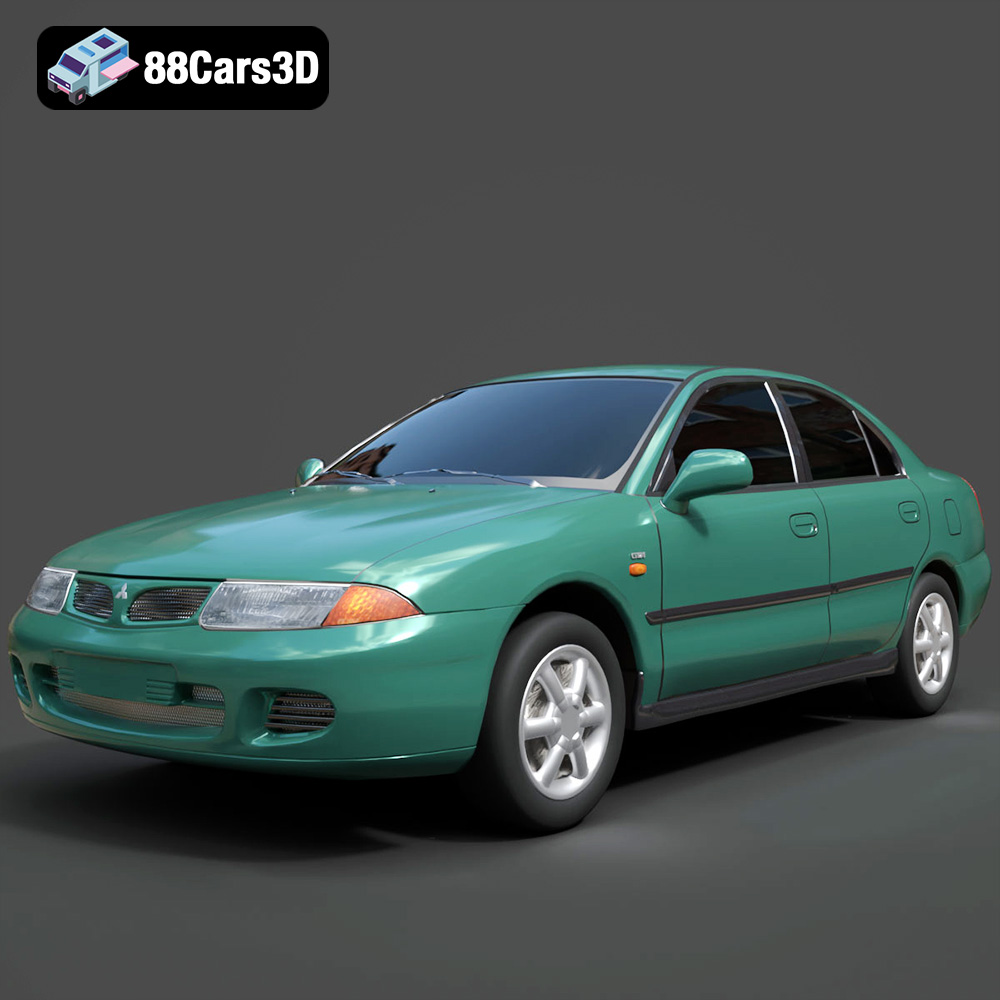
Texture: Yes
Material: Yes
Download the Mitsubishi Carisma 3D Model featuring clean geometry, realistic detailing, and a fully modeled interior. Includes .blend, .fbx, .obj, .glb, .stl, .ply, .unreal, and .max formats for rendering, simulation, and game development.
Price: $4.99
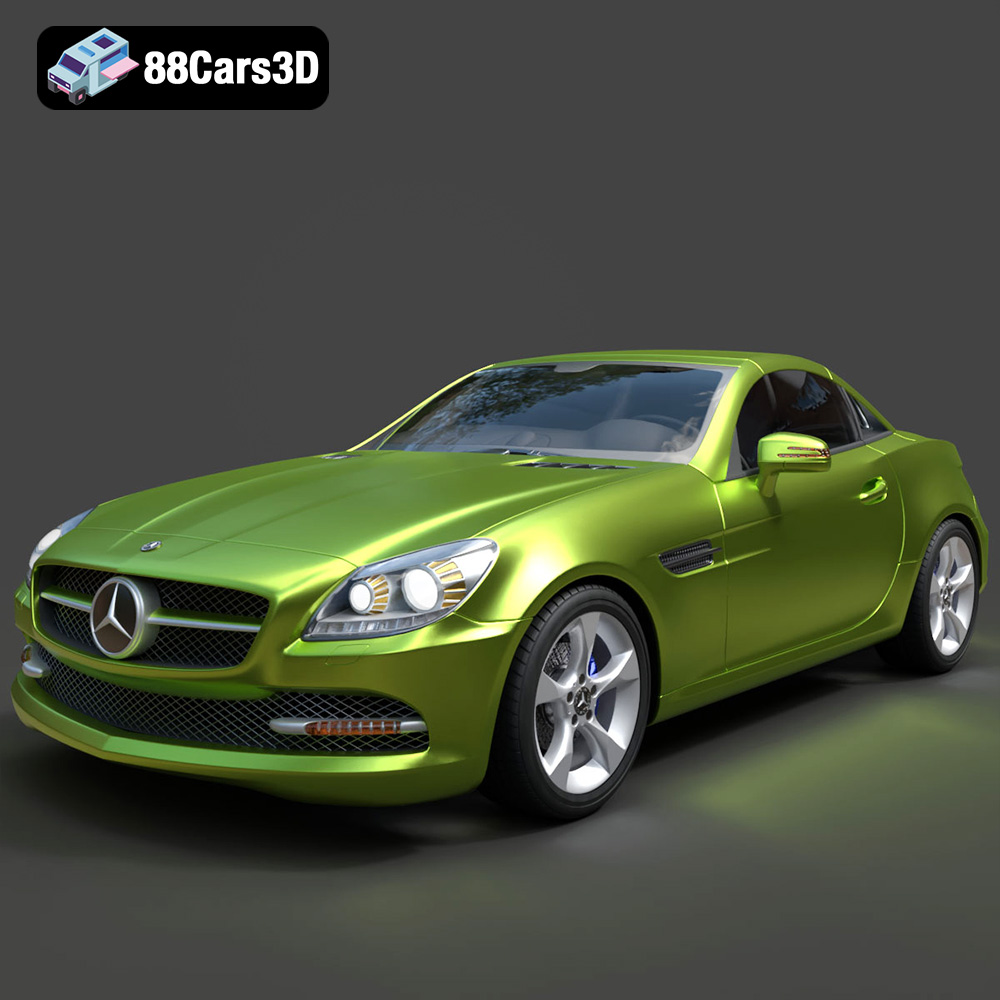
Texture: Yes
Material: Yes
Download the Mercedes-Benz SLK-Class 3D Model featuring clean geometry, realistic detailing, and a fully modeled interior. Includes .blend, .fbx, .obj, .glb, .stl, .ply, .unreal, and .max formats for rendering, simulation, and game development.
Price: $4.99
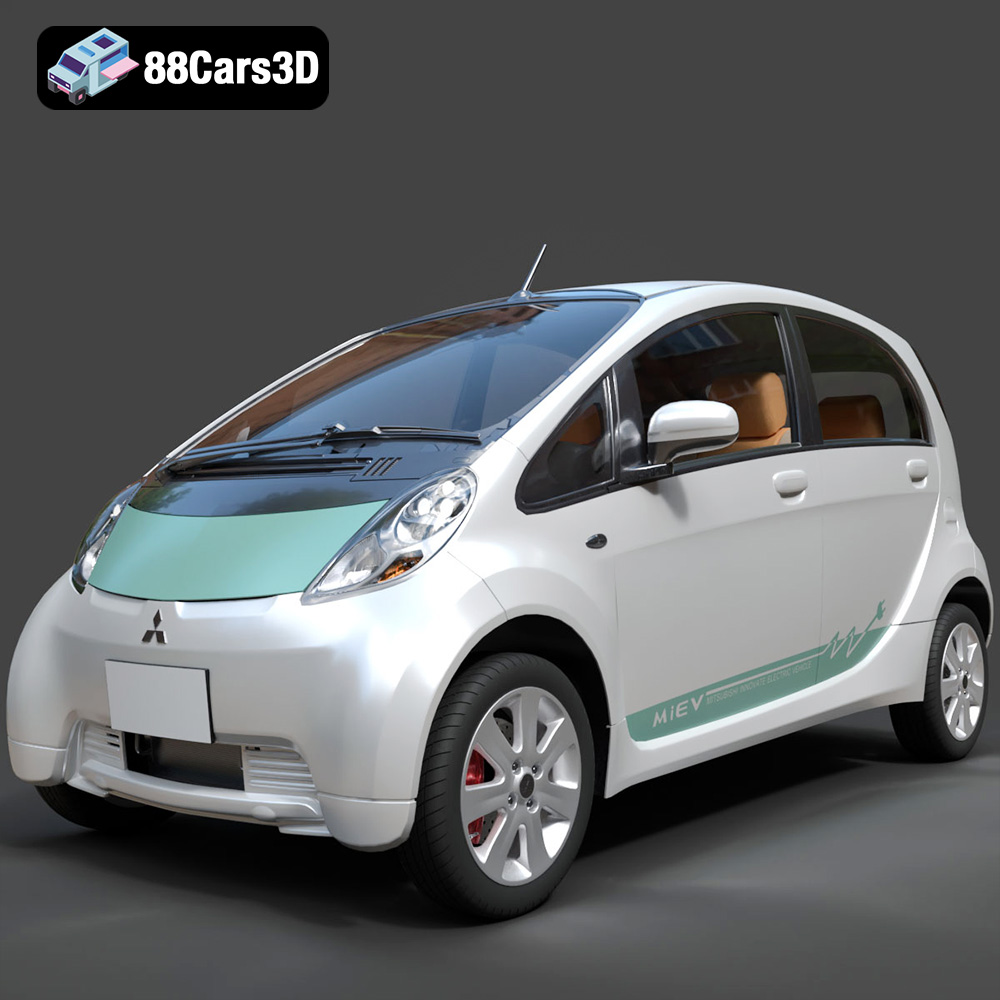
Texture: Yes
Material: Yes
Download the Mitsubishi i-MiEV 2025 3D Model featuring clean geometry, realistic detailing, and a fully modeled interior. Includes .blend, .fbx, .obj, .glb, .stl, .ply, .unreal, and .max formats for rendering, simulation, and game development.
Price: $4.99
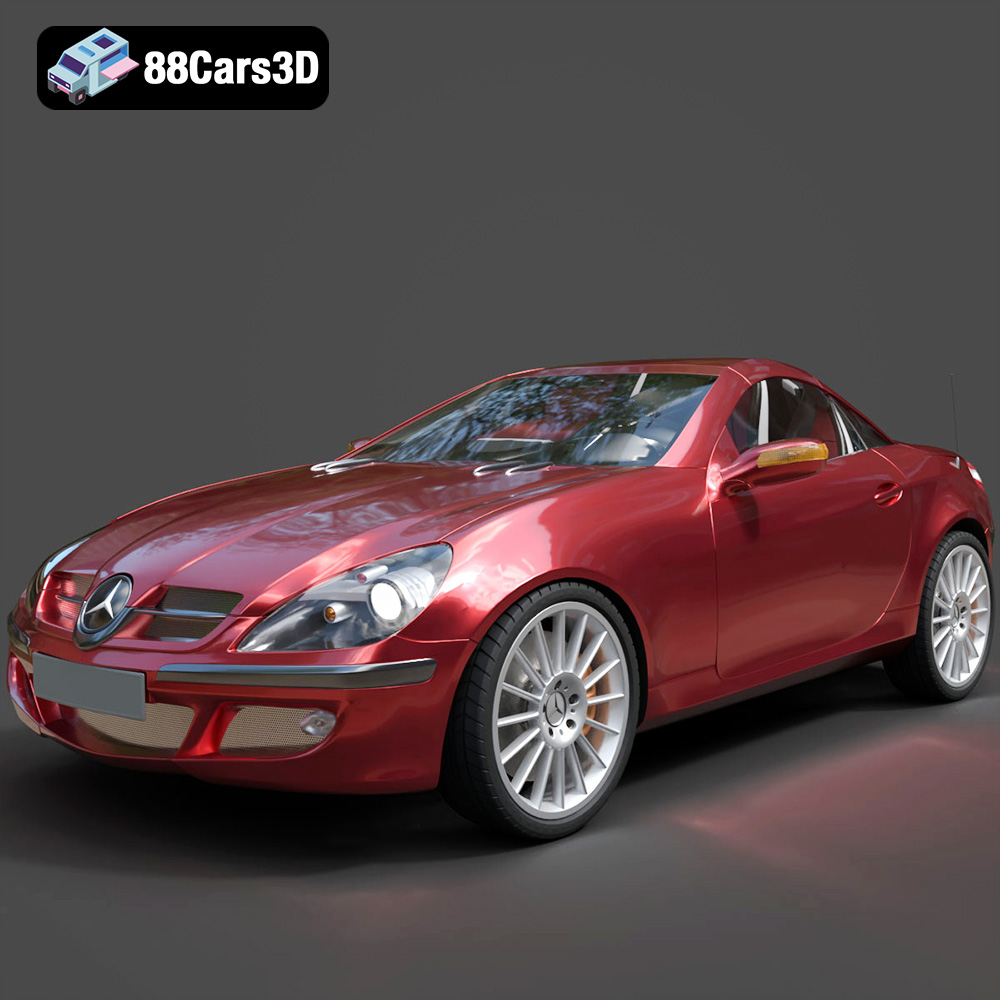
Texture: Yes
Material: Yes
Download the Mercedes-Benz SLK-Klasse 3D Model featuring clean geometry, realistic detailing, and a fully modeled interior. Includes .blend, .fbx, .obj, .glb, .stl, .ply, .unreal, and .max formats for rendering, simulation, and game development.
Price: $4.99

Texture: Yes
Material: Yes
Download the Nissan Fuga 2003 3D Model featuring clean geometry, realistic detailing, and a fully modeled interior. Includes .blend, .fbx, .obj, .glb, .stl, .ply, .unreal, and .max formats for rendering, simulation, and game development.
Price: $4.99

Texture: Yes
Material: Yes
Download the Nissan FairLady 240ZG 3D Model featuring clean geometry, realistic detailing, and a fully modeled interior. Includes .blend, .fbx, .obj, .glb, .stl, .ply, .unreal, and .max formats for rendering, simulation, and game development.
Price: $4.99

