⚡ FLASH SALE: Get 60% OFF All Premium 3D & STL Models! ⚡

In the fast-paced worlds of automotive design, game development, cinematic visualization, and interactive AR/VR experiences, the demand for exceptionally high-quality 3D car models is paramount. These digital assets are far more than just pretty pictures; they are complex constructs of meticulously crafted geometry, intelligent UV layouts, sophisticated material networks, and performance-optimized data. Crafting or even selecting the right 3D car model requires a deep understanding of the intricate technical processes involved, from the foundational principles of topology to the nuances of real-time rendering and multi-platform optimization.
This comprehensive guide is designed for 3D artists, game developers, automotive designers, and visualization professionals seeking to master the creation, optimization, and utilization of premium 3D vehicle assets. We’ll embark on a technical journey, unraveling the complexities of modeling clean surfaces, developing realistic PBR materials, achieving stunning renders, preparing models for interactive environments, and even adapting them for physical 3D printing. By the end of this deep dive, you’ll possess the knowledge to not only appreciate but also effectively leverage top-tier 3D car models in your professional projects, understanding what truly separates a good model from an exceptional one.
The structural integrity and visual fidelity of any 3D car model begin with its topology – the arrangement of vertices, edges, and faces that form its surface. For automotive models, where smooth, reflective surfaces and precise panel gaps are critical, superior topology isn’t just a best practice; it’s a fundamental requirement. Poor topology leads to shading artifacts, deformation issues, and difficulties in UV mapping and animation. Professionals prioritize clean, quad-based geometry, ensuring that the model can withstand subdivision smoothing and accurately represent the complex curves and angles of a vehicle body.
A well-modeled car will have its edges flowing along the natural contours and crease lines of the design, such as door seams, fender flares, and window frames. This intelligent edge flow is crucial for capturing accurate reflections and highlights, which are particularly sensitive on metallic and glossy car surfaces. It also facilitates easier modifications and ensures that the model deforms predictably if it needs to be animated or damaged. Achieving this requires a keen eye for detail and a methodical approach, often starting with precise blueprint matching and using techniques like spline modeling in 3ds Max or Maya, or careful box modeling and sub-division surface techniques in Blender.
The golden rule for high-quality 3D modeling, especially for subdivision-ready assets like car bodies, is to maintain an all-quad topology. Quads (four-sided polygons) are predictable under subdivision, producing smooth, organic curves without pinching or unwanted artifacts. Triangles (three-sided polygons) should be avoided on primary surfaces and only used sparingly in flat, non-deforming areas, while N-gons (polygons with more than four sides) are almost always problematic and must be eliminated. For a typical high-poly car model intended for rendering, polygon counts can range from 200,000 to over 1 million triangles, depending on the level of detail, interior, and engine components.
When modeling, artists often start with low-resolution base meshes, ensuring that the silhouette and major forms are correctly established. Then, they gradually add detail, using tools like edge loops and loop cuts to define sharp creases and panel lines. The goal is to distribute polygons evenly, providing enough resolution for smooth transitions without excessive density that would lead to unnecessarily large file sizes or slower viewport performance. Accurate representation of panel gaps, usually achieved by slightly separating adjacent mesh elements or defining them with very tight edge loops, is vital for realism.
Beyond simply using quads, the *direction* and *density* of edge loops are paramount for automotive models. Edge loops should follow the curvature and flow of the car’s design, circling around wheel wells, defining the edges of headlights, and running along character lines that define the vehicle’s aesthetic. This structured edge flow ensures that when a subdivision surface modifier is applied (e.g., Turbosmooth in 3ds Max, Subdivision Surface in Blender), the resulting high-polygon mesh retains perfectly smooth curves and sharp, well-defined creases where needed.
Consider the area around a door handle or a side mirror mount; the edge flow must be dense enough to support the complex geometry and hard edges without introducing unsightly pinches or distortions when smoothed. Similarly, for animations involving opening doors or manipulating suspension, the topology around pivot points and articulation zones must be meticulously planned to ensure clean deformation. Even if a model isn’t explicitly for animation, proper edge flow significantly aids in the baking of normal maps and ambient occlusion, contributing to a more realistic PBR material setup. Sourcing models from platforms like 88cars3d.com often ensures these topological best practices are already incorporated, saving significant rework.
Once the geometry is perfect, the next critical step in achieving photorealism for 3D car models is the application of textures and materials. This process involves two main components: UV mapping, which dictates how a 2D texture wraps around a 3D surface, and Physically Based Rendering (PBR) material creation, which defines how light interacts with the surface properties. Together, they bring the model to life with realistic paint finishes, detailed rubber, reflective chrome, and translucent glass.
Effective UV mapping for complex automotive shapes requires strategic planning to minimize distortion and maximize texture resolution. Meanwhile, PBR materials demand an understanding of real-world physics, using a collection of specialized maps to simulate properties like color, reflectivity, roughness, and surface imperfections. Mastering these techniques is essential for creating models that not only look stunning in a static render but also perform optimally in diverse lighting conditions and real-time environments.
UV mapping a car model is a meticulous process due to the myriad of complex curves, varying surface details, and distinct material zones. The goal is to create a seamless 2D representation of the 3D surface without stretching or overlapping UVs, while keeping seams in inconspicuous areas. Common techniques include planar mapping for flat or slightly curved surfaces (like the roof or hood), cylindrical mapping for parts like wheels, and specialized pelt mapping for more organic, irregular surfaces that need to be flattened out. The “Unwrap UVW” modifier in 3ds Max, Blender’s UV Editor, or Maya’s UV Toolkit provide robust tools for this task.
For a complete car model, it’s typical to use multiple UV sets or channels. One channel might be dedicated to the primary body paint, another for interior elements, and separate channels for wheels, tires, and small details like emblems. This allows for different texture resolutions and material applications across the model. Texture resolution is also key; a car body might use 4K (4096×4096) or even 8K texture maps for paint, normal details, and ambient occlusion, while smaller components like bolts might use 1K or 512×512 maps to optimize memory usage without sacrificing visual quality. Efficient use of UV space, packing islands tightly, and maintaining consistent texel density across relevant parts are crucial for professional results.
PBR materials are the cornerstone of modern rendering, accurately simulating how light interacts with surfaces based on real-world physics. There are two primary PBR workflows: Metallic/Roughness and Specular/Glossiness, with Metallic/Roughness being more prevalent in game engines and real-time applications. For a car model, creating PBR materials involves generating or painting several distinct texture maps:
Car paint is a particularly complex PBR material, often requiring multiple layers: a base coat (color, metallic flakes), a clear coat (glossy, reflective, sometimes with orange peel effect), and possibly a dirt/dust layer. Shaders in renderers like Corona Renderer, V-Ray (3ds Max), Cycles (Blender), or Arnold (Maya) offer advanced controls for creating these layered effects, including parameters for IOR (Index of Refraction) for glass and clear coats, and complex subsurface scattering for materials like leather.
Once a 3D car model is meticulously crafted with clean geometry and realistic PBR materials, the final frontier is rendering. This is where all the technical preparation culminates in stunning, photorealistic images or animations. Advanced rendering workflows involve careful scene setup, intelligent lighting strategies, and meticulous render settings to achieve showroom-quality visuals that can captivate an audience. Whether for marketing, film, or architectural visualization, the rendering process demands a blend of technical precision and artistic sensibility.
Modern renderers like Corona, V-Ray, Cycles, and Arnold offer powerful capabilities, but harnessing them effectively requires understanding how light behaves in a virtual environment and how to optimize settings for both speed and quality. From leveraging High Dynamic Range Images (HDRIs) to setting up complex studio lighting, every choice impacts the final aesthetic. Post-processing and compositing further refine the raw render, adding the final touches that elevate an image from good to extraordinary.
The foundation of a great automotive render lies in its scene setup. This typically includes a simple studio backdrop, a realistic ground plane (which can be reflective), and the car model itself, often centered on a turntable or within a virtual showroom. High Dynamic Range Images (HDRIs) are indispensable for automotive rendering. An HDRI provides both realistic environment lighting (global illumination) and high-quality reflections, making the car look like it’s in a real-world location or a professionally lit studio. Commercial HDRIs specifically designed for automotive photography often feature seamless studio environments or picturesque outdoor locations.
Beyond HDRIs, studio lighting setups are crucial for highlighting specific features of the car. This usually involves a combination of large area lights or softboxes positioned to create soft, diffused illumination and elegant reflections. Key lights define the main illumination, fill lights soften shadows, and rim lights (often placed behind or to the sides of the car) emphasize the car’s silhouette and add separation from the background. In 3ds Max, Corona and V-Ray offer sophisticated light sources and tools like Light Mix for interactive adjustments. Blender’s Cycles and Eevee also provide robust lighting options, including emissive meshes for custom light shapes. Physical camera settings – such as aperture (for depth of field), shutter speed, and ISO – are adjusted to mimic real-world photography, adding to the realism.
Achieving photorealism in rendering is a balance between quality and render time. Modern renderers typically employ ray tracing algorithms to simulate light physics accurately. Render settings need careful configuration: increasing samples or passes reduces noise, especially in complex areas like glass or reflections, but significantly increases render time. Denoising algorithms, built into many renderers (e.g., NVIDIA OptiX in Cycles, Corona Denoiser, V-Ray Denoiser), can dramatically reduce noise in post-production without requiring excessive samples.
For high-end visualization, generating multiple render passes is a standard practice. These passes (e.g., reflection, refraction, diffuse, raw lighting, ambient occlusion, Z-depth, object IDs) provide granular control during compositing in software like Photoshop or After Effects. This allows artists to adjust specific elements of the image independently, fine-tune reflections, correct colors, and add effects like lens flares or subtle volumetric lighting. Hardware considerations are also important: CPU-based renderers (like default Corona or Arnold) scale with processor cores, while GPU-based renderers (like Cycles or V-Ray GPU) leverage the parallel processing power of graphics cards, often leading to faster render times for complex scenes.
While high-end rendering focuses on maximum fidelity, preparing 3D car models for real-time applications like game engines (Unity, Unreal Engine) or interactive AR/VR experiences introduces a new set of challenges and requirements. Performance is paramount, as frames must be rendered in milliseconds, often on less powerful hardware. This necessitates aggressive optimization strategies for polygon counts, texture memory, and draw calls, ensuring a smooth and immersive user experience without compromising visual quality too much.
Adapting a detailed render-ready car model for a game or AR/VR involves careful reduction of complexity, strategic use of Level of Detail (LOD) systems, and specific file format considerations. The goal is to strike an optimal balance between visual fidelity and real-time performance, allowing players or users to interact with stunning vehicles fluidly. Marketplaces like 88cars3d.com often provide models specifically optimized for these demanding real-time environments, saving developers countless hours of work.
High-polygon render models are typically too heavy for real-time engines. The first step in optimization is often retopology or polygon reduction. Retopology involves manually rebuilding the mesh with a lower polygon count while maintaining the silhouette and key features. Automated decimation tools can also be used, though they sometimes require manual cleanup. For game assets, target polygon counts vary widely depending on the platform (mobile, console, PC) and the importance of the vehicle. A hero car might have 50,000-150,000 triangles, while a background vehicle could be 5,000-15,000. Texture resolutions also get scaled down, often to 2K or 1K for primary car body parts.
Level of Detail (LOD) systems are crucial. Instead of using a single high-poly mesh, an LOD system employs multiple versions of the model, each with progressively fewer polygons. As the car moves further from the camera, the engine automatically switches to a lower LOD version, reducing the computational load. Typically, 3-5 LODs are used (e.g., LOD0 for close-ups, LOD1 for mid-distance, LOD2 for far, LOD3 for extreme distance). Another critical optimization is managing draw calls – the number of commands sent from the CPU to the GPU. Each unique material or object often results in a draw call. Texture atlasing, where multiple smaller textures are combined into a single larger texture, and combining meshes into fewer objects, significantly reduces draw calls, improving performance.
AR/VR environments impose even stricter performance budgets than traditional games. The need for high frame rates (e.g., 90 FPS per eye for VR) and limited mobile processing power for AR means models must be exceptionally lightweight. Polygon counts for AR/VR cars can be extremely low, sometimes under 30,000 triangles for an entire vehicle, including the interior. Texture atlasing becomes even more critical, and texture resolutions are usually limited to 1K or 512×512 to conserve memory.
Specific AR/VR considerations include single-pass stereo rendering (to render both eyes efficiently), baking complex lighting into textures (lightmaps) rather than relying on real-time illumination, and simplifying material networks. Collision meshes, which are invisible simplified versions of the car, are also created for physics calculations, reducing overhead. File formats like GLB (GL Transmission Format Binary) and USDZ (Universal Scene Description Zip) are preferred for AR/VR due to their efficiency, compact size, and native support in platforms like Google’s ARCore and Apple’s ARKit. When selecting 3D car models for AR/VR, always check for “game-ready” or “AR/VR optimized” tags, as these models are specifically prepared with these stringent requirements in mind.
The journey of a 3D car model doesn’t end with rendering or game engine integration. Its utility extends to a multitude of applications, each demanding specific technical considerations regarding file formats and preparation techniques. From seamless exchange between different 3D software to precise physical replication through 3D printing, understanding these diverse applications is crucial for maximizing the value of a high-quality 3D asset. The ability to correctly convert, export, and prepare models for these varied purposes demonstrates true mastery of 3D pipelines.
Navigating the ecosystem of 3D file formats can be complex, as each format has its strengths and weaknesses, dictating how geometry, materials, animations, and other data are stored and transferred. Similarly, preparing a model for 3D printing introduces an entirely new set of requirements, primarily focused on creating watertight, manifold geometry that can be successfully translated into a physical object. Professionals need to be adept at these conversions and preparations to ensure their 3D car models are truly versatile.
The choice of file format is critical for interoperability and data integrity. Each format has specific capabilities and is optimized for different workflows:
When converting between formats, paying close attention to scale, axis systems (Z-up vs. Y-up), and material definitions is crucial to prevent data loss or visual discrepancies. Platforms like 88cars3d.com often provide models in multiple formats, ensuring broad compatibility for various project requirements.
Transforming a digital 3D car model into a tangible object via 3D printing introduces a distinct set of challenges focused on mesh integrity and physical properties. The primary requirement is a “watertight” and “manifold” mesh – meaning every edge is connected to exactly two faces, ensuring the model has a clearly defined inside and outside without any holes, inverted normals, or self-intersecting geometry. 3D printers cannot interpret ambiguous geometry.
Key preparation steps include:
For detailed car models, it might be necessary to separate parts (body, wheels, interior) for easier printing and assembly, or to optimize certain components for specific printing techniques (e.g., FDM vs. SLA). A meticulously cleaned and repaired mesh is paramount for a successful print, preventing wasted material and print time.
The journey from a conceptual idea to a high-quality 3D car model is a testament to the intricate blend of technical skill, artistic vision, and systematic problem-solving that defines professional 3D artistry. We’ve explored the foundational importance of clean topology and precise edge flow, which ensures the smooth, reflective surfaces characteristic of automotive design. We’ve delved into the creation of visually stunning PBR materials, where a deep understanding of light and surface interaction brings digital vehicles to life with incredible realism. Furthermore, we’ve dissected advanced rendering workflows that transform raw models into cinematic masterpieces, and discussed the critical optimization strategies required to make these complex assets perform flawlessly in demanding real-time environments like game engines and AR/VR applications.
Understanding these processes is not merely academic; it empowers artists and developers to make informed decisions, streamline workflows, and achieve professional-grade results consistently. Whether you are building models from scratch or sourcing them from reputable marketplaces, recognizing the hallmarks of quality—such as clean UVs, optimized polygon counts, and robust file format compatibility—is invaluable. By embracing these best practices, you can elevate your projects, deliver breathtaking visuals, and create truly immersive experiences. For your next project, explore the expertly crafted 3D car models available on marketplaces like 88cars3d.com, knowing that you’re investing in assets built on these very principles of quality and precision.

Texture: Yes
Material: Yes
Download the Mitsubishi Galant 2009 3D Model featuring clean geometry, realistic detailing, and a fully modeled interior. Includes .blend, .fbx, .obj, .glb, .stl, .ply, .unreal, and .max formats for rendering, simulation, and game development.
Price: $4.99

Texture: Yes
Material: Yes
Download the Nissan Primera Wagon 3D Model featuring clean geometry, realistic detailing, and a fully modeled interior. Includes .blend, .fbx, .obj, .glb, .stl, .ply, .unreal, and .max formats for rendering, simulation, and game development.
Price: $4.99

Texture: Yes
Material: Yes
Download the Mercedes-Benz S63 AMG Cabriolet 2017 3D Model featuring clean geometry, realistic detailing, and a fully modeled interior. Includes .blend, .fbx, .obj, .glb, .stl, .ply, .unreal, and .max formats for rendering, simulation, and game development.
Price: $20.99

Texture: Yes
Material: Yes
Download the Nissan Skyline R34 2002 3D Model featuring clean geometry, realistic detailing, and a fully modeled interior. Includes .blend, .fbx, .obj, .glb, .stl, .ply, .unreal, and .max formats for rendering, simulation, and game development.
Price: $4.99

Texture: Yes
Material: Yes
Download the Nissan Skyline 3D Model featuring clean geometry, realistic detailing, and a fully modeled interior. Includes .blend, .fbx, .obj, .glb, .stl, .ply, .unreal, and .max formats for rendering, simulation, and game development.
Price: $9.99

Texture: Yes
Material: Yes
Download the Mercedes-Benz S-Klasse W116 3D Model featuring clean geometry, realistic detailing, and a fully modeled interior. Includes .blend, .fbx, .obj, .glb, .stl, .ply, .unreal, and .max formats for rendering, simulation, and game development.
Price: $4.99
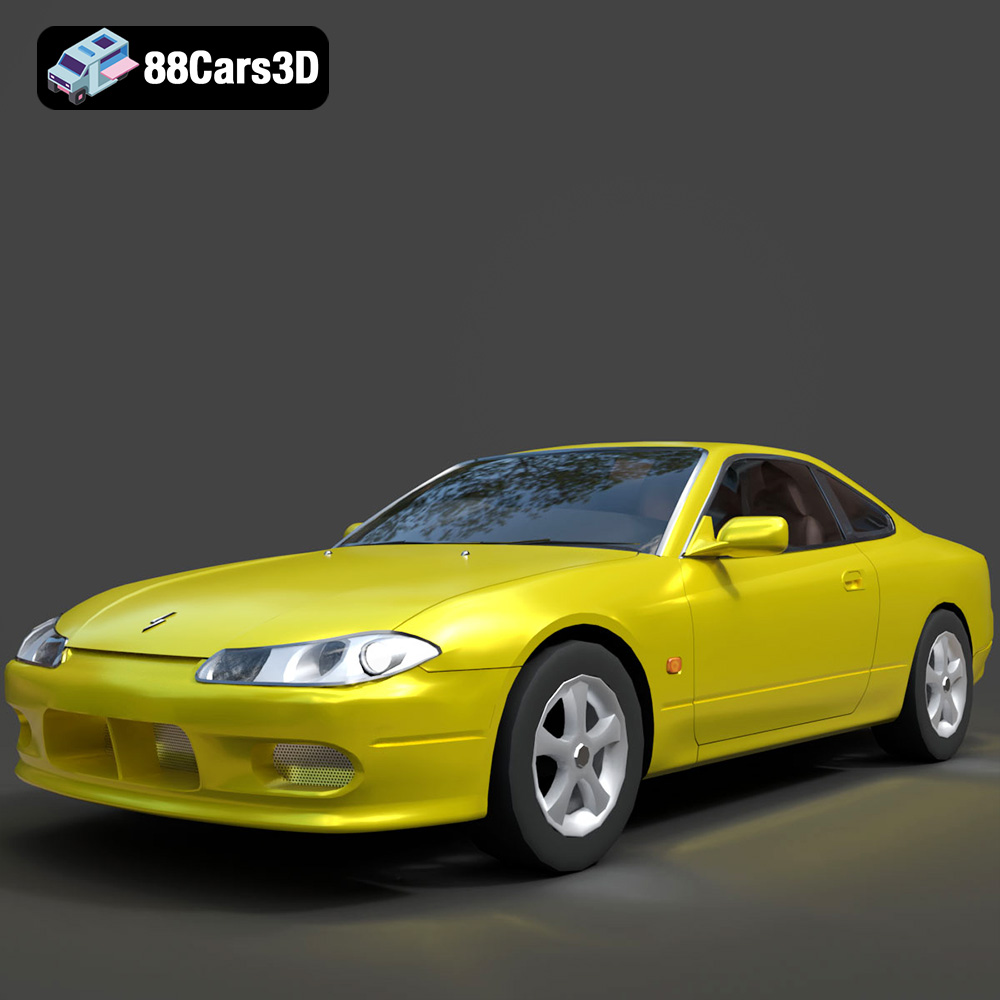
Texture: Yes
Material: Yes
Download the Nissan Silvia 3D Model featuring clean geometry, realistic detailing, and a fully modeled interior. Includes .blend, .fbx, .obj, .glb, .stl, .ply, .unreal, and .max formats for rendering, simulation, and game development.
Price: $4.99

Texture: Yes
Material: Yes
Download the Nissan 350Z 3D Model featuring clean geometry, realistic detailing, and a fully modeled interior. Includes .blend, .fbx, .obj, .glb, .stl, .ply, .unreal, and .max formats for rendering, simulation, and game development.
Price: $4.99

Texture: Yes
Material: Yes
Download the Nissan Skyline V35 2001 3D Model featuring clean geometry, realistic detailing, and a fully modeled interior. Includes .blend, .fbx, .obj, .glb, .stl, .ply, .unreal, and .max formats for rendering, simulation, and game development.
Price: $4.99

Texture: Yes
Material: Yes
Download the Mercedes-Benz S-Klasse 221-007 3D Model featuring clean geometry, realistic detailing, and a fully modeled interior. Includes .blend, .fbx, .obj, .glb, .stl, .ply, .unreal, and .max formats for rendering, simulation, and game development.
Price: $4.99

