⚡ FLASH SALE: Get 60% OFF All Premium 3D & STL Models! ⚡

The world of 3D automotive design and visualization is a fascinating blend of art and engineering, demanding precision, realism, and efficiency. From stunning cinematic renders to immersive real-time game experiences and practical AR/VR applications, the quality of a 3D car model is paramount. It dictates not only the visual fidelity but also the performance, flexibility, and overall success of any project. Whether you’re a seasoned 3D artist, an aspiring game developer, an automotive designer, or a student embarking on your first project, understanding the intricate technical details behind creating and utilizing professional-grade 3D car models is crucial.
This comprehensive guide dives deep into the technical workflows and best practices that elevate automotive rendering and visualization to professional standards. We’ll explore everything from the foundational principles of clean topology and efficient UV mapping to advanced PBR material creation, real-time game optimization, and preparing models for specialized applications like AR/VR and 3D printing. By the end, you’ll have a robust understanding of how to assess, optimize, and leverage high-quality 3D car models, ensuring your projects stand out in today’s competitive digital landscape. Let’s unlock the secrets to creating truly exceptional digital automobiles.
At the heart of any exceptional 3D car model lies impeccable topology. Topology refers to the arrangement of vertices, edges, and faces that form the surface of your model. For automotive designs, which are characterized by smooth, complex curves and sharp, defined lines, clean topology is not just a preference; it’s a necessity. Good topology ensures that your model deforms correctly, shades smoothly under various lighting conditions, and is easily editable. It’s the bedrock upon which all other detailing, texturing, and rendering efforts are built. Ignoring this fundamental principle can lead to pinching, artifacting, and a significantly longer, more frustrating workflow later on.
Professional 3D car models almost exclusively utilize quad-dominant meshes. This means that the vast majority of faces (polygons) in the mesh are four-sided quadrilaterals. While triangles (three-sided faces) are necessary in some specific areas or for game-ready low-poly models after triangulation, a clean high-poly base model should strive for quads. Why quads? They facilitate predictable behavior when using subdivision surface modifiers (like TurboSmooth in 3ds Max, Subdivision Surface in Blender, or Smooth Mesh in Maya). Subdivision surfaces add geometric detail by smoothing the mesh, and quads ensure this smoothing is uniform, without the pinching or unpredictable artifacts that often arise from n-gons (polygons with more than four sides) or poorly placed triangles.
When modeling, visualize the flow of edges across the surface. These edge loops should follow the natural contours and design lines of the car – around wheel arches, along body panel seams, and across major stylistic changes. This provides control over the curvature and allows for precise adjustments. High-quality 3D car models typically feature a poly count that balances detail with performance. For a high-resolution render-ready car, you might be looking at 200,000 to 500,000 polygons (before subdivision) for the entire vehicle, ensuring sufficient detail for close-up shots.
One of the biggest challenges in automotive modeling is maintaining both smooth, flowing curves and razor-sharp edges where needed, such as along door lines or character lines on the hood. This is achieved through strategic edge placement. To create a sharp edge on a subdivision surface model, you need to add supporting edge loops very close to the edge you want to sharpen. These “control loops” prevent the subdivision modifier from rounding off the corner too much. Conversely, for perfectly smooth surfaces, edge loops should be evenly spaced to allow for gradual curvature.
Consider the example of a car fender. The main surface will have flowing quads. To define the wheel arch opening, you’ll have an edge loop defining the inner and outer lip, with supporting loops close to them to maintain the sharpness. Similarly, for the hood, the main surface will be smooth, but the edges where it meets the fenders or windshield will have tighter control loops. Mastering this balance is key to achieving realistic automotive surfacing.
Even experienced artists encounter topology challenges. Common issues include:
Once your 3D car model has pristine topology, the next critical step for realism is UV mapping. UV mapping is the process of flattening the 3D surface of your model into a 2D space, allowing you to apply textures. Without proper UVs, even the most beautiful PBR textures will appear stretched, distorted, or misaligned. For complex objects like cars, meticulous UV unwrapping is essential to achieve a professional finish, especially when dealing with intricate decals, metallic flakes in paint, or subtle surface imperfections.
The goal of UV unwrapping is to minimize distortion and maximize efficient use of UV space. Think of it like carefully peeling an orange and laying its skin flat without tearing or stretching it excessively. Common techniques include:
Aim for a UV layout where the different parts of the car are organized logically, easy to navigate, and maximize the available texture space (the 0-1 UV square). For instance, the main body might occupy a large portion, with smaller parts like mirrors, lights, and badges having their own designated UV islands.
Texel density refers to the number of texture pixels per unit of 3D space. It’s crucial for consistency. A large surface like a car door should have roughly the same texel density as a smaller, equally important detail like a headlight lens, assuming they use the same texture resolution. Inconsistent texel density leads to some areas appearing blurry while others are sharp, breaking immersion. Tools exist in most 3D software to calculate and normalize texel density across different UV islands.
Optimizing UV space involves arranging UV islands efficiently within the 0-1 UV square to avoid wasted space. This might involve rotating islands, scaling them appropriately, and packing them tightly. For a complex 3D car model, you might have multiple UV sets (UV channels) for different parts of the car:
This multi-UV set approach allows for precise texturing without requiring a single, enormous texture map for the entire vehicle.
The cardinal rule of UV mapping is to minimize visible seams and distortion. Seams should ideally be placed in areas that are naturally hidden or blend with existing geometry. For a car, this often means along panel gaps, under trim pieces, or on surfaces that aren’t directly visible from common camera angles. After unwrapping, meticulously check your UV layout with a checker pattern texture. Look for:
A well-UV-mapped 3D car model is the canvas for stunning textures, laying the groundwork for realistic materials and lifelike renders. When purchasing 3D car models, verify the quality of their UV layouts – it’s a key indicator of professionalism.
With a perfectly modeled and UV-mapped car, the next step is to give it a soul through realistic materials. Physically Based Rendering (PBR) is the industry standard for creating materials that react realistically to light, making them look authentic in various lighting environments, from studio setups to outdoor scenes. PBR materials rely on accurate physical properties rather than subjective artistic interpretation, resulting in a consistent and believable appearance across different render engines and real-time platforms.
PBR is based on two main principles: energy conservation and real-world material properties. In essence, light hitting a surface is either reflected or absorbed. The total amount of reflected light cannot exceed the incoming light (energy conservation). Key PBR properties and their corresponding texture maps include:
Most PBR workflows fall into two categories: Metallic-Roughness (e.g., Substance Painter, Blender’s Principled BSDF, Unreal Engine) and Specular-Glossiness (e.g., V-Ray, Corona, older workflows). Understanding which workflow your chosen software uses is crucial for correct material setup.
Achieving believable car materials requires a nuanced approach:
For ultimate realism, simple PBR maps might not be enough. Advanced shader networks allow you to combine and layer different material properties, masks, and procedural textures. For example, to simulate dirt or dust on a car, you might:
Software like 3ds Max (with Corona or V-Ray), Blender (Cycles), and Maya (Arnold) provide powerful node-based shader editors for building these complex networks. This level of detail and control is what distinguishes a good render from an outstanding one, allowing for wear, tear, and environmental effects that truly ground the 3D car model in reality.
Rendering is the process of generating a 2D image from your 3D scene. For automotive rendering, achieving photo-realism requires a mastery of lighting, camera work, and render engine settings. The goal is to make the digital car indistinguishable from its real-world counterpart, capturing the sleek lines, reflective surfaces, and intricate details that define modern vehicles. This is where all the hard work in modeling, UV mapping, and material creation culminates.
Lighting is arguably the most crucial element for realistic renders. For cars, High Dynamic Range Images (HDRIs) are indispensable. An HDRI captures real-world lighting information (color, intensity, direction) and projects it onto a spherical environment, providing naturally accurate reflections and illumination. This is far superior to simple studio lights alone for achieving authentic vehicle reflections.
Treat your virtual camera like a real-world DSLR. Understanding photographic principles is vital:
Each renderer has its strengths and specific workflows:
Regardless of the engine, understanding concepts like sampling, noise reduction (denoisers), and render passes (for post-processing) is critical for achieving professional automotive rendering results. When downloading models from marketplaces like 88cars3d.com, you’ll often find they are prepared for multiple render engines, offering specific material setups.
While high-fidelity renders aim for ultimate realism with less concern for performance, developing game assets or models for interactive real-time applications (like configurators or simulations) requires a different mindset: optimization. The goal is to maintain visual quality while ensuring smooth framerates and efficient resource usage. This involves strategic polygon reduction, smart texturing, and intelligent asset management, vital for game engines like Unity and Unreal Engine.
Level of Detail (LOD) is a fundamental optimization technique for real-time applications. Instead of rendering a single high-polygon model at all distances, LODs involve creating multiple versions of the same asset, each with progressively fewer polygons. As the camera moves further away from the car, the engine automatically switches to a lower-detail version, significantly reducing the computational load without a noticeable drop in visual quality to the player.
The transition distances between LODs are carefully calibrated to be imperceptible. Tools within Unity and Unreal Engine (and external software like InstaLOD or Simplygon) assist in generating and managing LODs automatically or semi-automatically.
In real-time rendering, draw calls are costly. A draw call instructs the GPU to draw a batch of triangles. Each time a new material or texture is applied, a new draw call is typically generated. A car model with 50 different materials (one for each small part) would generate 50 draw calls, even if it has a low poly count.
Texture atlasing is a solution. Instead of having separate texture maps for dozens of small parts (e.g., bolts, emblems, interior buttons), all these smaller textures are combined into one large “atlas” texture. All parts that use textures from this atlas can then share a single material. This dramatically reduces the number of draw calls, improving performance.
Another draw call reduction technique is combining meshes. If a car has dozens of separate mesh objects (e.g., individual bolts, separate interior components), merging them into fewer, larger meshes can reduce the overhead of managing many individual objects.
For interactive driving games, a detailed visual mesh is too complex for physics calculations. Instead, a simplified collision mesh is used. This is a low-polygon, non-visible mesh that accurately represents the physical boundaries of the car for collision detection and physics simulations.
Additionally, optimizing scripts and physics interactions within the game engine itself is crucial. For example, ensuring that physics calculations are performed efficiently and only when necessary can prevent performance bottlenecks. A well-optimized game asset like a car ensures a smooth and immersive experience for players, even on less powerful hardware. High-quality 3D car models available on platforms like 88cars3d.com often come with pre-optimized versions or clear guidelines for game engine use.
The utility of 3D car models extends far beyond traditional rendering and gaming. Augmented Reality (AR), Virtual Reality (VR), 3D printing, and high-end configurators represent burgeoning fields where clean, optimized, and robust 3D assets are in high demand. Each of these applications presents unique technical requirements and opportunities for automotive visualization.
AR/VR experiences are inherently real-time, placing even stricter demands on performance than traditional games. Every frame needs to be rendered twice (once for each eye), requiring consistent high framerates (e.g., 90 FPS for comfortable VR). This means extreme optimization:
When developing for AR/VR, the focus is on maintaining an immersive experience. Jittering, low framerates, or visual artifacts can quickly break the sense of presence. Therefore, efficient file formats and aggressive optimization are non-negotiable.
3D printing converts a digital model into a physical object layer by layer. While it sounds straightforward, preparing a 3D car model for printing requires a different set of considerations:
The transition from a virtual model to a tangible object is incredibly rewarding, but it demands precise preparation to avoid printing failures. Many detailed 3D car models on platforms like 88cars3d.com are suitable as a base for 3D printing, but may require specific modifications for manufacturability.
Beyond traditional rendering, 3D car models are pivotal in professional visualization, particularly for automotive marketing and design reviews. Interactive car configurators, often seen on manufacturer websites, allow customers to customize a vehicle in real-time. These applications combine elements of game optimization with high-fidelity rendering, striking a balance between visual quality and interactivity.
These sophisticated applications represent the pinnacle of interactive automotive rendering, showcasing the power and versatility of well-crafted 3D car models in driving engagement and sales.
In the collaborative and multi-software world of 3D production, understanding file formats and ensuring cross-platform compatibility is paramount. A professional pipeline relies on the smooth exchange of data between modeling software (3ds Max, Blender, Maya), sculpting applications (ZBrush), texturing tools (Substance Painter), render engines, and game engines (Unity, Unreal Engine). Choosing the correct format for export and import prevents headaches, preserves data integrity, and saves countless hours of rework.
Each file format serves specific purposes and carries different types of data:
Successfully transferring 3D car models between different software requires careful attention during export and import:
In team environments, establishing clear protocols for file formats and asset management is essential. Version control systems (like Git LFS for large files) can track changes to 3D car models and prevent overwrites. Consistent naming conventions for files, objects, materials, and textures are non-negotiable for clarity and organization. Packaging assets (all meshes, textures, and relevant files) into a single, organized folder structure makes sharing and archiving straightforward. When sourcing models from marketplaces such as 88cars3d.com, look for comprehensive packages that include multiple file formats, organized texture sets, and clear documentation, ensuring seamless integration into your unique workflow.
The journey through the intricate world of 3D car models reveals that excellence is not an accident. It’s the culmination of meticulous attention to detail, a deep understanding of technical principles, and the strategic application of industry best practices. From the foundational integrity of clean topology and precise UV mapping to the lifelike fidelity of PBR materials and sophisticated rendering workflows, every step contributes to transforming a digital blueprint into a compelling visual experience.
Whether you’re crafting high-resolution renders for marketing, optimizing game assets for real-time performance, preparing models for immersive AR/VR applications, or even prototyping with 3D printing, the underlying principles of quality and efficiency remain constant. Mastering these techniques empowers you to create not just beautiful cars, but highly versatile, performant, and future-proof digital assets. By embracing these workflows, you ensure your 3D car models are not just visually stunning but also technically robust, ready to meet the demands of any project.
Invest in quality, understand the technical nuances, and continually refine your approach. For artists and developers seeking a head start, platforms like 88cars3d.com offer a vast collection of expertly crafted 3D car models that adhere to these very standards, providing a solid foundation for your next project. Dive in, experiment, and drive your creative visions forward with precision and passion!

Texture: Yes
Material: Yes
Download the Mitsubishi Galant 2009 3D Model featuring clean geometry, realistic detailing, and a fully modeled interior. Includes .blend, .fbx, .obj, .glb, .stl, .ply, .unreal, and .max formats for rendering, simulation, and game development.
Price: $4.99

Texture: Yes
Material: Yes
Download the Nissan Primera Wagon 3D Model featuring clean geometry, realistic detailing, and a fully modeled interior. Includes .blend, .fbx, .obj, .glb, .stl, .ply, .unreal, and .max formats for rendering, simulation, and game development.
Price: $4.99

Texture: Yes
Material: Yes
Download the Mercedes-Benz S63 AMG Cabriolet 2017 3D Model featuring clean geometry, realistic detailing, and a fully modeled interior. Includes .blend, .fbx, .obj, .glb, .stl, .ply, .unreal, and .max formats for rendering, simulation, and game development.
Price: $20.99

Texture: Yes
Material: Yes
Download the Nissan Skyline R34 2002 3D Model featuring clean geometry, realistic detailing, and a fully modeled interior. Includes .blend, .fbx, .obj, .glb, .stl, .ply, .unreal, and .max formats for rendering, simulation, and game development.
Price: $4.99

Texture: Yes
Material: Yes
Download the Nissan Skyline 3D Model featuring clean geometry, realistic detailing, and a fully modeled interior. Includes .blend, .fbx, .obj, .glb, .stl, .ply, .unreal, and .max formats for rendering, simulation, and game development.
Price: $9.99

Texture: Yes
Material: Yes
Download the Mercedes-Benz S-Klasse W116 3D Model featuring clean geometry, realistic detailing, and a fully modeled interior. Includes .blend, .fbx, .obj, .glb, .stl, .ply, .unreal, and .max formats for rendering, simulation, and game development.
Price: $4.99
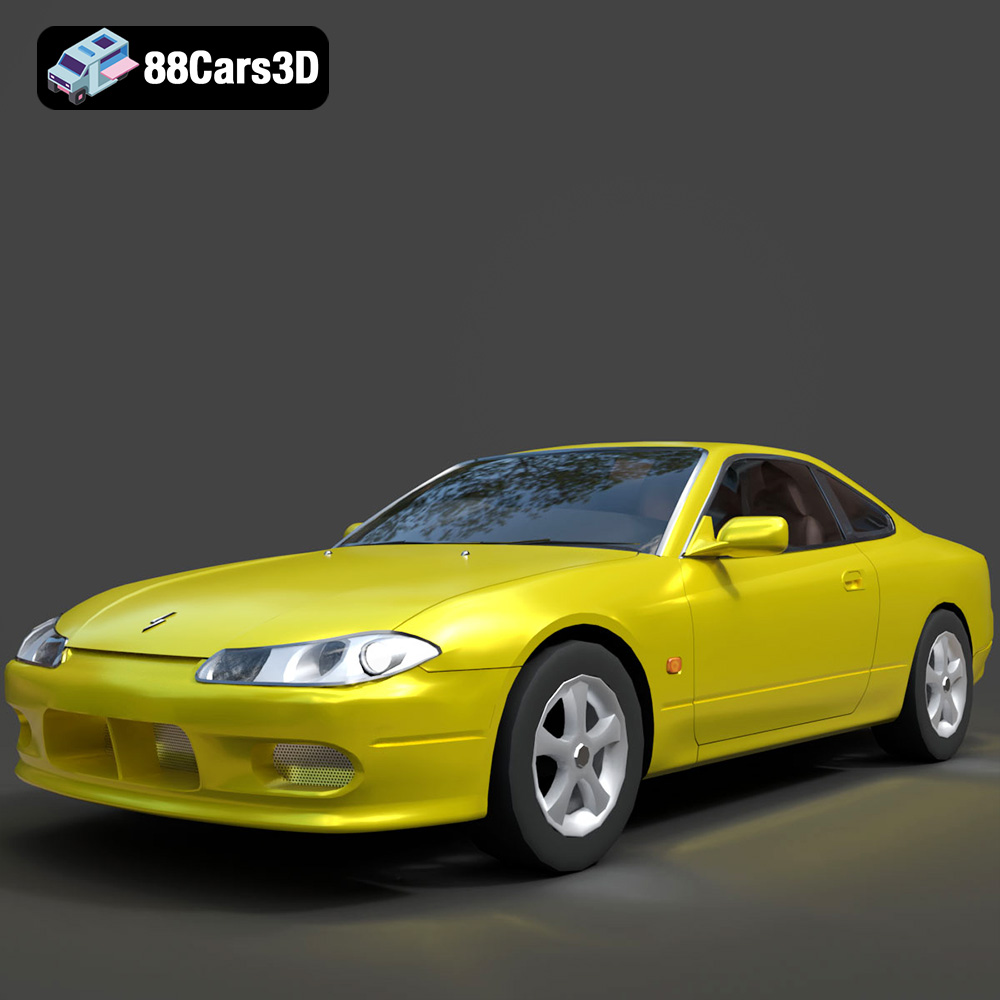
Texture: Yes
Material: Yes
Download the Nissan Silvia 3D Model featuring clean geometry, realistic detailing, and a fully modeled interior. Includes .blend, .fbx, .obj, .glb, .stl, .ply, .unreal, and .max formats for rendering, simulation, and game development.
Price: $4.99

Texture: Yes
Material: Yes
Download the Nissan 350Z 3D Model featuring clean geometry, realistic detailing, and a fully modeled interior. Includes .blend, .fbx, .obj, .glb, .stl, .ply, .unreal, and .max formats for rendering, simulation, and game development.
Price: $4.99

Texture: Yes
Material: Yes
Download the Nissan Skyline V35 2001 3D Model featuring clean geometry, realistic detailing, and a fully modeled interior. Includes .blend, .fbx, .obj, .glb, .stl, .ply, .unreal, and .max formats for rendering, simulation, and game development.
Price: $4.99

Texture: Yes
Material: Yes
Download the Mercedes-Benz S-Klasse 221-007 3D Model featuring clean geometry, realistic detailing, and a fully modeled interior. Includes .blend, .fbx, .obj, .glb, .stl, .ply, .unreal, and .max formats for rendering, simulation, and game development.
Price: $4.99

