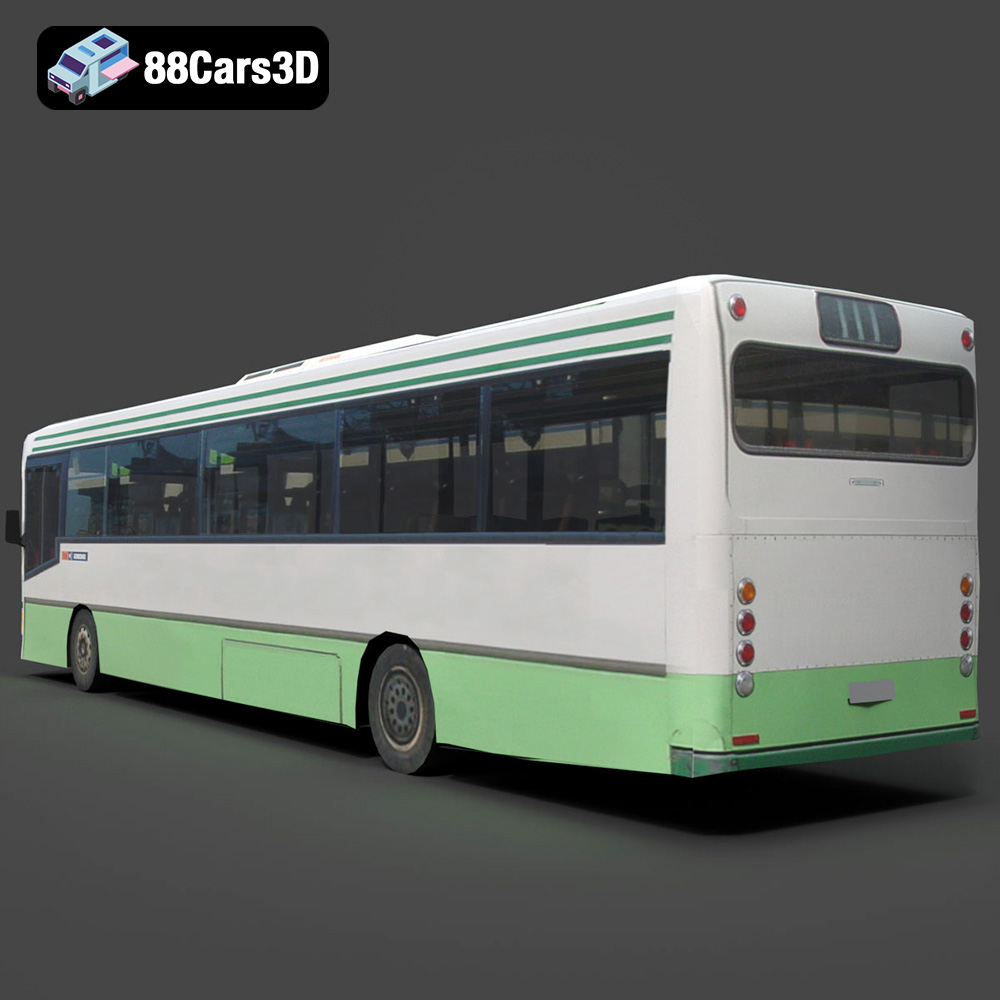
Generic City Bus 3D Model – Mastering Urban Environments: Integrating High-Fidelity 3D Car Models for Automotive Rendering and Game Development

Mastering Urban Environments: Integrating High-Fidelity 3D Car Models for Automotive Rendering and Game Development
The success of any photorealistic visualization, immersive game environment, or serious simulation hinges on the quality and technical robustness of its assets. When designing complex urban scenes, few elements are as crucial yet often overlooked as the standard public transport vehicle. A highly detailed, professionally modeled city bus is the backbone of metropolitan realism, anchoring the scale and activity of the digital world.
At 88cars3d.com, we specialize in providing professional-grade vehicles that meet the rigorous demands of cinematic rendering and high-performance real-time applications. Today, we delve into the technical anatomy and professional integration of a fundamental asset: the Generic City Bus 3D Model. This specific model is not just a visual placeholder; it is a meticulously constructed component built for versatility across rendering, game asset optimization, simulation, and even AR/VR deployment.
This comprehensive guide will explore the critical specifications, optimal workflows, and file format strategies required to leverage this robust 3D car model, ensuring seamless integration into pipelines utilizing tools like Blender, 3ds Max, and Unreal Engine.
The Technical Blueprint: Specifications Driving Realism and Performance
Professional 3D asset creation requires a careful balance between visual fidelity and performance efficiency. For large vehicles like a city bus, this balancing act is magnified, especially when the model is intended for densely populated real-time scenes or high-resolution architectural visualizations. The Generic City Bus 3D Model is engineered with several key technical advantages to ensure maximum utility.
Clean, Quad-Dominant Topology and Subdivision Strategy
The foundation of any high-quality 3D car model is its mesh topology. Low-quality models often rely on messy triangular topology that causes pinching, poor light reflection, and difficult deformation. Our featured city bus utilizes clean, quad-dominant geometry. This approach ensures:
- Smooth Subdivisions: When applying subdivision surface modifiers (like TurboSmooth in 3ds Max or Subdivision in Blender), the mesh maintains smooth curves, essential for the large, reflective surfaces of the bus body.
- Efficient Deformation: For animation workflows, particularly door opening mechanisms or suspension articulation, clean quads prevent texture stretching and allow for predictable, realistic deformation during rigging.
- Optimized UV Mapping: A clean mesh structure facilitates clean, non-overlapping UV mapping, which is crucial for applying complex liveries, weathering details, and high-resolution texture sets efficiently.
Real-World Scale and Asset Hierarchy
Accuracy in 3D modeling demands adherence to real-world measurements. The Generic City Bus 3D Model is modeled to accurate, real-world scale. This is vital for:
- Architectural Visualization (ArchViz): Integrating the bus into visualizations of cityscapes or transit hubs requires correct scale to maintain visual credibility against surrounding buildings, streets, and human models.
- Simulation Environments: Driving simulators require perfect scale alignment for realistic physics calculations, driver perspective, and collision detection.
- Animation Setup: The organized hierarchy, with properly set pivots for doors, wheels, and steering components, means animators can immediately begin keyframing without time-consuming setup corrections.
Detailed Exterior and Accessible Interior Modeling
A professional 3D car model must cater to various camera requirements. The bus includes detailed exterior fixtures—headlights, mirrors, wheels, and separated components for animation—but also features an accessible and optimized interior. This dual approach maximizes application versatility:
- Exterior-Focus Rendering: For cinematic shots where the bus is viewed from afar or in motion, optimized materials handle metallic body panels and realistic glass reflections.
- Interior/First-Person Views: The detailed driver’s cockpit and passenger seating allow for immersive, in-game camera views or walk-through animations, critical for serious simulation or detailed automotive rendering showcase reels.
Understanding 3D Model File Formats (The SEO-Critical Section)
Navigating professional 3D pipelines requires a deep understanding of file formats. The flexibility of a model often depends entirely on the formats it supports, dictating ease of transfer between DCC (Digital Content Creation) tools and game engines. The Generic City Bus 3D Model from 88cars3d.com is provided in a suite of formats, each optimized for a specific professional use case.
.blend – Fully Editable Blender Scene with Materials
The native Blender format (.blend) is essential for users prioritizing open-source workflows. This file provides the scene exactly as created, including procedural textures, shaders built with the Cycles/Eevee engine, modifiers, and the complete organizational structure. It is the best format for deep customization, allowing users to quickly adjust lighting, modify topology using Blender’s extensive toolset, or leverage Geometry Nodes for complex instancing.
.fbx – Ideal for Unreal, Unity, and Real-Time Pipelines
The FilmBox (.fbx) format is the industry standard for asset exchange, particularly when moving models into proprietary game engines like Unreal Engine and Unity. FBX efficiently packages mesh data, UVs, skeletal information (if rigged), and basic material assignments. Its primary advantage is reliable portability. When importing the bus into Unreal, FBX ensures proper scale translation, pivot points are maintained, and collision meshes can be accurately generated.
.obj – Universal Format for Cross-Software Compatibility
Wavefront Object (.obj) is perhaps the most universally supported 3D format. While it lacks advanced features like animation or complex node-based materials, it excels at reliably transmitting core mesh geometry and UV information across virtually any 3D application—from ZBrush to Houdini to older versions of DCC software. It serves as a failsafe when troubleshooting pipeline conflicts.
.glb – Optimized for AR, VR, and Browser-Based Display
The Graphics Library Transmission Format (.glb) is gaining rapid popularity due to its efficiency in web and immersive applications. GLB is a binary version of the glTF format, bundling geometry, textures, and animation into a single file. This optimization makes it perfect for quick loading in web viewers, e-commerce AR previews, and efficient deployment in mobile VR/AR applications where file size and load time are paramount.
.stl – Suitable for 3D Printing Output
Stereolithography (.stl) is the de facto standard for 3D printing. It represents the model’s surface geometry using only simple triangles, neglecting color or texture information. For users intending to produce a physical desktop model or prototype of the Generic City Bus, the .stl format ensures the mesh is watertight and ready to be sliced for FDM or resin printing.
.ply – Precision Mesh Format for CAD or Analysis
The Polygon File Format (.ply) is often used in fields requiring high precision, such as scanning, CAD, or analysis. It can store complex data beyond simple vertices, including color per vertex, normal vectors, and confidence levels, making it valuable for engineering validation or integrating the bus model into detailed simulation analysis systems.
.unreal – Engine-Ready Asset for Real-Time Environments
Providing an explicit .unreal format (or packaged Unreal project setup) signifies that the asset has been pre-configured specifically for the engine. This means materials are optimized for the PBR (Physically Based Rendering) pipeline, lightmap UVs are already generated, and the asset hierarchy adheres to Unreal naming conventions, drastically reducing preparation time for game assets.
.max – Editable 3ds Max Project for Animation and Rendering
For high-end rendering studios, particularly those focused on architectural visualization and cinematic automotive rendering, the native 3ds Max (.max) file is irreplaceable. It allows immediate access to V-Ray or Corona setup, complex material shaders, scene lighting, and the full modifier stack for parametric editing of the Generic City Bus model.
Professional Workflows: Integrating the Bus into 3ds Max and Blender
The true value of a professional 3D model lies in its ability to adapt seamlessly across multiple production environments. We explore how artists utilize the supplied file formats within two leading DCC packages for high-fidelity output.
3ds Max Workflow: Cinematic Automotive Rendering
3ds Max remains a powerhouse for automotive rendering, often paired with renderers like V-Ray or Corona. The native .max file provided with the Generic City Bus 3D Model streamlines this process:
- Material Conversion: The initial .max file often contains standard PBR materials. The first step is to convert these to V-Ray/Corona physical materials. Because the UVs are clean, swapping textures and adjusting metallic/roughness values is fast and accurate.
- Detail Augmentation: For extreme close-ups, artists can use the clean quad topology to apply subdivision modifiers (like TurboSmooth) selectively. Crucially, components like the door mechanisms and steering wheel are separated, allowing for specialized rigging using constraint systems for realistic animation sequences.
- Lighting and Reflection Setup: City buses have large, flat surfaces, making them excellent reflectors. Artists focus on using HDRI environments and strategically placed area lights to highlight the reflections on the bus body, achieving that signature automotive shine, particularly on the windows and chassis components.
Blender Workflow: Indie Game Development and Visualization
Blender’s versatility, particularly with the Eevee real-time renderer and Cycles path tracer, makes the .blend file an efficient starting point.
- Asset Customization: Using the .blend file allows immediate access to the node-based material editor. Artists can easily adjust the bus livery—crucial for brand customization—by editing UV layouts and texture masks directly in the shader network.
- Geometry Optimization: If the target platform is a mobile game or a VR environment requiring lower poly counts, Blender’s Decimate modifier can be used carefully. Since the topology is clean, decimation preserves structural integrity better than on messy meshes.
- Rigging for Eevee Animation: For animated visualization (e.g., showing the bus navigating a city street), the bus model’s organized hierarchy allows for rapid parent-child rigging. The optimized nature of the model ensures high frame rates even when rendering complex scenes using the real-time Eevee engine.
Game Asset Optimization: Preparing the Bus for Unreal and Unity
When transitioning any 3D car model into a game engine, the focus shifts entirely to performance. A highly detailed bus can easily drain resources if not properly optimized. Our Generic City Bus is delivered with game-ready specifications in the .fbx and .unreal formats.
Creating Optimized LODs (Level of Detail)
For urban environments in open-world games, the bus must have a tiered LOD system. If the bus is visible but far away, the engine should load a vastly simplified mesh to save on draw calls. A professional workflow involves:
- LOD0 (High Detail): Used for close-up views. Utilizes the full detail mesh (~50,000 to 150,000 triangles, depending on interior detail).
- LOD1 (Medium Detail): Used for mid-distance viewing. Geometry is reduced by 50-70% through automated or manual cleanup, simplifying geometry on less visible parts like the chassis underside.
- LOD2/LOD3 (Low Detail): Used for long distances or background traffic. Often reduced to shadow geometry and simplified box shape (~5,000 triangles), relying heavily on normal maps for perceived detail.
The clean topology of the starting mesh makes generating effective LODs significantly easier, preventing visual pops or artifacts when the engine switches between levels.
Collision Mesh Generation and Physics Setup
In simulation and game applications, the bus requires accurate physical representation. The game asset needs two distinct collision types:
- Simple Collision: Used for quick calculations, such as basic character pathfinding or large-scale physics simulation. This is typically a simplified box collider matching the overall dimensions.
- Complex Collision (Per-Poly): Used for detailed interactions, such as vehicle-to-vehicle contact or detailed player interaction. The Generic City Bus 3D Model’s clean mesh enables precise complex collision detection, critical for accurate driving dynamics in simulators.
PBR Material Pipeline in Real-Time Engines
Both Unreal Engine and Unity rely on Physically Based Rendering (PBR). When importing the .fbx, the textures (Albedo/Base Color, Normal, Roughness, Metallic, Ambient Occlusion) are mapped onto engine-specific shaders. The high-quality UV mapping on this model ensures that PBR texture resolution is utilized efficiently, preventing stretching or blurring on the large body surfaces, which is a common issue with poor-quality 3D car models.
Simulation and AR/VR Deployment: Beyond Traditional Rendering
The versatility of professional 3D assets extends beyond static images and conventional gaming. Public transport simulation, driver training, and immersive AR/VR experiences demand specific technical characteristics from their assets.
Leveraging the Model for Training Simulations
Driving simulators, often used for public transport driver training, require absolute realism in vehicle dimensions and interior layout. Since the Generic City Bus 3D Model features a detailed driver’s cockpit and is modeled to real-world scale, it is an excellent foundational asset for simulation platforms.
- Instrument Accuracy: The dashboard and controls are modeled accurately enough to serve as reference points for virtual instrument gauges and interactive inputs.
- Realistic Viewports: The placement of the windshield and mirrors is anatomically correct, ensuring the driver’s virtual field of view aligns with actual driving experiences, vital for practical training scenarios.
AR/VR Optimization Using .glb Format
Augmented Reality (AR) and Virtual Reality (VR) environments are constrained by processing power, especially on mobile devices. The included .glb format is tailor-made for these platforms:
- Small Footprint: GLB efficiently delivers mesh and texture data, allowing the large bus model to load quickly into mobile AR viewers or VR headsets without performance degradation.
- Instancing and Optimization: In large-scale VR city environments, the bus may be heavily instanced (repeated many times). Optimized geometry and material use—which is the goal of this asset—ensure that even dozens of buses can be rendered concurrently without causing framerate drops.
By offering specialized formats, 88cars3d.com ensures that creators can directly target high-growth immersive media markets with confidence.
Customization and Branding: Making the Asset Your Own
While the Generic City Bus 3D Model is ready to use immediately, professional projects almost always require specific branding, weathering, or scenario customization. The structure of this asset facilitates rapid modification.
Adjusting Livery and Decals
The application of custom company branding (liveries) is a key requirement for commercial visualization. Because the model features clean UV mapping, artists can use software like Substance Painter or directly edit the texture files to:
- Create Custom Masks: Generating clean alpha masks allows for precise placement of logos, route numbers, and advertising decals without distorting or stretching.
- Weathering and Wear: For post-apocalyptic games or gritty cinematic scenes, the clean UVs are essential for applying realistic dirt, rust, and graffiti overlays using masking techniques, adding crucial environmental storytelling without modifying the base geometry.
Material Swapping and Finish Modification
The materials—metal, rubber, glass, and plastic—are separated, allowing for independent modification. This enables swift scenario changes:
- Reflectivity Adjustment: Easily change the bus from a highly reflective, brand-new appearance to a dull, matte finish by simply tweaking the roughness and metallic values on the body panels.
- Glass Tinting: Adjusting the transmission and color of the window materials can achieve different moods—from bright, transparent windows for daytime scenes to dark, tinted windows for dramatic night renders.
Conclusion: The Value of Professional-Grade 3D Car Models
Creating believable and high-performing urban environments requires assets that are technically superior, flexible in their file format offerings, and optimized for multiple pipelines. The Generic City Bus 3D Model exemplifies what a professional 3D car model should be: robust, scalable, and engineered for efficiency across rendering, game asset integration, and advanced simulation.
Whether you are developing the next major open-world title requiring hundreds of highly optimized game assets, or you are an automotive rendering specialist crafting a photorealistic city visualization in 3ds Max, this model provides the reliable foundation needed for professional results. By choosing assets built with clean topology, organized hierarchies, and comprehensive file format support—like those available at 88cars3d.com—you ensure your production pipeline remains efficient and your final output achieves maximum fidelity.
Featured 3D Model
Generic City Bus 3D Model
Experience the precision and versatility of our Generic City Bus 3D model, meticulously crafted to represent a modern urban transport vehicle. This model boasts clean geometry and balanced detailing, making it an ideal asset for a wide range of applications. Whether you’re working on high-fidelity renders, intricate animations, realistic simulations, or optimizing for game development, this bus model provides a robust and scalable foundation. Includes detailed driver’s cockpit, organized hierarchy for rigging, and support for all major file formats (.max, .blend, .fbx, .unreal, .glb, .stl, etc.).
$19.99
Product Image Gallery