Get 20% OFF All Premium 3D & STL Models!

In the vast and rapidly evolving landscape of 3D visualization, automotive models stand as a cornerstone, driving innovation across industries from game development and film to product design and architectural visualization. The demand for high-quality, technically sound 3D car models has never been greater, pushing artists and developers to master intricate workflows and advanced techniques. Whether you’re crafting a hyper-realistic scene for a cinematic render, optimizing assets for a cutting-edge AR experience, or preparing a concept car for 3D printing, the underlying principles of good 3D modeling remain paramount.
This comprehensive guide delves deep into the technical intricacies of working with 3D car models, offering professional insights, step-by-step workflows, and best practices. We’ll explore everything from foundational topology and UV mapping to advanced PBR material creation, rendering strategies, game engine optimization, and specialized applications like AR/VR and 3D printing. Our aim is to equip you with the knowledge to not only understand the complexities involved but also to execute them flawlessly, elevating the realism, performance, and versatility of your automotive 3D projects. Get ready to unlock the full potential of your 3D car models.
The bedrock of any high-quality 3D car model lies in its topology – the arrangement of polygons and vertices that define its surface. For automotive models, which are characterized by smooth, reflective surfaces and sharp, precise edges, impeccable topology is not just a preference, but a necessity. Poor topology leads to shading artifacts, difficulty in sculpting or animating, and inefficient UV mapping. A clean, quad-based mesh with thoughtful edge flow ensures that reflections propagate smoothly across the car’s body, crucial for achieving photorealistic renders and robust game assets.
Best practice dictates a predominantly quad-based topology. Quads (four-sided polygons) are ideal for subdivision surface modeling (Sub-D), allowing for smooth transitions and controllable detail. Triangles should be avoided on large, flat, or curving surfaces unless absolutely necessary for specific optimizations or triangulation for game engines, where they should be minimized and placed strategically. N-gons (polygons with more than four sides) are almost always problematic for subdivision and deformation and should be eliminated entirely from production-ready models. A well-constructed mesh will also have consistent polygon density across the surface, ensuring that details are evenly distributed and that the model deforms predictably if animated. When sourcing models, platforms like 88cars3d.com prioritize this clean topology, offering models built with these industry standards in mind, saving artists countless hours of cleanup.
The standard workflow for creating production-ready automotive models involves starting with a low-to-mid poly base mesh composed entirely of quads, then applying subdivision surfaces (e.g., Turbosmooth in 3ds Max, Subdivision Surface in Blender, Smooth Mesh in Maya). This allows artists to work with a manageable polygon count while achieving extremely smooth, high-resolution results at render time or for baking. Key to this is intelligent edge loop placement. Edge loops should follow the natural contours and creases of the car body. For instance, an edge loop should run along the sharp line of a door panel, around wheel wells, and along the hood’s various folds. These control loops are essential for defining crisp edges while maintaining overall smoothness after subdivision. Techniques like adding “support loops” or “holding edges” near sharp creases prevent excessive rounding when subdivision is applied, ensuring that details like panel gaps and body lines retain their sharpness.
A typical high-quality automotive model intended for rendering might have a base mesh of 50,000-150,000 polygons, which can easily subdivide to several million polygons for a final render, providing exceptional detail and smoothness. For real-time applications, the unsubdivided mesh or a carefully optimized version would be used, often with normal maps baked from a high-poly sculpt to capture fine details.
One of the most challenging aspects of automotive modeling is accurately representing panel gaps and subtle surface variations. Panel gaps are crucial for realism; they define the separation between different parts of the car like doors, fenders, and the hood. These gaps must be consistently sized, typically between 1-3 millimeters in real-world scale, and follow the curvature of the vehicle perfectly. This often involves creating separate mesh elements for each panel, then carefully pushing edges inward to create the gap, ensuring there’s enough geometry for a bevel to catch reflections realistically. Alternatively, some workflows involve a single mesh with sculpted indentations, but this can complicate UV mapping and texturing if not executed carefully.
Creases and body lines, like those found along the side of a car or defining the shape of a bumper, require careful edge weighting or support loops to maintain their sharpness. Without proper control, subdivision can soften these crucial design elements, making the model look toy-like or blobby. Using tools like “crease sets” or selectively applying edge weighting can help preserve these hard edges while still benefiting from subdivision smoothing on other parts of the mesh. Consistency in the width and depth of these details across the entire model is vital for a believable outcome.
Once the 3D geometry is perfected, the next critical step is preparing it for texturing through UV mapping. UV mapping is the process of flattening the 3D surface of an object into 2D space, allowing 2D textures to be applied accurately. For complex automotive models, this process requires careful planning to minimize seams, avoid stretching, and maintain consistent texel density. Flawless UVs are paramount for applying realistic PBR (Physically Based Rendering) materials, ensuring that details like paint chips, subtle scratches, and intricate headlight textures appear natural and undistorted.
The challenge with cars lies in their varied surface types: large, smooth body panels, intricate grilles, transparent windows, and small, detailed components like emblems. Each requires a thoughtful approach to unwrapping. Overlapping UVs should be avoided unless explicitly for mirrored parts where textures are symmetrical or for specific game engine optimizations like texture atlasing, as they can cause issues with lightmap baking and unique texture painting. A well-organized UV layout makes the texturing process far more efficient and yields superior visual results.
Strategic UV unwrapping for a car typically involves breaking the model down into logical parts: main body, wheels, interior, glass, lights, and small details. Each part is then unwrapped individually. For the main body, cylindrical or planar projections followed by careful seam placement are common. Seams should be hidden in less visible areas, such as under the car, along natural panel lines, or inside crevices. After unwrapping, the UV shells are arranged in the 0-1 UV space, maximizing the use of texture real estate.
Texel density – the number of texture pixels per unit of 3D space – is a critical concept. Consistent texel density across all visible parts of the model ensures that textures appear equally sharp, regardless of the size of the UV shell. A common practice is to calculate the average texel density from a prominent part, like the hood, and then scale all other UV shells to match. For a high-quality render, body panels might utilize 2K or 4K textures, while smaller details could use 1K or 512px. For game assets, these resolutions would be considerably lower, often relying on texture atlases to combine multiple smaller elements into a single, larger texture map to reduce draw calls.
Techniques like texture atlasing involve combining UVs of multiple objects (e.g., all interior buttons) onto a single UV map to share one texture. This is a powerful optimization for game engines, reducing the number of materials and draw calls required, thereby improving performance significantly. Tools within 3ds Max, Blender, or Maya offer robust UV unwrapping and packing functionalities to achieve these layouts.
PBR (Physically Based Rendering) has become the industry standard for creating realistic materials due to its predictable and physically accurate light interactions. For automotive models, PBR is essential for replicating the complex surfaces of paint, glass, chrome, rubber, and various interior materials. A typical PBR workflow involves several texture maps:
Creating automotive materials often involves complex shader networks. Car paint, for instance, isn’t just a simple base color; it’s a layered material with a clear coat, metallic flakes, and potentially subsurface scattering for thicker paints. A typical car paint shader in renderers like Corona, V-Ray, Cycles, or Arnold might combine multiple layers: a base diffuse layer for the underlying paint, a metallic flake layer driven by a noise texture and anisotropic reflections, and a clear coat layer with Fresnel reflections. Glass materials require accurate refraction and reflection properties, often with subtle falloff and color absorption. Tire rubber needs precise roughness and subtle normal mapping for tread patterns. When you acquire a model from a source like 88cars3d.com, these intricate PBR material setups are often pre-configured, ready for immediate use in your preferred rendering engine, streamlining your workflow immensely.
Once the 3D car model is perfected and textured, the ultimate goal is often to render it into stunning, photorealistic images or animations. This involves mastering advanced rendering workflows, which encompass lighting, camera setup, render engine optimization, and material refinement. The choice of renderer (Corona, V-Ray, Cycles, Arnold) often dictates specific approaches and features, but the underlying principles of realistic light interaction and scene composition remain universal. Achieving a compelling automotive render is a blend of technical precision and artistic vision.
Rendering an automotive model is not just about pressing the render button. It requires careful consideration of how light interacts with the car’s reflective surfaces, how the environment plays a role in reflections, and how to compose an image that highlights the vehicle’s design. This process is iterative, involving numerous test renders and adjustments to materials, lighting, and camera angles to achieve the desired aesthetic. Professional studios often employ specialized rendering setups to showcase vehicles in the best possible light, mirroring real-world automotive photography studios.
Lighting is arguably the most crucial element in achieving a realistic render. For cars, studio lighting setups are common, utilizing multiple light sources to sculpt the vehicle’s form and highlight its reflective surfaces. A classic setup might involve a large key light (often a softbox or area light) to illuminate the main form, a fill light to soften shadows, and rim lights to define edges and separate the car from the background. HDRI (High Dynamic Range Image) maps are indispensable for realistic lighting, providing both illumination and reflections from a real-world environment. A high-quality HDRI of a studio, outdoor scene, or even a specific automotive photoshoot location can instantly imbue the render with believable reflections and ambient light, greatly enhancing realism.
When using HDRIs, consider their orientation and intensity. Rotating the HDRI can drastically change how reflections appear on the car’s body. Combining HDRIs with artificial area lights offers maximum control, allowing you to fine-tune highlights and shadows. For outdoor scenes, a physical sun and sky system combined with an HDRI for ambient reflections provides a robust solution. Always ensure that light sources are physically plausible; avoid placing lights where they wouldn’t naturally exist in the scene. Pay attention to how reflections behave on different materials – the sharp, detailed reflections on chrome versus the softer, more spread-out reflections on matte plastic.
Each renderer has its unique strengths and optimization strategies.
Regardless of the renderer, scene optimization is key: instancing repeated objects (like tire treads), optimizing mesh density for distant objects, and using efficient texture formats (e.g., EXR for HDRIs, PNG for color maps) can significantly reduce memory usage and render times.
While rendering for still images or cinematic animations prioritizes visual fidelity above all else, deploying 3D car models in interactive environments like video games, virtual reality (VR), or augmented reality (AR) demands a different set of optimizations. Performance becomes paramount, requiring a delicate balance between visual quality and real-time frame rates. Game developers and real-time artists must strategically reduce polygon counts, streamline materials, and employ various engine-specific techniques to ensure smooth, responsive experiences across diverse hardware.
The core challenge is to make the model look as good as possible while staying within strict performance budgets. This involves careful planning from the initial modeling stages, considering how the asset will be used and viewed. A car model that might be 500,000 polygons for a cinematic render is entirely unsuitable for a mobile VR game, which might require a target of 10,000-20,000 polygons for a hero vehicle, or even less. Efficient asset management directly impacts the fluidity of the interactive experience, preventing lag and maintaining immersion.
Level of Detail (LOD) is a crucial optimization technique for real-time applications. It involves creating multiple versions of the same 3D model, each with progressively lower polygon counts and simpler materials. The game engine then automatically switches between these LODs based on the object’s distance from the camera. For example, a car very close to the player might use LOD0 (high-poly, ~50,000-150,000 triangles), while a car further away might use LOD1 (~15,000-30,000 triangles), and a car in the distant background might use LOD2 or LOD3 (~2,000-5,000 triangles or even a billboard sprite for extreme distances).
Generating LODs typically involves poly-reduction tools within 3D software (e.g., ProOptimizer in 3ds Max, Decimate Modifier in Blender, or Maya’s Reduce tool) or dedicated game engine features. When reducing polygons, it’s essential to preserve the overall silhouette and critical details. Normal maps baked from the highest resolution model are then applied to the lower-poly LODs to restore fine surface detail. This ensures that the visual quality degradation is imperceptible to the player while significantly reducing the processing load on the GPU. Establishing a clear performance budget for polygon counts, texture memory, and draw calls per frame at the outset of a project is critical for successful optimization.
Both Unity and Unreal Engine provide robust tools and workflows for integrating and optimizing 3D car models.
In both engines, ensuring correct scale, pivot points, and a clean hierarchy for individual car parts (body, doors, wheels) facilitates animation and interaction. When preparing models from marketplaces like 88cars3d.com for game engines, always check for redundant geometry, unused materials, and ensure all textures are correctly referenced and packed if required by the engine.
The utility of high-quality 3D car models extends far beyond traditional rendering and game development. Augmented Reality (AR) and Virtual Reality (VR) applications are revolutionizing automotive design reviews, virtual showrooms, and training simulations. Simultaneously, 3D printing enables the rapid prototyping of concept cars and the creation of physical models for collectors. Each of these applications imposes unique technical requirements and optimization challenges on the 3D assets.
Understanding these diverse demands is crucial for any 3D artist or designer working with automotive models. A model designed for one purpose might need significant rework for another, highlighting the importance of adaptable workflows and versatile file formats. The ability to prepare a single high-quality base model for multiple outputs greatly enhances its value and expands its potential applications across various cutting-edge technologies.
AR/VR environments demand extremely high frame rates (typically 72-90 FPS per eye) to prevent motion sickness and ensure a truly immersive experience. This means performance optimization for 3D car models in AR/VR is even more critical than for traditional games.
For AR experiences, particularly on mobile, model file size is also a major concern due to download limits and device storage. Formats like glTF/GLB and USDZ are gaining traction because they package geometry, materials, and textures into single, optimized files, making them ideal for web-based AR and Apple’s ARKit. These formats are designed for efficient transmission and real-time rendering, directly catering to the unique needs of AR/VR platforms.
3D printing introduces an entirely different set of technical constraints. Unlike screen-based rendering, where “watertightness” (a fully enclosed mesh with no holes) is desirable but not always critical, for 3D printing, it is an absolute requirement.
For detailed automotive prototypes, models might be split into multiple parts (e.g., body, chassis, interior) that are printed separately and then assembled, allowing for finer detail and different material properties for each component. This modular approach is common for high-fidelity scale models.
The ability to use a 3D car model across different software and platforms hinges on its file format and proper data export.
When exporting, always ensure that normals are correctly oriented, transforms are frozen, and UVs are correctly assigned to avoid issues in the target application. Platforms like 88cars3d.com offer 3D car models in multiple popular formats, including FBX, OBJ, and often GLB, ensuring maximum compatibility for various project types.
Even the most meticulously modeled, textured, and lit 3D car render can be significantly enhanced through post-processing and compositing. This final stage is where the raw render output transforms into a polished, professional-grade image, mimicking the techniques used in real-world photography and film production. Post-production allows artists to fine-tune colors, add atmospheric effects, and inject artistic flair without incurring lengthy re-render times. It’s the difference between a good image and an outstanding one, adding the final layer of realism and visual impact.
Mastering post-processing workflows in software like Adobe Photoshop, Affinity Photo, or Blackmagic Fusion is an essential skill for any 3D artist. It provides the flexibility to adjust specific elements, correct minor imperfections, and achieve a consistent aesthetic across a series of renders. Understanding how to utilize render passes (AOVs) effectively is key to unlocking the full potential of this stage, allowing for granular control over every aspect of the final image.
Compositing involves combining multiple render passes (AOVs – Arbitrary Output Variables) from your 3D software to reconstruct and enhance the final image. Modern renderers can output a wealth of information, including diffuse color, reflections, refractions, specular, direct light, indirect light, Z-depth, normal maps, and object IDs.
Color grading is the process of adjusting the overall color, contrast, and tone of the image to achieve a specific mood or aesthetic. This can involve applying LUTs (Look-Up Tables), adjusting curves, levels, saturation, and color balance. For automotive renders, common techniques include enhancing vibrancy, subtly shifting color temperatures to evoke certain feelings (e.g., cooler tones for futuristic, warmer for classic), and adding vignettes to draw attention to the car. Consistent color grading ensures a professional and cohesive visual presentation across all your marketing materials.
Beyond basic compositing and color grading, several effects can significantly boost the realism and visual appeal of automotive renders:
The key to effective post-processing is subtlety. Overdoing any effect can quickly make the image look artificial. The goal is to enhance, not overpower, the quality of the underlying 3D render. By meticulously applying these techniques, artists can transform technically accurate renders into captivating visual masterpieces that resonate with their audience.
The journey of a 3D car model, from its initial polygon structure to its final rendered image or interactive application, is a testament to the intricate blend of technical skill and artistic vision. We’ve traversed the critical stages, from ensuring pristine topology and precise UV mapping to crafting lifelike PBR materials and navigating advanced rendering workflows. We’ve also explored the specialized optimizations required for real-time environments like games and AR/VR, and the unique preparations for physical fabrication through 3D printing.
The core takeaway is clear: success in automotive 3D visualization hinges on a deep understanding of industry best practices, meticulous attention to detail, and a commitment to continuous learning. Each component, from a single quad to a complex shader network, plays a vital role in achieving realism, performance, and versatility. By adhering to clean workflows, leveraging powerful software features, and strategically optimizing your assets, you can create 3D car models that truly stand out in any medium.
Whether you’re a seasoned professional or an aspiring artist, applying these detailed technical insights will undoubtedly elevate your projects. Remember that platforms like 88cars3d.com provide a valuable resource for sourcing high-quality, pre-optimized 3D car models that already adhere to many of these standards, giving you a powerful head start. Invest in clean geometry, smart texturing, and thoughtful optimization, and watch your 3D automotive creations accelerate past the competition. The road ahead for 3D visualization is exciting, and with these skills, you are well-equipped to drive its future.

Texture: Yes
Material: Yes
Download the Nissan Fuga 2003 3D Model featuring clean geometry, realistic detailing, and a fully modeled interior. Includes .blend, .fbx, .obj, .glb, .stl, .ply, .unreal, and .max formats for rendering, simulation, and game development.
Price: $4.99

Texture: Yes
Material: Yes
Download the Nissan FairLady 240ZG 3D Model featuring clean geometry, realistic detailing, and a fully modeled interior. Includes .blend, .fbx, .obj, .glb, .stl, .ply, .unreal, and .max formats for rendering, simulation, and game development.
Price: $4.99

Texture: Yes
Material: Yes
Download the Nissan GT-R 2008 3D Model featuring clean geometry, realistic detailing, and a fully modeled interior. Includes .blend, .fbx, .obj, .glb, .stl, .ply, .unreal, and .max formats for rendering, simulation, and game development.
Price: $4.99

Texture: Yes
Material: Yes
Download the Nissan Cube 3D Model featuring clean geometry, realistic detailing, and a fully modeled interior. Includes .blend, .fbx, .obj, .glb, .stl, .ply, .unreal, and .max formats for rendering, simulation, and game development.
Price: $4.99

Texture: Yes
Material: Yes
Download the Nissan Cedric Y32 3D Model featuring clean geometry, realistic detailing, and a fully modeled interior. Includes .blend, .fbx, .obj, .glb, .stl, .ply, .unreal, and .max formats for rendering, simulation, and game development.
Price: $4.99

Texture: Yes
Material: Yes
Download the Nissan Cima Infiniti Q45 2007 3D Model featuring clean geometry, realistic detailing, and a fully modeled interior. Includes .blend, .fbx, .obj, .glb, .stl, .ply, .unreal, and .max formats for rendering, simulation, and game development.
Price: $4.99

Texture: Yes
Material: Yes
Download the Nissan Juke 2025 3D Model featuring clean geometry, realistic detailing, and a fully modeled interior. Includes .blend, .fbx, .obj, .glb, .stl, .ply, .unreal, and .max formats for rendering, simulation, and game development.
Price: $4.99
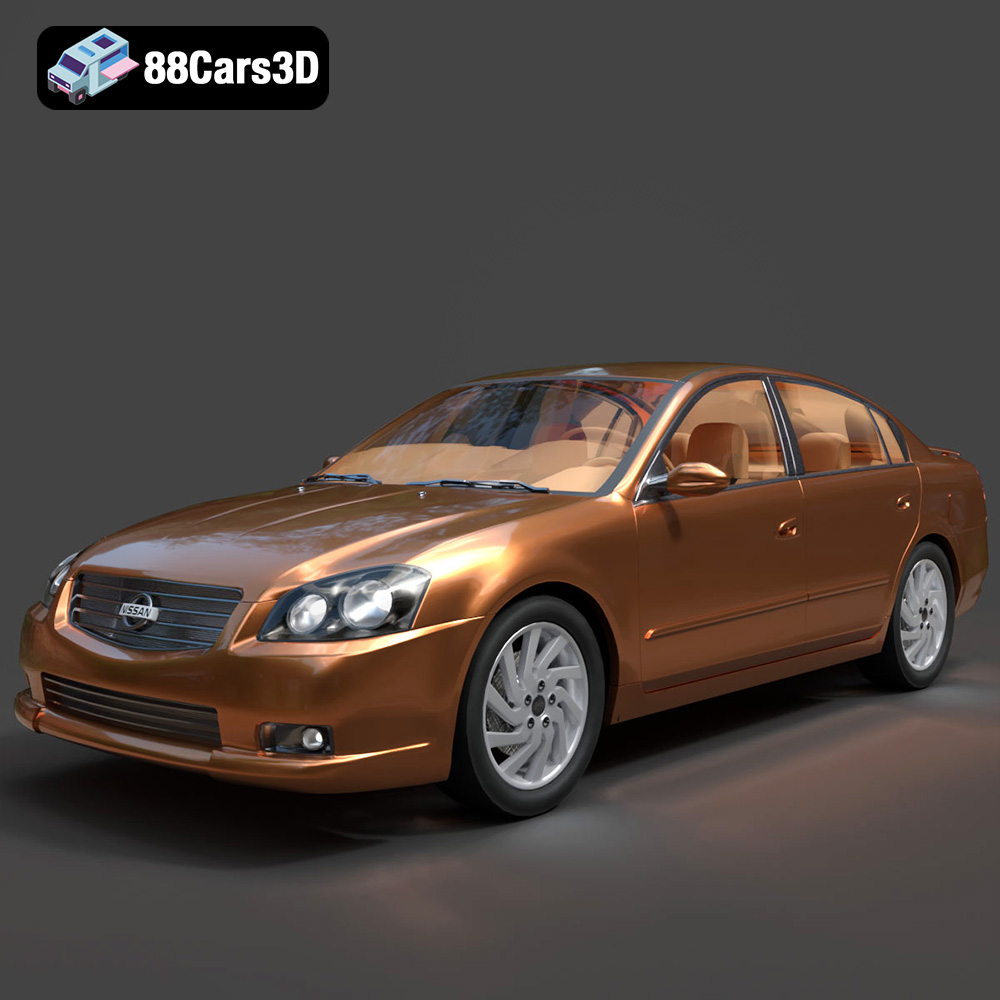
Texture: Yes
Material: Yes
Download the Nissan Altima 007 3D Model featuring clean geometry, realistic detailing, and a fully modeled interior. Includes .blend, .fbx, .obj, .glb, .stl, .ply, .unreal, and .max formats for rendering, simulation, and game development.
Price: $4.99
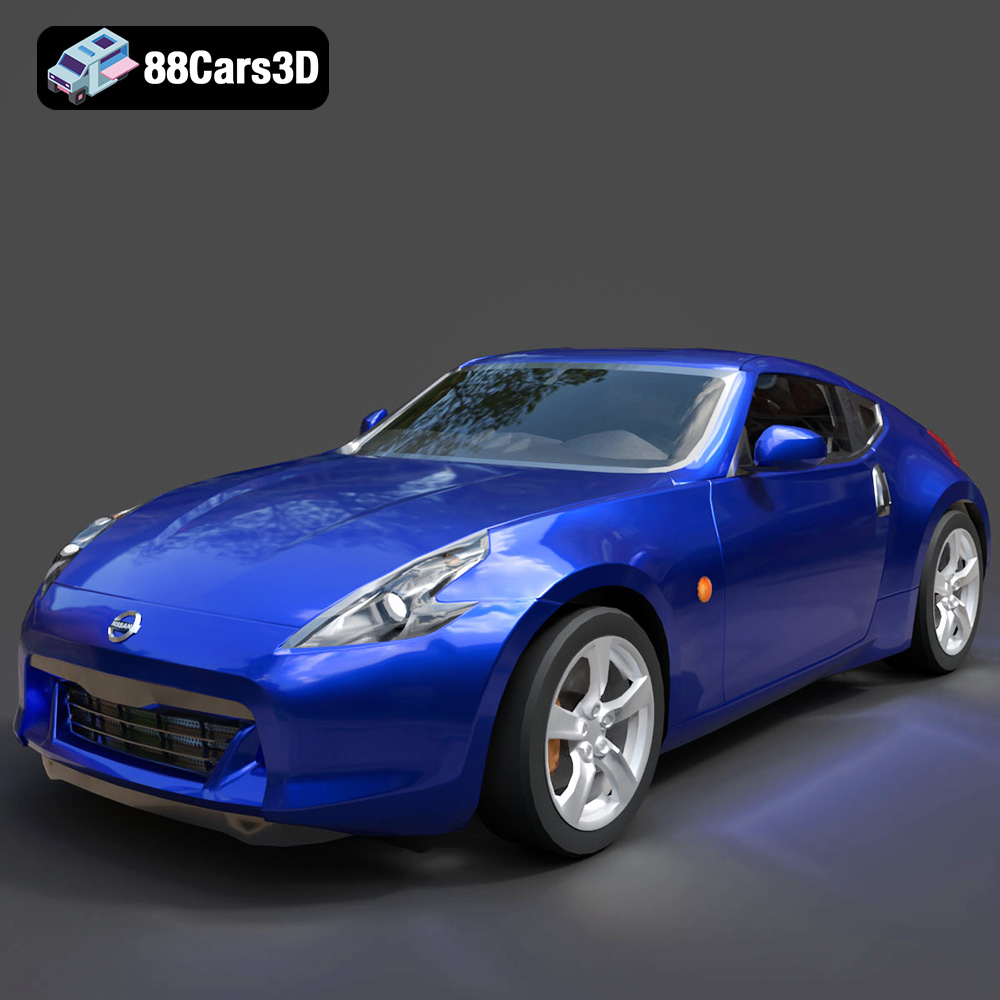
Texture: Yes
Material: Yes
Download the Nissan 370Z 2020 3D Model featuring clean geometry, realistic detailing, and a fully modeled interior. Includes .blend, .fbx, .obj, .glb, .stl, .ply, .unreal, and .max formats for rendering, simulation, and game development.
Price: $4.99

Texture: Yes
Material: Yes
Download the Mazda MX-5 2025 3D Model featuring clean geometry, realistic detailing, and a fully modeled interior. Includes .blend, .fbx, .obj, .glb, .stl, .ply, .unreal, and .max formats for rendering, simulation, and game development.
Price: $4.99

