Get 20% OFF All Premium 3D & STL Models!

The world of 3D automotive design and visualization is a dynamic realm where artistry meets technical precision. From crafting breathtaking cinematic renders to developing immersive game environments and real-time AR/VR experiences, the quality of your 3D car models dictates the success of your projects. Achieving photorealism, optimal performance, and cross-platform compatibility isn’t just about pushing polygons; it’s about a deep understanding of complex workflows, material science, and optimization strategies. For both seasoned professionals and aspiring artists, mastering these intricate details is the key to transforming vision into reality.
This comprehensive guide dives deep into the technical intricacies behind creating, optimizing, and deploying high-quality 3D car models. We’ll explore everything from the fundamental principles of mesh topology and advanced UV mapping to the nuances of Physically Based Rendering (PBR) material creation, cutting-edge rendering techniques, and the critical optimization steps required for game engines and interactive platforms. Whether your goal is to produce stunning visualizations for automotive marketing, develop compelling game assets, or prepare models for 3D printing and augmented reality, this article will equip you with the knowledge and actionable insights to elevate your craft. We’ll uncover industry best practices, software-specific techniques across platforms like 3ds Max, Blender, Unity, and Unreal Engine, and how to leverage high-quality resources, such as those found on 88cars3d.com, to accelerate your workflow and achieve superior results.
At the heart of any professional 3D car model lies impeccable mesh topology. This isn’t merely about having enough polygons; it’s about the strategic arrangement of vertices, edges, and faces to ensure smooth surfaces, accurate reflections, and efficient deformation. For automotive models, which are characterized by sleek curves and intricate panel gaps, clean topology is paramount. It affects everything from how well a model subdivides to how accurately light bounces off its surfaces, making it a critical first step in achieving photorealistic results.
Clean topology primarily refers to models built almost exclusively with quads (four-sided polygons). While triangles are permissible in very isolated, flat areas or for final game-ready optimization, N-gons (polygons with more than four sides) should be avoided entirely in production modeling, especially for subdivision surfaces. Quads allow for predictable and smooth subdivision, which is essential for rendering high-detail automotive surfaces without visible faceting. When applying subdivision modifiers (like Turbosmooth in 3ds Max, Subdivision Surface in Blender, or Smooth Mesh in Maya), a quad-based mesh will produce a naturally flowing, smooth surface, whereas N-gons can lead to pinching, artifacts, and undesirable creases. Furthermore, clean quad topology simplifies rigging and animation, as deformations (e.g., opening doors or suspension compression) occur more smoothly and predictably without mesh tearing or unwanted stretching.
Beyond quads, the concept of “edge flow” is critical for automotive models. Edge flow dictates how edges travel across the surface, directly impacting how light reflects off the car’s body. Automotive surfaces are highly reflective, and any imperfection in the mesh or uneven edge distribution will manifest as visual distortions in the reflections – often referred to as “bad reflections.” Good edge flow means edges follow the natural contours and curvature of the car, particularly around transitions, creases, and character lines. This ensures a uniform distribution of polygons, preventing “starving” or “overfeeding” areas where polygons are too sparse or too dense, respectively. Achieving this often involves using specific modeling techniques like careful loop cuts, bridging, and careful redirection of edge loops to maintain consistent surface tension.
While high polygon counts can achieve extreme detail, they also increase file size, rendering times, and game engine overhead. Effective optimization involves finding the sweet spot. For hero shots or offline rendering, a highly detailed model with 500,000 to 2 million polygons (pre-subdivision) is acceptable, as subdivision modifiers can push this significantly higher. For real-time applications, however, this needs to be drastically reduced. The key is to remove redundant edges and vertices that don’t contribute to the silhouette or critical surface detail. This process often involves manual decimation, using tools to reduce polygon count while preserving hard edges and major forms. Many artists create different versions: a high-poly sculpt for baking normal maps, a mid-poly for hero rendering, and multiple Low Poly meshes (LODs) for game engines.
Once your 3D car model has impeccable topology, the next crucial step is to prepare it for texturing and shading. This involves creating a clean and efficient UV map and then developing sophisticated Physically Based Rendering (PBR) materials. PBR is the industry standard for achieving photorealistic surfaces, simulating how light interacts with real-world materials based on their physical properties. Without proper UVs and well-calibrated PBR textures, even the best model will fall flat, lacking the visual richness and realism demanded by modern rendering engines and game environments.
UV mapping is the process of flattening the 3D surface of your model into a 2D space, allowing textures to be painted or applied without distortion. For complex automotive geometries, strategic UV unwrapping is paramount. The goal is to minimize seams, prevent stretching, and maximize texture resolution utilization. This often means separating parts of the car like individual panels (hood, doors, fenders), wheels, and interior elements onto their own UV islands. Overlapping UVs should generally be avoided for unique texture maps, but can be useful for repeating patterns or shared elements like bolts if carefully planned. For high-quality automotive renders, multiple UV sets might be used – one for general surface detail, another for decals or dirt layers, and even a dedicated set for lightmaps in game engines. Efficient packing of UV islands within the 0-1 UV space is also vital to reduce wasted texture space.
PBR materials represent a standardized approach to shading that accurately simulates how light interacts with surfaces in the real world. This system typically relies on several key texture maps: Albedo (or Base Color), Normal, Roughness, Metallic (or Specular), and Ambient Occlusion (AO). For automotive materials, additional maps like clear coat, anisotropy, and subsurface scattering can further enhance realism. The “shader network” refers to how these maps are combined and interpreted by the rendering engine. Car paint, for instance, requires a complex PBR setup often involving a base metallic layer with a clear coat over it, controlling parameters like reflection depth, color tint, and subtle flake effects. Glass, rubber, and chrome also have distinct PBR properties that need careful calibration, often requiring custom shaders or advanced material setups in rendering software like Corona, V-Ray, Cycles, or Arnold.
The resolution of your textures directly impacts the visual fidelity of your 3D car model. For high-end cinematic renders, resolutions of 4K (4096×4096) or even 8K (8192×8192) are common for major components like the car body, wheels, and interior. However, higher resolutions equate to larger file sizes and increased memory consumption, which is particularly problematic for real-time applications. Texture atlasing is a powerful optimization technique where multiple smaller textures (e.g., for individual car parts like lights, badges, or small interior buttons) are combined into a single, larger texture sheet. This reduces draw calls in game engines and improves rendering performance by allowing the GPU to process fewer texture files. When sourcing high-quality models, such as those found on 88cars3d.com, look for assets that come with optimized textures and efficient atlasing for maximum usability across various projects.
Once your 3D car model is meticulously detailed with clean topology, expertly UV mapped, and textured with realistic PBR materials, the final frontier is rendering. This is where all the technical preparation culminates in stunning, photorealistic images or animations. High-fidelity automotive rendering goes beyond simply hitting the render button; it involves a sophisticated interplay of lighting, camera work, environment setup, and post-processing. Specialized renderers like Corona, V-Ray, Cycles, and Arnold offer powerful tools to achieve cinematic results, each with its unique strengths and workflows.
Lighting is the single most critical factor in achieving photorealism. For automotive rendering, artists typically rely on a combination of High Dynamic Range Image (HDRI) maps and targeted area/spot lights. HDRIs provide realistic global illumination, reflections, and ambient light, instantly grounding the car in a believable environment. A high-quality HDRI of an outdoor scene, studio, or custom setup can dramatically enhance the perceived realism. Complementary lights – often discreet area lights or subtle spotlights – are used to emphasize specific design features, create dramatic highlights, or simulate bounce light from the ground. Understanding the principles of photography, such as three-point lighting, rim lighting, and fill light, translates directly into effective 3D lighting setups. Careful placement of these lights is crucial to sculpt the car’s form and highlight its reflective surfaces without introducing harsh or distracting shadows.
Each renderer has its own methodology and strengths. Choosing the right renderer often depends on your specific needs, software ecosystem, and desired aesthetic.
Each renderer requires understanding its specific material nodes (e.g., V-RayMtl, CoronaMtl, Standard Surface in Arnold, Principled BSDF in Cycles) and how they interpret PBR textures. Learning to optimize render settings (sampling, ray depths, denoising) for speed versus quality is an ongoing process specific to each engine.
Rendering an image is often just the beginning. Post-processing and compositing in software like Adobe Photoshop, Affinity Photo, or Blackmagic Fusion are crucial steps to elevate raw renders into final, polished images. This stage involves adjustments to color grading, contrast, exposure, white balance, and adding effects like depth of field (if not rendered directly), motion blur, chromatic aberration, and lens flares. Render passes (also known as AOVs – Arbitrary Output Variables) generated by the renderer – such as separate passes for reflections, refractions, shadows, ambient occlusion, and object IDs – are invaluable during compositing. These passes allow for non-destructive adjustments to specific elements of the image without re-rendering the entire scene, giving artists immense control over the final look. Professional automotive visualization heavily relies on compositing to achieve that glossy, high-production look seen in marketing materials.
While high-fidelity renders prioritize visual perfection without strict polygon or texture budget constraints, game development demands a rigorous approach to optimization. 3D car models intended for real-time engines like Unity or Unreal Engine must strike a delicate balance between visual quality and performance. Every polygon, texture, and material adds to the computational load, and inefficient assets can lead to frame rate drops, longer load times, and a poor user experience. Mastering game asset optimization is crucial for delivering smooth, interactive automotive experiences.
Level of Detail (LOD) is a fundamental optimization technique for game assets. It involves creating multiple versions of a 3D car model, each with a progressively lower polygon count. The game engine then dynamically switches between these LODs based on the camera’s distance from the object. For example, a car might have a high-poly LOD0 (50k-100k polygons) for close-up views, a mid-poly LOD1 (15k-30k) for medium distances, and a low-poly LOD2 (3k-10k) for distant views, potentially even a billboard or impostor for extreme distances. This ensures that the engine only renders the necessary detail, saving significant processing power. Equally important is reducing draw calls – the number of instructions the CPU sends to the GPU to render objects. Each material, mesh, and unique texture typically constitutes a draw call. Combining multiple meshes into one and using texture atlases (as discussed earlier) are prime strategies to minimize draw calls, leading to smoother performance, especially in scenes with many cars.
For a 3D car model to interact realistically within a game world, it needs a collision mesh. This is a simplified, often invisible, mesh that the game engine uses for physics calculations (e.g., detecting impacts, navigating terrain). Using the detailed visual mesh for collision would be computationally expensive and unnecessary. Collision meshes are typically much lower poly, often composed of simple convex shapes (boxes, capsules, spheres) or a very basic representation of the car’s silhouette. In addition, for advanced vehicle physics, many game engines require a “Physics Asset” or “Rigid Body” setup. This involves defining individual components of the car (body, wheels, suspension, chassis) as separate rigid bodies with defined mass, inertia, and constraints, allowing for realistic suspension simulation, wheel rotation, and deformation in crashes. This often requires careful planning and setup within the 3D software before export.
The process of exporting your optimized 3D car models from your 3D software to a game engine is critical. The FBX (Filmbox) format is the industry standard for this, as it supports meshes, materials, animations, and skeletal data. When exporting, careful attention must be paid to scale (Unity defaults to 0.01 scale, Unreal Engine to 1.0, though this can be adjusted), pivot points, and coordinate systems. Once imported into Unity or Unreal Engine, the models need to be correctly set up. This involves assigning PBR materials to the mesh, configuring texture maps, and ensuring normal maps are correctly interpreted (e.g., Unity uses DirectX normal maps, Unreal uses OpenGL, though most engines can flip automatically). Setting up prefabs (Unity) or blueprints (Unreal Engine) allows you to package the car model with its materials, collision meshes, LODs, and any associated scripts or physics components for easy instancing and management within your game project. High-quality game-ready assets available on platforms like 88cars3d.com often come pre-optimized and configured for direct import into popular game engines, significantly streamlining the development process.
The applications for high-quality 3D car models extend far beyond traditional static renders and game engines. Augmented Reality (AR), Virtual Reality (VR), and 3D printing represent rapidly growing frontiers that demand specialized optimization and preparation techniques. Furthermore, the ability to seamlessly transition models between different software packages and platforms necessitates a deep understanding of file formats and conversion strategies. Each of these applications introduces its own set of technical challenges and opportunities for innovative visualization.
AR/VR environments place even stricter performance demands on 3D car models than traditional video games, especially for mobile AR (e.g., ARKit, ARCore) and standalone VR headsets (e.g., Meta Quest). In these contexts, frame rates must be consistently high (72-90+ FPS per eye) to prevent motion sickness and ensure a comfortable, immersive experience. This means aggressive polygon reduction is often necessary – car models might need to be below 50,000 polygons, sometimes even as low as 10,000-20,000 for mobile AR. Texture resolutions also need careful management; 1K-2K textures are common. Beyond raw poly count, draw calls become even more critical, often necessitating heavy use of texture atlasing and combining meshes. Shaders must be simplified, leveraging mobile-friendly PBR or unlit materials. Furthermore, AR/VR models often require specific scale and coordinate system adherence to integrate correctly into the virtual or augmented space. Pre-baked lighting (lightmaps) can be used to reduce real-time lighting calculations, enhancing performance while maintaining visual quality.
Transforming a digital 3D car model into a physical object via 3D printing introduces a unique set of technical requirements. Unlike rendering, which cares about surface appearance, 3D printing cares about watertight geometry and manifold meshes.
Mesh repair tools found in most 3D software (e.g., Blender’s 3D Print Toolbox, 3ds Max’s STL Check modifier) or dedicated repair software (e.g., Netfabb, Meshmixer) are invaluable for preparing models for printing.
The digital ecosystem for 3D car models involves a variety of file formats, each with its strengths and typical use cases. Understanding these formats and how to convert between them is essential for cross-platform compatibility:
Effective conversion tools (e.g., online converters, dedicated plugins, or even importing/exporting directly through 3D software) are crucial for moving assets between different pipelines. When you acquire models from marketplaces like 88cars3d.com, they often provide models in multiple formats to ensure maximum compatibility for your diverse project needs.
Developing high-quality 3D car models is a complex undertaking that benefits immensely from structured workflows, disciplined asset management, and an understanding of common pitfalls. Adopting professional best practices not only streamlines your creative process but also ensures the longevity, reusability, and interoperability of your 3D assets. From maintaining organized project files to systematically tackling technical challenges, a robust workflow is the hallmark of efficient and successful 3D production.
In any significant 3D project, effective asset management and version control are non-negotiable. It’s easy to lose track of different iterations of a model, texture set, or scene file. Implementing a naming convention (e.g., “CarModel_Exterior_LP_v001.fbx”, “CarModel_Paint_Albedo_4K.png”) is fundamental. For larger teams or ongoing projects, version control systems like Git (with Git LFS for large files), Perforce, or dedicated asset management systems (e.g., Autodesk ShotGrid, Open Asset Import Library) are invaluable. These systems track changes, allow multiple artists to work on different parts of a project simultaneously, and provide a history of modifications, making it easy to revert to previous versions if needed. Even for solo artists, manually saving incremental versions (e.g., “_v001”, “_v002”) is a simple but effective form of version control that can save countless hours if an unexpected error occurs or a design change is requested.
Working with 3D car models inevitably presents specific challenges.
Anticipating these issues and knowing how to troubleshoot them efficiently is a critical skill for any 3D artist specializing in automotive visualization.
The field of automotive visualization is continuously evolving. Real-time rendering is rapidly gaining ground, with game engines like Unreal Engine and Unity becoming increasingly capable of producing photorealistic results that blur the line between real-time and offline renders. This enables interactive configurators, virtual showrooms, and real-time design reviews that were previously impossible. Cloud rendering services are making high-end rendering more accessible. Furthermore, advancements in procedural modeling and texture generation (e.g., Substance Designer) are accelerating asset creation. The integration of AI for tasks like image denoising, texture generation, and even automated retopology is also on the horizon. Staying abreast of these technological shifts and integrating new tools and techniques into your workflow will be essential for remaining competitive and innovative in this dynamic industry.
The journey through creating, optimizing, and deploying high-quality 3D car models is a multifaceted endeavor that demands a blend of artistic vision and rigorous technical expertise. From the foundational principles of clean topology and strategic UV mapping to the advanced nuances of PBR material creation, cinematic rendering workflows, and meticulous game engine optimization, every step contributes to the final impact of your automotive visualization. We’ve explored how proper edge flow ensures stunning reflections, how PBR materials bring surfaces to life, and how careful optimization makes models perform flawlessly across various platforms, including AR/VR and 3D printing.
Mastering these techniques not only elevates the quality of your work but also enhances your efficiency and versatility as a 3D artist. Whether you’re crafting a hero vehicle for a AAA game, a photorealistic render for an automotive campaign, or an interactive AR experience, a deep understanding of these technical considerations is your most valuable asset. Remember that continuous learning, embracing new tools and formats like glTF/GLB and USDZ, and adhering to professional best practices are key to staying ahead in this dynamic industry. For those seeking a head start or needing premium, pre-optimized 3D car models that meet these exacting standards, platforms like 88cars3d.com offer an invaluable resource, allowing artists to focus on creative execution rather than starting from scratch. Invest in your technical knowledge, refine your workflows, and unlock the full potential of your 3D automotive projects.

Texture: Yes
Material: Yes
Download the Mercedes E-Class w124 Kombi 3D Model featuring clean geometry, realistic detailing, and a fully modeled interior. Includes .blend, .fbx, .obj, .glb, .stl, .ply, .unreal, and .max formats for rendering, simulation, and game development.
Price: $4.99

Texture: Yes
Material: Yes
Download the Mercedes-Benz CL6540-005 3D Model featuring clean geometry, realistic detailing, and a fully modeled interior. Includes .blend, .fbx, .obj, .glb, .stl, .ply, .unreal, and .max formats for rendering, simulation, and game development.
Price: $4.99

Texture: Yes
Material: Yes
Download the Mercedes E-Class w124 Coupe 3D Model featuring clean geometry, realistic detailing, and a fully modeled interior. Includes .blend, .fbx, .obj, .glb, .stl, .ply, .unreal, and .max formats for rendering, simulation, and game development.
Price: $4.99

Texture: Yes
Material: Yes
Download the Mercedes-Benz E-Klasse 63 AMG 3D Model featuring clean geometry, realistic detailing, and a fully modeled interior. Includes .blend, .fbx, .obj, .glb, .stl, .ply, .unreal, and .max formats for rendering, simulation, and game development.
Price: $4.99

Texture: Yes
Material: Yes
Download the Mini Cabrio 2025 3D Model featuring clean geometry, realistic detailing, and a fully modeled interior. Includes .blend, .fbx, .obj, .glb, .stl, .ply, .unreal, and .max formats for rendering, simulation, and game development.
Price: $4.99

Texture: Yes
Material: Yes
Download the Nissan 350Z 3D Model featuring clean geometry, realistic detailing, and a fully modeled interior. Includes .blend, .fbx, .obj, .glb, .stl, .ply, .unreal, and .max formats for rendering, simulation, and game development.
Price: $4.99

Texture: Yes
Material: Yes
Download the Mercedes-Benz E-Klasse Coupe 3D Model featuring clean geometry, realistic detailing, and a fully modeled interior. Includes .blend, .fbx, .obj, .glb, .stl, .ply, .unreal, and .max formats for rendering, simulation, and game development.
Price: $4.99

Texture: Yes
Material: Yes
Download the Benza MERS-007 3D Model featuring clean geometry, realistic detailing, and a fully modeled interior. Includes .blend, .fbx, .obj, .glb, .stl, .ply, .unreal, and .max formats for rendering, simulation, and game development.
Price: $4.99
Texture: Yes
Material: Yes
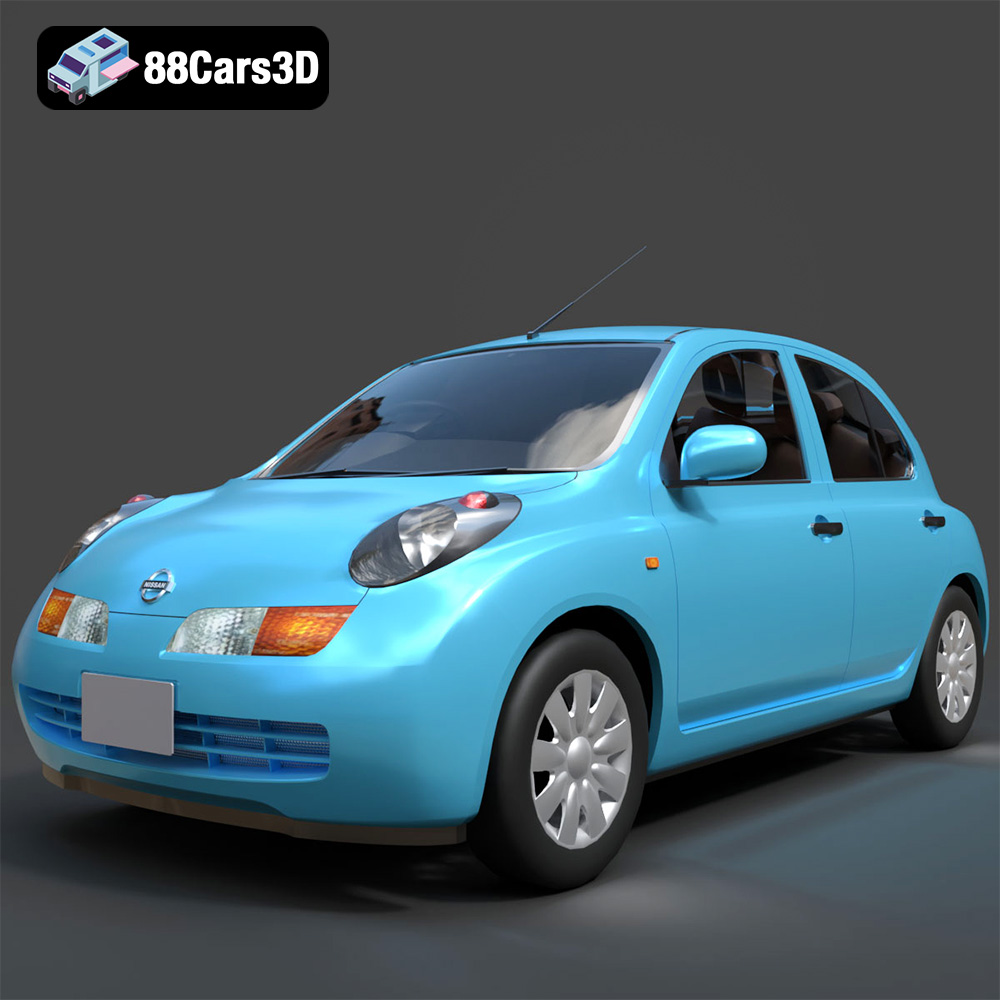
Download the Nissan March 2025 3D Model featuring clean geometry, realistic detailing, and a fully modeled interior. Includes .blend, .fbx, .obj, .glb, .stl, .ply, .unreal, and .max formats for rendering, simulation, and game development.
Price: $4.99
Texture: Yes
Material: Yes
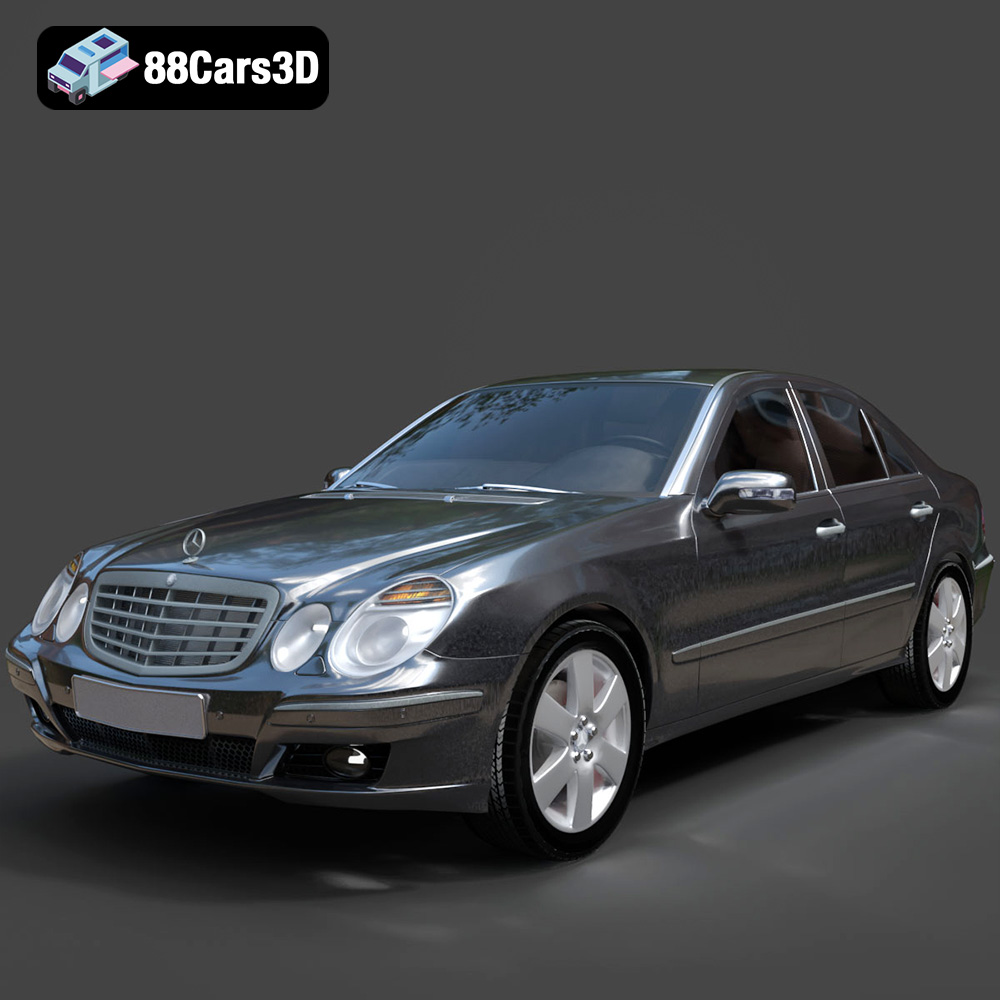
Download the Mercedes E-Class 2007 3D Model featuring clean geometry, realistic detailing, and a fully modeled interior. Includes .blend, .fbx, .obj, .glb, .stl, .ply, .unreal, and .max formats for rendering, simulation, and game development.
Price: $4.99

