Mastering the Art of 3D Automotive Design: Why High-Fidelity Car Models Drive Success
In the dynamic world of digital content creation, the demand for photorealistic 3D assets continues to skyrocket. From blockbuster video games and immersive AR/VR experiences to captivating automotive marketing campaigns and detailed architectural visualizations, high-quality 3D car models are the unsung heroes that bring virtual worlds to life. These assets are not just static representations; they are complex digital blueprints that convey design intent, technical precision, and emotional appeal.
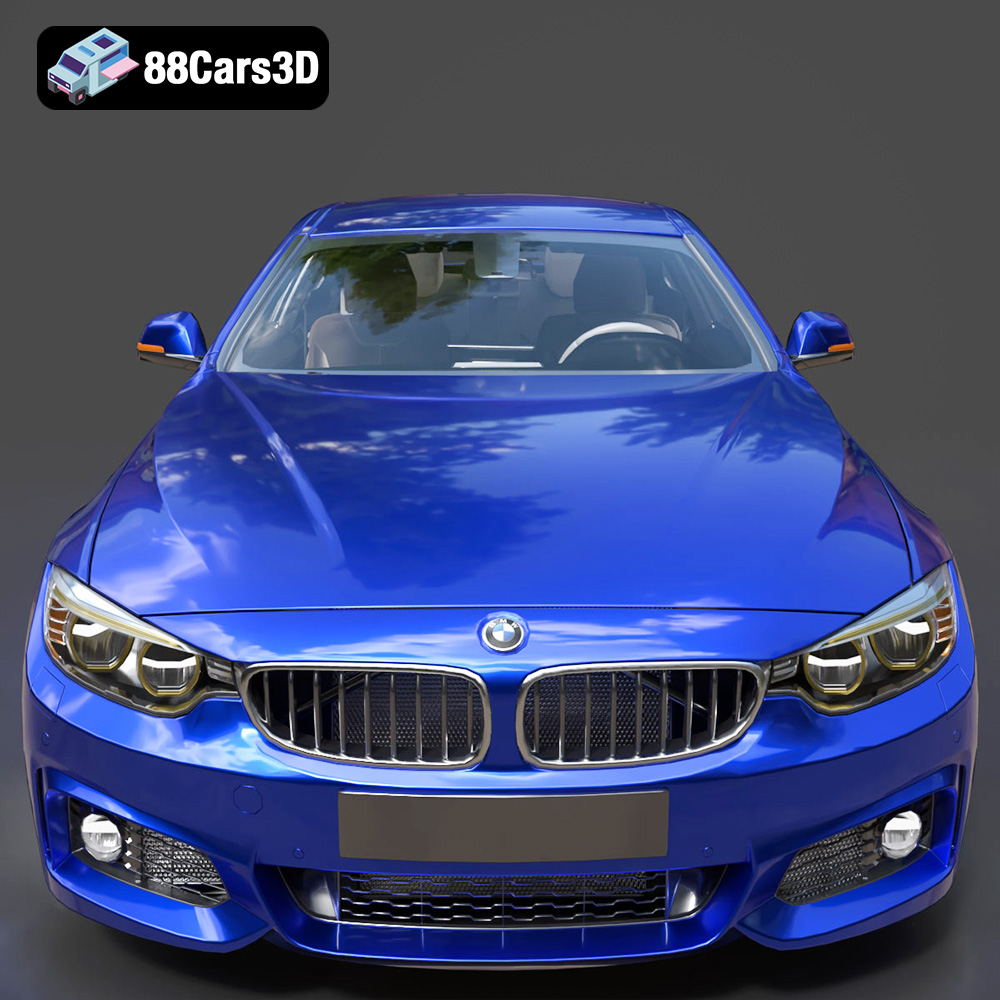
The quest for unparalleled realism often begins with finding a robust, meticulously crafted 3D model that can seamlessly integrate into diverse professional pipelines. This is where a model like the BMW 4 Series Coupe M Sport 2014 3D Model truly shines. It isn’t merely a digital replica; it’s a testament to professional-grade geometry, PBR-ready materials, and thoughtful organization, designed to empower creators across multiple industries. Whether you’re a game developer aiming for the next-gen driving simulator, an architect looking to populate your scenes with authentic vehicles, or a marketer needing a hero asset for a product launch, understanding the technical underpinnings and versatility of such a model is crucial for success.
The Foundation of Realistic Automotive Visualization: Precision and Performance
Achieving breathtaking realism in 3D automotive visualization hinges on two primary pillars: the accuracy of the model’s geometry and the quality of its materials. A truly professional 3D car model goes beyond superficial aesthetics, offering a deep level of detail that holds up under close scrutiny, while simultaneously being optimized for efficient rendering and real-time performance.
The Importance of Accurate Geometry and PBR Materials
The BMW 4 Series Coupe M Sport 2014 3D Model exemplifies this dual focus. Its geometry is designed with professional-grade precision, meticulously capturing the aggressive styling and dynamic characteristics of the M Sport package. This isn’t just about having the right shape; it’s about the topology – the underlying structure of polygons that defines the model’s surfaces. Clean topology ensures smooth deformations, efficient UV unwrapping, and predictable subdivision behavior, all critical for high-end rendering and animation.
Equally vital are the PBR (Physically Based Rendering) ready materials. PBR is a modern rendering paradigm that simulates how light interacts with surfaces in a physically accurate way, resulting in incredibly lifelike visuals. For a car model, this means realistically replicating the subtle nuances of metallic car paint, the reflective qualities of glass, the texture of tire rubber, and the intricate details of interior surfaces. PBR materials use maps like Albedo (base color), Normal (surface detail), Roughness (micro-surface texture), Metallic (how metallic a surface is), and sometimes Ambient Occlusion (self-shadowing) to achieve this realism. The PBR-ready nature of the BMW 4 Series Coupe M Sport 2014 3D Model ensures that it will look fantastic and consistent across different rendering engines and lighting conditions, directly contributing to high-fidelity simulations and visualizations.
Streamlined Workflows: Logical Grouping and Naming
A high-quality 3D model is not just about its visual appeal; its internal structure and organization are equally important for professional workflows. The BMW 4 Series Coupe M Sport 2014 3D Model addresses this by having all its components logically grouped and named. Imagine trying to animate a car door or modify a wheel without clearly labeled objects; it would be a nightmare.
Proper grouping and naming conventions allow artists to quickly identify, select, and manipulate specific parts of the vehicle. This ease of manipulation is invaluable when integrating the model into complex scenes, applying custom animations, or making specific modifications. For instance, being able to quickly select “Front_Left_Wheel” or “Door_Handle_Driver_Side” significantly accelerates the production pipeline, saving countless hours and reducing frustration. This attention to detail in organization is a hallmark of professional assets, facilitating seamless integration into any demanding project.
Understanding 3D Model File Formats: The Key to Interoperability
The world of 3D modeling is rich with diverse software and applications, each with its own preferred file types. To ensure maximum compatibility and utility, high-quality 3D car models often come in a variety of formats, each serving specific purposes. Understanding these formats is crucial for artists and developers to choose the right tool for the job, ensuring efficient workflows and optimal results.
The BMW 4 Series Coupe M Sport 2014 3D Model from 88cars3d.com provides a comprehensive suite of file formats, making it incredibly versatile:
.blend – Fully Editable Blender Scene with Materials
The `.blend` file is Blender’s native format and is essentially a complete Blender project. It contains not just the raw 3D mesh data, but also materials, textures, lighting setups, cameras, animations, rigging, and even scene properties. This format is ideal for users who primarily work in Blender, offering full editability and the ability to dissect every aspect of the model. It’s perfect for customization, learning from the setup, or rendering directly within Blender using Cycles or Eevee.
.fbx – Ideal for Unreal, Unity, and Real-time Pipelines
The Filmbox (`.fbx`) format is an industry-standard proprietary file format developed by Autodesk, widely used for exchanging 3D data between different software applications. It supports geometry, materials (with texture references), animations, skeletal data, and more. `.fbx` is particularly popular in game development due to its robust support for animations and its excellent compatibility with game engines like Unreal Engine and Unity. It efficiently packages complex scenes into a single file, making it a go-to for real-time applications where performance and animation are critical.
.obj – Universal Format for Cross-Software Compatibility
The Wavefront OBJ (`.obj`) format is one of the oldest and most universal 3D file formats. It is a simple, text-based format that primarily stores geometry (vertices, normals, texture coordinates, and faces) and references external material files (`.mtl`). While it doesn’t support animations or skeletal data, its widespread compatibility makes it an excellent choice for basic mesh exchange between virtually any 3D software. If you need a clean mesh to start a project in an unfamiliar application, `.obj` is often the safest bet.
.glb – Optimized for AR, VR, and Browser-based Display
The GL Transmission Format Binary (`.glb`) is the binary version of glTF (Graphics Library Transmission Format). It’s designed to be an efficient, compact, and easily loadable format for 3D scenes and models, especially well-suited for web-based 3D, AR (Augmented Reality), and VR (Virtual Reality) applications. `.glb` files embed all assets (geometry, textures, materials, animations) into a single file, reducing network requests and simplifying deployment. This optimization makes it perfect for displaying 3D models interactively in web browsers or integrating them into mobile AR/VR experiences, providing quick load times and smooth performance.
.stl – Suitable for 3D Printing Output
Stereolithography (`.stl`) is a standard file format used for 3D printing and CAD (Computer-Aided Design) applications. It describes only the surface geometry of a 3D object using a collection of interconnected triangles (a triangulated surface mesh). `.stl` files do not contain color, texture, or material information, focusing solely on the physical form. For the BMW 4 Series Coupe M Sport 2014 3D Model, the `.stl` version would be used to produce a physical prototype or miniature replica, requiring a “manifold” mesh where all surfaces are closed and watertight.
.ply – Precision Mesh Format for CAD or Analysis
The Polygon File Format (`.ply`), also known as the Stanford Triangle Format, is primarily used for storing 3D data from 3D scanners. It can store a wider range of properties than `.obj` or `.stl`, including color, transparency, normals, texture coordinates, and even reliability information for scanned data, on a per-vertex or per-face basis. `.ply` is often used for archiving high-precision mesh data, scientific visualization, or applications requiring detailed geometric analysis, such as in CAD or industrial design workflows.
.unreal – Engine-ready Asset for Real-time Environments
The inclusion of an `.unreal` asset means the model is specifically prepared and configured for direct use within Unreal Engine. This often implies that the model has been imported, optimized, and set up with appropriate materials, colliders, and potentially LODs (Levels of Detail) within an Unreal Engine project. This saves significant development time for Unreal users, as the tedious process of importing, scaling, assigning materials, and configuring physics assets has already been completed, allowing for immediate integration into an interactive real-time environment.
.max – Editable 3ds Max Project for Animation and Rendering
Similar to `.blend` for Blender, the `.max` file is the native project format for Autodesk 3ds Max. It contains the entire scene, including geometry, materials, textures, lights, cameras, animations, and render settings. For professionals working in architectural visualization, cinematic rendering, or product design who rely on 3ds Max (often paired with renderers like V-Ray or Corona), this format offers maximum flexibility for editing, animation, and high-fidelity output. The `.max` file allows full control over the model’s appearance and behavior within a powerful rendering ecosystem.
Unleashing the Power of the BMW 4 Series Coupe M Sport 2014 in Game Development
The video game industry thrives on realism and performance, making high-quality 3D car models indispensable. The BMW 4 Series Coupe M Sport 2014 3D Model is explicitly optimized for both Unreal Engine and Unity, making it an exceptional game asset ready for integration into the next generation of driving simulators, open-world environments, or even mobile games.
Optimization for Real-time Performance
In game development, the balance between visual fidelity and real-time performance is critical. A high-quality 3D car model, even one as detailed as the BMW 4 Series, must be optimized to render efficiently without bogging down the game engine. This involves several technical considerations:
- Polygon Count Management: While the model offers professional-grade geometry, an efficient game asset might employ Levels of Detail (LODs). This means having multiple versions of the model, each with a progressively lower polygon count, that the engine swaps between based on the camera’s distance. The included `.fbx` and `.unreal` formats are typically optimized for this purpose, potentially having already undergone such simplification or being ready for automatic LOD generation within the engine.
- Efficient UV Mapping: Clean and efficient UV maps are crucial for applying textures without distortion and for maximizing texture atlas efficiency. Well-laid-out UVs mean fewer draw calls and better performance.
- PBR Material Setup: Game engines like Unreal and Unity are built around PBR workflows. The BMW model’s PBR-ready materials ensure that the car’s paint, glass, and other surfaces will react accurately to the engine’s lighting, providing a visually consistent and realistic look with minimal setup.
- Pre-configured Assets: The `.unreal` format is a game-changer for Unreal Engine users. It signifies that the model is likely pre-configured with materials, possibly collision meshes, and even basic physics assets, drastically reducing the time spent on integration and optimization within the engine.
Crafting Immersive Driving Experiences
Imagine the roar of the engine, the glint of sunlight off the metallic paint, and the realistic reflections on the windows as a player speeds through a virtual city or races on a track. The BMW 4 Series Coupe M Sport 2014 3D Model provides the visual foundation for such immersive experiences. Its aggressive styling and dynamic characteristics directly translate into a compelling in-game presence.
Developers can leverage this model to:
- Build Realistic Car Showrooms: Showcase the BMW in a virtual environment, allowing players to explore it from every angle before purchasing.
- Populate Open-World Environments: Add authentic traffic or parked vehicles to enhance the realism and density of a game world.
- Create Engaging Cinematic Sequences: Use the high-fidelity model for cutscenes or in-game cinematics, where every detail matters.
- Develop Full-Fledged Driving Simulators: With proper physics integration and animation, this model can be the star of a realistic racing or driving simulation, offering players an authentic BMW experience.
Elevating Architectural and Automotive Rendering with Premium Assets
Beyond the fast-paced world of gaming, the demand for high-quality 3D car models is equally profound in architectural visualization (ArchViz) and automotive marketing. In these fields, the goal is often to create stunning, photorealistic still images or animations that captivate audiences and convey a sense of luxury, performance, or aspiration. The BMW 4 Series Coupe M Sport 2014 3D Model, with its professional-grade detail and PBR materials, is perfectly suited for these high-stakes applications.
Achieving Photorealism in Marketing and Advertising
Automotive marketing relies heavily on visually appealing representations of vehicles. Whether it’s for print ads, online campaigns, or promotional videos, the goal is to present the car in the best possible light. The BMW 4 Series Coupe M Sport 2014 3D Model provides a perfect foundation for this. Artists using software like 3ds Max, Blender, or Cinema 4D, paired with powerful renderers such as V-Ray, Corona Renderer, Octane, or Cycles, can create breathtaking renders:
- Detailed Material Customization: Leveraging the PBR-ready materials, artists can fine-tune the paint finish, glass refraction, tire textures, and interior details to match specific brand guidelines or desired visual effects. This includes adjusting metallic flakes in the paint, the clarity of the glass, and the subtle wear on tires.
- Sophisticated Lighting and Environment: Photorealism is heavily influenced by lighting. Artists can place the 3D BMW model within realistic HDRI (High Dynamic Range Image) environments that provide accurate global illumination and reflections, simulating everything from a sunny afternoon to an overcast sky. Additional artificial lights can be strategically placed to highlight specific features of the car, mimicking professional photography studio setups.
- Camera and Composition: Just like a professional photographer, a 3D artist can experiment with camera angles, focal lengths, depth of field, and composition to create dynamic and aesthetically pleasing shots that emphasize the car’s design and features.
- Animation for Cinematics: For advertising videos, the model can be animated—doors opening, wheels turning, or even dynamic camera movements around the vehicle—to create engaging cinematic sequences that showcase the car’s versatility and appeal.
The availability of the `.max` and `.blend` files means full control over every aspect of the scene, from advanced material tweaks to complex animation paths, making the 88cars3d.com model an invaluable asset for high-end automotive rendering.
Integrating into Architectural Visualizations
Architectural visualizations often require a sense of scale and realism that can only be achieved by populating a scene with appropriate context elements, and cars play a significant role in this. Placing a high-quality vehicle like the BMW 4 Series Coupe M Sport 2014 into a rendered architectural scene instantly grounds the building in reality, adds a touch of sophistication, and provides a sense of scale and liveliness.
- Enhancing Realism: A detailed 3D car model prevents architectural renders from looking sterile or unfinished. It adds life to parking lots, driveways, or street scenes, making the environment more believable and inviting.
- Contextualizing Design: The style and model of the car can also contribute to the overall narrative of the architectural project. A luxury car like the BMW 4 Series can suggest a high-end residential or commercial development, aligning with the desired aesthetic and target audience.
- Scale and Perspective: Cars are universally recognized in terms of size, providing an immediate reference for the scale of the surrounding architecture.
For ArchViz artists, the precise geometry and realistic materials of this BMW model ensure that it seamlessly blends into the photorealistic environments they strive to create, enhancing the overall impact of their presentations.
Beyond Traditional Screens: AR/VR and 3D Printing Applications
The utility of high-fidelity 3D car models extends far beyond traditional rendering and game development, venturing into cutting-edge applications such as Augmented Reality (AR), Virtual Reality (VR), and even physical prototyping through 3D printing. The versatility of the BMW 4 Series Coupe M Sport 2014 3D Model is evident in its support for formats tailored to these innovative uses.
Interactive Experiences in AR/VR
AR and VR are transforming how we interact with digital content, offering immersive and interactive experiences. High-quality 3D car models are central to these technologies, allowing users to explore vehicles in entirely new ways:
- Virtual Showrooms: Imagine donning a VR headset and walking around the BMW 4 Series Coupe M Sport 2014, opening doors, peering into the interior, and even customizing its color in real-time. Models optimized for AR/VR, particularly those provided in `.glb` format, are crucial for these interactive virtual showrooms. The `.glb` format’s single-file embedding and optimizations ensure quick loading times and smooth performance, vital for maintaining immersion.
- Augmented Reality Product Previews: With AR, potential buyers can place the 3D car model in their own driveway using a smartphone or tablet, viewing it at actual size, seeing how it fits, and even observing how different lighting conditions affect its appearance. The 88cars3d.com model, available in `.glb`, is perfectly suited for such AR applications, enabling businesses to offer compelling product previews that bridge the gap between digital and physical.
- Training and Simulation: Beyond marketing, AR/VR can be used for training scenarios, allowing engineers or technicians to interact with a digital twin of the car for maintenance simulations or design reviews in a collaborative virtual space.
The emphasis on optimized assets and compact formats like `.glb` for the BMW 4 Series Coupe M Sport 2014 ensures it performs excellently in these real-time, interactive environments, pushing the boundaries of what’s possible in digital visualization.
Prototyping and Physical Creation via 3D Printing
For designers, engineers, or enthusiasts who wish to bring the digital into the physical realm, 3D printing offers an exciting avenue. The inclusion of the `.stl` file format for the BMW 4 Series Coupe M Sport 2014 3D Model makes it suitable for this purpose.
- Rapid Prototyping: Automotive designers can use the `.stl` file to quickly print physical prototypes or scale models of the BMW. This allows for tangible review of forms, proportions, and details that might be harder to assess purely on screen. It’s an invaluable step in the design validation process, enabling quick iterations and physical feedback.
- Collectible Models: Enthusiasts or small businesses can leverage the `.stl` file to 3D print high-quality scale models of the BMW 4 Series, creating unique collectibles or personalized items. The precision of the digital model translates directly to the accuracy of the physical print, assuming a capable 3D printer.
- Technical Considerations for 3D Printing: When using an `.stl` file for 3D printing, it’s essential that the mesh is “manifold” or “watertight,” meaning it has no holes, overlapping faces, or inverted normals. This ensures the printer can correctly interpret the volume to be printed. While the provided `.stl` is generally optimized for this, minor adjustments might be needed depending on the specific printer and desired scale, highlighting the flexibility afforded by a professionally prepared model.
This dual capability – digital and physical – underscores the comprehensive utility of such a versatile 3D asset, catering to a wide spectrum of creative and technical needs.
Workflow Integration: A Professional’s Guide
The true value of a premium 3D model like the BMW 4 Series Coupe M Sport 2014 3D Model is realized through its seamless integration into various professional workflows. Different software packages cater to distinct needs, and understanding how to effectively leverage this model within each environment is key to maximizing its potential. 88cars3d.com ensures that artists have the right tools for their preferred pipeline.
3ds Max and V-Ray Workflow: From Import to Final Render
For many professionals in architectural visualization, product rendering, and animation, Autodesk 3ds Max combined with a powerful renderer like V-Ray (or Corona) is the industry standard. The included `.max` file simplifies this workflow significantly:
- Import/Open: Simply open the `.max` file directly. All geometry, materials, UVs, and potentially even basic scene lighting will already be loaded.
- Material Conversion (if needed): If the scene uses a standard Max material, you might convert it to V-Ray materials using the V-Ray Material Converter, ensuring full compatibility with V-Ray’s advanced rendering capabilities. Since the model is PBR-ready, the textures (Albedo, Normal, Roughness, Metallic) will map directly to the corresponding V-Ray material slots.
- Scene Integration: Merge the car into your existing 3ds Max scene (e.g., an architectural environment). Use precise scaling and positioning tools to place it accurately.
- Lighting and Environment: Set up your preferred lighting. This could involve V-Ray Sun and Sky, V-Ray Lights, or an HDRI (High Dynamic Range Image) environment applied to a V-Ray Dome Light for realistic global illumination and reflections. The PBR materials of the BMW 4 Series Coupe M Sport 2014 will react accurately to this lighting, producing stunning photorealistic results.
- Camera Setup: Position a V-Ray Physical Camera, adjusting focal length, depth of field, and exposure to frame the car within your composition.
- Rendering: Configure V-Ray render settings for optimal quality and speed, then initiate the render. Post-processing in tools like Photoshop can further enhance the final image, adding effects like bloom, color grading, or lens flares.
Blender and Cycles/Eevee Workflow: Customization and Animation
Blender has emerged as a powerhouse for 3D content creation, offering robust modeling, rendering, and animation tools. The `.blend` file for the BMW 4 Series Coupe M Sport 2014 3D Model provides a native and fully editable experience:
- Open the .blend File: Directly open the file, and the entire scene, including the car model, materials, and potentially even a basic lighting setup, will be available.
- Material Inspection and Customization: Explore the node-based PBR materials in Blender’s Shader Editor. Adjust colors, fine-tune roughness, or swap out texture maps to customize the car’s appearance. The logical grouping and naming of components make it easy to select specific parts for material application.
- Rigging and Animation: For advanced users, the model is prepared for rigging, allowing for complex animations like opening doors, steering, or realistic suspension compression. The clean topology facilitates deformation. Keyframe animation can be applied directly in Blender’s timeline.
- Lighting with HDRI and Area Lights: Set up realistic lighting using an HDRI environment in the World settings for ambient light and reflections. Supplement with Blender’s Area Lights or Sun lamp to highlight specific features of the BMW.
- Rendering with Cycles or Eevee: Render high-quality images or animations using Cycles (for photorealistic, ray-traced results) or Eevee (for fast, real-time rendering, ideal for previewing or stylized output). Blender’s compositing tools can be used for final image adjustments.
Unreal Engine Integration: Blueprints and Interactive Setups
For real-time applications like video games, simulations, or interactive experiences, Unreal Engine is a leading choice. The dedicated `.unreal` asset, alongside the `.fbx` file, streamlines integration:
- Import or Drag-and-Drop: For the `.fbx` file, import it via the Content Browser. The `.unreal` file might be part of an asset pack that you simply add to your project. Unreal Engine will typically import geometry, UVs, and PBR texture maps automatically.
- Material Assignment: Unreal Engine’s powerful material editor allows you to create PBR materials using the provided texture maps. The metallic, roughness, and normal maps from the BMW 4 Series Coupe M Sport 2014 3D Model will plug directly into the corresponding nodes. The pre-configured `.unreal` asset will likely have these materials already set up.
- Collision and Physics: Generate collision meshes or use pre-existing ones. Configure physics assets to allow the car to interact realistically with the game world, including suspension, wheels, and body.
- Blueprint Integration: For interactive functionality (e.g., driving, opening doors, custom cameras), use Unreal Engine Blueprints. Attach the BMW model to a vehicle blueprint, allowing it to be driven, customized in-game, or controlled by AI.
- Lighting and Post-Processing: Utilize Unreal Engine’s real-time lighting systems (e.g., Lumen or baked lighting) and post-processing volumes to achieve cinematic visuals, controlling exposure, color grading, ambient occlusion, and reflections.
These detailed workflows highlight how the thoughtful preparation and multiple file formats of the 88cars3d.com BMW 4 Series Coupe M Sport 2014 3D Model cater to the specific demands of diverse creative professionals, ensuring efficiency and high-quality output.
Conclusion: The Undeniable Value of Premium 3D Car Models
In today’s visually driven industries, the difference between good and great often lies in the quality of your foundational assets. High-fidelity 3D car models are more than just digital objects; they are critical components that elevate realism, streamline production, and unlock new creative possibilities across gaming, architectural visualization, automotive marketing, and cutting-edge AR/VR experiences. The technical depth, versatility, and thoughtful optimization embedded in professional 3D car models are invaluable.
The BMW 4 Series Coupe M Sport 2014 3D Model stands as a prime example of such an asset. Its meticulously captured geometry, PBR-ready materials, and logically organized structure ensure it meets the rigorous demands of any professional pipeline. With comprehensive file format support, including `.blend`, `.fbx`, `.obj`, `.glb`, `.stl`, `.ply`, `.unreal`, and `.max`, this model offers unparalleled flexibility, enabling seamless integration into virtually any 3D software or real-time engine. Whether you’re crafting the next viral automotive advertisement, designing an immersive game world, or prototyping a physical model, this asset from 88cars3d.com is engineered to deliver stunning results and accelerate your creative workflow. Investing in such a high-quality 3D car model is an investment in the success and visual impact of your projects.
Featured 3D Model
BMW 4 Series Coupe M Sport 2014 3D Model
Bring unparalleled realism to your projects with the BMW 4 Series Coupe M Sport 2014 3D Model. This asset meticulously captures the aggressive styling and dynamic characteristics of the M Sport package, making it perfect for high-fidelity simulations and visualizations. The model boasts professional-grade geometry optimized for performance and detail. It includes realistic, PBR-ready materials replicating paint, glass, and rubber textures. All components are logically grouped and named, ensuring easy manipulation and integration into any professional pipeline. This versatile asset is ideal for various industries, including video game development (optimized for both Unreal Engine and Unity), architectural visualization, automotive marketing, cinematic rendering, and interactive AR/VR experiences.
$14.99
Product Image Gallery