

Mastering High-Fidelity Automotive Rendering and Game Development: A Technical Deep Dive into the BMW M6 Coupe (F12)
In the demanding world of professional 3D visualization and game development, the quality of source assets dictates the final output. High-performance vehicles, particularly luxury sports cars like the BMW M6 Coupe (F12), require meticulous detail to capture their iconic engineering and design aesthetic accurately. Utilizing premium 3D car models is non-negotiable for studios aiming for photorealism in automotive rendering or seamless performance in interactive experiences.
The creation and implementation of a professional-grade asset, such as the BMW M6 Coupe (F12) available at 88cars3d.com, involves far more than simple geometry modeling. It demands careful consideration of topology, material layering, hierarchical organization, and multi-format compatibility to ensure smooth integration across various software ecosystems, from 3ds Max and Blender to Unreal Engine and Unity.
This comprehensive guide explores the technical advantages of using such a meticulously crafted model, detailing how its features translate into streamlined workflows, superior visual fidelity, and optimal performance across rendering, simulation, and game production pipelines.
The Foundation of Automotive Realism: Detailing the BMW M6 (F12) Geometry
The BMW M6 Coupe (F12) model is built upon a foundation of clean, professional geometry. For vehicles, geometric integrity is paramount, especially when subtle reflections and high-speed deformations are involved. The model’s design prioritizes visual accuracy while maintaining technical efficiency.
The Importance of Quad-Dominant Topology
Professional automotive models rely heavily on quad-dominant topology, meaning the mesh is constructed primarily of four-sided polygons. This characteristic is crucial for several technical reasons:
- Subdivision Surfaces: Quads guarantee predictable and smooth subdivision (using modifiers like Turbosmooth or Subdivision Surface), which is essential for rendering close-up shots of car bodies where curvature must be flawless. Triangles or N-gons often result in artifacts, pinching, or noticeable mesh seams upon subdivision.
- Deformation and Animation: Clean quad flow ensures the mesh deforms predictably. This is vital for animation sequences involving suspension travel, door opening, or subtle chassis flexing, preventing material stretching or unwanted distortion.
- UV Mapping Efficiency: Quad-based meshes are easier to unwrap and lay out UVs onto a 2D space, ensuring texture detail (like paint flakes, decals, or carbon fiber weaves) is applied uniformly without stretching.
Components and Hierarchy for Dynamic Animation
A static model limits application, but a dynamically prepared model expands possibilities significantly. The M6 model features a logically organized hierarchy, where components are separated and correctly pivoted:
- Separated Parts: Doors, hood, trunk, and individual wheels are distinct mesh elements.
- Pivot Points: Pivot points for rotational elements (like doors or wheels) are set to their real-world rotation axis. This means an animator can instantly keyframe a door opening sequence without manual pivot adjustment, saving hours in the animation pipeline.
- Real-World Scale: Modeling to real-world scale is non-negotiable for physics simulations, ensuring accurate camera depth-of-field effects in rendering, and precise integration into architectural visualization scenes (ArchViz).
Understanding 3D Model File Formats for Professional Pipelines
A high-quality 3D car model is defined not only by its geometry but by its versatility across different software platforms. For high-end assets like the BMW M6 Coupe (F12), a robust selection of file formats is essential, each serving a specific technical purpose. The extensive format support provided by 88cars3d.com ensures that creative professionals are not hampered by compatibility issues, offering flexibility for multiple use cases from cinematic visualization to high-performance real-time applications.
Choosing the correct format is a critical first step in any professional workflow, as it dictates how materials, lighting, animation data, and mesh integrity are transferred.
Exchange Formats: FBX and OBJ for Interoperability
These formats are the bedrock of cross-platform 3D production:
- .fbx (Filmbox): Considered the industry standard for exchange, .fbx is critical for transferring assets between rendering packages and real-time engines (Unreal, Unity). Technically, .fbx excels because it can encapsulate complex data, including hierarchical structure, pivot points, skinning, skeletal data, and PBR material assignments (though material translation sometimes requires minor manual adjustment post-import). It is the preferred format when moving the M6 model into Unreal Engine for dynamic driving simulations.
- .obj (Wavefront Object): This is a universal geometry format. While highly compatible across virtually all 3D software, .obj is a basic mesh format; it only stores vertex, normal, and UV data, often requiring companion files (.mtl for basic material definitions) and cannot typically store rigging or animation data. It is best used when only the raw mesh data of the BMW M6 body shell is needed for sculpting or retopology within a third-party tool.
Engine-Specific and Proprietary Solutions
These formats offer deep integration within their native ecosystems, maximizing efficiency:
- .max (3ds Max): The proprietary format for Autodesk 3ds Max. Using the native .max file ensures that all scene data—including V-Ray or Arnold shaders, complex procedural textures, lighting setups, and specific modifiers—are preserved exactly as authored. This is indispensable for animators or visualization specialists working within the established 3ds Max rendering pipeline.
- .blend (Blender): The native project file for Blender. This includes Cycles or Eevee material node setups, scene organization, and potentially geometry nodes or other Blender-specific modifiers. For users leveraging Blender’s fast development cycles and powerful Cycles rendering, the .blend file provides a ready-to-render setup straight out of the box.
- .unreal (Unreal Engine Project): This represents a pre-configured project setup, often including imported meshes, pre-set Level of Detail (LOD) settings, PBR master materials, and possibly vehicle physics configurations. This drastically accelerates the process of bringing the BMW M6 into a realistic, interactive environment without tedious initial setup steps.
Specialized Formats for Visualization and Manufacturing
Beyond traditional rendering and gaming, specialized formats enable niche professional applications:
- .glb (GL Transmission Format Binary): Optimized for efficient transmission and loading, .glb is the go-to format for AR/VR and web-based visualization. It bundles geometry, materials, and textures into a single, compact binary file, making the M6 highly accessible for mobile AR apps or interactive browser viewers.
- .stl (Stereolithography): This format is essential for additive manufacturing, primarily 3D printing. It defines the surface geometry using a series of connected triangles. While the source mesh is high-poly, the .stl output requires the mesh to be manifold (water-tight) to ensure print success.
- .ply (Polygon File Format): A high-precision format often used in CAD, industrial visualization, or scientific analysis. It allows storage of data attributes beyond color, such as transparency, and is preferred when absolute mesh fidelity is required for analysis or comparison against manufacturing blueprints.
Optimizing the M6 for Real-Time Environments: Game Asset Integration
Integrating a complex automotive model into a game engine requires careful optimization. The goal is to maximize visual fidelity while minimizing draw calls and maintaining acceptable framerates. The BMW M6 model, designated as a high-fidelity game asset, must be pipeline-ready for platforms like Unreal Engine and Unity.
Setting Up the Unreal Engine Project
The provision of a native .unreal file drastically simplifies the initial setup. However, standard FBX import requires adherence to critical technical standards:
- LOD Generation: High-poly visualization meshes are too demanding for standard gameplay. A professional game asset must include multiple Level of Detail (LOD) stages. The full visualization model serves as LOD0, while successive stages (LOD1, LOD2, LOD3) must be systematically decimated to reduce polygon count by 50-75% at each step, ensuring performance scales as the car moves away from the camera.
- Collision Meshes: Accurate collision meshes (simplified convex hull shapes, often suffixed UCX_) must be created and linked to the main geometry. These low-poly proxies are essential for accurate physics simulation and driving mechanics without the computational cost of using the detailed visual mesh.
PBR Texturing and Material Instancing
Real-time engines utilize Physically Based Rendering (PBR) systems. The M6 asset must utilize metallic/roughness maps for maximum realism:
- Texture Channels: PBR requires specific maps (Base Color, Normal, Metallic, Roughness, Ambient Occlusion). High-quality UV maps (non-overlapping, uniform texel density) are necessary for applying these textures cleanly, especially for intricate details like brake caliper logos or dashboard textures.
- Material Instancing: Using a single PBR master material and creating instances for variations (e.g., changing the M6 paint color from deep blue to aggressive red) allows developers to maintain efficient draw calls. This optimization ensures that numerous versions of the vehicle can be rendered efficiently within a single scene.
Achieving Cinematic Quality: Advanced Automotive Rendering Workflows
For high-impact marketing materials, commercials, or architectural visualizations, the focus shifts entirely from real-time optimization to absolute photorealism. This is where the clean geometry of the BMW M6 truly shines in automotive rendering packages like 3ds Max (V-Ray/Arnold) or Blender (Cycles).
Mastering the Multi-Layer Car Paint Shader
The key differentiator in professional car rendering is the complexity of the paint shader. A basic Phong or Blinn shader is insufficient. The M6 requires a multi-layer material setup:
- Base Layer: Diffuse color with subtle roughness variations.
- Metallic Flakes Layer: A procedural or texture-based layer simulating metallic micro-flakes embedded in the paint, reacting dynamically to light sources.
- Clearcoat Layer: A highly reflective, sharp, anisotropic specular layer simulating the protective glossy top coat. This layer is crucial for capturing the elongated, sharp reflections characteristic of high-end automotive finishes.
Lighting and Environment Setup for Reflections
A car model is only as good as the environment it reflects. Perfect lighting is achieved using High Dynamic Range Imagery (HDRI):
- Image-Based Lighting (IBL): High-resolution, calibrated HDRI domes (studio setups or outdoor environments) are used to provide physically accurate, detailed reflections on the car body. The reflection map reveals the quality of the model’s surfaces, where any imperfections in the quad topology or smoothing groups would be immediately visible.
- Fill and Key Lights: Supplemental geometric area lights (softboxes) are often introduced in 3ds Max or Blender to highlight specific design features, such as the kidney grilles or the sharp character lines running along the M6’s side panels.
Precision and Utility: The Role of Automotive Models in Simulation and Prototyping
Beyond entertainment, high-fidelity 3D car models serve crucial roles in specialized professional fields. The accuracy of the BMW M6 Coupe (F12) model, modeled to exact real-world dimensions, makes it an invaluable asset for technical simulation and product visualization.
Integration into Driving Simulators
For professional driving trainers or scientific studies, the mesh integrity and scale are vital for physics integration. The geometry must accurately represent the exterior envelope for collision detection, aerodynamics, and visual feedback:
- Physics Asset Generation: The model provides the visual counterpart to the complex physics asset (chassis, wheels, suspension structure) used by simulation software. Accurate scaling ensures that parameters like wheel rotation speed and center of mass calculations are congruent with the visual output, maintaining immersion and realism.
- Cockpit Fidelity: The detailed interior modeling—dashboard, steering wheel, and gauges—is critical for VR or immersive cockpit simulations, providing accurate visual references for trainees.
Converting the M6 Mesh for 3D Printing
As mentioned, the .stl format facilitates physical prototyping. While the initial mesh is complex, the conversion process involves preparing the geometry for manufacturing constraints:
- Manifold Check: Ensuring the mesh is completely closed (water-tight) with no holes or flipped normals is essential for successful .stl generation.
- Wall Thickness: Adjusting the mesh thickness (often performed by hollowing or thickening the model) to meet the minimum requirements of the 3D printer material ensures structural integrity in the physical output. A highly detailed M6 scale model can be produced, suitable for design review or exhibition.
Technical Deep Dive: Topology, UV Mapping, and Scale
The true measure of a high-quality asset is its underlying technical execution. Professionals purchasing assets from specialized marketplaces like 88cars3d.com expect optimized resources that minimize post-purchase cleanup.
Non-Overlapping UV Layout for Texture Fidelity
UV mapping is the process of flattening the 3D surface onto a 2D map for texture application. For an asset like the BMW M6, the UVs must be meticulously laid out:
- Unique UV Sets: The UVs must be non-overlapping (unique) across the main body panels, wheels, and interior components. This is critical for applying texture maps that are not meant to tile—such as decals, custom liveries, license plates, or specific dirt/damage maps. Overlapping UVs would cause textures to repeat or mirror incorrectly.
- Texel Density: Maintaining a consistent texel density (pixels per unit area) across highly visible parts ensures that texture resolution is uniform, preventing blurring on large surfaces like the hood or fender.
Maintaining Real-World Scale
The adherence to real-world scale (1 unit = 1 meter, for example) impacts every aspect of production:
- Rendering Accuracy: Accurate scale is required for physically accurate camera settings (Depth of Field, lens effects) and volumetric effects (fog, atmosphere). If the car is scaled incorrectly, the lighting will look unnatural.
- Integration: When placing the M6 into an architectural visualization scene or alongside other vehicles, consistent scale ensures the model immediately fits the scene without requiring time-consuming manual resizing and pivot verification.
Conclusion: Elevating Projects with Professional 3D Car Models
The journey from raw geometry to a deployable, high-fidelity 3D car model is complex, requiring mastery over topology, PBR material systems, and multi-format pipeline requirements. The BMW M6 Coupe (F12) model serves as an exemplar of technical excellence, offering clean geometry, accurate hierarchy, and comprehensive format support (.max, .blend, .fbx, .unreal, etc.) necessary for the most demanding professional projects.
Whether your goal is cutting-edge automotive rendering for marketing campaigns, building highly realistic game assets for a new driving simulator, or creating precise visualizations for AR/VR, leveraging pre-optimized, expert assets saves significant development time and guarantees superior visual results. Assets of this caliber are essential tools for any serious visualization professional, ensuring projects are efficient, technically sound, and visually stunning.
Featured 3D Model
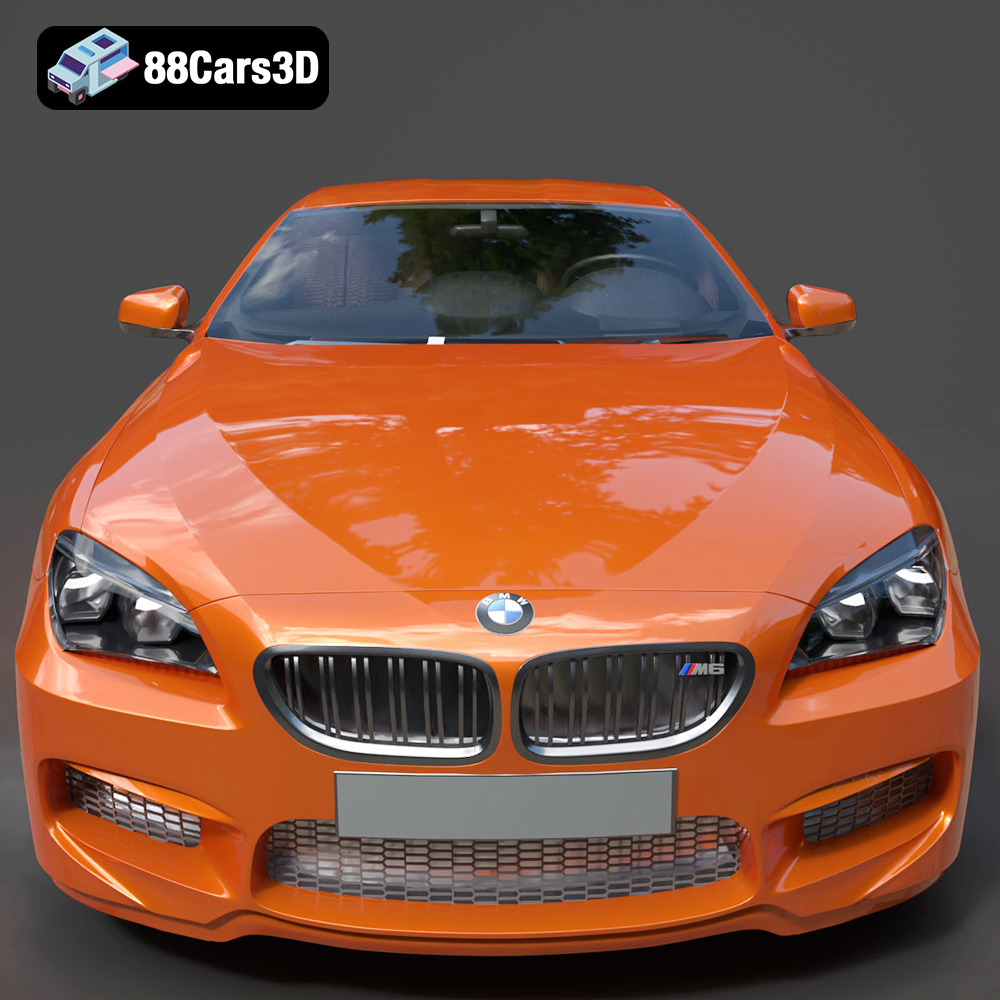
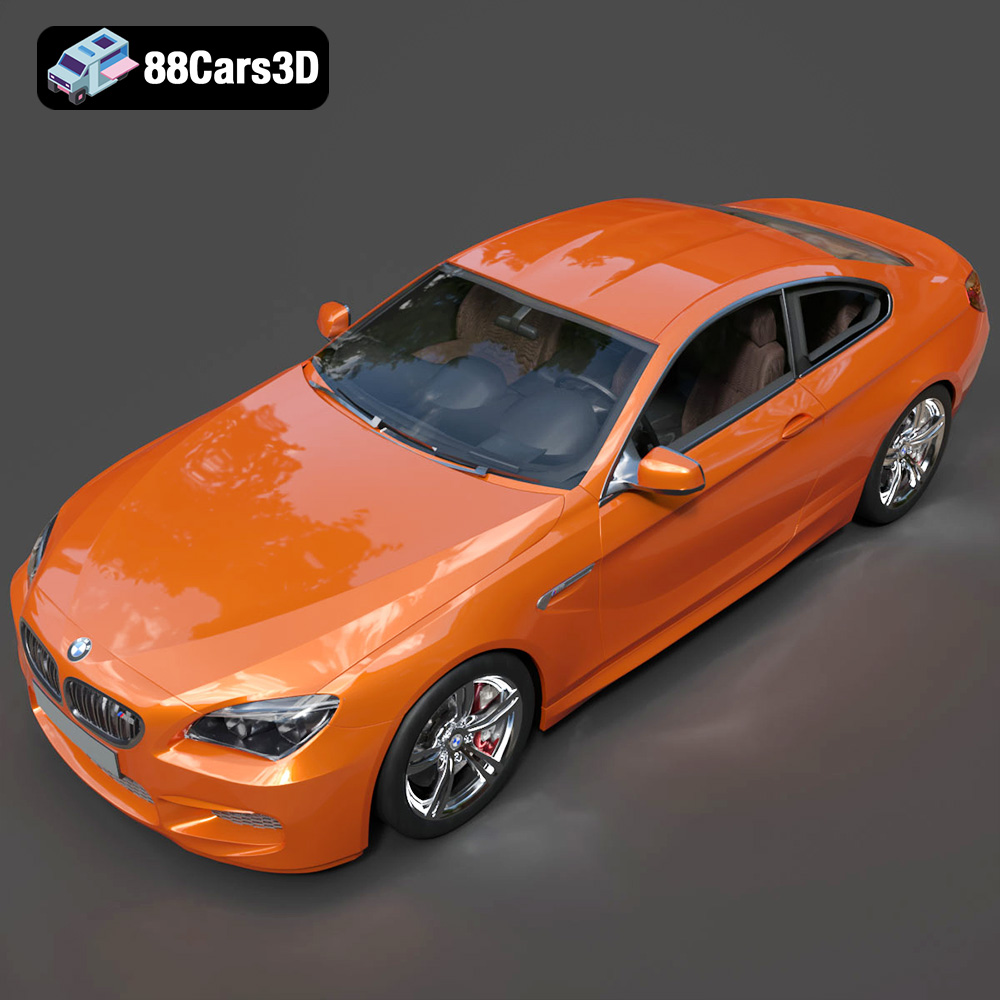
BMW M6 Coupe (F12) 3D Model
This professional 3D model accurately represents the iconic BMW M6 Coupe (F12), a high-performance luxury sports car known for its powerful engine and sophisticated design. Crafted with clean geometry and balanced detailing, this model offers exceptional visual fidelity. It is ideally suited for a wide range of applications, including high-end rendering projects, realistic animations, detailed simulations, and immersive game development.
$10.79
Product Image Gallery





Related Tags
.arvr
.blend
.bmw
.coupe
.f12
.fbx
.gameasset
.glb
.luxurycar
.m6coupe
.max
.obj
.ply
.rendering
.simulation
.sportsCar
.stl
.unreal
