Get 50% OFF All Premium 3D & STL Models!

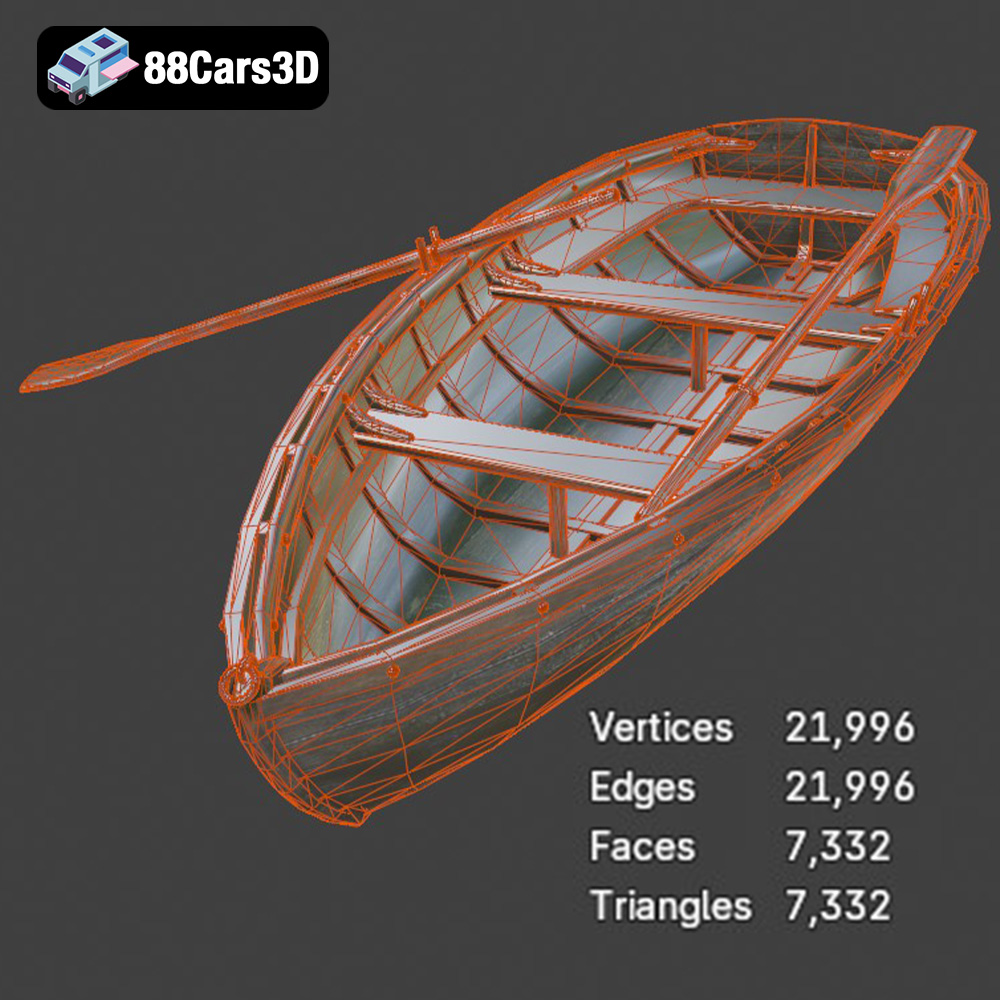
The Boat 3D Model available at 88cars3d.com offers enthusiasts a fantastic opportunity to bring a detailed watercraft replica to life through 3D printing. Whether you’re interested in creating a scale model for display, a prop for a diorama, or even a component for a larger maritime-themed project, this guide will provide you with the technical knowledge needed to achieve high-quality 3D printed results. We will cover everything from selecting the right material and printer settings to post-processing techniques to ensure your boat model looks its best.
The selection of the right 3D printing technology is crucial for achieving optimal results with the Boat 3D Model. Two primary options are Fused Deposition Modeling (FDM) and Stereolithography (SLA) or resin printing.
FDM printing is more accessible and cost-effective, utilizing filaments like PLA or PETG. For larger boat models, FDM offers a practical solution. However, achieving fine details, particularly on smaller scales like 1:72 or 1:48, can be challenging. Layer lines may be visible, requiring more post-processing.
Resin printing, on the other hand, excels at producing highly detailed parts with smooth surfaces. This makes it ideal for smaller scale models where intricate features like railings, propellers, and deck details are paramount. Resin printers tend to be more expensive, and the resins themselves require careful handling and disposal. For the Boat 3D Model, especially at scales demanding precision, resin printing is generally the preferred choice.
Choosing the correct file format is crucial for a smooth 3D printing experience. Several formats are available, each with its strengths and weaknesses, but some are better suited for 3D printing than others. Understanding these formats will help you prepare the Boat 3D Model for optimal results.
The .stl (Stereolithography) format is the industry standard for 3D printing. It represents the 3D model’s surface geometry as a collection of triangles. STL files are mesh-only, meaning they contain no color or texture information; this keeps the files relatively small and easy to process. Most slicing software readily accepts STL files, making them the most practical choice for 3D printing. The Boat 3D Model available on 88cars3d.com includes an STL format specifically optimized for printing. When working with STL files, ensure the mesh quality is high enough to capture the details of the model, but not so high that it becomes computationally expensive to slice and print.
The .obj (Wavefront Object) format is a more versatile format that supports both geometry and texture information. This means you can potentially print the Boat 3D Model with colors, provided your printer supports multi-material or color printing. However, for most standard 3D printing applications, the texture information is not used, and the .obj file is treated similarly to an STL file.
The .ply (Polygon File Format or Stanford Triangle Format) is designed for storing 3D data acquired from 3D scanners. It is capable of representing high-detail meshes accurately, which can be beneficial for complex models like the Boat 3D Model. However, .ply files can be quite large, and not all slicing software fully supports them.
.blend files are native to the Blender 3D creation suite. This format is extremely useful if you want to customize the Boat 3D Model before printing. You can modify the geometry, add details, or even split the model into separate parts for easier printing and assembly. However, .blend files cannot be directly used by slicing software; you need to export the model to a printable format like .stl after making your modifications.
The .fbx (Filmbox) format is commonly used for exchanging 3D data between different software applications. It supports geometry, textures, materials, and animations. While some slicing software can import .fbx files, they are generally not preferred for 3D printing due to their complexity. It’s better to convert the model to .stl after importing and preparing it in your 3D modeling software.
The .glb (GL Transmission Format Binary) format is designed for efficient delivery and loading of 3D models in web and mobile applications, particularly for Augmented Reality (AR) previews. While not directly used for 3D printing, .glb files allow you to visualize the Boat 3D Model in a real-world setting using your smartphone or tablet before committing to a print.
.max files are native to Autodesk 3ds Max. Similar to .blend files, they contain the entire 3D scene, including geometry, textures, and lighting. If you have access to 3ds Max, you can use .max files to modify the Boat 3D Model extensively. Always export to .stl for the actual printing process.
Ultimately, for 3D printing the Boat 3D Model, the .stl format is the most reliable and widely supported. Ensure that the STL file is properly scaled and oriented before sending it to the slicing software. Clean, well-defined meshes are essential for a successful print.
Before sending the Boat 3D Model to your printer, careful preparation is essential. This involves using slicing software to convert the 3D model into instructions that the printer can understand. Additionally, model optimization may be needed to ensure successful printing.
Slicing software like Cura, PrusaSlicer, or Simplify3D allows you to control various printing parameters. Key settings for the Boat 3D Model include:
* **Layer Height:** For FDM, a layer height of 0.1 to 0.2 mm is recommended. For resin, you can go as low as 0.025 to 0.05 mm for increased detail.
* **Infill Density:** An infill density of 20-35% is generally sufficient for structural integrity without adding excessive weight.
* **Wall Thickness:** Aim for a wall thickness of 2-3 mm to provide adequate strength.
* **Support Structures:** The Boat 3D Model will likely require supports for overhanging features such as railings, windshield frames, and propellers. Experiment with support placement to minimize material usage and ease of removal.
* **Print Speed:** Adjust print speed based on your printer’s capabilities and the material being used. Slower speeds often result in better quality.
* **Orientation:** Carefully consider the print orientation to minimize the need for supports and optimize surface finish. Printing the hull flat may be simplest, but splitting it vertically can allow for larger prints.
Before slicing, it’s crucial to inspect the STL file for any errors or imperfections. Software like MeshMixer or Netfabb can be used to repair non-manifold geometry, fill holes, and smooth surfaces. Optimizing the mesh can reduce file size and improve print performance. For the Boat 3D Model, ensure that all parts are properly connected and that the mesh is watertight to prevent issues during printing.
The choice of material significantly impacts the final appearance, strength, and durability of the 3D printed Boat 3D Model. Here’s a breakdown of suitable materials:
PLA is a popular, biodegradable thermoplastic known for its ease of use and relatively low printing temperature. It is a good choice for beginners and for creating display models that don’t require high heat resistance. However, PLA can be brittle and may not be suitable for functional parts or outdoor use.
PETG offers a good balance of strength, flexibility, and temperature resistance. It is more durable than PLA and is less prone to warping. PETG is a solid choice for printing parts that need to withstand some stress or for models that will be exposed to sunlight.
Resin printing provides the highest level of detail and surface finish. Standard resins are suitable for display models, while tougher resins can be used for functional parts. However, resins are more expensive and require careful handling. Resin printing is ideal for the Boat 3D Model when fine details are critical.
Post-processing is often necessary to achieve a professional-looking finish on your 3D printed Boat 3D Model. This includes removing supports, sanding, priming, and painting.
Carefully remove support structures using pliers or a sharp knife. Sand down any rough edges or blemishes with progressively finer grits of sandpaper. For resin prints, ensure the model is thoroughly cleaned and cured before sanding.
Apply a primer coat to create a smooth surface for painting. Choose a primer that is compatible with your chosen material. Once the primer is dry, apply several thin coats of paint, allowing each coat to dry completely before applying the next. Consider using gloss marine paint to give the boat a realistic finish. Adding decals can further enhance the realism of the model.
Even with careful preparation, 3D printing can sometimes present challenges. Here are some common issues and their solutions:
Warping occurs when the corners of the print lift off the build plate. This can be caused by poor bed adhesion or uneven cooling. To prevent warping, ensure the build plate is clean and level, use a heated bed, and consider adding a brim to the print.
Stringing refers to thin strands of plastic that form between different parts of the print. This is often caused by excessive retraction or high printing temperatures. Adjust retraction settings and lower the printing temperature to minimize stringing.
Poor layer adhesion can result in weak or delaminated prints. Increase the printing temperature and reduce the layer height to improve layer adhesion.
The print time and material costs for the Boat 3D Model will vary depending on the size, infill density, and material used. A smaller model printed with PLA may take a few hours and cost only a few dollars in material, while a larger model printed with resin could take significantly longer and cost more. Use your slicing software to estimate print time and material usage before starting the print.
The Boat 3D Model is a high-detail digital recreation of a versatile watercraft designed for marine visualization, simulation, and entertainment applications. Featuring realistic hull proportions and functional deck detailing, this model captures the structural balance, buoyant form, and nautical design elements of a modern recreational boat.
$5
3D printing the Boat 3D Model from 88cars3d.com can be a rewarding project for both beginners and experienced enthusiasts in additive manufacturing. By carefully selecting the right printing technology, material, and settings, you can create a stunning replica of a modern boat. Remember to pay attention to pre-print preparation and post-processing techniques to achieve a professional finish. With a bit of patience and practice, you’ll be able to showcase a beautiful 3D printed boat model that you can be proud of. Enjoy the process and happy printing!
.arvr
.blend
.boat
.boat3dmodel
.fbx
.gameasset
.glb
.marinesimulation
.marinevehicle
.max
.obj
.oceanrender
.ply
.rendering
.sailing
.simulation
.stl
.unreal
.watercraft
yacht