Get 20% OFF All Premium 3D & STL Models!

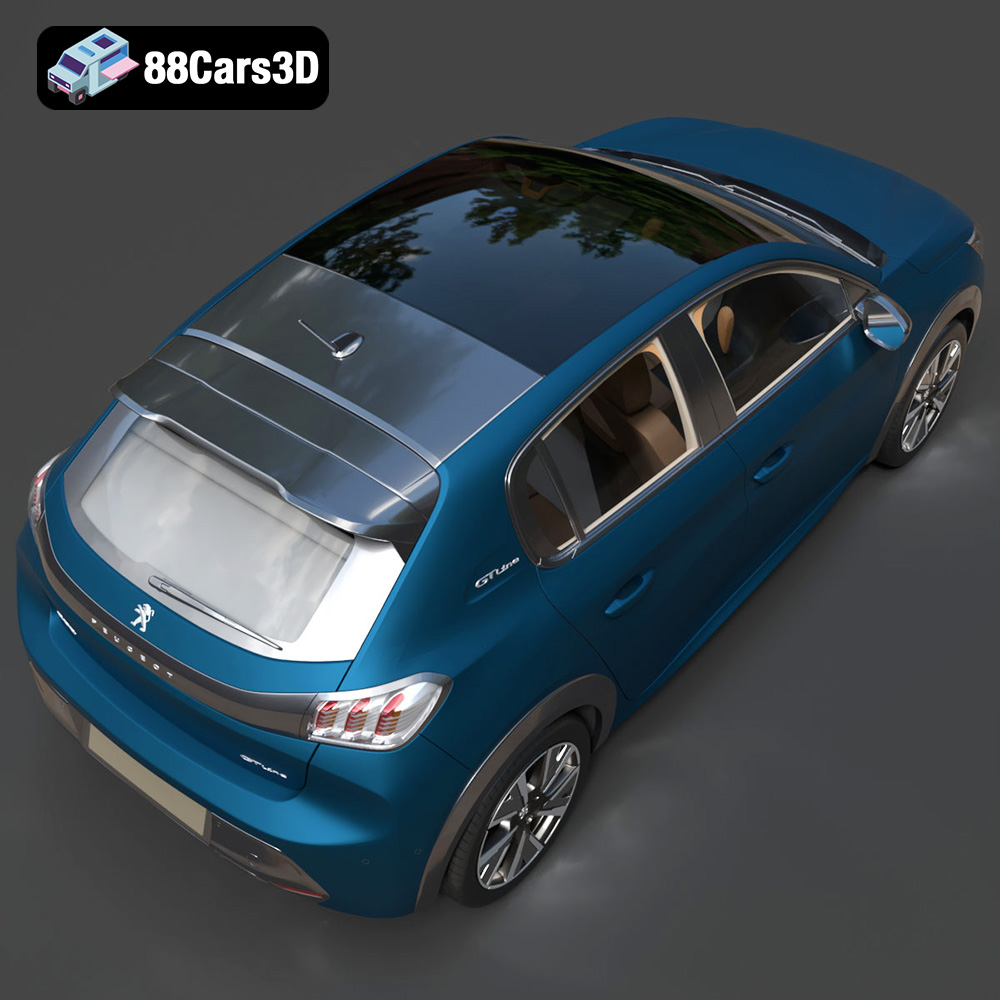
The 2020 Peugeot 208 is a standout hatchback, known for its distinctive styling and modern features. Bringing this vehicle to life through 3D printing offers enthusiasts and modelers a unique opportunity to own a detailed replica. This guide will walk you through the entire process, from preparing your STL files to applying the final touches. Whether you’re aiming for a display model or a game asset prototype, this guide will provide the necessary steps to achieve a high-quality 3D printed Peugeot 208.
The 2020 Peugeot 208 model, with its intricate details like the ‘saber-tooth’ LED daytime running lights and detailed interior, benefits from the precision offered by various 3D printing technologies. The two most common options are Fused Deposition Modeling (FDM) and Stereolithography (SLA) or resin printing.
FDM printers are widely accessible and offer a broad range of material options, including PLA, PETG, and ABS. For larger scale models, FDM is a cost-effective choice. However, due to the layer-by-layer deposition process, FDM prints may exhibit visible layer lines, particularly on curved surfaces like the car’s body panels. Post-processing, such as sanding and filling, may be necessary to achieve a smooth finish. For the Peugeot 208, orienting the model strategically can minimize the impact of layer lines on prominent features.
Resin printers, such as SLA or DLP, use liquid resin cured by UV light, enabling significantly higher resolution and finer details. This makes resin printing ideal for capturing the intricate features of the Peugeot 208, like the complex grille design and detailed interior components. Resin prints typically require less post-processing compared to FDM prints but necessitate careful handling of resin and proper ventilation. For smaller scale models where detail is paramount, resin printing is the preferred choice.
Selecting the correct file format is crucial for a successful 3D printing experience. Different file formats offer varying levels of detail and compatibility with slicing software. Understanding these formats ensures that the model translates accurately from the digital realm to the physical world.
The STL (Stereolithography) file format is the workhorse of 3D printing. It represents the surface geometry of a 3D object as a collection of triangles. This format is universally compatible with virtually all 3D printing software and hardware. For the Peugeot 208, the STL file will contain the mesh data needed to recreate the car’s exterior and interior. When preparing the STL file, ensure the mesh is watertight (no gaps or holes) and the normals are correctly oriented (pointing outwards) to avoid printing errors. Mesh quality is paramount. A high-resolution STL file will have more triangles, resulting in a smoother surface but potentially larger file size. A low-resolution STL will have fewer triangles, leading to a faceted appearance. Striking a balance is important, especially for detailed models like the Peugeot 208.
The OBJ (Object) file format is another widely used format that, unlike STL, can store color and texture information alongside the geometry. This is particularly useful if you intend to print a multi-colored Peugeot 208 model or use textures in post-processing. While most slicing software supports OBJ, it’s primarily used for visualization rather than printing directly. The Peugeot 208 model available from 88cars3d.com provides an OBJ file for users who wish to apply custom textures or render the model.
The PLY (Polygon File Format) is designed to store 3D scan data, including color and surface normals. It offers higher precision than STL, making it suitable for very detailed prints where accuracy is crucial. However, its compatibility with slicing software may be limited compared to STL.
The BLEND file is the native format for Blender, a popular open-source 3D modeling software. This file contains the entire scene, including the model, materials, lighting, and modifiers. Having the BLEND file for the Peugeot 208 allows you to make modifications to the model before exporting it to a printable format. For example, you could simplify the interior to reduce printing complexity or add custom details.
The FBX (Filmbox) format is primarily used for animation and game development. It supports complex data such as animations, skeletons, and materials. While not typically used directly for 3D printing, it can be imported into some slicing software that supports material properties, allowing for advanced print settings based on material assignments.
The GLB (GL Transmission Format Binary) is a binary file format that represents 3D models in a compact, efficient manner. It’s designed for web and mobile applications, making it ideal for previewing the Peugeot 208 model in augmented reality (AR) before printing. This allows you to visualize the model in real-world settings, ensuring it meets your expectations before committing to the print.
Similar to .blend, the .max file is the native format for 3ds Max, another professional 3D modeling software. This file contains the complete project, allowing for extensive modifications to the Peugeot 208 model. You can adjust the geometry, materials, and lighting before exporting it to a printable format like STL.
For 3D printing the Peugeot 208 model from 88cars3d.com, the **STL file** is the most suitable option. It provides the necessary mesh data in a format that is universally compatible with slicing software. Ensure the STL file is properly prepared, with a watertight mesh and correct normals, to achieve the best possible printing results.
Before sending the Peugeot 208 model to the printer, several steps are essential to ensure a successful print. This involves using slicing software to convert the 3D model into a series of instructions that the printer can understand.
Popular slicing software options include Cura, PrusaSlicer, Simplify3D, and Chitubox (for resin printing). Each software offers different features and levels of control over print settings. Cura and PrusaSlicer are excellent choices for FDM printing, offering user-friendly interfaces and comprehensive settings. Chitubox is specifically designed for resin printing, providing advanced support generation and hollowing tools. Selecting the right software depends on your printer type and desired level of customization.
The orientation of the Peugeot 208 model on the print bed significantly impacts print quality and the need for supports. For FDM printing, orienting the model at an angle (e.g., 45 degrees) can minimize the visibility of layer lines on curved surfaces. However, this may require more support structures.
Supports are necessary to hold up overhanging features, such as the side mirrors, exhaust tips, and steering wheel. Slicing software automatically generates supports, but manual adjustments may be needed to optimize their placement and minimize material usage. Consider using tree supports for FDM, as they are easier to remove and leave fewer marks on the model. For resin printing, carefully place supports to avoid damaging delicate features during removal.
The 88cars3d.com description recommends scaling the model to 1:12, 1:18, or 1:24. Choose a scale that suits your printer’s build volume and desired level of detail. For resin printing, hollowing the model is crucial to reduce resin consumption and prevent warping. Hollowing involves creating a hollow interior with a thin wall thickness. Be sure to add drainage holes to allow resin to escape after printing.
The choice of material and printer settings directly influences the appearance, strength, and overall quality of the 3D printed Peugeot 208.
For FDM printing, PLA is a popular choice due to its ease of use, low odor, and biodegradability. PETG offers improved strength and heat resistance compared to PLA, making it suitable for parts that may be exposed to higher temperatures. Resin is the material of choice for SLA/DLP printing, offering superior detail and smooth surfaces.
* **Layer Height:** 0.1mm – 0.2mm (lower for finer details)
* **Infill:** 20-30% (adjust based on desired strength)
* **Wall Thickness:** 1.2-2.0mm (ensure adequate strength)
* **Print Speed:** 40-60mm/s (adjust based on material)
* **Temperature:** PLA: 200-220°C, PETG: 230-250°C
* **Bed Temperature:** PLA: 60°C, PETG: 80°C
* **Supports:** Enabled, with optimized placement
* **Layer Height:** 0.04mm – 0.08mm (lower for finer details)
* **Exposure Time:** Varies based on resin (consult manufacturer’s recommendations)
* **Lift Speed:** 60-80mm/min
* **Supports:** Enabled, with careful placement to minimize damage
Post-processing is the final step in transforming a raw 3D print into a polished and presentable model. This involves removing supports, sanding, priming, and painting.
Carefully remove support structures using pliers, cutters, or a hobby knife. Take your time to avoid damaging the model. Sand down any remaining support marks or layer lines using progressively finer grits of sandpaper (e.g., 220, 400, 600). For FDM prints, consider using a filler primer to smooth out imperfections before sanding.
Apply a primer coat to the model to create a uniform surface for painting. This also helps the paint adhere better. Choose a primer that is compatible with your chosen paint. Use spray paint or an airbrush to apply the desired color coats. The Peugeot 208 is available in several striking colors, such as Faro Yellow, Vertigo Blue, and Elixir Red. Consider using metallic paints for an authentic factory finish. Apply clear coat for added protection and shine.
The Peugeot 208 model from 88cars3d.com features separate wheels, suspension, and steering components, allowing for animation. Assemble these parts carefully, using glue or fasteners as needed. Add additional details, such as decals, mirrors, or custom license plates, to personalize your model.
Even with careful preparation, 3D printing can sometimes present challenges. Here are some common issues and their solutions:
Warping occurs when the corners of the print lift off the build plate. This is more common with ABS and larger prints. Solutions include using a heated bed, applying adhesive (e.g., glue stick or hairspray) to the build plate, and enclosing the printer to maintain a consistent temperature.
Stringing is the formation of thin strands of plastic between parts of the print. This is usually caused by excessive retraction or printing at too high a temperature. Adjust the retraction settings in your slicing software and lower the printing temperature.
Layer shifting occurs when the print layers become misaligned. This can be caused by loose belts, stepper motor issues, or bed wobble. Ensure all belts are properly tensioned, stepper motors are functioning correctly, and the print bed is stable.
Elephant’s foot is the expansion of the bottom layers of the print. This is typically caused by the initial layer being too squished. Adjust the Z-offset or reduce the initial layer height to prevent this.
The Peugeot 208 2020 3D model available on 88cars3d.com is already optimized with a triangle count of approximately 120k, striking a balance between detail and printability. However, here are some tips to further optimize the model for 3D printing success:
* **Simplify Complex Geometries:** Consider simplifying the interior details if they are not essential for your intended use. This can reduce printing time and material consumption.
* **Ensure Watertightness:** Use a mesh editing tool like MeshMixer or Blender to check for and repair any holes or gaps in the model.
* **Optimize Support Placement:** Manually adjust support placement in your slicing software to minimize material usage and ensure easy removal.
* **Split into Multiple Parts:** If your printer’s build volume is limited, consider splitting the model into multiple parts and printing them separately. This also allows for printing different parts with different materials or settings.
The Peugeot 208 model offered on 88cars3d.com is designed for a variety of applications, including 3D printing, rendering, game development, and AR/VR. By following the guidelines in this comprehensive guide, you can successfully 3D print a high-quality replica of this iconic hatchback. Remember to experiment with different materials and settings to achieve the best results for your specific printer and desired outcome.
The 2020 Peugeot 208 redefined the modern compact hatchback segment with its bold, aggressive styling and sporty proportions. Featuring the striking ‘saber-tooth’ LED daytime running lights, a muscular sculpted hood, and an elegant gloss-black rear light cluster fascia, this vehicle stands out in any urban setting. Its dynamic stance and streamlined profile perfectly capture the essence of contemporary European car design.
$19.99
.2020
.208
.blend
.fbx
.glb
.hatchback
.max
.obj
.peugeot
.ply
.rendering
.stl
.unreal
car-3d-model
city-car
compact-car
game asset
game-ready
low-poly
optimized
VR/AR