Get 20% OFF All Premium 3D & STL Models!

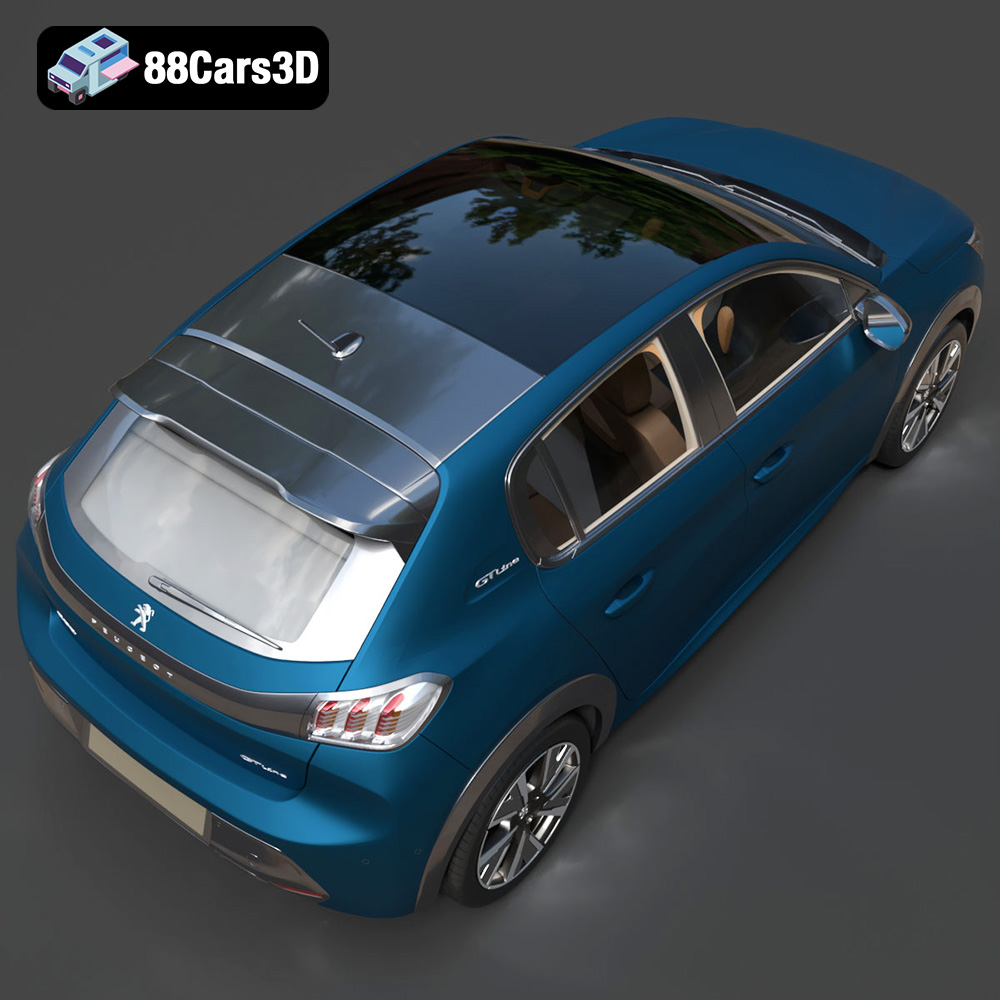
The Peugeot 208, with its striking design and modern features, has captured the hearts of car enthusiasts worldwide. Now, thanks to the detailed 3D model available at 88cars3d.com, you can bring this iconic hatchback to life through the magic of 3D printing. This guide provides a comprehensive overview of the 3D printing process, from pre-print preparation to post-processing techniques, ensuring a successful and rewarding project.
Selecting the appropriate 3D printing technology is crucial for achieving the desired level of detail and accuracy in your 208 model. Two primary technologies are commonly used for this type of project:
FDM printers extrude molten plastic filament layer by layer to build the model. While FDM printers are generally more affordable, achieving very fine details can be challenging, especially on curved surfaces. Consider using a smaller nozzle size and lower layer heights to improve detail resolution.
SLA and DLP printers use liquid resin that is cured by a laser or projector. These technologies offer significantly higher resolution and are ideal for capturing intricate details like the Peugeot’s signature ‘fang’ LED DRLs and the complex geometries of the alloy wheels. Resin printing is generally recommended for small-scale models where details are paramount, as indicated in the product description on 88cars3d.com.
The Peugeot 208 3D model is available in various file formats, each serving different purposes. Understanding these formats is crucial for a smooth 3D printing workflow.
The .stl (Stereolithography) file format is the workhorse of 3D printing. It represents the 3D model as a collection of triangles, forming a mesh that approximates the surface geometry. This format is universally compatible with virtually all slicing software, making it the most reliable choice for 3D printing. The simplicity of .stl files also means they are generally smaller in size compared to other formats.
However, the .stl format has limitations. It only stores information about the surface geometry and lacks data about color, textures, or materials. Therefore, if you intend to paint or apply textures to your 3D printed Peugeot 208 model, you’ll need to do so during the post-processing stage.
The quality of the .stl file directly impacts the final print quality. A high-resolution .stl file will have a denser mesh (more triangles), resulting in a smoother surface and more accurate representation of the original model. However, a very dense mesh can also increase file size and processing time in your slicing software. The 120k triangle count of the Peugeot 208 model strikes a good balance between detail and performance. Ensure that when exporting to .stl from other formats you retain as much of this detail as possible.
The .obj (Wavefront Object) file format is another common format for 3D models. Unlike .stl, .obj files can store color and texture information, making them suitable for applications where a colored 3D print is desired (although full-color 3D printing technology is still relatively niche). While .obj files are generally compatible with most slicing software, some programs may not fully support the color and texture data.
The .ply (Polygon File Format) is designed for storing 3D data acquired from scanning technologies. It can represent not only the geometry but also color, normals, and other properties. While .ply can offer high precision, its complex data structure might not be fully supported by all slicing software.
The .blend file is the native format for Blender, a free and open-source 3D creation suite. This format allows for complete modification of the 3D model before exporting it for 3D printing. You can adjust the model’s geometry, add details, or modify its scale. If you intend to customize the Peugeot 208 model extensively, working with the .blend file is the most flexible option.
The .fbx (Filmbox) format is a proprietary file format developed by Autodesk. It’s commonly used for exchanging 3D data between different software applications. .fbx files can store geometry, textures, materials, and animations. While some slicing software can import .fbx files, the support for materials and textures may vary.
The .glb (GL Transmission Format Binary) is a format designed for efficient transmission and loading of 3D models in web and mobile applications. It is widely used for Augmented Reality (AR) applications as it allows users to preview the model in their real-world environment before printing. While not directly used for 3D printing, the .glb file provides a valuable way to visualize the model’s size and appearance.
The .max file is the native format for Autodesk 3ds Max, a professional 3D modeling, animation, and rendering software. Similar to .blend, .max files allow for extensive modification of the 3D model before exporting for 3D printing.
Recommendation: For 3D printing the Peugeot 208 model, the .stl format is the most reliable and widely supported option. If you intend to customize the model before printing, use the .blend or .max file, make your modifications, and then export to .stl.
Before sending the Peugeot 208 model to your 3D printer, you’ll need to prepare it using slicing software. This process involves converting the 3D model into a series of instructions that the printer can understand.
Popular slicing software options include Cura, PrusaSlicer, Simplify3D, and IdeaMaker. Each offers a range of features and settings to optimize your 3D prints. Consider factors like user-friendliness, advanced features, and compatibility with your 3D printer when making your selection.
The orientation of the model on the print bed significantly impacts print quality, support requirements, and print time. For the Peugeot 208, printing the frame at an angle (as suggested in the product description) will improve structural integrity and reduce the need for supports on the larger flat surfaces. Wheels should be printed separately to optimize detail and minimize support usage.
Carefully consider where supports are needed. Complex areas like side mirrors, exhaust tips, and the steering wheel will likely require supports to prevent sagging during printing. Use the slicing software’s support generation tools to strategically place supports while minimizing their impact on the final surface finish.
The product description on 88cars3d.com recommends scales of 1:12, 1:18, or 1:24. Choose a scale that suits your printer’s build volume and desired level of detail. Remember that smaller scales will require finer layer heights and may be better suited for resin printing. Adjust the model’s scale in your slicing software before proceeding with other settings.
Set the layer height according to the chosen printing technology and scale. For FDM printing, a layer height of 0.1mm to 0.2mm is a good starting point. For resin printing, layer heights as low as 0.04mm to 0.12mm (as suggested) can be used to capture finer details.
The choice of material significantly affects the strength, appearance, and overall success of your 3D printed Peugeot 208.
PLA (Polylactic Acid): PLA is a biodegradable thermoplastic that is easy to print and offers good detail. It’s a good choice for beginners and for models that don’t require high heat resistance.
PETG (Polyethylene Terephthalate Glycol-modified): PETG is more durable and heat-resistant than PLA, making it suitable for parts that need to withstand some stress or higher temperatures. It can be slightly more challenging to print than PLA, requiring careful temperature and cooling settings.
Resin: As mentioned earlier, resin is ideal for achieving the highest level of detail, especially for smaller-scale models. Various types of resin are available, including standard resins, tough resins, and flexible resins. Choose a resin that suits your desired properties and printer compatibility.
Temperature: Refer to the material manufacturer’s recommendations for optimal printing temperatures. PLA typically prints around 200-220°C, while PETG requires temperatures around 230-250°C. Resin printing does not involve temperature settings.
Print Speed: Slower print speeds generally improve print quality, especially for intricate details. Start with a print speed of 40-60mm/s for FDM printing and adjust as needed.
Infill: Infill provides internal support for the model. A 20-30% infill density (as suggested in the product description) is typically sufficient for display models. Increase infill for parts that require more strength.
Supports: Configure support settings carefully to minimize material usage and ensure easy removal. Consider using tree supports or adjustable support density to optimize support structures.
Adhesion: Ensure good bed adhesion to prevent warping or detachment during printing. Use a heated bed, build plate adhesive, or a brim to improve adhesion.
Once the 3D printing process is complete, post-processing techniques are essential to refine the appearance and finish of your Peugeot 208 model.
Carefully remove any support structures using pliers, cutters, or a specialized support removal tool. Be gentle to avoid damaging the model’s surface. Use sandpaper with progressively finer grits (e.g., 220, 400, 600) to smooth out any imperfections and support marks. For resin prints, ensure the model is fully cured before sanding.
Apply a primer coat to the model to create a smooth and uniform surface for painting. Use multiple thin coats of primer for best results. Once the primer is dry, sand it lightly with fine-grit sandpaper to remove any imperfections.
Paint the model using acrylic paints or automotive spray paints. The product description mentions authentic factory colors like Faro Yellow, Vertigo Blue, and Elixir Red. Consider using stencils or masking tape to create accurate paint lines and details. For metallic finishes, apply a clear coat after painting to protect the finish and add gloss.
If you printed the wheels and other components separately, carefully assemble them using glue or small screws. Add any final details, such as decals, badges, or aftermarket accessories, to personalize your Peugeot 208 model.
Even with careful preparation, 3D printing can sometimes present challenges. Here are some common issues and their solutions:
Warping occurs when the corners of the model lift off the print bed due to uneven cooling. Increase bed adhesion, reduce print speed, and ensure proper bed leveling to prevent warping.
Stringing occurs when small strands of filament are left between different parts of the model. Reduce printing temperature, increase retraction distance, and decrease travel speed to minimize stringing.
Layer separation occurs when the layers of the print do not adhere properly. Increase printing temperature, reduce print speed, and ensure proper bed adhesion to prevent layer separation.
Elephant’s foot is a phenomenon where the bottom layers of the print are wider than the rest of the model. Lower the initial layer temperature, reduce the flow rate for the first layer, or use a chamfer to mitigate elephant’s foot.
The print time and material cost will vary depending on the chosen scale, layer height, infill density, and printing technology.
A 1:18 scale Peugeot 208 model printed with PLA or PETG could take anywhere from 10 to 20 hours to print, depending on the complexity and settings. The material cost could range from $5 to $15.
A smaller-scale resin print (e.g., 1:24) could take 4 to 8 hours to print. The material cost would depend on the type of resin used, but it could be comparable to or slightly higher than FDM printing.
3D printing the Peugeot 208 3D model from 88cars3d.com is a rewarding project that combines technical skill with creative expression. By carefully selecting the right 3D printing technology, preparing the model in slicing software, choosing appropriate materials and settings, and applying post-processing techniques, you can create a stunning replica of this iconic hatchback. Remember to consult the product description on 88cars3d.com for specific recommendations and customization options.
The 2020 Peugeot 208 redefined the modern compact hatchback segment with its bold, aggressive styling and sporty proportions. Featuring the striking ‘saber-tooth’ LED daytime running lights, a muscular sculpted hood, and an elegant gloss-black rear light cluster fascia, this vehicle stands out in any urban setting. Its dynamic stance and streamlined profile perfectly capture the essence of contemporary European car design.
$19.99
.2020
.208
.blend
.fbx
.glb
.hatchback
.max
.obj
.peugeot
.ply
.rendering
.stl
.unreal
car-3d-model
city-car
compact-car
game asset
game-ready
low-poly
optimized
VR/AR