Get 20% OFF All Premium 3D & STL Models!

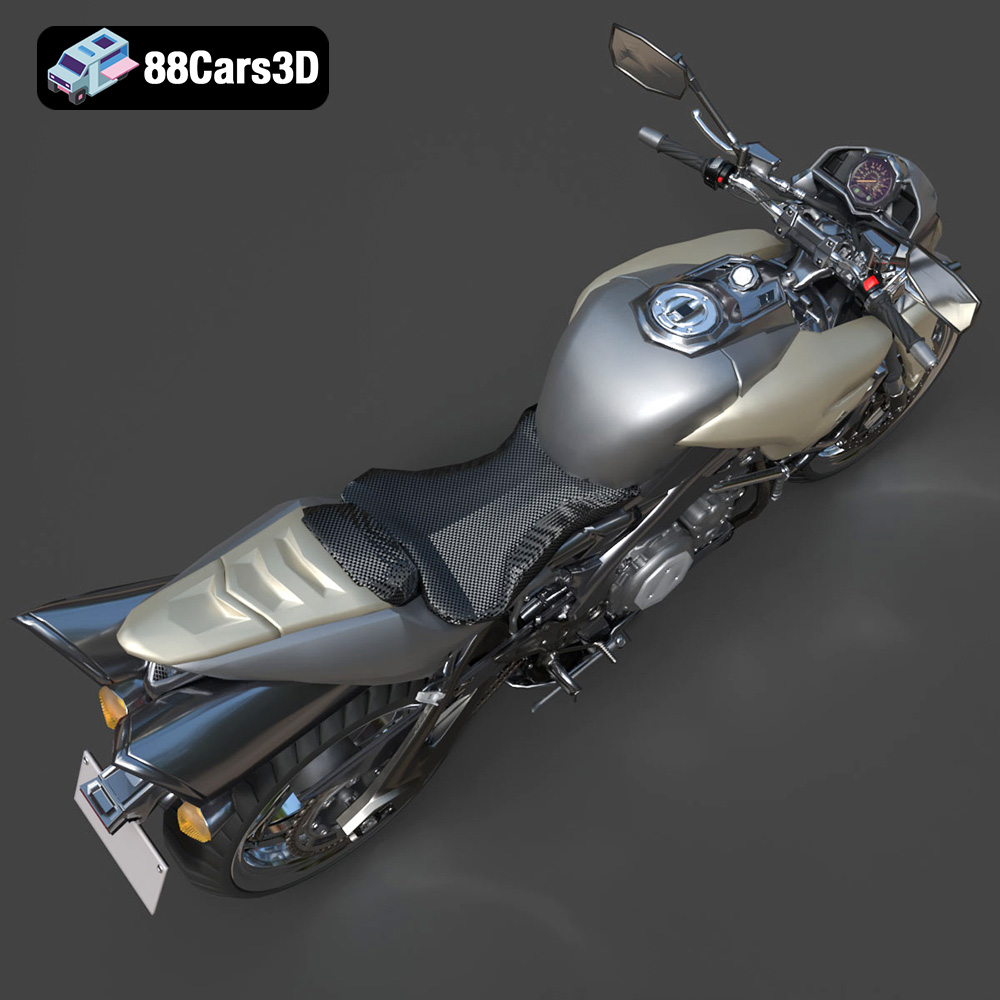
The Suzuki King B 2008, a motorcycle celebrated for its aggressive styling and powerful engine, can now grace your desk or shelf thanks to the power of 3D printing. This guide provides a comprehensive overview of how to successfully 3D print this iconic naked streetfighter, focusing on printer settings, material choices, pre-print preparation, post-processing techniques, and troubleshooting common issues. The digital files available at 88cars3d.com make this project accessible, but understanding the nuances of 3D printing will ensure the best possible result.
Selecting the right 3D printer is the first crucial step in bringing your Suzuki King B 2008 model to life. There are two primary types of 3D printers suitable for this project: Fused Deposition Modeling (FDM) and Stereolithography (SLA) or resin printers. Each technology has its strengths and weaknesses, influencing the final print quality and the level of detail achievable.
FDM printers are known for their affordability and ease of use. They work by extruding molten plastic filament layer by layer to build the object. For the King B, an FDM printer can be a viable option, especially for larger scale models or for those new to 3D printing.
* **Material Choice:** PLA is a common and easy-to-print material suitable for beginners. PETG offers improved strength and temperature resistance.
* **Printer Considerations:** Ensure your printer has a stable build platform and good temperature control. A nozzle size of 0.4mm is typical, but a smaller nozzle (0.25mm) can improve detail.
* **Scale:** Due to the layer lines inherent in FDM printing, larger scales (1:12 or 1:18) are generally recommended to better showcase the model’s details.
Resin printers use liquid resin cured by UV light to create incredibly detailed parts. This makes them ideal for smaller scales or for printing intricate components of the King B, such as the engine or exhaust system.
* **Resin Type:** Standard resin is a good starting point. ABS-like resins offer increased strength.
* **Printer Specifications:** Look for a resin printer with high resolution (e.g., 2K or 4K LCD). Leveling the build plate accurately is crucial for successful prints.
* **Scale:** Resin printers excel at smaller scales (1:24 or even smaller) due to their ability to reproduce fine details.
Choosing the correct file format is vital for a smooth 3D printing experience. The Suzuki King B 2008 model from 88cars3d.com is available in multiple formats, each with its own strengths and applications. Understanding these formats will help you make the best choice for your printing workflow.
The .stl (Stereolithography) format is the workhorse of 3D printing. It represents the 3D model’s surface geometry using a mesh of triangles. This format is universally compatible with slicing software and 3D printers. However, it only stores the shape of the model, lacking information about color, texture, or materials. For 3D printing, .stl is generally the go-to format. Slicing software takes the .stl file and converts it into a set of instructions (G-code) for the 3D printer. The quality of the .stl file, particularly the density of the triangle mesh, directly impacts the smoothness and accuracy of the final printed object. Higher resolution .stl files contain more triangles, resulting in a smoother surface but also larger file sizes. Ensure your slicing software can handle the file size, and balance the resolution with your printer’s capabilities.
The .obj (Object) format is a more versatile format than .stl, as it can store color and texture information in addition to the geometry. This can be useful if you intend to paint the 3D printed model and want to use the .obj file as a reference for the color scheme. While some 3D printers can print in multiple colors, .obj is primarily useful for transferring models between different software applications while retaining visual data. Many slicing software packages can import .obj files, but .stl remains the preferred format for the actual slicing and printing process.
The .ply (Polygon File Format) is designed for storing 3D data acquired from 3D scanners. It’s known for its ability to capture detailed surface information, including color and texture. While less common than .stl or .obj in the general 3D printing world, .ply can be useful for printing models with complex geometries or highly detailed surfaces. The primary advantage of .ply is its ability to store data beyond simple geometry, allowing for richer and more accurate representations of the original object. Compatibility with slicing software is generally good, but it’s always best to check if your specific software supports .ply files.
.blend (Blender), .fbx (Filmbox), .glb (GL Transmission Format) and .max (3ds Max) are primarily used for editing, animating, and previewing the 3D model before printing. .blend is the native format for Blender, a popular open-source 3D modeling software. .fbx is commonly used for transferring models between different 3D applications, especially in game development. .glb is designed for efficient transmission and loading of 3D models in web applications and AR/VR environments. Finally, .max is the native file format for Autodesk 3ds Max, another industry-standard 3D modeling and rendering software. These formats are usually not directly compatible with slicing software. However, you can use these files to make modifications to the model before exporting it as an .stl file for 3D printing.
Once you’ve chosen your 3D printer and file format, the next step is to prepare the model for printing using slicing software. This software converts the 3D model into a series of layers that the printer can understand and build. Popular slicing software options include Cura, PrusaSlicer, Simplify3D, and Chitubox (for resin printing).
The slicing parameters you choose will significantly impact the final print quality, strength, and printing time. Here are some recommended settings for the Suzuki King B 2008 model:
* **Layer Height:** For FDM printing, a layer height of 0.1mm to 0.2mm provides a good balance between detail and printing speed. For resin printing, a layer height of 0.025mm to 0.05mm is recommended for maximum detail.
* **Infill Density:** An infill density of 20% to 30% is sufficient for most parts of the King B. Increase the infill density for parts that require more strength, such as the frame.
* **Wall Thickness:** A wall thickness of 1.2mm to 2.0mm is recommended for FDM printing. For resin printing, a wall thickness of 1.0mm is generally sufficient.
* **Support Structures:** The Suzuki King B model will likely require support structures, especially for overhanging parts like the exhaust, mirrors, and handlebars. Experiment with different support patterns and densities to find the optimal balance between support and ease of removal.
* **Print Orientation:** Orient the model to minimize the need for supports and to maximize the strength of the printed parts. For example, printing the frame at an angle can improve its structural integrity. Printing wheels separately allows for better detail and reduces support requirements.
Before slicing, it’s essential to check the 3D model for any errors or imperfections. Slicing software often includes tools for repairing minor issues, such as non-manifold edges or holes. If the model has significant errors, you may need to use dedicated 3D modeling software like Blender to fix them. The product description suggests printing the model at a 1:12, 1:18, or 1:24 scale. Scale the model appropriately in your slicing software before generating the G-code.
The choice of material is crucial for achieving the desired aesthetics, strength, and durability of your 3D printed Suzuki King B 2008 model.
PLA (Polylactic Acid) is a biodegradable thermoplastic polymer derived from renewable resources like corn starch or sugarcane. It is a popular choice for 3D printing due to its ease of use, low printing temperature, and minimal warping. PLA is suitable for non-functional parts of the King B model, such as the body panels or display stand.
PETG (Polyethylene Terephthalate Glycol-modified) offers improved strength, flexibility, and temperature resistance compared to PLA. It is a good choice for parts that require more durability, such as the frame, suspension components, or wheels.
ABS (Acrylonitrile Butadiene Styrene) is a strong and heat-resistant thermoplastic polymer commonly used in automotive parts and consumer electronics. However, ABS is more difficult to print than PLA or PETG due to its higher printing temperature and tendency to warp. It’s best suited for experienced 3D printer users.
Resin offers the highest level of detail and is ideal for printing intricate parts like the engine, exhaust, and smaller details of the motorcycle. However, resin prints require post-processing, including washing and curing, and resin can be more brittle than FDM filaments.
Once the printing is complete, post-processing is essential to achieve a professional-looking finish.
Carefully remove the support structures from the printed parts. Use sharp tools like pliers or a hobby knife to avoid damaging the model. For resin prints, wash the parts in isopropyl alcohol (IPA) to remove any uncured resin.
Sanding is crucial for removing layer lines and achieving a smooth surface finish. Start with coarse sandpaper (e.g., 220 grit) and gradually move to finer grits (e.g., 400, 600, 800, 1000) for a polished look. For resin prints, wet sanding is recommended.
Apply a primer to the sanded parts to create a smooth surface for painting. Use spray paint or an airbrush to apply the desired colors. Refer to images of the real Suzuki King B 2008 for accurate color matching. Consider using metallic paints for the engine, exhaust, and other metal parts. Clear coat is often applied after painting to protect the color layers.
Carefully assemble the printed parts using glue or screws. Refer to the 3D model as a guide for the correct assembly order. Ensure proper alignment of all parts for a realistic-looking model.
Even with careful preparation, you may encounter issues during the 3D printing process. Here are some common problems and their solutions:
* **Warping:** This occurs when the printed part lifts from the build plate. Ensure the build plate is properly leveled and heated. Use a brim or raft to increase adhesion.
* **Stringing:** This is caused by excessive filament oozing from the nozzle during travel moves. Reduce the printing temperature, increase retraction settings, and adjust travel speed.
* **Layer Shifting:** This can be caused by loose belts or stepper motors. Tighten the belts and check the stepper motor drivers.
* **Support Failure:** If the supports fail, increase the support density and thickness. Adjust the support angle and ensure proper adhesion to the build plate.
* **Resin Print Cracking:** In resin prints, cracking can happen due to stress during the printing or post-processing. Try using a flexible resin, orient the parts to minimize stress, and avoid rapid temperature changes during curing.
By carefully following these steps and troubleshooting any issues that arise, you can successfully 3D print a stunning replica of the Suzuki King B 2008, a testament to your skill and the capabilities of additive manufacturing. Remember to check out 88cars3d.com for a wide selection of high-quality 3D models optimized for printing.
The Suzuki King B (B-King) 2008 is a legendary naked streetfighter motorcycle that commands attention with its imposing stance and aggressive styling. Born from a radical concept, it features the heart of the iconic Hayabusa, showcasing a massive 1340cc inline-four engine, dual under-seat exhausts, and distinctive muscular bodywork that defined a new era of hyper-naked bikes.
$39.99
.2008
.blend
.fbx
.glb
.max
.motorcycle
.obj
.ply
.rendering
.stl
.streetfighter
.suzuki
.unreal
b-king
game asset
game-ready
hyper-naked
king-b
low-poly
motorcycle-3d-model
naked-bike
optimized
VR/AR