Get 20% OFF All Premium 3D & STL Models!

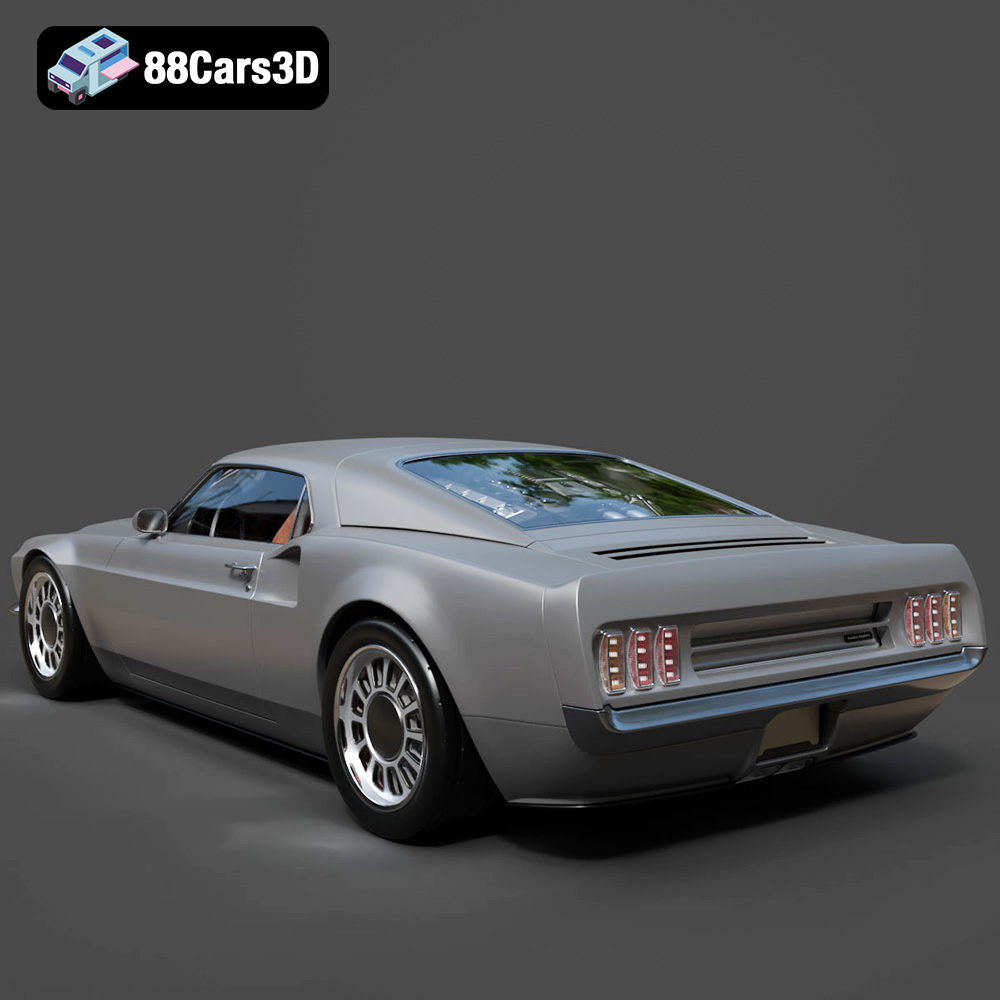
The Ford Mustang Mach 40 is a dream machine, a stunning restomod blending classic muscle with modern supercar engineering. Now, thanks to 88cars3d.com, you can bring this iconic vehicle to life in miniature form with the power of 3D printing. This article will be your comprehensive guide to successfully 3D printing the Mustang Mach 40 model, covering everything from pre-print preparation and optimal printer settings to post-processing techniques that will transform your print into a showroom-worthy piece. We’ll explore the best materials, slicing strategies, and troubleshooting tips to ensure a rewarding and successful 3D printing experience. Get ready to unleash the beast!
Choosing the right file format is crucial for a successful 3D printing experience. While 88cars3d.com provides a variety of formats for the Ford Mustang Mach 40 model, understanding the nuances of each will help you make the best choice for your specific needs and software.
The .stl (Stereolithography) file format is the workhorse of 3D printing. It represents the 3D model as a collection of triangles, approximating the surfaces of the object. This simplicity is its strength, making it universally compatible with virtually all 3D printing software and printers. However, this simplicity also means that .stl files only contain geometric data; they do not store color, texture, or material information. Therefore, if you plan to paint your 3D printed Mach 40 model, .stl is an excellent and reliable choice. Most slicing software is optimized for handling .stl files, making it easy to import, orient, scale, and add supports. A high-quality .stl file, like the one available for the Mustang Mach 40, will have a fine mesh with smaller triangles, resulting in a smoother surface on the final print. However, this also increases the file size and processing time.
The .obj (Object) file format is more versatile than .stl because it can store color and texture information in addition to the geometric data. This makes it suitable for 3D printing models with multiple colors or complex surface finishes, provided your printer supports multi-material or full-color printing. However, .obj files can be more complex than .stl files, potentially leading to compatibility issues with some slicing software or printers.
The .ply (Polygon File Format) is designed for storing 3D data acquired from 3D scanners. It’s capable of representing high-detail models with complex geometries, making it suitable for capturing intricate details of the Mach 40. The .ply format can also store color and surface properties.
The .blend file is the native format for Blender, a popular open-source 3D modeling software. If you want to customize the Mustang Mach 40 model before printing, the .blend file provides the most flexibility. You can modify the model’s geometry, add details, or even create variations of the design. However, you’ll need Blender installed to work with .blend files, and you’ll need to export the modified model to a printable format like .stl before slicing.
The .fbx (Filmbox) format is widely used in game development and animation. It supports the transfer of models, materials, and animations between different software applications. While not directly used for 3D printing, it is important for the wider ecosystem of 3D modeling.
The .glb (GL Transmission Format Binary) is designed for efficient delivery of 3D models, especially for web and mobile applications. It’s a self-contained format that includes the model’s geometry, textures, and animations in a single file. This is especially useful for previewing the Mach 40 model in Augmented Reality (AR) before committing to a print.
The .max file is the native format for 3ds Max, a professional 3D modeling and animation software. Similar to .blend, this format is ideal for extensive customization of the Mustang Mach 40 model before exporting it for 3D printing.
**Choosing the Right Format:**
For 3D printing the Ford Mustang Mach 40, the **.stl format is the recommended starting point**. Its simplicity and wide compatibility make it the most reliable option. If you plan to print in color or require texture information, consider using the .obj format, ensuring your printer and software support it. If you want to modify the model extensively before printing, the .blend or .max files offer the most flexibility, but remember to export the final model to .stl for printing.
Mesh quality is paramount for successful printing. Ensure that the .stl file you choose has a sufficient triangle count to capture the details of the Mach 40 without being excessively large, which can strain your computer’s resources during slicing. A well-optimized .stl file strikes a balance between detail and performance, resulting in a smooth and accurate 3D printed model.
The material you choose for 3D printing the Ford Mustang Mach 40 will significantly impact the final result. Each material has unique properties, advantages, and disadvantages. Here’s a breakdown of the most common options:
PLA (Polylactic Acid) is a biodegradable thermoplastic derived from renewable resources like corn starch or sugarcane. It’s known for its ease of use, low printing temperature, and minimal warping. PLA is a great choice for beginners and for models where high strength and heat resistance aren’t critical.
* **Pros:** Easy to print, low odor, wide availability, good for detailed prints.
* **Cons:** Low heat resistance, can warp in direct sunlight, lower strength than other materials.
* **Recommended for:** Initial test prints, display models, parts that don’t require high strength.
* **Estimated Material Cost:** Relatively inexpensive, around $20-$30 per kg.
PETG (Polyethylene Terephthalate Glycol-modified) combines the ease of printing of PLA with the strength and durability of ABS. It has excellent layer adhesion, good impact resistance, and higher temperature resistance than PLA. PETG is a versatile choice for functional parts and models that need to withstand some wear and tear.
* **Pros:** Good strength and durability, higher temperature resistance than PLA, good layer adhesion, relatively easy to print.
* **Cons:** More prone to stringing than PLA, requires higher printing temperature.
* **Recommended for:** Parts that need to be durable and heat-resistant, functional components, models with moving parts.
* **Estimated Material Cost:** Slightly more expensive than PLA, around $25-$35 per kg.
Resin printing, using technologies like SLA (Stereolithography) or DLP (Digital Light Processing), offers unparalleled detail and surface finish compared to filament-based printing (FDM). Resin is ideal for intricate models like the Ford Mustang Mach 40, where capturing fine details like the engine components, interior features, and complex body lines is crucial.
* **Pros:** Exceptional detail, smooth surface finish, ideal for small and intricate parts.
* **Cons:** More expensive than filament-based printing, requires post-processing (washing and curing), can be brittle, resin fumes can be hazardous.
* **Recommended for:** Highly detailed models, small parts, miniatures, display models.
* **Estimated Material Cost:** More expensive than filament, around $40-$60 per liter.
* **Resin:** If you prioritize detail and a smooth surface finish, resin is the best choice. Consider a tough resin for increased durability.
* **PETG:** A good all-around choice for a balance of strength, durability, and ease of printing.
* **PLA:** Suitable for initial test prints or display models that won’t be subjected to stress or high temperatures.
Before you hit the print button, proper preparation is essential for a successful outcome. This involves using slicing software to convert the 3D model into instructions for your printer and optimizing the model for printing.
Slicing software is the bridge between your 3D model and your 3D printer. It takes the .stl file (or other compatible format) and slices it into layers, generating the G-code that your printer uses to build the model layer by layer. Popular slicing software options include:
* **Cura:** A free and open-source slicer with a user-friendly interface and a wide range of settings.
* **PrusaSlicer:** Another excellent free slicer, known for its advanced features and accurate print predictions.
* **Simplify3D:** A commercial slicer with powerful customization options and advanced support generation.
The orientation of the model on the build plate significantly affects the print quality, strength, and support requirements. For the Ford Mustang Mach 40, consider these guidelines:
* **Frame:** Printing the frame at an angle (e.g., 45 degrees) can improve its structural integrity and reduce the need for supports on the underside.
* **Wheels:** Print the wheels separately for better detail and to avoid support marks on the visible surfaces.
* **Detailed Parts:** Pay close attention to overhangs and areas that require support. Use support blockers in your slicing software to minimize support material where it’s not needed.
The recommended scales for printing the Mach 40 are 1:12, 1:18, or 1:24. Choose a scale that suits your printer’s build volume and desired level of detail. Remember to account for tolerances, especially if you plan to assemble multiple parts. A tolerance of 0.1-0.2mm between mating surfaces is generally recommended.
Dialing in the right printer settings is crucial for achieving a high-quality 3D print of the Ford Mustang Mach 40. These settings will vary depending on your printer, material, and desired level of detail. However, here are some general guidelines to get you started:
* **Resin:** Use a layer height of 0.025-0.05mm for exceptional detail.
* **Filament (PLA/PETG):** Use a layer height of 0.1-0.2mm for a good balance of detail and print speed. A smaller layer height (e.g., 0.1mm) will result in a smoother surface finish but will increase print time.
* **Infill Density:** Use an infill density of 20-30% for most parts. Increase the infill density to 40-50% for parts that need to be stronger, such as the chassis.
* **Infill Pattern:** Choose a rectilinear or gyroid infill pattern for a good balance of strength and print speed.
* **Resin:** Follow the resin manufacturer’s recommendations for exposure time and lift speed.
* **Filament (PLA):** Use a print speed of 40-60mm/s and a printing temperature of 200-220°C.
* **Filament (PETG):** Use a print speed of 30-50mm/s and a printing temperature of 230-250°C.
* **Support Type:** Use tree supports or linear supports for filament-based printing. Use light supports in resin printing.
* **Support Density:** Adjust the support density to provide adequate support without being excessive.
Post-processing is the final step in transforming your 3D printed Ford Mustang Mach 40 into a stunning replica. This involves removing supports, sanding, priming, and painting the model.
Carefully remove the supports using pliers or a hobby knife. Be gentle to avoid damaging the model. Sand the surfaces with progressively finer grit sandpaper (e.g., 220, 400, 600 grit) to smooth out any imperfections and layer lines.
Apply a primer to the model to create a smooth and uniform surface for painting. Use spray paint or an airbrush to apply the desired colors. Consider using masking tape to create clean lines and separate different colored areas. Apply clear coat for protection and a glossy finish.
Assemble the different parts of the Mach 40 model, such as the wheels, chassis, and interior components. Use glue or epoxy to join the parts together. Add finishing touches like decals, badges, and chrome accents to enhance the realism of the model.
Even with careful preparation, 3D printing can sometimes present challenges. Here are some common issues and how to address them:
* **Warping:** Ensure the build plate is properly leveled and heated. Use a brim or raft to improve adhesion.
* **Stringing:** Reduce the printing temperature and retraction distance.
* **Layer Separation:** Increase the printing temperature and reduce the print speed.
* **Support Issues:** Adjust the support density and placement. Consider using a different support type.
* **Resin Printing Failures:** Increase exposure time, clean the build plate thoroughly, and ensure proper resin viscosity.
By understanding these potential issues and their solutions, you’ll be well-equipped to overcome any challenges and achieve a successful 3D print of the Ford Mustang Mach 40. Remember that iterative testing and experimentation are key to dialing in the perfect settings for your specific printer and material. With patience and persistence, you can create a stunning 3D printed replica of this iconic vehicle. And don’t forget to check out 88cars3d.com for more amazing 3D models!
The Ford Mustang Mach 40 is a breathtaking custom restomod that perfectly marries the classic, aggressive aesthetics of a 1969 Mustang Mach 1 with the mid-engine supercar layout of the legendary Ford GT40. This iconic vehicle features a dramatically widened stance, a massive supercharged 5.4-liter V8 engine visibly mounted behind the cockpit, and sleek, retro-futuristic styling cues.
$19.99
.blend
.fbx
.ford
.glb
.max
.obj
.ply
.rendering
.restomod
.stl
.unreal
car-3d-model
custom-car
game asset
game-ready
low-poly
muscle-car
mustang-mach-40
optimized
VR/AR