Get 20% OFF All Premium 3D & STL Models!

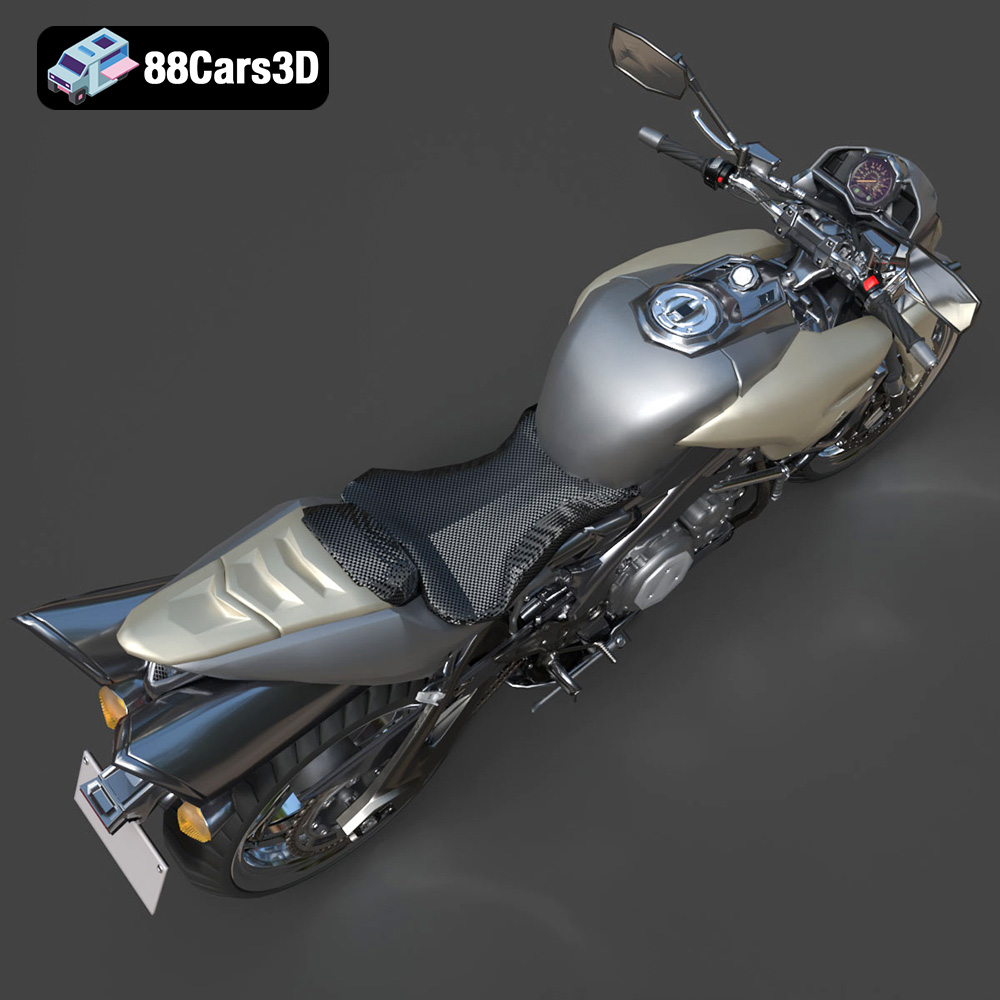
The Suzuki King B 2008, a legendary naked streetfighter, is a bold statement on two wheels. Its aggressive styling and powerful engine have captivated motorcycle enthusiasts for years. Now, thanks to advancements in 3D printing, you can bring this iconic machine to life in miniature form. This guide will provide a comprehensive overview of 3D printing the Suzuki King B 2008 model, covering everything from pre-print preparation to post-processing techniques. Whether you’re a seasoned 3D printing veteran or a curious newcomer, this article will equip you with the knowledge to create a stunning replica of this iconic motorcycle. This detailed model available on 88cars3d.com captures the essence of the King B perfectly, making it an ideal project for both display and functional applications.
Before diving into the specifics of 3D printing the Suzuki King B 2008, it’s crucial to understand the various file formats available and their suitability for additive manufacturing. While the model from 88cars3d.com includes several formats, not all are created equal when it comes to 3D printing.
The .stl (stereolithography) format is the industry standard for 3D printing. It represents the 3D model as a mesh of interconnected triangles, defining the object’s surface geometry. STL files are universally compatible with slicing software, which translates the 3D model into instructions that the 3D printer can understand and execute. The simplicity of the STL format makes it reliable and efficient for most 3D printing applications. However, it only stores the geometry of the model, lacking information about color, texture, or materials. For the Suzuki King B 2008, the STL file will be the primary choice for printing, requiring careful consideration of mesh quality to ensure a smooth and accurate final product. A higher triangle count generally results in a smoother surface but also increases file size and processing time.
The .obj (object) format is a more versatile file type that can store not only geometry but also color, texture, and material information. While this is a significant advantage for rendering and visualization, its application in 3D printing is limited to specialized printers capable of multi-material or full-color printing. If you intend to explore these advanced printing options with the Suzuki King B 2008 model, the .obj file becomes relevant.
The .ply (polygon) format is known for its ability to capture high-detail meshes, making it suitable for models with intricate features. While not as widely used as STL, it can be beneficial for complex geometries, especially when paired with high-resolution 3D printing techniques. However, not all slicing software fully supports .ply files, so compatibility should be verified before use.
.blend (Blender), .fbx (Filmbox), .glb (GL Transmission Format), and .max (3ds Max) are primarily used for editing, animating, and previewing the 3D model before printing. These formats store the complete project file, including scene information, materials, and animations. While not directly used for 3D printing, they allow for customization and modifications to the model before exporting it as an STL file. For example, you might use Blender to split the Suzuki King B 2008 model into separate parts for easier printing and painting, or to add custom details. The .glb format is particularly useful for previewing the model in augmented reality (AR) before committing to a print, allowing you to visualize the scale and appearance in a real-world setting.
Ultimately, the .stl file format will be the most important for 3D printing the Suzuki King B 2008. Ensuring the STL file is of high quality, with a sufficient number of triangles to capture the model’s details, is crucial for a successful print. Understanding the other file formats allows for customization and exploration of advanced printing techniques.
Once you’ve chosen the appropriate file format (primarily STL), the next step is to prepare the model for 3D printing. This involves using slicing software to convert the 3D model into a series of instructions that the printer can understand, as well as optimizing the model for printability.
Numerous slicing software options are available, each with its own strengths and weaknesses. Popular choices include Cura, PrusaSlicer, Simplify3D, and Chitubox (for resin printing). Consider factors such as ease of use, features, and compatibility with your 3D printer when selecting a slicer. For the Suzuki King B 2008, Cura or PrusaSlicer are excellent starting points due to their user-friendly interfaces and extensive customization options.
Before slicing, it’s essential to inspect the 3D model for any errors, such as non-manifold edges or holes in the mesh. These errors can lead to printing issues or a failed print. Many slicing software packages include built-in repair tools, but dedicated mesh editing software like MeshMixer or Netfabb can provide more advanced repair capabilities. Consider thickening thin walls in the model, especially for smaller scales, to ensure they are printable.
The product description for the Suzuki King B 2008 model recommends scales of 1:12, 1:18, or 1:24. Choosing the right scale depends on your desired size and level of detail. Smaller scales are easier and faster to print but may sacrifice fine details. Larger scales offer more detail but require more material and longer print times. Ensure you scale the model appropriately in your slicing software before proceeding.
The choice of material is critical for the success of your 3D printed Suzuki King B 2008 model. Different materials offer varying properties in terms of strength, flexibility, detail resolution, and aesthetics.
For FDM (Fused Deposition Modeling) printing, the most common materials are PLA (Polylactic Acid) and PETG (Polyethylene Terephthalate Glycol). PLA is a biodegradable thermoplastic known for its ease of printing, low odor, and wide availability. It’s an excellent choice for beginners and for parts that don’t require high strength or heat resistance. PETG offers improved strength, flexibility, and heat resistance compared to PLA, making it suitable for more functional parts. For the Suzuki King B 2008, consider using PLA for the main body and PETG for parts that may experience stress, such as the suspension components.
Resin printing (Stereolithography or Digital Light Processing) offers superior detail resolution compared to FDM printing, making it ideal for intricate models like the Suzuki King B 2008. Resin materials are generally more brittle than FDM filaments, but they can capture incredibly fine details. The product description specifically recommends resin printing for achieving the finest details. Choose a resin that is specifically designed for 3D printing and compatible with your resin printer.
Consider the colors of the materials you choose, as this will impact the final appearance of the model. You can either print in a single color and paint the model afterward, or print individual parts in different colors and assemble them. Metallic filaments and resins can add a realistic touch to the model, especially for the engine and exhaust components.
Achieving a high-quality 3D printed model of the Suzuki King B 2008 requires careful optimization of print settings. These settings will vary depending on the material and printer you’re using, but here are some general guidelines:
Layer height is a crucial setting that determines the resolution of the print. Lower layer heights result in smoother surfaces and finer details but also increase print time. The product description recommends a layer height of 0.04–0.12 mm for resin printing. For FDM printing, a layer height of 0.1-0.2 mm is a good starting point.
Infill density affects the strength and weight of the model. Higher infill densities result in stronger but heavier prints. The product description recommends an infill of 20–30%. Choose an infill pattern that provides good structural support, such as gyroid or honeycomb.
Support structures are necessary for printing overhangs and complex geometries. The Suzuki King B 2008 model will require supports for parts like the exhaust, mirrors, and handlebars. Use your slicing software to generate appropriate support structures. Consider using soluble support material for FDM printing to simplify support removal.
The orientation of the model on the print bed can significantly impact print quality and support requirements. The product description recommends printing the frame angled for structural integrity and the wheels separately. Experiment with different orientations to minimize support usage and optimize surface finish.
Once the 3D printing is complete, post-processing is essential to achieve a polished and professional-looking final product.
Carefully remove support structures using appropriate tools, such as pliers, knives, or specialized support removal tools. Be careful not to damage the model during support removal. Clean up any remaining support marks with sandpaper or a file. For resin prints, ensure the model is thoroughly cleaned with isopropyl alcohol to remove any uncured resin.
Sanding is crucial for achieving a smooth surface finish. Start with coarse grit sandpaper (e.g., 220 grit) and gradually move to finer grits (e.g., 400, 600, 800 grit) to remove layer lines and imperfections. For resin prints, wet sanding can help to minimize dust.
Priming the model with a suitable primer is essential for creating a smooth surface for painting. Apply multiple thin coats of primer, allowing each coat to dry completely before applying the next. Once the primer is dry, you can paint the model with your desired colors. Use masking tape to create clean lines and details. The product description recommends using authentic factory colors with metallic finishes for the Suzuki King B 2008.
If you printed the model in multiple parts, carefully assemble them using glue or other appropriate adhesives. Ensure the parts are properly aligned before bonding them together.
Even with careful preparation and optimized settings, 3D printing can sometimes present challenges. Here are some common issues and their solutions:
* **Warping:** This occurs when the corners of the print lift off the print bed. Ensure the print bed is properly leveled and heated. Use a brim or raft to improve adhesion.
* **Stringing:** This is when thin strands of plastic are left between parts of the print. Reduce the printing temperature and increase retraction settings.
* **Layer Shifting:** This occurs when the layers of the print are misaligned. Check the belts and pulleys on your printer to ensure they are tight and properly tensioned.
* **Elephant’s Foot:** This is when the bottom layers of the print are wider than the rest of the print. Adjust the initial layer settings in your slicing software.
* **Brittle Prints:** Adjust material settings, increase the infill density, and change the infill pattern for better structural integrity.
By understanding these common issues and their solutions, you can increase your chances of a successful 3D print.
The Suzuki King B (B-King) 2008 is a legendary naked streetfighter motorcycle that commands attention with its imposing stance and aggressive styling. Born from a radical concept, it features the heart of the iconic Hayabusa, showcasing a massive 1340cc inline-four engine, dual under-seat exhausts, and distinctive muscular bodywork that defined a new era of hyper-naked bikes. This model from 88cars3d.com is optimized for 3D printing!
$39.99
.2008
.blend
.fbx
.glb
.max
.motorcycle
.obj
.ply
.rendering
.stl
.streetfighter
.suzuki
.unreal
b-king
game asset
game-ready
hyper-naked
king-b
low-poly
motorcycle-3d-model
naked-bike
optimized
VR/AR