Get 20% OFF All Premium 3D & STL Models!

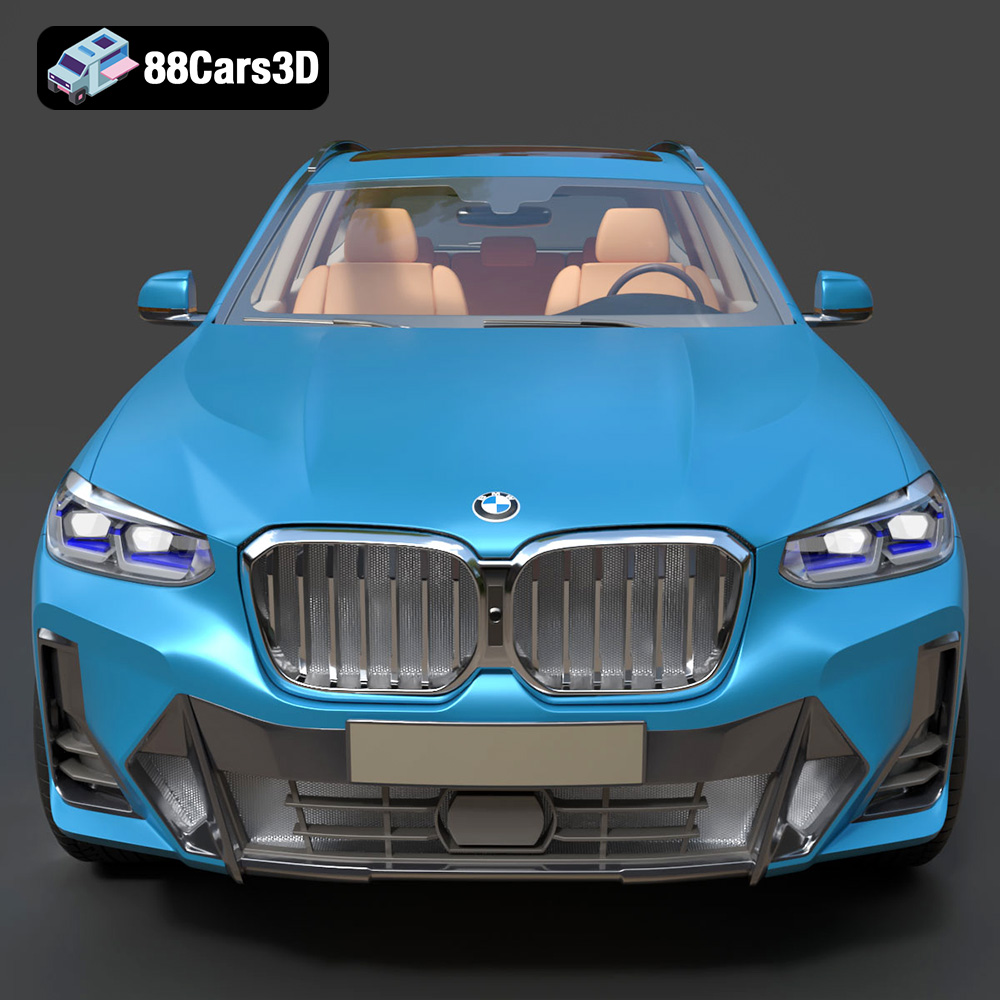
The BMW X3 2024, a symbol of luxury and performance, is now within reach for 3D printing enthusiasts. Thanks to 88cars3d.com, you can acquire a highly detailed 3D model of this iconic SUV and bring it to life through additive manufacturing. This guide provides a comprehensive walkthrough of 3D printing the BMW X3 2024 model, covering everything from pre-print preparation to post-processing finishing touches. Whether you’re a seasoned 3D printing expert or just starting, this article will equip you with the knowledge to create a stunning replica.
Before diving into the printing process, careful preparation is crucial for optimal results. This stage involves inspecting the model, choosing the appropriate scale, and selecting the right settings in your slicing software.
* **Mesh Analysis:** Start by importing the STL file into your slicing software. Examine the model for any errors, such as non-manifold edges, holes, or flipped normals. These imperfections can lead to printing failures.
* **Repair Tools:** Utilize the repair tools available in your slicing software (e.g., Netfabb Basic, MeshMixer, or the built-in repair features of Cura or PrusaSlicer) to automatically fix these issues. For more complex problems, manual mesh editing might be necessary.
* **Verification:** After the repair process, double-check the model to ensure that all errors have been resolved. A watertight mesh is essential for successful 3D printing.
* **Choosing the Right Scale:** The BMW X3 2024 model from 88cars3d.com is designed with scalability in mind. Recommended scales range from 1:12 to 1:24. Consider the level of detail you want to capture and the size of your 3D printer’s build volume. A smaller scale (e.g., 1:24) is more manageable for smaller printers, while a larger scale (e.g., 1:12) allows for more intricate detailing.
* **Optimal Print Orientation:** Print orientation significantly impacts print quality, support requirements, and structural integrity. For the BMW X3, printing the frame at an angle (e.g., 45 degrees) often provides better structural support and reduces the need for extensive support structures. Orient the model to minimize overhangs and maximize bed adhesion. Consider printing the wheels and other detailed parts separately for finer control over their orientation.
* **Software Selection:** Choose a slicing software that suits your needs and printer capabilities. Popular options include Cura, PrusaSlicer, Simplify3D, and IdeaMaker. Each software has its strengths and weaknesses, so experiment to find the one that works best for you.
* **Profile Creation:** Create a custom profile specifically tailored to the BMW X3 model. This profile should include settings optimized for the chosen material and scale. Saving this profile allows you to easily replicate the same settings for future prints.
Selecting the right file format is a crucial step in the 3D printing process. Understanding the nuances of each format ensures compatibility, optimal print quality, and efficient workflow. Let’s delve into the common file formats and their relevance to printing the BMW X3 2024 model.
The .stl (stereolithography) format is the de facto standard for 3D printing. It represents a 3D model’s surface geometry as a collection of triangles. This simplicity makes it universally compatible with virtually all slicing software and 3D printers. However, the .stl format only stores mesh data; it doesn’t include information about color, texture, or materials. For 3D printing the BMW X3, the .stl file from 88cars3d.com is your primary starting point. Ensure the STL file is properly scaled and oriented within your slicing software before proceeding. The quality of the final print is directly tied to the mesh density (number of triangles) in the STL file. Higher triangle counts result in smoother curves and finer details but increase file size and processing time.
The .obj (object) format is another widely used format that, unlike .stl, supports color and texture information. While less common than STL for pure 3D printing, OBJ is valuable if you plan to incorporate color or texture into your BMW X3 print, especially if using a multi-material printer or exploring post-processing techniques like painting and applying decals. Many advanced slicing programs can import OBJ files and translate the color data into specific print instructions or serve as a guide for manual painting.
The .ply (polygon) format is designed for storing 3D data acquired from 3D scanners. It’s capable of capturing high-resolution mesh data, including color and surface normals, making it suitable for representing complex geometries with intricate details. While not as universally supported as .stl, .ply can be beneficial when printing highly detailed parts of the BMW X3, such as the interior dashboard or intricate wheel designs, where capturing fine surface details is paramount.
The .blend file is the native format for Blender, a popular open-source 3D modeling software. This format contains the entire Blender scene, including the model’s geometry, textures, materials, lighting, and animations. For advanced users, the .blend file offers the ultimate flexibility to customize the BMW X3 model before exporting it to a printable format like .stl. You can modify the model’s design, add personalized details, or optimize it for specific printing requirements.
The .fbx (filmbox) format is a proprietary format developed by Autodesk, widely used in the game development and animation industries. It supports a wide range of 3D data, including geometry, textures, materials, animations, and skeletal rigs. While not directly printable, .fbx can be imported into some advanced slicing software that can interpret material data and potentially translate it into print instructions for multi-material 3D printers.
The .glb (GL Transmission Format Binary) is a file format designed for efficient transmission and loading of 3D models, particularly in web and AR/VR applications. It’s a binary version of the .glTF format and includes all necessary data, such as geometry, textures, and animations, in a single file. While not directly used for 3D printing, the .glb file allows you to preview the BMW X3 model in augmented reality on your smartphone or tablet before committing to the printing process. This can help you visualize the model’s size, scale, and appearance in a real-world context.
Similar to .blend, .max is the native file format for Autodesk 3ds Max, another professional 3D modeling and animation software. It contains all the elements of a 3ds Max scene, offering extensive customization options for the BMW X3 model. If you’re proficient in 3ds Max, you can use the .max file to modify the model’s design, add intricate details, or optimize it for specific printing requirements before exporting it to a printable format.
While other formats offer advantages in terms of color, texture, and customization, the .stl format remains the most reliable and widely supported for 3D printing. When preparing the BMW X3 model for printing, prioritize using the .stl file provided by 88cars3d.com. Ensure that the STL file is free of errors, properly scaled, and oriented within your slicing software. Pay close attention to the mesh density and consider increasing it for areas requiring finer detail. Remember that the quality of the STL file directly impacts the quality of the final 3D printed model.
The correct printer settings are paramount for a successful 3D print. These settings will vary based on the material you choose and the level of detail you want to achieve.
* **Layer Height Selection:** Layer height determines the resolution and smoothness of the printed object. A lower layer height (e.g., 0.04 mm) produces finer details and smoother surfaces, but it also increases print time. A higher layer height (e.g., 0.12 mm) prints faster but sacrifices some detail. For the BMW X3 model, a layer height between 0.04 mm and 0.08 mm is recommended, especially for resin printing, to capture the intricate details of the body and interior.
* **First Layer Height:** Ensuring good bed adhesion is crucial. Setting the first layer height slightly higher (e.g., 120% of the standard layer height) can help with adhesion, particularly for larger models.
* **Infill for Strength and Weight:** Infill refers to the internal structure of the 3D print. Higher infill percentages (e.g., 30%) provide greater strength and rigidity but also increase material consumption and print time. Lower infill percentages (e.g., 15%) result in lighter prints but may compromise structural integrity. For the BMW X3, an infill density between 20% and 30% is recommended for most parts.
* **Infill Pattern:** Different infill patterns (e.g., grid, honeycomb, gyroid) offer varying degrees of strength and material usage. A gyroid infill provides excellent strength in all directions while minimizing material usage. Consider experimenting with different infill patterns to find the best balance for your needs.
* **Support Generation:** The BMW X3 model will likely require support structures for overhanging features such as the exhaust system, side mirrors, and certain parts of the body. Choose a support generation strategy that minimizes material usage while providing adequate support.
* **Support Settings:** Adjust the support density, angle, and placement to optimize support removal and surface quality. Tree supports are often a good option as they use less material and are easier to remove than traditional linear supports.
* **Support Material:** For dual-extrusion printers, consider using a dissolvable support material (e.g., PVA) for easy removal and a pristine surface finish.
The choice of material significantly impacts the appearance, strength, and durability of the 3D printed BMW X3.
* **PLA Advantages:** PLA (polylactic acid) is a popular thermoplastic known for its ease of printing, biodegradability, and wide availability. It’s an excellent choice for beginners and hobbyists.
* **PLA Considerations:** PLA has a relatively low melting temperature and can be prone to warping in high-temperature environments. It’s also less durable than other materials like PETG or ABS.
* **PLA Settings:** Recommended printing temperature for PLA is typically between 190°C and 220°C, with a bed temperature of 60°C.
* **PETG Advantages:** PETG (polyethylene terephthalate glycol-modified) offers a good balance of strength, durability, and heat resistance. It’s less prone to warping than ABS and is more impact-resistant than PLA.
* **PETG Considerations:** PETG can be slightly more challenging to print than PLA, requiring careful temperature and retraction settings to avoid stringing.
* **PETG Settings:** Recommended printing temperature for PETG is typically between 220°C and 250°C, with a bed temperature of 70°C-80°C.
* **Resin Advantages:** Resin 3D printing (SLA/DLP) offers unparalleled detail and a smooth surface finish, making it ideal for intricate models like the BMW X3.
* **Resin Considerations:** Resin printing requires specialized equipment and post-processing steps, including washing and curing. Resin materials can also be more brittle than thermoplastics.
* **Resin Settings:** Resin printing settings vary depending on the type of resin and the printer used. Follow the manufacturer’s recommendations for exposure time, layer height, and other parameters.
Post-processing is essential to achieve a professional-looking finish on your 3D printed BMW X3.
* **Careful Removal:** Carefully remove support structures using pliers, tweezers, or a sharp knife. Be gentle to avoid damaging the model’s surface.
* **Surface Cleanup:** Use sandpaper or a rotary tool to smooth any rough edges or support remnants. Start with coarse grit sandpaper and gradually move to finer grits for a polished finish.
* **Resin Washing and Curing:** For resin prints, wash the model in isopropyl alcohol (IPA) to remove uncured resin. Then, cure the model under UV light to fully harden the resin.
* **Sanding for Smoothness:** Sand the entire model to create a smooth surface for painting. Pay particular attention to layer lines and any imperfections.
* **Priming for Paint Adhesion:** Apply a coat of primer to the model to improve paint adhesion and create a uniform surface. Choose a primer that is compatible with the chosen paint.
* **Color Selection:** Research the authentic BMW X3 factory colors to achieve a realistic look. Consider using automotive paints or model paints for the best results.
* **Painting Techniques:** Apply multiple thin coats of paint for a smooth, even finish. Use masking tape to create clean lines and separate different color areas.
* **Clear Coating:** Apply a clear coat to protect the paint and add a glossy or matte finish.
* **Component Assembly:** If you printed the BMW X3 in multiple parts (e.g., wheels, body, interior), carefully assemble the components using glue or fasteners.
* **Alignment and Fit:** Ensure that all parts are properly aligned and fitted together. Use clamps or tape to hold the parts in place while the adhesive dries.
Even with careful preparation, you may encounter some common 3D printing issues. Here are some tips for troubleshooting:
* **Cause:** Warping occurs when the printed object detaches from the build plate due to uneven cooling.
* **Solutions:** Increase bed adhesion by using a raft or brim, increasing bed temperature, or using a bed adhesive. Ensure proper room ventilation to prevent drafts.
* **Cause:** Stringing occurs when molten filament oozes from the nozzle during travel moves.
* **Solutions:** Increase retraction distance and speed, decrease printing temperature, and ensure proper cooling.
* **Cause:** Layer separation occurs when the layers of the printed object do not adhere properly.
* **Solutions:** Increase printing temperature, decrease layer height, and ensure proper bed adhesion.
* **Cause:** Elephant’s foot is a deformation of the first layer, causing it to spread out.
* **Solutions:** Reduce the initial layer printing temperature, slightly increase the distance between the nozzle and the print bed, or use a chamfer on the bottom of the model.
By carefully following these steps and troubleshooting any issues that arise, you can create a stunning 3D printed replica of the BMW X3 2024. Remember that patience and experimentation are key to achieving optimal results. You can find the high-quality 3D model on 88cars3d.com, ready for your next 3D printing project!
The BMW X3 is the epitome of the premium compact luxury SUV, combining sporty driving dynamics with versatile, everyday practicality. This exceptionally detailed 3D model captures its confident stance, sharp aerodynamic profile, and the iconic, aggressive kidney grille paired with sleek LED lighting elements. Every visual cue, from the muscular wheel arches to the integrated exhaust system, reflects the true heritage of BMW’s ultimate driving machines.
$19.99
.2024
.blend
.bmw
.fbx
.glb
.luxury suv
.max
.obj
.ply
.rendering
.stl
.unreal
.x3
car-3d-model
game asset
game-ready
low-poly
optimized
SUV
VR/AR