Get 20% OFF All Premium 3D & STL Models!

In the dynamic world of digital content creation, the allure of classic automobiles remains as potent as ever. From the roaring engines of racing simulations to the nostalgic charm of cinematic visualizations, a meticulously crafted 3D car model can elevate any project. The challenge lies in capturing not just the visual aesthetics but also the spirit and technical accuracy of these iconic machines. This requires a deep understanding of modeling principles, optimization techniques, and the nuances of various digital pipelines.
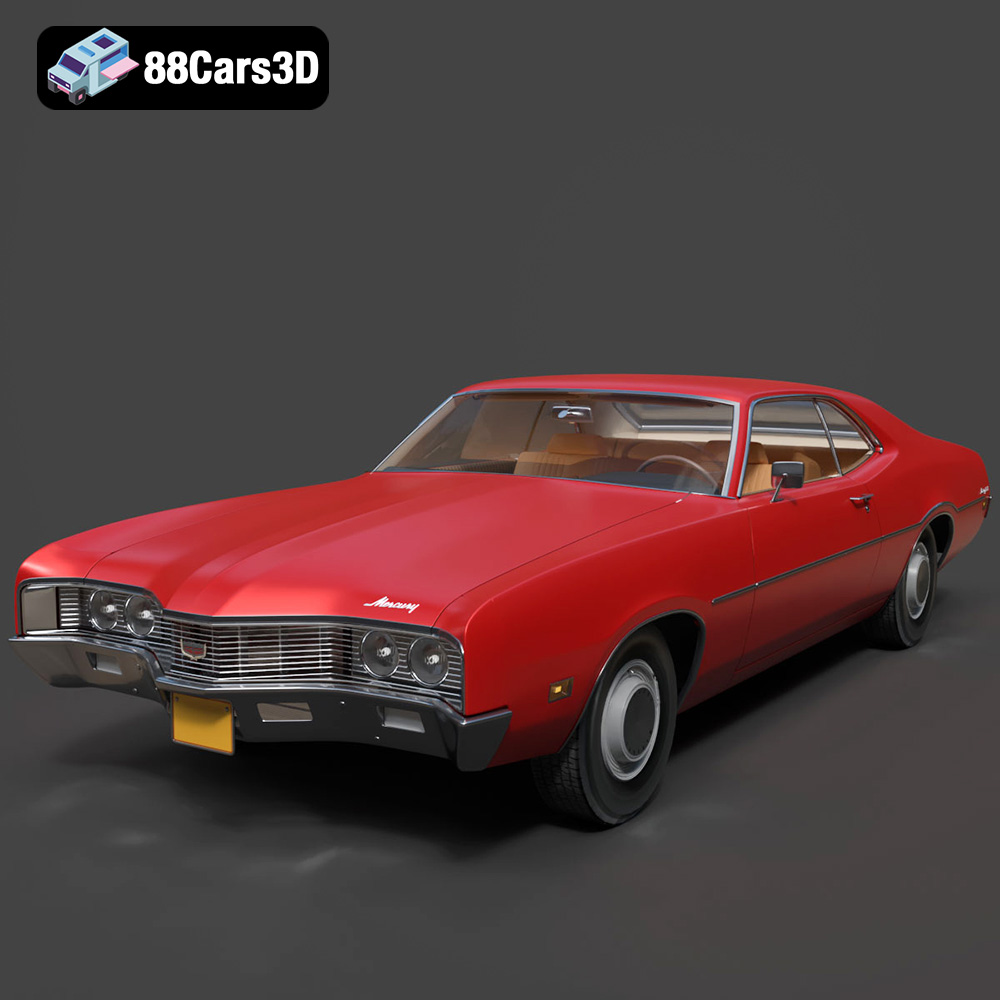
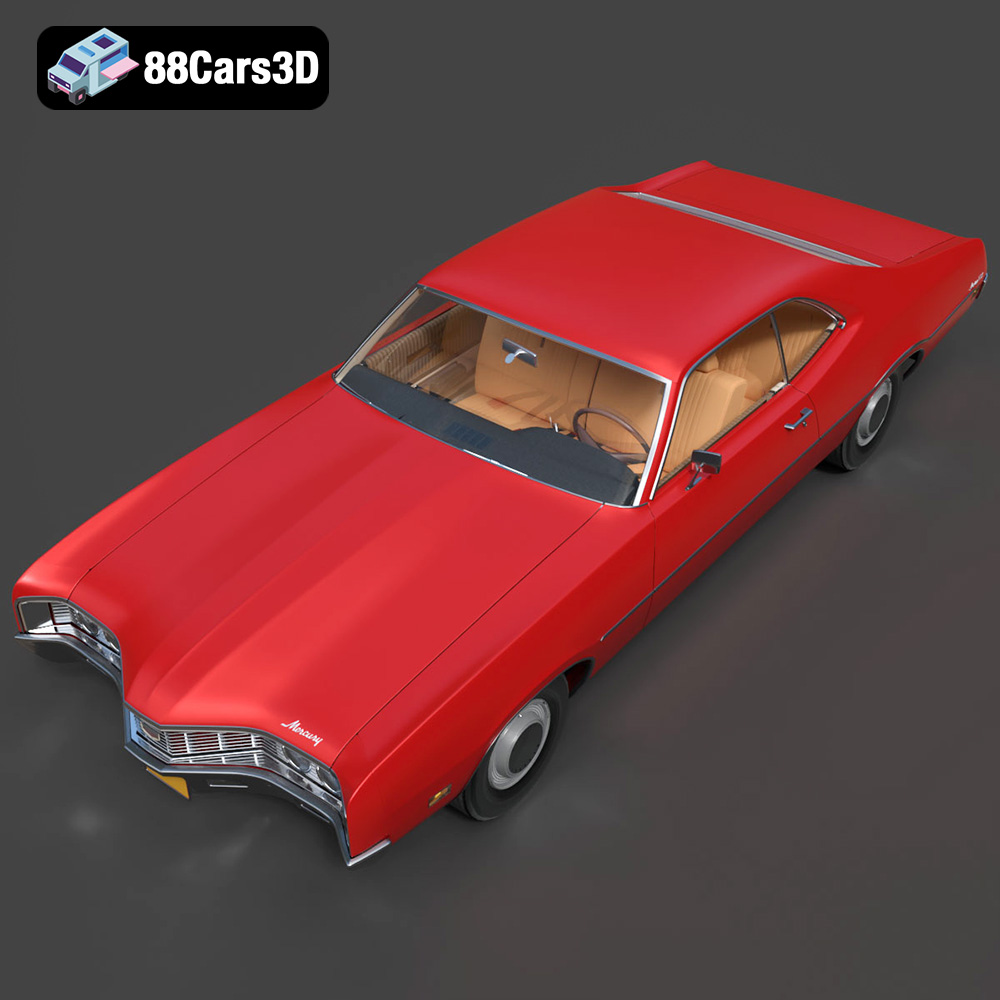
One such automotive legend that demands attention is the 1970 Mercury Montego. Known for its commanding presence, bold styling, and a powerful V8 heart, this classic muscle car embodies an era of unparalleled automotive design. Imagine bringing this vintage powerhouse to life in a cutting-edge game engine or a hyper-realistic render. Thanks to expertly developed assets, such as the Mercury Montego 1970 3D Model available on 88cars3d.com, creators can seamlessly integrate this iconic vehicle into their professional workflows.
This comprehensive guide delves into the technical intricacies of utilizing high-quality 3D car models, exploring file formats, workflow integration, and the myriad applications across game development, rendering, AR/VR, and 3D printing. We will examine how a premium asset like the 1970 Mercury Montego model serves as a cornerstone for diverse digital projects, offering both visual fidelity and practical optimization.
Navigating the landscape of 3D asset creation and deployment requires a solid grasp of various file formats, each with its own strengths, limitations, and specific use cases. The choice of format can significantly impact a project’s workflow, compatibility, and final output quality. The Mercury Montego 1970 3D Model is a prime example of an asset offered with a comprehensive range of formats, ensuring maximum versatility across different applications.
The .blend format is Blender’s native file type. It encapsulates an entire Blender scene, including the 3D mesh, materials, textures, lighting, cameras, animations, physics simulations, and even custom scripts. For artists primarily working within the Blender ecosystem, a .blend file offers the most complete and editable version of the model. It retains all non-destructive modifiers, procedural textures, and rigging information, allowing for extensive customization and iterative design. Using the .blend file for the Mercury Montego means you have direct access to its original setup, enabling deep modifications to its materials, geometry, or even preparing it for specific animations within Blender.
Autodesk’s .fbx (Filmbox) format has become the de facto standard for exchanging 3D data between various software applications and game engines. Its robust nature allows it to store not only mesh data but also materials, textures, lights, cameras, skeletal animation, and even embedded media. For game development, especially with Unreal Engine and Unity, .fbx is often the preferred choice due to its excellent support for real-time pipelines. When importing the Mercury Montego as an .fbx, developers can expect its clean mesh, proper UVs, and potentially baked textures to transfer efficiently, ready for PBR material setup and integration into engine physics systems. It is ideal for assets that need to move between different stages of a production pipeline.
The .obj (Wavefront Object) format is one of the oldest and most widely supported 3D file formats. It is revered for its simplicity and universality. An .obj file primarily stores geometric data (vertices, normals, texture coordinates, and faces) and can reference external material definition files (.mtl) for basic color and texture information. While it lacks support for animation, rigging, or complex material networks, its broad compatibility makes it an excellent choice for straightforward mesh exchange between almost any 3D software. For the Mercury Montego, the .obj version ensures that the core geometry can be opened and manipulated in virtually any 3D application, serving as a reliable fallback or a starting point for re-texturing or re-rigging from scratch.
.glb (GL Transmission Format Binary) is a compact, self-contained binary version of the glTF format, designed for efficient transmission and loading of 3D scenes and models on the web and in augmented/virtual reality applications. It bundles all necessary data—mesh, materials, textures, animations—into a single file, making it incredibly easy to use in browser-based viewers, WebGL applications, and mobile AR/VR experiences. The .glb version of the Mercury Montego 3D model is perfect for creating interactive virtual showrooms or integrating the classic car into a mobile AR experience, allowing users to view and interact with the model seamlessly without complex setups.
The .stl (Stereolithography) format represents a 3D model as a collection of unconnected triangular facets. It’s the primary file format used for 3D printing, defining the surface geometry of an object without color, texture, or material properties. While visually less rich, its purpose is purely functional: to convey the shape for additive manufacturing. For hobbyists or professionals looking to create a physical replica of the Mercury Montego, the .stl file is essential. The product description for the Montego specifically outlines recommended 3D print settings, emphasizing the conversion capability for display-scale models, often leveraging resin printing for fine detail reproduction.
The .ply (Polygon File Format) is another widely supported format for storing 3D data, particularly popular in academic and research contexts, as well as for storing data from 3D scanners. It can store various properties for each vertex (such as color, normal, transparency) and face (such as color), offering more flexibility than .obj in some aspects. It’s often used for precision mesh data, reverse engineering, or CAD applications where exact geometric representation and additional vertex/face attributes are crucial. For specific engineering analyses or highly precise fabrication, the .ply version of the Montego could be beneficial.
While not a standalone file extension in the traditional sense, an “.unreal” asset typically refers to a model specifically prepared and optimized for direct import and use within Unreal Engine. This often implies an .fbx file that has undergone specific preprocessing, correct scale, appropriate material IDs, and potentially even includes pre-setup blueprint elements or collision meshes tailored for Unreal. It signifies an asset that streamlines the integration process, requiring minimal additional setup once imported into an Unreal Engine project. For the Mercury Montego, having an .unreal designation means it’s been prepped for optimal performance and appearance within the demanding real-time environment of Unreal, reducing development time significantly.
Similar to .blend for Blender, the .max format is Autodesk 3ds Max’s native file type. It preserves the complete scene data, including all geometry, modifiers, materials, textures, lighting, cameras, animation rigs, and render settings specific to 3ds Max. For professionals whose primary workflow revolves around 3ds Max, the .max file provides the highest level of editable control and fidelity, particularly for complex animation and advanced rendering setups using engines like V-Ray or Corona Renderer. The .max version of the Mercury Montego allows artists to delve into the exact construction, material assignments, and potential scene configurations used during its initial development, offering unparalleled flexibility for high-end cinematic rendering or product visualization.
Understanding these formats empowers digital artists and developers to select the right tool for the job, ensuring seamless integration and optimal performance for valuable 3D car models like the Mercury Montego.
Creating a high-quality 3D car model is an intricate blend of artistic vision and technical precision. It goes far beyond simply tracing blueprints; it involves capturing the very soul of a vehicle. For a classic like the 1970 Mercury Montego, this means meticulous research, careful topology, and an understanding of how every detail contributes to the overall presence of the car.
The first step in crafting an exceptional 3D car model is deep immersion into the subject matter. For the 1970 Mercury Montego, this involved studying historical photographs, engineering diagrams, and period advertisements to accurately reproduce its distinctive features. The model’s description highlights its “imposing road presence, distinct pronounced front grille, and sweeping fastback or hardtop styling,” all elements that require careful attention. The detailed V8 engine block, authentic dual exhaust system, and beautifully reproduced chrome bumpers and trim lines are not just add-ons; they are critical components that define its vintage character. This commitment to authenticity ensures that when the model is rendered, it instantly evokes the golden era of American muscle, making it a powerful asset for `automotive rendering` projects that demand historical accuracy.
Every curve, vent, and badge must be accurately translated into 3D geometry. This includes the “iconic split front grille,” “accurately modeled quad headlights and taillights,” and “period-correct wheels with detailed classic tires and hubcaps.” Inside, “detailed vintage vinyl seating with accurate stitch patterns” and an “authentic dashboard with detailed vintage instrument cluster and dials” ensure that even first-person perspectives in games or VR experiences feel genuinely 1970s. Such fidelity transforms a mere mesh into a compelling digital artifact.
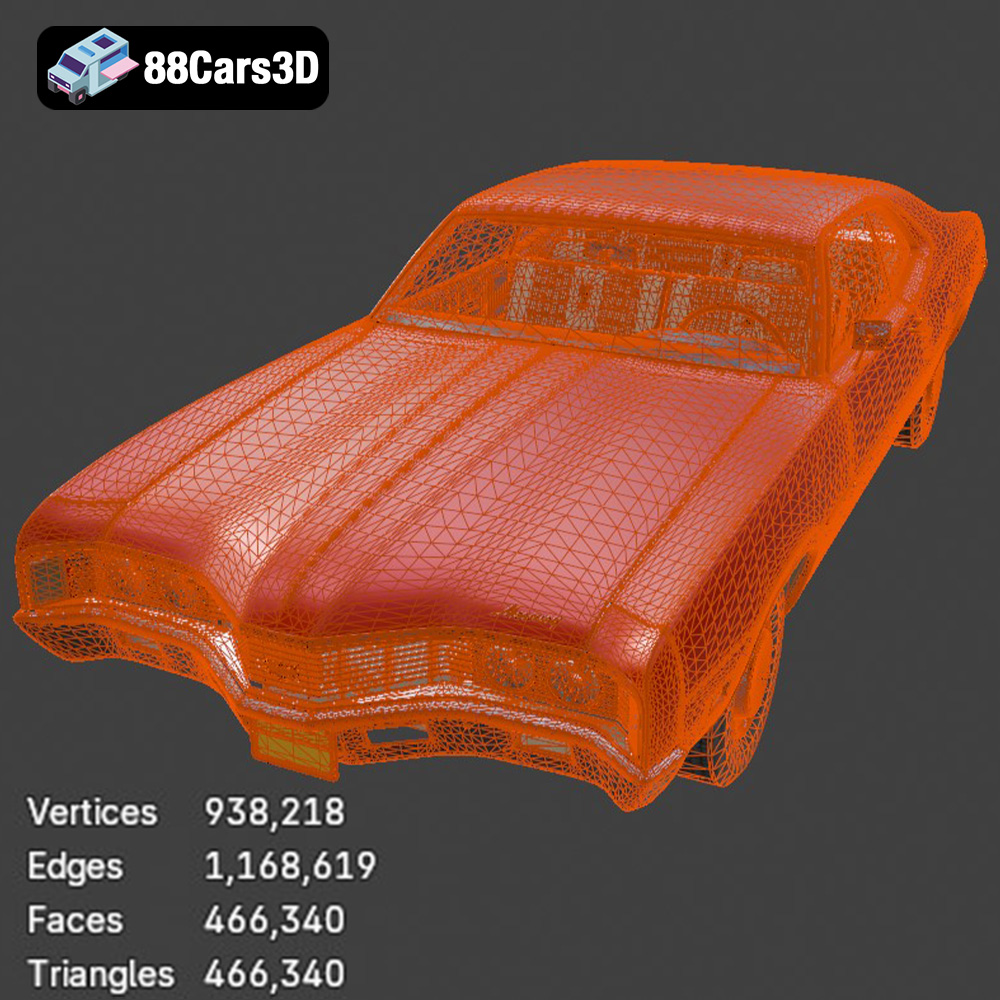
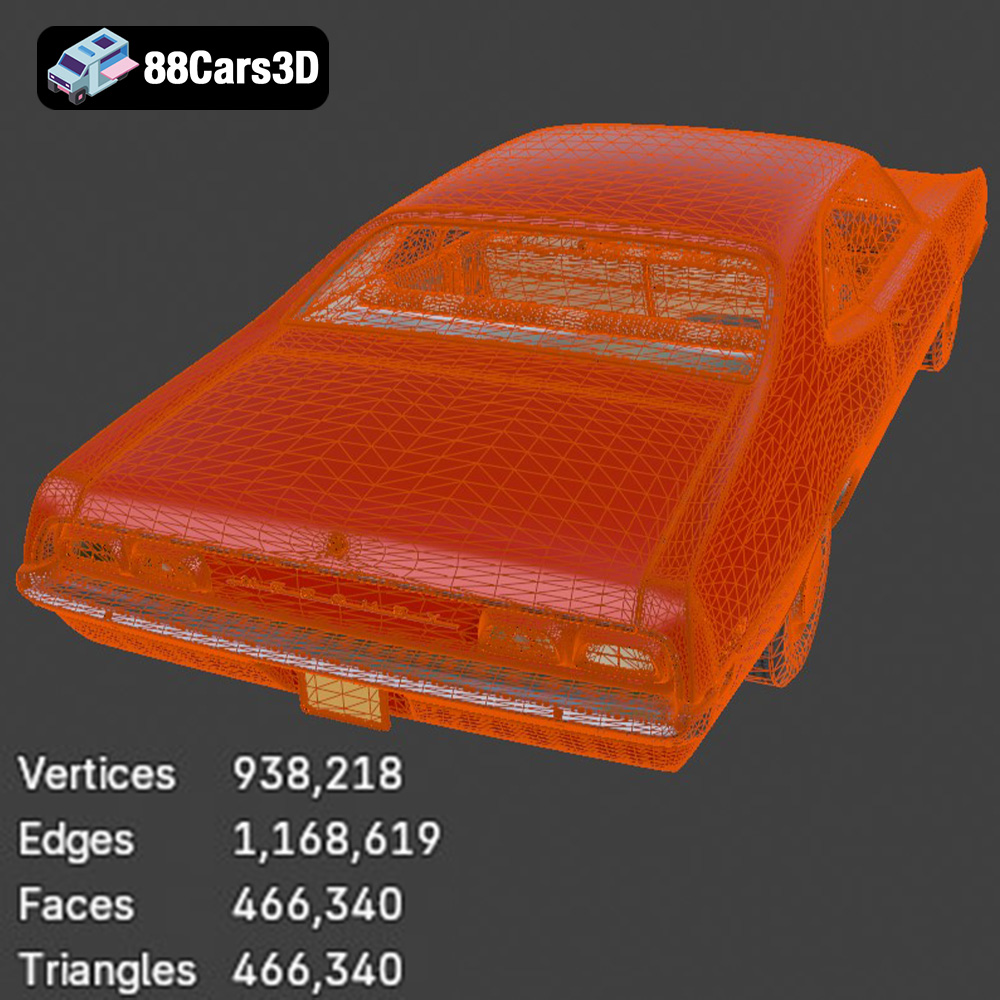
Beyond visual accuracy, a truly professional 3D car model must be technically sound. This means optimizing the mesh for performance without sacrificing detail. The Mercury Montego model, with its “well-optimized topology with a triangle count of 466,340,” exemplifies this balance. This poly count is high enough to convey exquisite detail for close-up renders and cinematics, yet optimized enough to be classified as “game-ready” for real-time engines like Unreal and Unity.
Clean topology, characterized by quads and efficient edge flow, is crucial for smooth subdivisions, distortion-free deformations, and proper UV mapping. A messy mesh can lead to rendering artifacts, performance bottlenecks, and difficulties in texturing or animating. Furthermore, features like “separate wheels, suspension, and steering components for seamless animation” indicate that the model has been intentionally structured for practical use. The “proper pivot setup for steering, wheel rotation, and suspension travel” is a technical detail that dramatically simplifies the rigging and animation process for `game assets`, ensuring realistic vehicle dynamics with minimal effort from the developer.
The true value of a versatile 3D asset, such as the Mercury Montego 1970 model, lies in its ability to seamlessly integrate into various professional digital production pipelines. Whether the goal is real-time interaction or photorealistic cinematic output, the technical preparation of the model dictates its ease of use and ultimate quality.
For game developers, `game assets` must meet stringent performance criteria while maintaining visual appeal. The Mercury Montego 3D model, classified as “Game-Ready & Optimized,” is perfectly suited for this demanding environment. Its triangle count of 466,340 is a sweet spot, allowing for high detail without crippling frame rates in open-world games or racing titles.
A typical workflow involves importing the .fbx or .unreal file into a game engine. In Unreal Engine, for instance, the .fbx would be imported, often automatically generating basic materials. Developers then refine these using Physically Based Rendering (PBR) workflows, assigning textures for albedo (base color), roughness, metallic, normal, and ambient occlusion. The separate components for wheels, suspension, and steering are critical here. These enable animators and physics engineers to set up realistic vehicle dynamics, including steering input, wheel rotation, and suspension compression, using the engine’s built-in vehicle systems or custom blueprints.
The “real-world scale accuracy” and “proper pivot setup” are invaluable. They mean less time spent adjusting sizes or repositioning pivot points, allowing developers to focus on gameplay mechanics and environmental integration. For VR applications, like “immersive virtual showrooms,” the optimized polycount also ensures smooth performance, reducing the risk of motion sickness and enhancing user engagement.
When it comes to `automotive rendering` for marketing, visualization, or cinematic sequences, the .max or .blend file formats offer the highest degree of control. Artists can open the native file in their preferred software and access all aspects of the model’s construction.
In 3ds Max, for example, an artist can load the .max file, which often comes with pre-set materials or a clear material ID structure. Using powerful renderers like V-Ray or Corona, they can then fine-tune materials to achieve hyper-realistic results. This might involve adjusting the reflectivity of the chrome bumpers, the specularity of the vintage paint, or the subtle textures of the vinyl seating. Customization options, such as “change body/tank colors” or “modify tire textures,” become straightforward, allowing artists to create multiple variations for different client needs.
Blender artists would leverage the .blend file, utilizing Cycles or Eevee for rendering. The same principles apply: refining PBR materials, setting up complex lighting environments (e.g., studio HDRIs or environmental lighting for urban scenes), and adding post-processing effects. The “optimized interior geometry” is particularly beneficial for interior shots or driving simulators where the cockpit needs to be viewed in high detail. Whether producing a stunning visual for a brand campaign or integrating the Montego into a 1970s urban environment, these native files provide the flexibility and detail required for top-tier visual output.
The utility of a robust 3D car model extends far beyond traditional game and rendering applications. Modern technologies like Augmented Reality (AR), Virtual Reality (VR), and 3D printing open new avenues for engaging with digital assets, turning virtual models into interactive experiences or tangible collectibles. The Mercury Montego 1970 3D Model is built with these diverse applications in mind.
Augmented Reality and Virtual Reality are transforming how we interact with digital content. For `3D car models`, AR/VR applications provide unparalleled immersion, from virtual showrooms to interactive car configurators. The .glb file format, a highlight of the Montego’s offerings, is specifically optimized for these environments. Its compact, self-contained nature ensures quick loading times and smooth performance on mobile AR devices or dedicated VR headsets.
Imagine clients exploring the Mercury Montego in a virtual showroom, walking around it, opening doors, and even sitting inside (if the interior is rigged for interaction). They could use a configurator to “change body/tank colors” or “adjust material finishes” in real-time. For educational purposes or historical simulations, an AR app could project the Montego onto a real-world surface, allowing users to examine its historical details up close. The optimized mesh is crucial here, as AR/VR applications demand efficient rendering to maintain high frame rates and prevent motion sickness, making this model a superb choice for such cutting-edge experiences.
The ability to transform a digital model into a physical object through 3D printing offers an exciting dimension for hobbyists, collectors, and prototyping. The inclusion of the .stl format for the Mercury Montego is specifically tailored for this purpose. While the digital model excels in visual fidelity, the .stl provides the geometric data necessary for additive manufacturing.
The product description provides detailed 3D print settings, which are crucial for a successful print. Recommendations like “Recommended scale: 1:12 / 1:18 / 1:24” and “Layer height: 0.04–0.12 mm (Resin printing recommended for fine details)” guide users towards achieving the best possible physical replica. Furthermore, specific instructions on “Supports: Required for detailed parts like exhaust, mirrors, classic bumpers, and steering wheel” and “Print orientation: Frame printed angled for structural integrity; wheels printed separately” demonstrate a practical understanding of 3D printing challenges and solutions. Post-processing, including sanding, primer, and painting with “authentic factory colors with metallic and chrome finishes,” elevates a raw print to a museum-quality display piece. This versatility makes the Montego model not just a digital asset, but a gateway to tangible craftsmanship.
High-quality `3D car models` are indispensable tools in visualization and marketing. Brands leverage these assets to create compelling advertisements, product configurators, and lifestyle imagery without the logistical challenges and costs of physical photography or videography. The Mercury Montego model, with its stunning detail, offers immense potential here.
For example, automotive companies or historical societies can use high-resolution renders of the Montego for digital campaigns, showcasing its iconic design from every angle. The “customization options” for colors, tire textures, and material finishes allow for generating an endless array of marketing visuals from a single base model. Artists can adapt lighting for “different environmental setups and studio renders,” placing the Montego in a vintage street scene, a sleek modern studio, or a dramatic sunset backdrop. This flexibility not only saves production time and costs but also allows for creative freedom that would be impossible with traditional photography, making it a powerful asset for any visualization project.
In a fast-paced digital industry, leveraging pre-made, high-quality 3D assets is not just a convenience; it’s a strategic advantage. For projects requiring `3D car models`, sourcing from reputable marketplaces like 88cars3d.com offers significant benefits, ensuring both efficiency and excellence.
Modeling a vehicle as complex and detailed as the 1970 Mercury Montego from scratch is a monumental undertaking. It requires countless hours of research, modeling, UV unwrapping, texturing, and optimization by experienced 3D artists. By acquiring a professionally crafted model, creators can drastically reduce development timelines and reallocate valuable resources to other critical aspects of their project, such as game mechanics, environmental design, or animation.
For a small studio or an independent developer, the time saved can mean the difference between meeting a deadline and falling behind. For larger studios, it means optimizing budgets and accelerating production cycles. The immediate availability of a “game-ready” asset with “proper pivot setup” and “real-world scale accuracy” translates directly into faster prototyping and smoother integration, making the investment in premium `game assets` highly cost-effective.
The quality of a 3D model can make or break a project’s visual integrity. Premium assets, like those found on 88cars3d.com, undergo rigorous quality control. This includes ensuring clean, optimized topology, accurate scale, proper UV mapping, and well-organized material IDs. The Mercury Montego model’s “exceptional attention to detail” and “well-optimized topology” are testament to this commitment to quality.
Furthermore, offering a wide array of file formats – .blend, .fbx, .obj, .glb, .stl, .ply, .unreal, and .max – guarantees maximum compatibility across virtually all major 3D software and real-time engines. This eliminates the headache of file conversions, potential data loss, or compatibility issues that can plague projects using less versatile assets. Whether you’re focused on high-end `automotive rendering`, developing an interactive AR experience, or creating a physical 3D print, the included formats ensure that the Mercury Montego is ready for your specific application, right out of the box.
The journey from a classic automobile to a high-fidelity digital asset is a testament to the power of modern 3D modeling and rendering technologies. The 1970 Mercury Montego 3D model stands as a prime example of an asset that perfectly marries historical authenticity with technical excellence. Its meticulously crafted details, optimized topology, and wide array of included file formats make it an indispensable tool for professionals across various industries.
Whether you are a game developer building an immersive racing title, an `automotive rendering` artist crafting stunning visualizations, an AR/VR designer creating interactive experiences, or a hobbyist looking to 3D print a tangible piece of automotive history, this model offers unmatched versatility and quality. It demonstrates how a single, well-developed asset can streamline workflows, inspire creativity, and elevate the final output of any digital project.
For those seeking to infuse their creations with the timeless appeal and robust engineering of classic cars, exploring premium `3D car models` like the Mercury Montego on 88cars3d.com is a strategic move. It’s an investment in quality, efficiency, and the unparalleled ability to bring digital dreams to vivid, compelling reality.
Experience the golden era of American muscle with this meticulously crafted 1970 Mercury Montego 3D model. Known for its imposing road presence, distinct pronounced front grille, and sweeping fastback or hardtop styling, the 1970 Montego captures the essence of classic 70s performance. This model highlights key visual elements including a highly detailed V8 engine block, authentic dual exhaust system, and beautifully reproduced chrome bumpers and trim lines that define its vintage character. Designed with exceptional attention to detail, this 3D model features a well-optimized topology with a triangle count of 466,340, striking the perfect balance between high-end visual fidelity and game-ready performance. Whether you are developing an open-world driving game, crafting an immersive VR showroom, or producing cinematic animations, this asset delivers unmatched realism and versatility. Perfect for classic car street racing games, historical 1970s urban environments, automotive configurators, and high-quality cinematic renders.
$26.00
.blend
.fbx
.glb
.max
.mercury
.obj
.ply
.rendering
.stl
.unreal
car-3d-model
classic-car
game asset
game-ready
low-poly
montego-1970
muscle-car
optimized
VR/AR