Get 20% OFF All Premium 3D & STL Models!

The sleek lines, intricate details, and raw power of an automobile have always captivated designers, artists, and enthusiasts alike. In the digital realm, transforming these magnificent machines into high-fidelity 3D car models is an art and a science, demanding a profound understanding of technical workflows, artistic vision, and optimization strategies. Whether you’re a seasoned 3D artist aiming for photorealistic renders, a game developer crafting immersive virtual worlds, an automotive designer visualizing future concepts, or a student embarking on your journey, mastering the intricacies of 3D car model development is paramount.
This comprehensive guide delves deep into the technical landscape of creating, optimizing, and deploying 3D car models across various industries. We’ll explore everything from the foundational principles of topology and UV mapping to advanced PBR material creation, sophisticated rendering techniques, game engine optimization, and specialized applications like AR/VR and 3D printing. Our goal is to equip you with the knowledge and actionable insights needed to elevate your automotive visualization projects, ensuring your models are not only visually stunning but also technically robust and versatile. Prepare to unlock the full potential of your automotive rendering and game asset creation workflows.
At the heart of any exceptional 3D car model lies impeccable topology and intelligent edge flow. These aren’t just technical jargon; they are the bedrock upon which realism, animation capability, and downstream versatility are built. For automotive models, where reflections, curves, and hard edges define the aesthetic, clean topology is non-negotiable. It dictates how light interacts with the surface, how subdivision modifiers smooth the mesh, and how easy the model is to modify or animate.
The primary goal is to maintain an all-quad mesh wherever possible, especially on visible surfaces. Quads (four-sided polygons) deform predictably, crucial for subdivision surfaces, and prevent unsightly pinching or artifacts. Triangles (three-sided polygons) can introduce stiffness and unpredictable smoothing, while Ngons (polygons with more than four sides) are generally avoided as they can cause shading issues and are incompatible with subdivision surface modifiers. Strategic placement of triangles in flat, less visible areas might be acceptable for performance, but never on core surfaces or areas intended for deformation.
Achieving clean topology involves a meticulous approach to mesh construction. For vehicle bodies, which are typically composed of large, smooth panels, an even distribution of polygons is critical. This ensures that when a subdivision surface modifier (like Turbosmooth in 3ds Max or Subdivision Surface in Blender) is applied, the surface remains perfectly smooth without bumps or ripples. Artists often start with simple primitive shapes, box-modeling or poly-modeling techniques, gradually refining the shape by adding edge loops and extruding faces. The density of polygons should be just enough to capture the form at the lowest subdivision level, allowing the modifier to create the high-resolution detail. Too many polygons at the base level can make editing cumbersome and increase file size unnecessarily, while too few can result in a blocky, unrefined shape.
A common pitfall is the creation of “poles” or vertices where many edges converge (more than 5 or fewer than 3). While not always avoidable, their placement should be strategic, ideally in flat areas or less visible parts of the model, to prevent shading irregularities. The overall goal is a mesh that looks good even without subdivision, where the form is clearly defined by the base mesh.
Edge flow refers to the direction and pattern of edges across the surface of your model. For automotive designs, a logical and consistent edge flow is vital for capturing the intricate curvatures and sharp creases that define a car’s aesthetic. Edges should ideally follow the natural contours and design lines of the vehicle. This is particularly important around wheel arches, door cut lines, hood vents, and headlights.
To create smooth, flowing curves and crisp, hard edges simultaneously, artists employ “control loops” or “supporting loops.” These are extra edge loops run parallel and close to a main edge. When a subdivision surface modifier is applied, these supporting loops ‘tighten’ the main edge, making it appear sharper without causing the entire surface to become angular. The closer the supporting loops are to the main edge, the sharper the resulting crease. Conversely, wider spacing between loops creates a softer, more gradual curve. Mastering this technique allows for incredible control over the final surface smoothness and fidelity, ensuring that reflections glide across the surface perfectly without distortion, which is crucial for realistic automotive rendering.
Once the topology of your 3D car model is perfected, the next crucial step in bringing it to life is applying textures and materials. This involves two core processes: UV mapping and Physically Based Rendering (PBR) material creation. These stages are where the visual fidelity truly takes shape, transforming a raw mesh into a realistic, detailed representation that reacts accurately to light.
UV mapping is the process of flattening the 3D surface of your model into a 2D space, allowing you to paint or apply 2D textures onto it. It’s essentially like carefully unfolding a cardboard box into a flat sheet. For complex objects like cars, meticulous UV unwrapping is critical to avoid texture stretching, seams, and to ensure optimal utilization of texture space. Poor UVs can lead to blurry textures, noticeable seams, and wasted resolution, undermining even the most detailed PBR materials.
Unwrapping a car model requires strategic planning of seam placement. Ideally, seams should be hidden in less visible areas, such as along interior edges, under the vehicle, or where different material panels meet. Tools like 3ds Max’s Unwrap UVW, Blender’s UV Editor, or Maya’s UV Toolkit offer various projection methods (planar, cylindrical, spherical, pelt mapping) and straightening tools to achieve clean, undistorted UV layouts. A common practice for car bodies is to create several distinct UV islands for large panels (hood, roof, doors) and smaller elements (mirrors, lights, emblems).
One critical aspect is maintaining consistent texel density across all UV islands. Texel density refers to the number of texture pixels per unit of 3D space. If one part of the car has a high texel density (many pixels per inch) and another has a low density, textures will appear crisp on one area and blurry on another. Tools exist to visualize and unify texel density, ensuring uniform texture resolution across the entire model. Efficient packing of UV islands within the 0-1 UV space is also essential, minimizing wasted space while ensuring sufficient padding between islands to prevent bleeding when mipmaps are generated for game engines.
PBR materials are the industry standard for achieving photorealistic results because they accurately simulate how light interacts with surfaces in the real world. They rely on a set of texture maps that define various physical properties of a material. The two most common PBR workflows are “Metallic/Roughness” and “Specular/Glossiness.” The Metallic/Roughness workflow (common in game engines and modern renderers like Blender’s Cycles, Unreal Engine, Unity, Substance Painter) uses maps for Base Color (albedo), Metallic (how reflective and metallic a surface is), and Roughness (how diffuse or shiny a surface is). The Specular/Glossiness workflow (often found in V-Ray, Corona, Arnold) uses maps for Diffuse, Specular (color and intensity of reflections), and Glossiness (inverse of roughness).
Beyond these core maps, additional textures are crucial for adding micro-detail and realism:
Creating these maps typically involves texturing software like Substance Painter, Mari, or even Photoshop for simpler tasks. These tools allow artists to layer materials, generate procedural textures, and paint directly onto the 3D model. In your chosen 3D software (3ds Max, Maya, Blender), these maps are then connected to a shader network, which is a visual representation of how the material properties are combined. Proper PBR setup ensures that your 3D car models respond to various lighting conditions in a physically plausible way, leading to incredibly convincing renders.
With a meticulously modeled and textured 3D car model, the next critical phase is rendering – transforming your digital asset into a stunning 2D image or animation. This process is where all the prior work culminates, and the choices you make in lighting, camera, and render settings significantly impact the final visual quality. Achieving photorealistic automotive rendering requires more than just powerful hardware; it demands a deep understanding of lighting principles, camera optics, and renderer-specific optimizations.
Renderers like Corona Renderer, V-Ray, Cycles, and Arnold are industry workhorses, each offering unique strengths and workflows. While their interfaces and terminology may differ, the underlying principles of how they simulate light and materials remain consistent with PBR standards. Mastering one often provides a strong foundation for understanding others.
Lighting is paramount in automotive rendering, as it defines the mood, highlights the car’s contours, and reveals material properties. Two primary approaches dominate:
Beyond light sources, the environment plays a crucial role. A simple infinite plane or a carefully modeled studio backdrop is often used for reflections and ground shadows. Proper reflection cards (planes with emissive materials or simple geometry) can be strategically placed outside the camera’s view to generate specific, desirable reflections on the car’s bodywork, enhancing its perceived polish and depth.
Each renderer offers a suite of settings that need careful calibration for optimal quality and render times.
For all renderers, understanding the interaction between material properties, light sources, and camera settings (like depth of field, motion blur, and focal length) is key. A longer focal length (e.g., 85mm-135mm) often creates more flattering perspectives for cars, minimizing distortion. Using a subtle depth of field can help isolate the subject and add a cinematic quality. Experimentation and iterative rendering are essential to discover the perfect balance for your specific scene.
While photorealistic offline rendering is one facet, deploying 3D car models in real-time environments like game engines or interactive applications presents a unique set of challenges and requirements. Performance optimization becomes paramount, as real-time environments demand that models render smoothly at high frame rates. This is where the distinction between a high-poly render model and a game-ready asset becomes clear, involving strategic polycount reduction, efficient texturing, and smart asset management.
The versatility of your 3D car model also hinges on its compatibility with various platforms and software. Understanding different file formats and their respective strengths and weaknesses is crucial for seamless integration into diverse workflows, from Unity and Unreal Engine to web-based AR experiences and professional visualization tools. High-quality game assets, particularly for hero vehicles, must strike a delicate balance between visual fidelity and performance efficiency.
Game engine optimization begins with managing polygon count. A typical hero car in a modern game might range from 50,000 to 150,000 triangles, while background vehicles could be as low as 10,000-30,000. This often necessitates retopology or automated decimation of high-poly source models, carefully balancing visual detail with performance. Techniques like baking normal maps from high-poly models onto optimized low-poly meshes allow the illusion of detail without the geometric overhead.
Key optimization strategies include:
Platforms like 88cars3d.com often provide models pre-optimized or with multiple LODs, streamlining the process for game developers and ensuring immediate usability.
The choice of file format depends heavily on the intended application and target software.
When preparing models for various platforms, consider the destination software’s preferred format. For instance, game engines typically prefer FBX for its comprehensive data support, while web AR experiences might lean towards GLB or USDZ for their efficiency and PBR compatibility. Always export with embedded media (textures) if the option is available, and ensure correct unit scales are maintained to prevent import issues.
The utility of high-quality 3D car models extends far beyond traditional rendering and gaming. Emerging technologies like Augmented Reality (AR), Virtual Reality (VR), and advanced 3D printing have opened up exciting new avenues for designers, engineers, and marketers. However, each of these applications introduces its own set of technical requirements and optimization strategies, demanding specialized preparation to ensure optimal performance and desired outcomes.
For automotive visualization, these technologies offer unparalleled opportunities for immersive experiences. Imagine configurating your dream car in AR on your driveway, or exploring its interior in VR before it’s even built. From rapid prototyping physical parts to creating interactive marketing tools, 3D car models are at the forefront of innovation across diverse industries.
AR/VR environments impose stringent performance budgets due to the real-time, often mobile-constrained, nature of the applications. Smooth frame rates are critical to prevent motion sickness and ensure a comfortable, immersive experience.
When sourcing models from marketplaces such as 88cars3d.com, checking for formats like GLB or USDZ, or models explicitly labeled “AR/VR ready,” can save significant optimization time. The key is balance: providing enough detail to be convincing while maintaining frame rates suitable for interactive, real-time rendering on potentially limited hardware.
3D printing transforms digital models into physical objects, but it requires a very different set of mesh properties than rendering or game development. The most critical requirement for 3D printable models is that they must be “watertight” or “manifold.” This means the mesh must form a completely closed volume, with no holes, inverted normals, or self-intersecting geometry. Every edge must be shared by exactly two faces.
For automotive prototypes or scale models, accurate modeling from CAD data is often the starting point, followed by mesh clean-up and preparation specifically for the chosen 3D printing technology (SLA, FDM, SLS etc.).
The journey of creating a compelling 3D car model doesn’t end when the renderer finishes its work. Just as a professional photographer refines their images in post-production, a 3D artist leverages post-processing and compositing techniques to elevate raw renders into truly stunning visual masterpieces. This final stage is crucial for enhancing realism, correcting imperfections, and imbuing the image with a distinct mood and artistic flair. It’s where your automotive rendering achieves its full potential and maximum impact.
Post-processing involves applying global adjustments and effects directly to the final rendered image, while compositing refers to combining multiple render elements (or “passes”) generated by the 3D software into a single, cohesive image. Both are indispensable for achieving professional-grade results that stand out in portfolios, advertisements, and presentations.
Even the most perfect render can benefit from careful post-production. These adjustments typically occur in image editing software like Adobe Photoshop, Affinity Photo, or GIMP.
Many renderers have built-in post-processing capabilities (like Corona’s LightMix or V-Ray’s Frame Buffer), allowing artists to make basic adjustments directly within the 3D application, providing an excellent starting point before moving to external software for more intricate work. The key is restraint; subtle enhancements often yield the most believable results.
For ultimate control and flexibility, professional artists rely on compositing using render passes (also known as AOV – Arbitrary Output Variables). Instead of rendering a single “beauty” image, the renderer outputs multiple layers, each containing specific information about the scene. These passes are then combined and manipulated in compositing software like Adobe Photoshop, Blackmagic Fusion, or Foundry Nuke.
Common render passes include:
By compositing these layers, artists gain unprecedented control. For example, you can adjust the intensity of reflections on the car’s paint without affecting the reflections in the windows, or change the color of shadows to match a new background. This non-destructive workflow allows for extensive experimentation and refinement, ensuring every pixel contributes to the overall visual impact of your 3D car model presentation.
The journey of bringing a 3D car model to life is a testament to the blend of artistic skill, technical acumen, and meticulous attention to detail. We’ve traversed the intricate landscape from the foundational principles of clean topology and strategic edge flow, ensuring a robust and visually appealing base for your automotive assets. We then delved into the crucial process of UV mapping and the power of PBR materials, which are essential for creating surfaces that interact with light in a physically accurate and breathtaking manner.
Our exploration continued into advanced automotive rendering workflows, highlighting the nuances of lighting and renderer-specific optimizations that transform digital models into photorealistic images. We also addressed the vital considerations for real-time applications, examining game engine optimization techniques and the array of file formats necessary for versatility across platforms like Unity, Unreal, and the web. Finally, we touched upon specialized applications in AR/VR and 3D printing, along with the critical role of post-processing and compositing in delivering truly impactful visualizations.
Mastering these techniques not only elevates the quality of your work but also enhances the efficiency and adaptability of your 3D car models across an ever-evolving digital landscape. The pursuit of perfection in 3D visualization is an ongoing learning process, constantly evolving with new tools and technologies. By applying the detailed insights and best practices shared in this guide, you are well-equipped to tackle complex projects and produce stunning results.
For those looking to accelerate their projects or find inspiration, explore high-quality, pre-modeled 3D car models. Resources like 88cars3d.com offer a vast selection of professionally crafted assets, providing excellent starting points for your rendering, game development, or visualization needs. Keep pushing the boundaries of realism and creativity – the digital automotive world awaits your next masterpiece!

Texture: Yes
Material: Yes
Download the Mercedes-Benz CL6540-005 3D Model featuring clean geometry, realistic detailing, and a fully modeled interior. Includes .blend, .fbx, .obj, .glb, .stl, .ply, .unreal, and .max formats for rendering, simulation, and game development.
Price: $4.99

Texture: Yes
Material: Yes
Download the Mercedes E-Class w124 Coupe 3D Model featuring clean geometry, realistic detailing, and a fully modeled interior. Includes .blend, .fbx, .obj, .glb, .stl, .ply, .unreal, and .max formats for rendering, simulation, and game development.
Price: $4.99

Texture: Yes
Material: Yes
Download the Mercedes-Benz E-Klasse 63 AMG 3D Model featuring clean geometry, realistic detailing, and a fully modeled interior. Includes .blend, .fbx, .obj, .glb, .stl, .ply, .unreal, and .max formats for rendering, simulation, and game development.
Price: $4.99

Texture: Yes
Material: Yes
Download the Mini Cabrio 2025 3D Model featuring clean geometry, realistic detailing, and a fully modeled interior. Includes .blend, .fbx, .obj, .glb, .stl, .ply, .unreal, and .max formats for rendering, simulation, and game development.
Price: $4.99

Texture: Yes
Material: Yes
Download the Nissan 350Z 3D Model featuring clean geometry, realistic detailing, and a fully modeled interior. Includes .blend, .fbx, .obj, .glb, .stl, .ply, .unreal, and .max formats for rendering, simulation, and game development.
Price: $4.99

Texture: Yes
Material: Yes
Download the Mercedes-Benz E-Klasse Coupe 3D Model featuring clean geometry, realistic detailing, and a fully modeled interior. Includes .blend, .fbx, .obj, .glb, .stl, .ply, .unreal, and .max formats for rendering, simulation, and game development.
Price: $4.99

Texture: Yes
Material: Yes
Download the Benza MERS-007 3D Model featuring clean geometry, realistic detailing, and a fully modeled interior. Includes .blend, .fbx, .obj, .glb, .stl, .ply, .unreal, and .max formats for rendering, simulation, and game development.
Price: $4.99
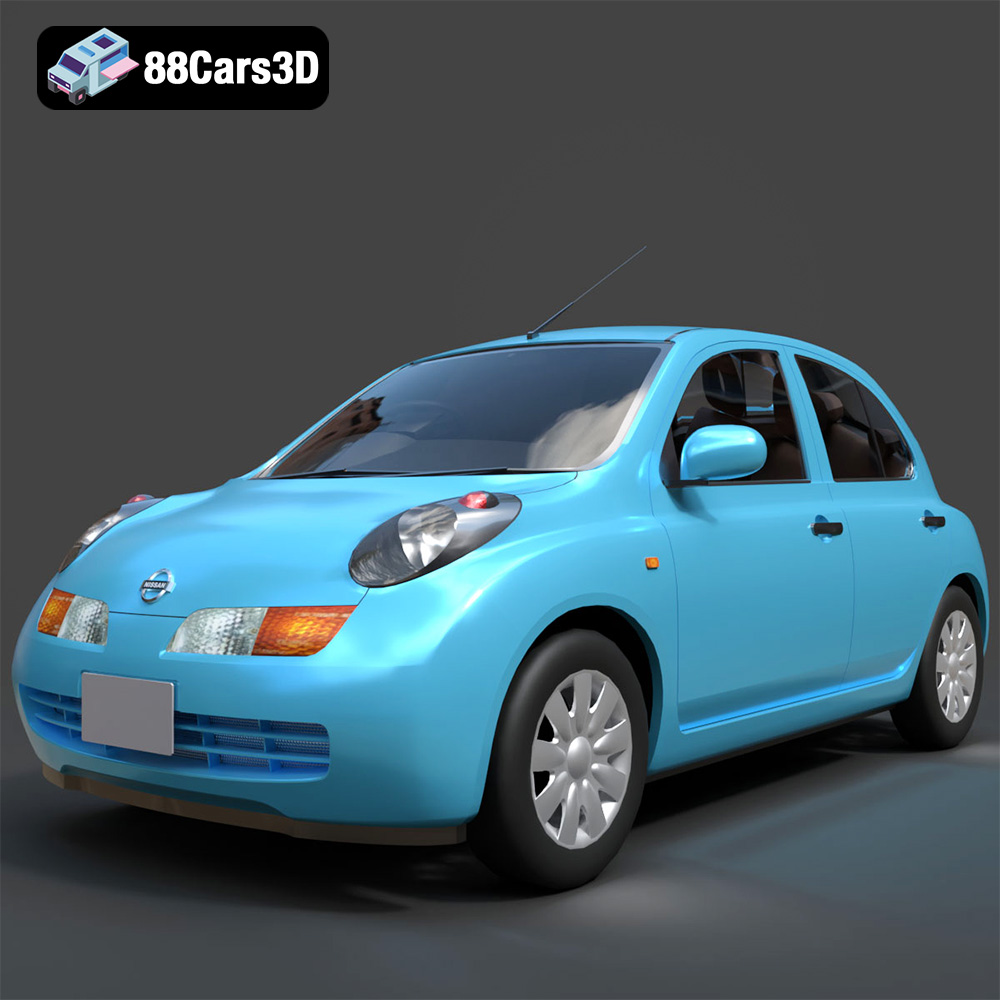
Texture: Yes
Material: Yes
Download the Nissan March 2025 3D Model featuring clean geometry, realistic detailing, and a fully modeled interior. Includes .blend, .fbx, .obj, .glb, .stl, .ply, .unreal, and .max formats for rendering, simulation, and game development.
Price: $4.99

Texture: Yes
Material: Yes
Download the Mitsubishi Galant 2009 3D Model featuring clean geometry, realistic detailing, and a fully modeled interior. Includes .blend, .fbx, .obj, .glb, .stl, .ply, .unreal, and .max formats for rendering, simulation, and game development.
Price: $4.99

Texture: Yes
Material: Yes
Download the Nissan Primera Wagon 3D Model featuring clean geometry, realistic detailing, and a fully modeled interior. Includes .blend, .fbx, .obj, .glb, .stl, .ply, .unreal, and .max formats for rendering, simulation, and game development.
Price: $4.99

