Elevating Your Projects with Professional 3D Car Models: A Deep Dive
In the vast landscape of digital creation, the demand for hyper-realistic and meticulously crafted assets is constantly on the rise. Whether you’re a seasoned game developer striving for unparalleled immersion, an architectural visualizer aiming for photorealistic contextual scenes, or a marketer creating captivating automotive advertisements, the quality of your 3D models dictates the success of your final output. Low-fidelity assets can break immersion, compromise visual integrity, and ultimately detract from the professional polish of your work. This is precisely why investing in high-quality 3D car models is not just a luxury, but a fundamental necessity for any serious professional.
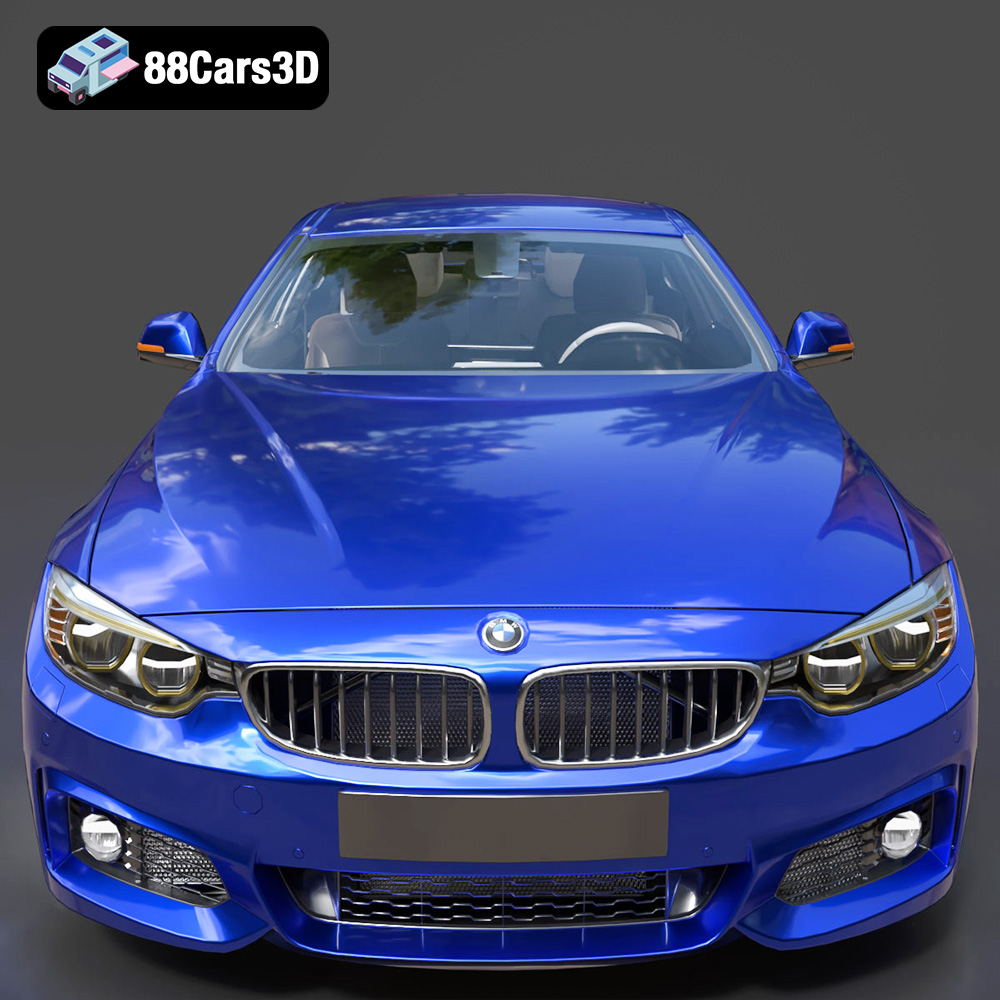
Imagine needing to bring the sleek lines and dynamic presence of a modern sports coupe to a critical project. A prime example of such an asset is the BMW 4 Series Coupe M Sport 2014 3D Model, a meticulously crafted digital twin that embodies aggressive styling and professional-grade detailing. This model serves as an excellent case study throughout this article, illustrating how a premium asset can seamlessly integrate into diverse workflows and elevate a project’s visual standards. From its PBR-ready materials to its optimized geometry, it exemplifies the benchmarks for excellence in 3D automotive assets.
The Foundation of Digital Realism: Why High-Quality 3D Car Models Matter
The visual fidelity of a 3D model is paramount in today’s demanding digital environment. Generic or poorly optimized 3D car models simply won’t cut it for projects that aim for impact and realism. High-quality assets, like those found on marketplaces such as 88cars3d.com, are developed with an acute understanding of both aesthetic precision and technical performance, making them indispensable for professional applications.
Beyond Aesthetics: Performance and Optimization
While visual appeal is often the first thing noticed, the true mark of a professional 3D car model lies in its underlying technical structure. A model might look stunning in a static render, but if its polygon count is excessively high without proper optimization, or if its mesh is riddled with errors, it will quickly become a bottleneck in real-time applications like game engines or AR/VR experiences. Models such as the BMW 4 Series Coupe M Sport 2014 3D Model are specifically designed with optimized geometry, ensuring a balance between visual detail and runtime performance. This means efficient polygon distribution, clean topology, and often, strategically implemented Level of Detail (LOD) meshes for scalability across different platforms and performance targets.
For game developers, an unoptimized asset can lead to significant frame rate drops, impacting player experience. For architectural visualization, heavy models can slow down rendering times to an impractical degree. Professional-grade 3D car models mitigate these issues by offering clean, efficient geometry that respects system resources while still delivering stunning visuals. This attention to detail extends to naming conventions and grouping, making the asset easy to navigate and manipulate within complex scenes.
The Role of PBR Materials and Texturing
Photorealistic rendering relies heavily on physically based rendering (PBR) materials. PBR workflows simulate how light interacts with surfaces in the real world, resulting in incredibly believable textures and shaders. A high-quality 3D car model will come with PBR-ready materials that accurately replicate surfaces like glossy paint, reflective chrome, textured rubber, and transparent glass. These materials typically include maps for Albedo (Base Color), Normal, Roughness, Metallic, Ambient Occlusion, and often Emissive properties for lights.
The BMW 4 Series Coupe M Sport 2014 3D Model, for instance, is advertised with realistic, PBR-ready materials, meaning it will respond correctly to diverse lighting conditions, producing accurate reflections, refractions, and surface characteristics. This significantly reduces the time artists spend on material creation, allowing them to focus on lighting, scene composition, and animation. Moreover, consistent PBR material standards ensure that the model will look correct and consistent across various rendering engines, from V-Ray in 3ds Max to Unreal Engine’s advanced rendering pipeline.
Understanding 3D Model File Formats
Choosing the correct file format for your 3D car models is a critical decision that impacts workflow efficiency, compatibility, and the ultimate output of your project. Each format serves specific purposes and excels in different use cases, offering distinct advantages for artists, developers, and designers. Understanding these nuances is crucial for any professional working with 3D assets.
Versatility for Diverse Workflows
.blend – Fully editable Blender scene with materials and lighting setup: The .blend format is Blender’s native file type. It’s comprehensive, storing everything within a Blender project: 3D models, materials, textures (packed within the file or linked), lighting setups, animations, physics simulations, and even scene layouts. This format is ideal for users who primarily work in Blender and require full editability, allowing them to dissect, modify, or animate the model with complete control. For the BMW 4 Series Coupe M Sport 2014 3D Model, having a .blend file means Blender users get a ready-to-render scene with pre-configured lighting, offering a fantastic starting point for custom renders or integration into larger Blender projects.
.fbx – Ideal for Unreal, Unity, and real-time pipelines: FBX (Filmbox) is one of the most widely used proprietary file formats for 3D data exchange, developed by Autodesk. It’s renowned for its ability to store not just geometry, but also animation, cameras, lights, and skeletal deformations. This makes it the go-to format for exporting assets between different 3D software packages and, critically, for game engines like Unreal Engine and Unity. Its robust support for animations and hierarchical structures ensures that complex rigged models can be transferred with their motion data intact. The .fbx version of the BMW 4 Series Coupe M Sport 2014 3D Model would be optimized for game engine import, often with embedded textures and materials ready for the engine’s PBR workflow.
.obj – Universal format for cross-software compatibility: OBJ (Wavefront Object) is a universal 3D geometry definition file format that is ASCII-based. It’s incredibly simple and widely supported by almost every 3D application. OBJ files primarily store geometry (vertices, normals, texture coordinates, and faces) and can reference an external .mtl (material) file for basic material properties. While it doesn’t support animation or advanced scene data, its simplicity and ubiquity make it excellent for transferring static mesh data between disparate software. If you need a fallback or a simple mesh for sculpting or re-topology in a less common program, .obj is a reliable choice.
.glb – Optimized for AR, VR, and browser-based display: GLB (GL Transmission Format Binary) is the binary version of glTF, an open-standard, royalty-free specification for 3D scenes and models. GLB files package all assets (geometry, textures, animations) into a single file, making them highly efficient for web-based 3D, AR (Augmented Reality), and VR (Virtual Reality) applications. It’s often referred to as the “JPEG for 3D” due to its optimization for delivery and loading speed. The .glb version of the BMW 4 Series Coupe M Sport 2014 3D Model would be perfect for quickly showcasing the model on a website or integrating it into an AR app where file size and loading performance are critical.
.stl – Suitable for 3D printing output: STL (Stereolithography) is a standard file format used for 3D printing. It represents a 3D model as a series of connected triangles (a tessellated surface) without any color, texture, or material information. Its primary purpose is to define the surface geometry of a 3D object for manufacturing. When working with the .stl version of the BMW 4 Series Coupe M Sport 2014 3D Model, users can directly send it to a 3D printer for creating physical prototypes or scale models.
.ply – Precision mesh format for CAD or analysis: PLY (Polygon File Format, or Stanford Triangle Format) is another format that stores 3D data. It can store a variety of properties including color, transparency, texture coordinates, normals, and range data, making it more versatile than STL for certain applications. PLY is often used in scientific and engineering fields, such as 3D scanning, CAD software, and for storing precise polygon meshes for analysis. Its flexibility in storing various vertex and face properties makes it valuable for detailed mesh examination.
.unreal – Engine-ready asset for real-time environments: While not a standalone file extension in the traditional sense like .fbx or .obj, “unreal” typically refers to assets that have been specifically pre-configured or packaged for direct import and optimal performance within Unreal Engine. This could involve specific naming conventions, asset hierarchy, material setups using Unreal’s own shaders, and possibly even pre-applied collision meshes or LODs. This specialized asset type saves significant setup time for Unreal Engine developers, ensuring the BMW 4 Series Coupe M Sport 2014 3D Model integrates seamlessly and runs efficiently within an Unreal project from the get-go.
.max – Editable 3ds Max project for animation and rendering: The .max format is Autodesk 3ds Max’s native scene file. Similar to .blend, it contains all the information pertaining to a 3ds Max project, including geometry, materials, textures, lighting, cameras, animations, and render settings. This format provides the most comprehensive control for 3ds Max users, allowing for deep modifications, advanced animation setups, or integration into existing 3ds Max scenes for high-end rendering. The .max file for the BMW 4 Series Coupe M Sport 2014 3D Model would be the ideal starting point for a professional automotive visualization studio utilizing 3ds Max and V-Ray or Corona for advertising renders.
Choosing the Right Format for Your Project
The choice of format depends entirely on your project’s requirements. For game development, .fbx and .unreal are indispensable. For high-fidelity rendering and animation in specific software, their native formats (.blend, .max) offer the most control. For web-based or AR/VR applications, .glb is the clear winner. And for physical prototyping, .stl is the standard. A versatile asset like the BMW 4 Series Coupe M Sport 2014 3D Model, offering a comprehensive suite of these formats, provides maximum flexibility for any professional pipeline.
Integrating Automotive 3D Models into Professional Workflows
The utility of a premium 3D car model truly shines when integrated into industry-standard software and workflows. Whether your expertise lies in rendering stunning visuals or developing interactive experiences, understanding the nuances of importing and manipulating these assets is crucial. The BMW 4 Series Coupe M Sport 2014 3D Model, with its diverse file formats, is designed to fit seamlessly into multiple professional pipelines.
Mastering 3ds Max for Cinematic Rendering
For decades, Autodesk 3ds Max has been a cornerstone of architectural visualization, product design, and cinematic rendering. When incorporating a 3D car model into 3ds Max, the .max file is often the most direct and feature-rich option. It typically preserves all material assignments, texture paths, and even basic scene setups. If a .max file isn’t available, .fbx is the next best choice, offering excellent compatibility for geometry and basic PBR material setup.
Workflow Example: An automotive advertising agency needs to create a high-resolution print ad for the new BMW 4 Series.
- Import: The designer imports the BMW 4 Series Coupe M Sport 2014 3D Model‘s .max file directly into 3ds Max.
- Scene Setup: A studio environment is built, complete with HDR lighting and strategic softboxes to highlight the car’s contours.
- Material Refinement: The existing PBR materials for paint, glass, and tires are fine-tuned using renderers like V-Ray or Corona. This might involve adjusting clear coat reflections, adding subtle dirt or dust maps, or changing the paint’s metallic flake intensity.
- Camera & Composition: Cinematic camera angles are set up, employing depth of field and motion blur (if animating) to create a sense of speed and dynamism.
- Rendering: High-resolution stills are rendered, often in multiple passes (beauty, reflections, shadows, object IDs) for maximum flexibility in post-production with tools like Photoshop.
The clean geometry and PBR-ready materials of models like those from 88cars3d.com significantly reduce setup time, allowing artists to focus on artistic direction rather than technical troubleshooting.
Blender’s Power for Indie Developers and ArchViz
Blender has exploded in popularity, becoming a powerhouse for everything from animation to game development and architectural visualization, thanks to its open-source nature and robust feature set. The .blend file format offers the most complete integration for Blender users.
Workflow Example: An indie game studio is developing a racing game and needs a detailed car model for their initial prototype.
- Import: The game developer opens the .blend file of the BMW 4 Series Coupe M Sport 2014 3D Model directly in Blender.
- Asset Inspection: They examine the model’s topology, poly count, and UV mapping. If necessary, LOD meshes are generated within Blender to ensure optimal performance across different hardware configurations.
- Rigging & Animation: A basic rig is created for the wheels, allowing for rotation and steering animation. Doors might also be rigged for interactive elements.
- Export for Engine: The model is then exported as an .fbx file, carefully selecting options to bake textures and ensure proper scaling and coordinate systems for Unreal Engine or Unity.
Blender’s comprehensive toolset allows for full customization, making it an excellent platform for adapting 3D car models to specific project needs.
Unreal Engine: The Apex of Real-Time Visualization
Unreal Engine stands at the forefront of real-time rendering, not just for games but increasingly for virtual production, architectural walkthroughs, and automotive configurators. For Unreal Engine, the .fbx format is standard, but having a dedicated “.unreal” optimized asset streamlines the process even further.
Workflow Example: An automotive manufacturer wants an interactive configurator for their new car model, allowing customers to explore features in real-time VR.
- Import: The developer imports the BMW 4 Series Coupe M Sport 2014 3D Model (either the optimized .unreal asset or a well-prepared .fbx) into Unreal Engine.
- Material Setup: Unreal’s advanced material editor (Node-based) is used to verify and enhance the PBR materials. This might involve setting up car paint shaders with multiple layers (base coat, clear coat, metallic flakes) and creating dynamic material instances for color changes.
- Lighting & Reflections: The scene is lit using physically accurate light sources (e.g., Sky Light with an HDRI, directional light for sun). Reflection captures are placed strategically to ensure accurate real-time reflections on the car’s glossy surfaces.
- Interactivity & Blueprints: Blueprints are created to allow users to change paint colors, wheel types, open doors, and view interior details. VR controls are implemented for an immersive experience.
- Optimization: LODs are verified or generated, and efficient collision meshes are applied to ensure smooth performance in VR, crucial for minimizing motion sickness.
The “game-engine ready” nature of assets like the BMW 4 Series Coupe M Sport 2014 3D Model makes it an invaluable resource for real-time applications, saving countless hours of optimization and material setup.
From Concept to Consumer: Real-World Applications
The versatility of high-quality 3D car models extends across numerous industries, each leveraging these digital assets to achieve specific goals. From captivating virtual worlds to compelling marketing campaigns, the demand for authentic and detailed vehicles is universal.
Game Development: Driving Immersion with Game Assets
In game development, 3D car models are central to creating believable and engaging virtual environments. Whether it’s an open-world exploration game, a high-octane racing simulator, or a realistic urban RPG, the authenticity of the vehicles directly contributes to player immersion. The BMW 4 Series Coupe M Sport 2014 3D Model is described as “optimized for both Unreal Engine and Unity,” highlighting its readiness for game environments.
For racing games, precise collision meshes, accurate suspension setups (if the model includes basic rigging), and multiple levels of detail (LODs) are critical. An LOD system ensures that distant cars use lower-resolution meshes, reducing rendering overhead, while close-up vehicles display full detail. This optimization is crucial for maintaining smooth frame rates, especially in graphically intensive scenes with multiple vehicles. Beyond geometry, realistic PBR materials and well-mapped textures ensure that cars react convincingly to dynamic lighting, weather effects, and damage models, enhancing the overall game experience.
Architectural and Product Visualization: Context and Appeal
Architectural visualization (ArchViz) relies heavily on contextual elements to bring static building renderings to life. Placing realistic 3D car models around a proposed building can convey scale, activity, and a sense of habitation. The BMW 4 Series Coupe M Sport 2014 3D Model, with its modern styling, would be perfect for populating a contemporary urban scene or a luxury residential development, adding a layer of realism and aspiration.
Similarly, in product visualization, a high-quality 3D car can serve as a compelling prop or a center-stage item in a digital showroom. Automotive marketing campaigns frequently use fully CGI (Computer-Generated Imagery) scenes to showcase vehicles in ideal, impossible, or highly stylized environments. The professional-grade geometry and PBR materials of models from 88cars3d.com enable photorealistic renders that are indistinguishable from real-world photography, offering unparalleled control over lighting, camera angles, and creative direction without the logistical costs of physical photoshoots.
AR/VR Experiences: Bringing Cars to Life in Digital Spaces
Augmented Reality (AR) and Virtual Reality (VR) are transforming how we interact with digital content. 3D car models are at the forefront of this revolution, enabling immersive experiences such as virtual showrooms, interactive training simulations, and even virtual test drives. The .glb format, included with the BMW 4 Series Coupe M Sport 2014 3D Model, is particularly well-suited for AR/VR applications due to its efficiency and all-in-one packaging.
Imagine a customer using an AR app on their phone to place the BMW 4 Series Coupe M Sport 2014 3D Model realistically scaled in their driveway, viewing it from all angles, changing colors, and even peeking inside. In VR, users could “step inside” the car, experience its interior, and interact with its features, providing a level of engagement far beyond static images or videos. For these applications, optimized poly counts and efficient PBR materials are crucial for maintaining smooth framerates and preventing motion sickness in VR, while delivering a convincing visual experience in AR.
Technical Deep Dive: Geometry, UVs, and Rigging Considerations
Beyond simply looking good, a truly professional 3D car model is built on a foundation of sound technical practices. Understanding these elements is key to both creating and effectively utilizing 3D assets in any advanced project.
Poly Count and Level of Detail (LOD) Strategies
Poly count refers to the number of polygons (or triangles) that make up a 3D model. While a higher poly count generally means more detail, it also translates to increased computational load. For high-fidelity cinematic renders or close-up product shots, a very high poly count (e.g., millions of triangles for a car with a detailed interior) is acceptable, as rendering is a batch process.
However, for real-time applications like games or AR/VR, poly count must be carefully managed. This is where Level of Detail (LOD) strategies become indispensable. An LOD system involves creating multiple versions of the same 3D car model, each with a progressively lower polygon count. When the object is close to the camera, the highest detail (LOD0) is used. As it moves further away, the engine automatically swaps to lower detail versions (LOD1, LOD2, etc.), significantly reducing the number of polygons that need to be rendered each frame without a noticeable loss of quality to the viewer.
A professional 3D car model, like those offered at 88cars3d.com, will often come with pre-configured LODs or will have a clean enough base mesh to easily generate them. The BMW 4 Series Coupe M Sport 2014 3D Model’s “optimized geometry” implies it’s ready for such strategies, ensuring performance across various platforms.
The Art of UV Mapping and Texture Atlases
UV mapping is the process of unwrapping a 3D model’s surface into a 2D plane, allowing textures to be painted or applied without distortion. Flawless UVs are critical for applying high-resolution PBR textures accurately, preventing stretching, seams, and artifacts that can ruin realism. Good UVs are organized, efficient, and maximize texture space utilization.
Texture atlases take this efficiency a step further. Instead of having a separate texture file for every small part of a model, an atlas combines multiple textures (e.g., all interior plastics, dashboard elements, seat fabrics) into a single, larger texture map. This reduces draw calls in game engines (the number of times the engine has to tell the GPU to render a different material), leading to significant performance improvements. Professional 3D car models are typically designed with optimized UVs and often utilize atlases to ensure both visual quality and real-time performance.
Basic Rigging for Animation and Interactivity
While a car model isn’t typically “rigged” in the same way a character is, certain elements require basic rigging for animation and interactivity. The most common components include:
- Wheels: Independent pivots for each wheel, allowing them to rotate for movement and steer appropriately.
- Doors: Pivots for each door to open and close.
- Hood and Trunk: Pivots for opening.
- Steering Wheel: A pivot for rotation.
For game assets or interactive configurators, this basic rigging is essential. It enables dynamic animations in cutscenes, interactive elements in AR/VR, or realistic physics simulation in game engines where wheels need to spin and interact with the ground. A professional 3D car model should have a clean hierarchical structure, making it straightforward for users to add such rigging if not already included.
Conclusion: Drive Your Projects Forward with Premium 3D Car Models
The digital landscape demands realism, performance, and flexibility. Whether you’re crafting immersive game worlds, visualizing groundbreaking architecture, or producing stunning automotive marketing content, the foundation of your success lies in the quality of your 3D assets. High-quality 3D car models are not just static objects; they are dynamic tools that integrate seamlessly into complex workflows, enhance visual fidelity, and optimize performance across diverse platforms.
We’ve explored how different file formats cater to specific needs, from the comprehensive .max and .blend files for design heavyweights to the efficient .fbx and .glb for real-time applications and web-based experiences. We’ve delved into professional workflows in 3ds Max, Blender, and Unreal Engine, showcasing how premium assets accelerate production and elevate output. Furthermore, we’ve highlighted the critical role of optimized geometry, PBR materials, efficient UVs, and strategic LODs in achieving both stunning visuals and robust performance.
The BMW 4 Series Coupe M Sport 2014 3D Model stands as an exemplary representation of what a professional-grade asset offers. Its meticulous detail, PBR-ready materials, and comprehensive file format support make it an invaluable resource for creators across industries. When you acquire assets of this caliber from trusted sources like 88cars3d.com, you’re not just buying a model; you’re investing in efficiency, quality, and the ability to truly bring your creative visions to life with unparalleled realism.
Don’t let subpar assets hold back your next project. Embrace the power of expertly crafted 3D car models and drive your digital creations to new heights of excellence.
Featured 3D Model
BMW 4 Series Coupe M Sport 2014 3D Model
Bring unparalleled realism to your projects with the BMW 4 Series Coupe M Sport 2014 3D Model. This asset meticulously captures the aggressive styling and dynamic characteristics of the M Sport package, making it perfect for high-fidelity simulations and visualizations. The model boasts professional-grade geometry optimized for performance and detail. It includes realistic, PBR-ready materials replicating paint, glass, and rubber textures. All components are logically grouped and named, ensuring easy manipulation and integration into any professional pipeline. This versatile asset is ideal for various industries, including video game development (optimized for both Unreal Engine and Unity), architectural visualization, automotive marketing, cinematic rendering, and interactive AR/VR experiences.
$14.99
Product Image Gallery