Mastering Automotive 3D: Elevating Projects with Premium 3D Car Models
In the demanding world of digital content creation, the difference between a good project and an exceptional one often lies in the quality of its foundational assets. Whether you’re crafting a hyper-realistic automotive advertisement, developing an immersive racing game, or visualizing an architectural marvel, the fidelity of your 3D models can make or break the final output. High-quality 3D car models are not just static representations; they are intricate digital sculptures, meticulously crafted to convey the essence of real-world vehicles with stunning accuracy.
The pursuit of photorealism and efficient performance drives innovation in 3D asset development. Artists and developers are constantly seeking models that not only look fantastic but also integrate seamlessly into diverse professional pipelines. This often means models equipped with clean topology, robust UVs, and PBR-ready materials, all packaged in formats that cater to a wide range of software and engines. It’s about providing the creative freedom and technical reliability needed to push boundaries.
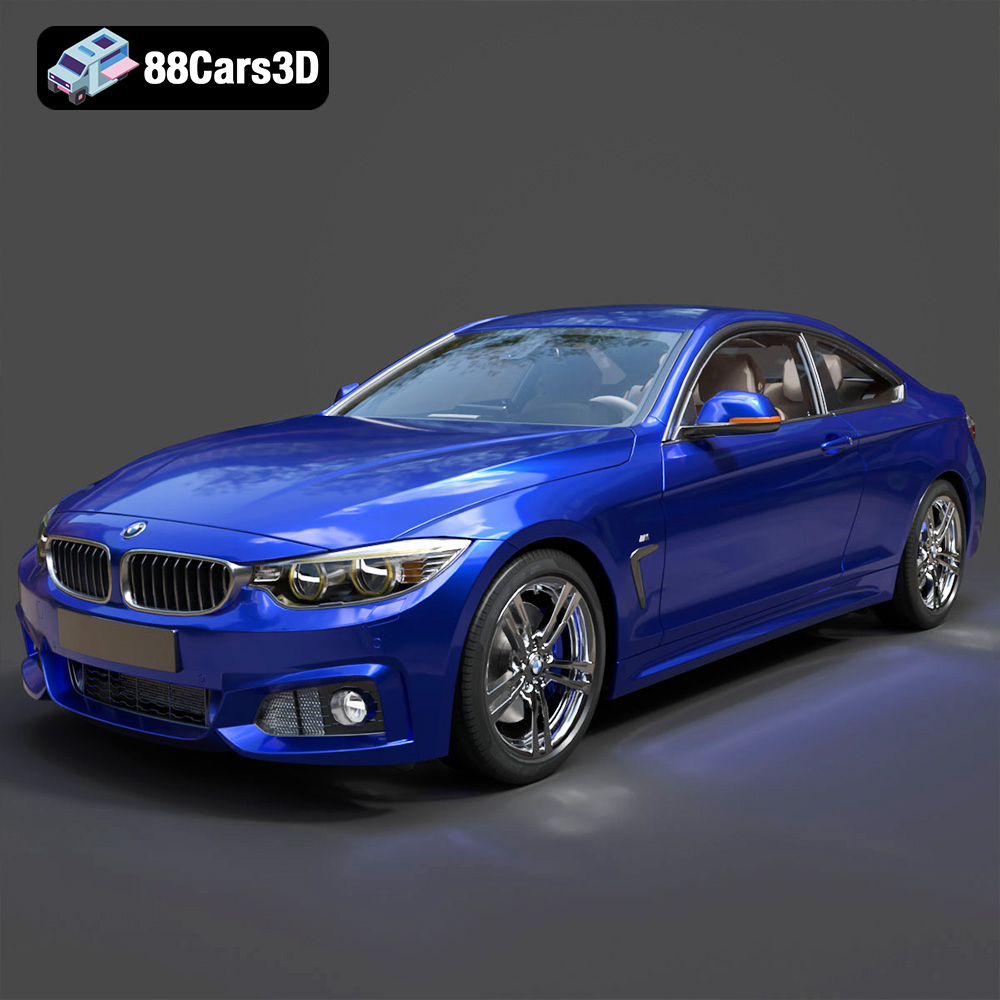
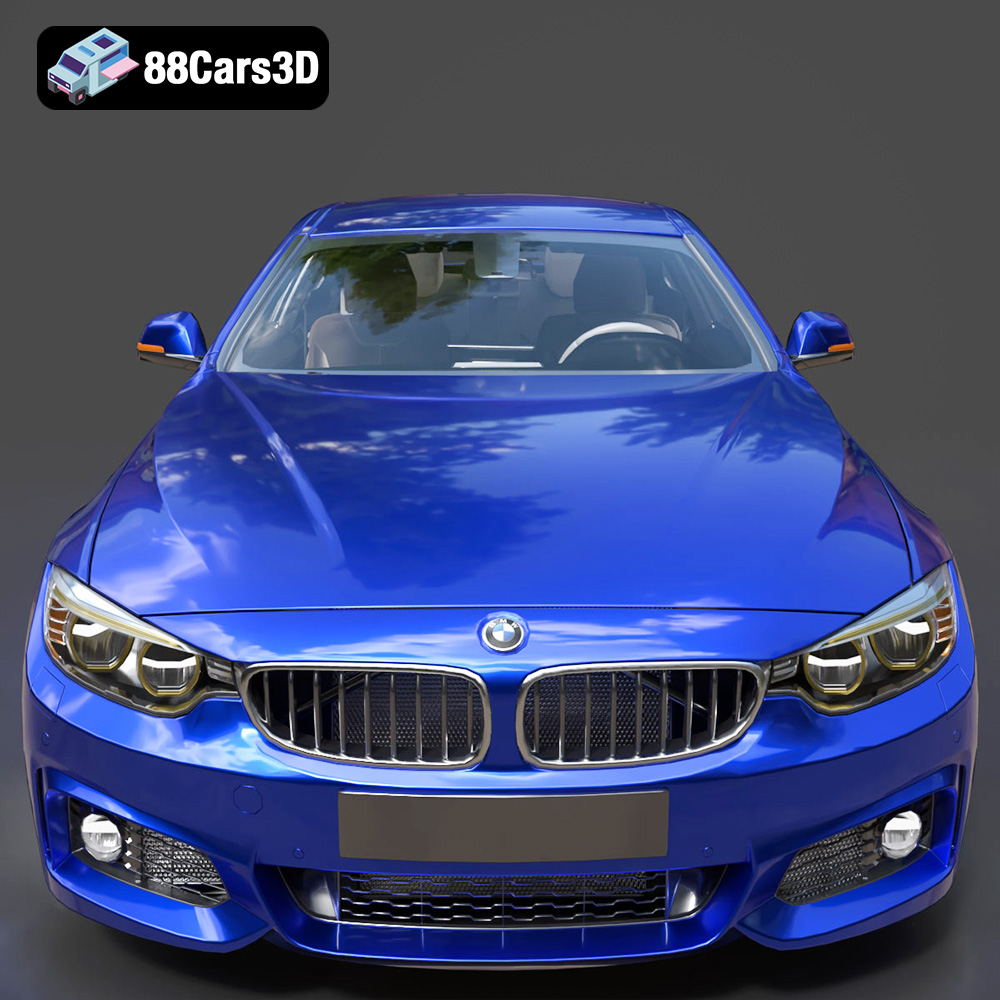
Today, we delve into the world of professional 3D automotive assets, using a prime example to illustrate these principles: the BMW 4 Series Coupe M Sport 2014 3D Model available on 88cars3d.com. This asset isn’t merely a static object; it’s a meticulously engineered digital twin, poised to bring unparalleled realism to simulations, visualizations, and interactive experiences. Its aggressive styling and dynamic characteristics, faithfully captured, make it a powerful tool for anyone seeking to elevate their automotive rendering and game asset libraries.
Understanding 3D Model File Formats: The Backbone of Digital Assets
The journey of a 3D model, from creation to deployment, is intrinsically linked to the file formats it supports. Each format serves a specific purpose, optimized for different stages of a workflow or for particular software ecosystems. Understanding these distinctions is crucial for seamless integration and optimal performance. The BMW 4 Series Coupe M Sport 2014 3D Model, for instance, comes with a comprehensive suite of formats, ensuring its versatility across the industry.
.blend – The Native Blender Ecosystem
The .blend format is the native file type for Blender, the popular open-source 3D creation suite. When you acquire a .blend file, you’re not just getting the mesh; you’re often getting the entire scene setup, including materials, textures, lighting, camera angles, and even animation data if present. This format offers maximum editability within Blender, allowing artists to dissect the model, understand its construction, modify materials, adjust lighting, or even retopologize parts with ease. For the BMW 4 Series model, the .blend file provides an excellent starting point for artists who prefer Blender’s powerful toolset for automotive rendering or further customization.
.fbx – The Industry Standard for Interoperability
.fbx (Filmbox) is a proprietary file format owned by Autodesk, widely recognized as an industry standard for exchanging 3D data between various software applications and game engines. It excels at preserving a broad range of 3D information, including geometry, materials, textures, animations, skinning, and camera data. Its strength lies in its ability to maintain scene hierarchy and object transformations accurately. For game development, especially with Unreal Engine and Unity, .fbx is often the go-to format for importing complex assets like a detailed 3D car model, ensuring that the model’s structure and animations (if any) are faithfully transferred.
.obj – The Universal Geometry Carrier
The .obj (Wavefront Object) format is one of the oldest and most widely supported 3D file formats. It’s a universal format primarily used for transferring geometry data (vertices, normals, UV coordinates, and polygonal faces) between different 3D applications. While .obj files can reference external material libraries (.mtl files) for basic material properties and texture paths, they don’t typically embed animation or complex scene data. Its strength lies in its simplicity and universal compatibility, making it a reliable choice when you need to import just the raw geometry of a 3D car model into virtually any 3D software for further processing.
.glb – Optimized for AR, VR, and Web
.glb (GLB format for GL Transmission Format) is a modern, royalty-free specification for 3D scenes and models. It’s a binary version of glTF (GL Transmission Format), designed for efficient transmission and loading of 3D scenes and models by applications. .glb files contain everything needed for a 3D model – geometry, materials, textures, animations – in a single, self-contained file. This makes it incredibly efficient for web-based 3D viewers, AR/VR applications, and mobile experiences, where file size and load times are critical. For showcasing the BMW 4 Series in an interactive online portfolio or an augmented reality app, .glb is an optimal choice.
.stl – The Domain of 3D Printing
.stl (STereoLithography) is the most common file format for 3D printing. It represents a 3D model as a series of connected triangles (a tessellation of the surface geometry) without any color, texture, or material information. Its simplicity makes it ideal for additive manufacturing processes. While not directly used for rendering, having an .stl option for the BMW 4 Series model means it’s ready for physical prototyping or creating miniature replicas, bridging the gap between digital and tangible assets.
.ply – Precision Mesh for Analysis
.ply (Polygon File Format) is another format for storing 3D data, particularly known for its ability to store detailed information about scanned objects. It can include geometry, color, transparency, and sometimes even surface normal data per vertex or face. It’s often used in scientific computing, 3D scanning, and applications where precise polygonal mesh data, including attributes beyond just position, is crucial for analysis or high-fidelity visualization. For intricate reverse engineering or specific CAD workflows involving the BMW 4 Series, .ply could be a valuable asset.
.unreal – Engine-Ready for Real-Time
The mention of .unreal typically refers to assets or scene files specifically configured and optimized for Unreal Engine. While Unreal primarily uses .fbx for import, a .unreal file might imply a packaged asset with materials, collision meshes, LODs (Levels of Detail), and blueprint configurations already set up within an Unreal project. This dramatically streamlines the workflow for developers, offering a “drag-and-drop” solution for incorporating the BMW 4 Series directly into a real-time environment with minimal setup.
.max – The 3ds Max Professional Environment
Finally, the .max format is the native file format for Autodesk 3ds Max, a powerhouse for 3D modeling, animation, and rendering, particularly strong in architectural visualization and product design. Like .blend, a .max file contains the entire scene, including geometry, modifiers, materials, lighting, cameras, and animation curves. For professionals deeply embedded in the 3ds Max ecosystem, this file offers the highest degree of flexibility for rendering, scene manipulation, and creating complex animations of the BMW 4 Series, leveraging V-Ray, Corona, or Arnold renderers.
The availability of such a diverse range of formats for the BMW 4 Series Coupe M Sport 2014 3D Model underscores its professional utility, making it adaptable to virtually any project requirement you might encounter at 88cars3d.com.
The Art and Science of Automotive 3D Modeling
Creating a high-quality 3D car model like the BMW 4 Series Coupe M Sport 2014 is a fusion of artistic skill and technical precision. It goes beyond simply replicating contours; it involves understanding the subtle nuances of automotive design, the way light interacts with surfaces, and the performance demands of different rendering engines and real-time applications.
Capturing Aggressive Styling and Dynamic Characteristics
The M Sport package on a BMW 4 Series is not just an aesthetic upgrade; it embodies a performance-oriented philosophy. Translating this into a 3D model requires meticulous attention to detail. Every crease, vent, and aerodynamic line must be accurately represented. This includes the distinctive M Sport front apron, side skirts, and rear bumper, along with the specific wheel designs. The challenge lies in ensuring that these elements not only look correct from every angle but also contribute to the overall impression of speed and athleticism, even in a static render. This level of accuracy is paramount for professional automotive rendering, where subtle imperfections can break immersion.
Professional-Grade Geometry and Topology
Underneath the stunning visual surface lies the geometry. A “professional-grade” model implies clean, optimized topology. This means:
- Quad-based Mesh: Primarily using four-sided polygons (quads) for smooth subdivision and predictable deformation.
- Optimized Poly Count: A balance between detail and performance. While high-poly models are crucial for cinematic renders, game assets often require multiple Levels of Detail (LODs) to scale resolution based on distance from the camera, ensuring smooth frame rates without sacrificing visual quality up close.
- Non-overlapping UVs: Essential for proper texture mapping without distortion or visible seams. Clean UV layouts allow for efficient texture artist workflows and accurate PBR material representation.
- Logical Grouping and Naming: Components like doors, wheels, interior elements, and lights are separated and clearly named. This makes the model easy to navigate, modify, and animate within any 3D software.
The BMW 4 Series Coupe M Sport 2014 3D Model’s description highlights these attributes, emphasizing its readiness for professional pipelines.
PBR-Ready Materials and Realistic Textures
Physically Based Rendering (PBR) has become the gold standard for achieving photorealism in 3D. PBR materials simulate how light behaves in the real world, based on physical properties of surfaces (roughness, metallicness, albedo, normal maps, etc.). For an automotive model, this translates to:
- Paint: A complex PBR material accurately simulating clear coat, metallic flake, and base color, reacting realistically to environmental lighting.
- Glass: Proper refraction and reflection values for windows and headlights.
- Rubber: Subtle surface imperfections and appropriate roughness for tires and trim.
- Chrome/Metallic Accents: Accurate reflections and specularity.
The inclusion of “realistic, PBR-ready materials” in the BMW 4 Series model ensures that it will look convincing under any lighting conditions, from a bright studio setup to a dynamic outdoor scene in Unreal Engine or Blender.
Integrating the BMW 4 Series Model into Professional Workflows
The true value of a versatile 3D asset is its adaptability across different software environments and professional applications. The BMW 4 Series Coupe M Sport 2014 3D Model, with its diverse file formats, is designed to integrate seamlessly into a variety of industry-standard workflows.
Automotive Rendering in 3ds Max and Blender
For high-fidelity cinematic renders or detailed product visualizations, 3ds Max and Blender are prime choices.
- 3ds Max Workflow: Using the .max file, artists can open the scene directly within 3ds Max. Here, they can leverage powerful renderers like V-Ray, Corona, or Arnold. The workflow typically involves:
- Importing the .max file.
- Setting up a studio lighting environment (e.g., HDRI maps for realistic reflections).
- Adjusting materials for specific looks (e.g., changing paint color, fine-tuning clear coat reflections).
- Adding camera effects like depth of field.
- Rendering high-resolution stills or animation sequences.
The logically grouped components of the BMW 4 Series model make it easy to isolate parts for specific material assignments or animations, such as opening doors or rotating wheels.
- Blender Workflow: The .blend file offers a similar level of native control. Blender’s Cycles or Eevee renderers can produce stunning results. The process often involves:
- Opening the .blend file with its pre-configured materials and lighting.
- Refining lighting with custom studio setups or environmental HDRIs.
- Utilizing Blender’s robust animation tools for dynamic shots of the BMW.
- Compositing render passes for post-production enhancements.
For enthusiasts and professionals alike, the .blend format for the BMW 4 Series provides a complete, ready-to-render scene, saving valuable setup time.
Game Development with Unreal Engine and Unity
For real-time applications like video games, AR/VR experiences, and interactive simulations, performance is as crucial as visual quality.
- Unreal Engine Integration: The .fbx and .unreal files are key here.
- Import the .fbx file into Unreal Engine 5 (or earlier versions). The engine will typically import meshes, materials, and textures automatically.
- Utilize the .unreal asset (if provided as a full package) which might include pre-configured Blueprints for easy integration into a vehicle system, collision meshes, and multiple LODs.
- Adjust PBR materials within Unreal’s material editor to match the desired look under engine lighting.
- Set up physics for realistic driving behavior.
- Implement LODs to ensure efficient rendering across different distances.
A high-quality 3D car model like the BMW 4 Series from 88cars3d.com significantly accelerates development, providing a game-ready asset that meets stringent performance and visual standards.
- Unity Workflow: Unity also heavily relies on .fbx for asset import.
- Drag and drop the .fbx file into the Unity project window.
- Unity imports the model, its materials, and textures.
- Assign appropriate PBR shaders (e.g., Standard Shader or HDRP/URP PBR shaders) and adjust material properties.
- Add physics components (e.g., Wheel Colliders, Rigidbody) for interactive vehicle behavior.
- Optimize with LODs and occlusion culling for performance.
The “game-engine ready” nature of the BMW 4 Series model ensures that the transition from modeling software to game engine is smooth and efficient, reducing the need for extensive post-import cleanup.
Real-World Applications: From ArchViz to Game Development
The versatility of a professional 3D car model extends across numerous industries, proving its indispensable value in diverse creative and technical fields.
Architectural Visualization (ArchViz)
In architectural visualization, vehicles are crucial for giving scale, context, and life to static building renders. A high-quality model like the BMW 4 Series Coupe M Sport 2014 can elevate an ArchViz scene from sterile to dynamic.
- Contextual Realism: Placing a modern, stylish car in front of a new building project instantly grounds the architecture in a real-world setting, suggesting movement and lifestyle.
- Composition and Scale: Cars provide a familiar reference point for human scale, helping viewers understand the size and proportions of architectural elements.
- Mood and Storytelling: A sleek BMW can evoke a sense of luxury, modernity, or urban sophistication, complementing the narrative of a high-end residential or commercial development.
The model’s realistic materials ensure it integrates seamlessly with the sophisticated lighting and material setups common in ArchViz, reflecting its environment accurately.
Automotive Marketing and Advertising
This is perhaps the most direct application. For automotive brands, dealerships, or marketing agencies, photorealistic 3D models are invaluable for creating stunning visuals without the cost and logistical challenges of physical photoshoots.
- Virtual Showrooms: Interactive 3D configurators allow potential buyers to explore different colors, trims, and features of a car like the BMW 4 Series in real-time.
- Dynamic Commercials: Complex camera movements, impossible with physical vehicles, become achievable with 3D models, allowing for cinematic narratives.
- Product Visualizations: Detailed renders for brochures, websites, and social media campaigns, showcasing specific features or design details from impossible angles.
The ability to render the BMW 4 Series in various environments, lighting conditions, and with different material finishes offers endless creative possibilities for marketing campaigns.
Cinematic Rendering and Animation
Film, television, and animation studios demand the highest levels of detail and realism. Whether it’s for a background prop, a chase scene, or a detailed close-up, the BMW 4 Series model is designed to meet these rigorous standards.
- VFX Integration: For visual effects shots, integrating a 3D car into live-action footage requires extreme precision in lighting, texturing, and camera tracking. A PBR-ready model ensures seamless blending.
- Animated Sequences: The logically grouped components facilitate animation, allowing animators to create realistic driving sequences, door openings, or even complex crash simulations.
- Pre-visualization (Pre-viz): Directors and cinematographers can use high-quality 3D models during pre-production to plan shots and sequences, saving time and resources on set.
Interactive AR/VR Experiences
Augmented Reality (AR) and Virtual Reality (VR) are transforming how we interact with digital content. For automotive applications, 3D car models are at the heart of these immersive experiences.
- Virtual Test Drives: Users can “sit” inside or “drive” the BMW 4 Series in a VR environment, exploring its interior and exterior in a fully immersive way.
- AR Showcases: Overlaying the 3D model onto the real world via a smartphone or tablet allows users to virtually “place” the car in their driveway or office, customizing it in real-time.
- Training and Simulation: For automotive designers or mechanics, VR simulations can provide interactive training on vehicle components and systems.
The inclusion of the .glb format for the BMW 4 Series model makes it exceptionally suitable for these modern, interactive platforms, ensuring efficient loading and rendering in real-time AR/VR engines.
Leveraging High-Quality Assets for Competitive Advantage
In a fast-paced digital world, efficiency and quality are paramount. Acquiring pre-made, high-quality 3D assets like the BMW 4 Series Coupe M Sport 2014 3D Model from platforms like 88cars3d.com offers a significant competitive edge for studios, freelancers, and individual creators alike.
Time and Cost Efficiency
Creating a highly detailed, accurate 3D car model from scratch is an incredibly time-consuming and expensive process. It requires expert modelers, UV artists, and material specialists. For many projects, particularly those with tight deadlines or budgets, investing in a ready-made asset is a strategic decision.
- Reduced Development Time: Instead of spending weeks or months on modeling, texturing, and rigging, teams can immediately integrate the asset and focus on scene setup, lighting, and animation.
- Lower Production Costs: The cost of purchasing a premium model is often a fraction of what it would cost to commission or produce a similar asset internally.
- Scalability: For studios managing multiple projects, a library of high-quality assets allows for rapid prototyping and deployment across various client needs.
The price point of a model like the BMW 4 Series on 88cars3d.com makes professional-grade assets accessible, democratizing high-fidelity 3D content.
Ensuring Professional Standards
Not all 3D models are created equal. Poorly constructed models can lead to numerous headaches: bad topology causing rendering artifacts, messy UVs making texturing difficult, or unoptimized meshes hindering real-time performance. Investing in assets described as “professional-grade geometry,” with “PBR-ready materials,” and “logically grouped and named components” guarantees a certain level of quality.
- Reliability: Knowing that the asset has been meticulously crafted by experienced artists means fewer unexpected technical issues during production.
- Consistency: High-quality assets help maintain a consistent visual standard across all elements of a project, which is crucial for client satisfaction and brand image.
- Future-Proofing: Models with clean topology and good UVs are easier to update, re-texture, or adapt for future technological advancements or project requirements.
Focusing on Creativity and Innovation
By offloading the complex and labor-intensive task of asset creation, artists and designers are freed to concentrate on the more creative aspects of their work.
- Enhanced Artistic Freedom: More time can be dedicated to scene composition, lighting design, narrative development, and character animation, rather than fixing geometry or wrestling with UVs.
- Exploration of New Ideas: With foundational assets in place, teams can experiment with different concepts, rendering styles, or interactive features, pushing the boundaries of their projects.
- Competitive Edge: Delivering projects faster, with higher visual fidelity, and with more innovative creative elements, positions individuals and studios favorably in a competitive market.
The BMW 4 Series Coupe M Sport 2014 3D Model exemplifies an asset that empowers creators, allowing them to focus on bringing their unique visions to life with speed and precision.
Conclusion
The landscape of 3D content creation is constantly evolving, driven by the insatiable demand for photorealism and immersive experiences. At the heart of this evolution are high-quality 3D assets – the building blocks upon which stunning visualizations, engaging games, and compelling narratives are constructed. The journey from a concept to a finished digital product is complex, but with the right tools and resources, it can be streamlined and elevated.
The BMW 4 Series Coupe M Sport 2014 3D Model, available at 88cars3d.com, stands as a testament to what professional-grade 3D car models offer. Its meticulous detail, PBR-ready materials, and comprehensive file format support (from .blend and .max for detailed rendering to .fbx and .unreal for game engines, and .glb for AR/VR) make it an incredibly versatile and powerful asset. It’s designed not just to look good, but to perform flawlessly across diverse professional pipelines, whether for automotive rendering, architectural visualization, game development, or cinematic production.
For artists, designers, and developers, leveraging such high-fidelity 3D car models means not only saving invaluable time and resources but also ensuring that their projects consistently meet the highest standards of quality and realism. By choosing assets that seamlessly integrate into established workflows, creators can dedicate more energy to innovation and storytelling, ultimately delivering more impactful and visually stunning results. In the competitive realm of digital content, the choice of assets can be the catalyst for extraordinary achievement.
Featured 3D Model
BMW 4 Series Coupe M Sport 2014 3D Model
Bring unparalleled realism to your projects with the BMW 4 Series Coupe M Sport 2014 3D Model. This asset meticulously captures the aggressive styling and dynamic characteristics of the M Sport package, making it perfect for high-fidelity simulations and visualizations.
$14.99
Product Image Gallery