Driving Digital Realism: A Deep Dive into High-Quality 3D City Bus Models
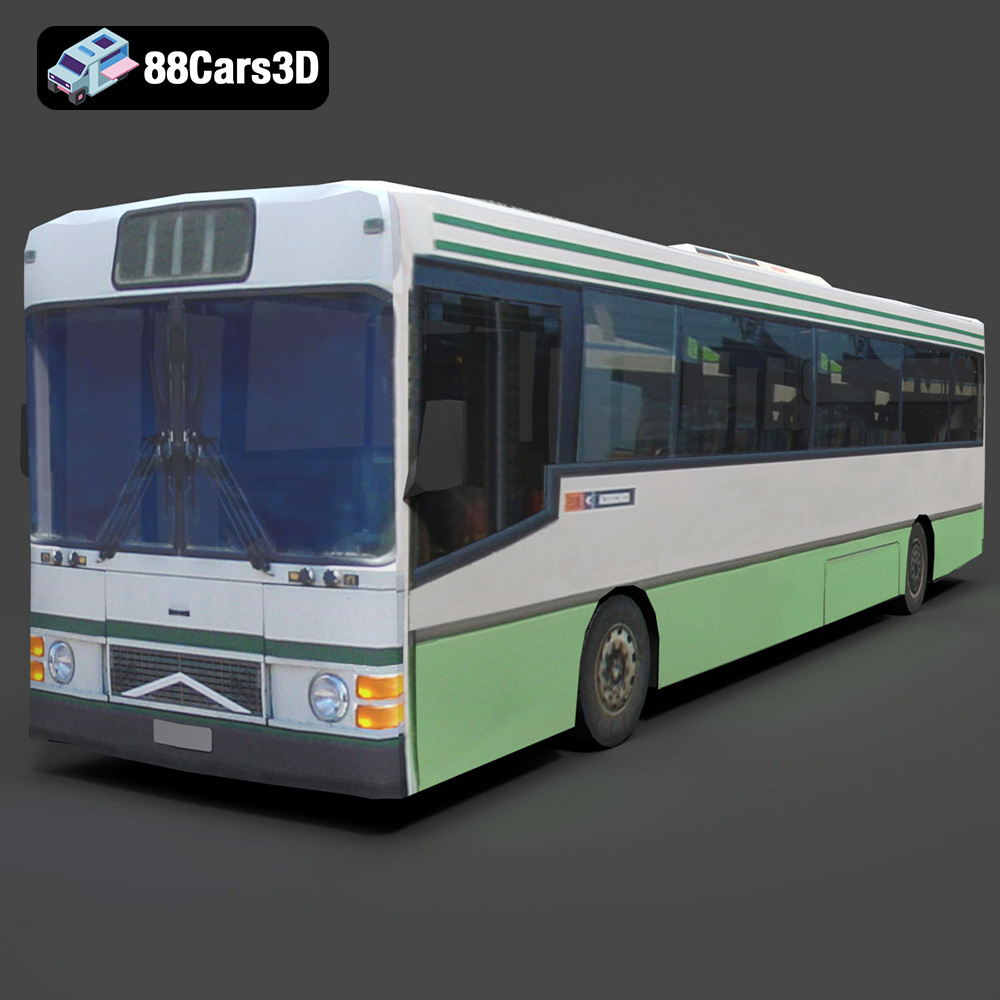
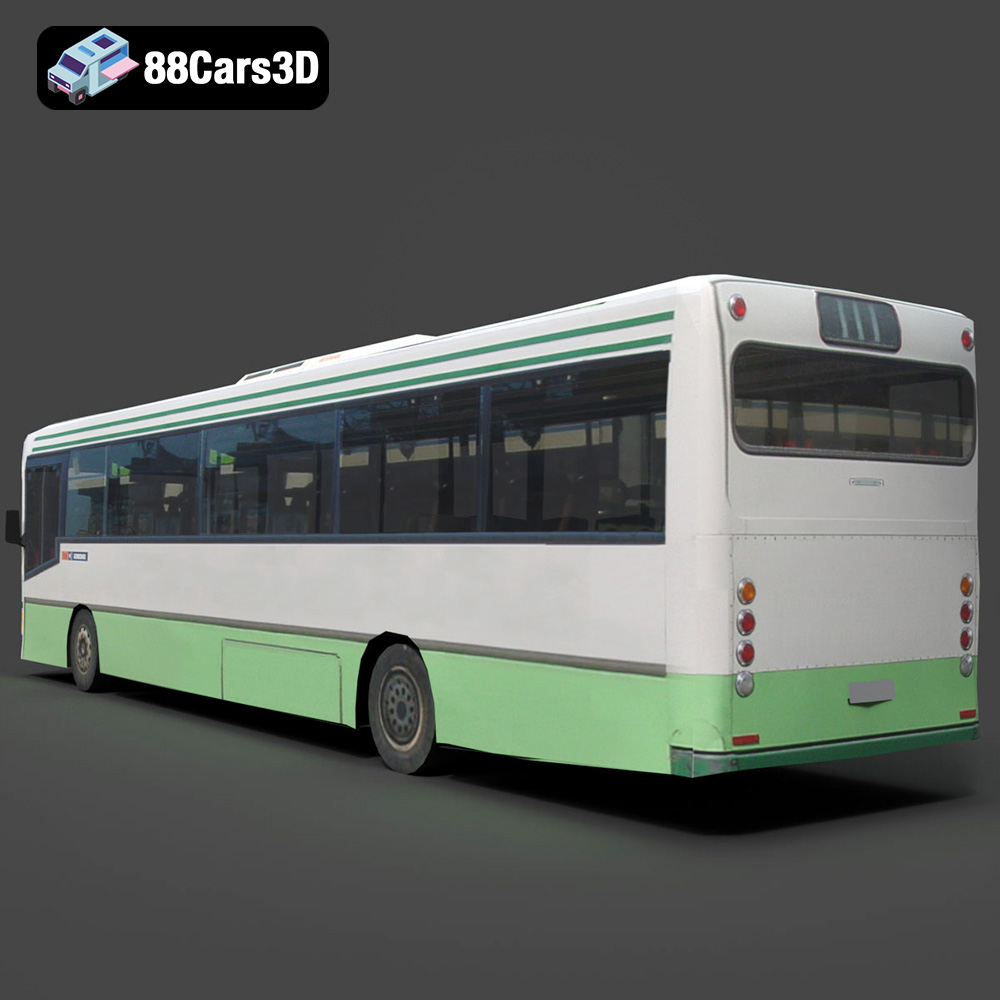
In the dynamic world of 3D visualization, the demand for highly realistic and versatile assets is constant. From bustling urban simulations to immersive game environments and precise architectural renders, the ability to populate scenes with believable vehicles is paramount. This isn’t merely about aesthetics; it’s about functionality, performance, and seamless integration into complex pipelines. Today, we’re taking a closer look at a cornerstone asset for any digital cityscape: a meticulously crafted 3D city bus model. Specifically, we’ll explore the technical advantages and diverse applications of a high-quality asset like the Generic City Bus 3D Model available on 88cars3d.com.
This model isn’t just a static object; it’s a testament to the blend of artistic skill and technical precision required in modern 3D asset creation. It provides a robust and scalable foundation for projects ranging from high-fidelity cinematic renders to optimized real-time experiences, making it an invaluable addition to any professional’s digital toolkit. Its design philosophy centers around clean geometry, balanced detailing, and an array of features that cater to the most demanding professional workflows.
Understanding 3D Model File Formats
Selecting the correct 3D model file format is crucial for a successful workflow, impacting everything from compatibility to performance and specific use cases. The Generic City Bus 3D Model comes with a comprehensive suite of formats, each optimized for different applications. Understanding these formats is key to maximizing the utility of your 3D car models.
.blend – Fully Editable Blender Scene with Materials
The .blend file is Blender’s native format, offering a complete and editable project scene. When you download the Generic City Bus as a .blend file, you get everything: the mesh, materials, textures (if packed), lighting setups, cameras, and any modifiers or animation data. This format is ideal for artists who primarily use Blender and require full control over every aspect of the model. You can easily modify geometry, adjust materials, rig components, or integrate it into larger Blender projects without any loss of data fidelity. It’s the ultimate format for customization and iterative design within the Blender ecosystem.
.fbx – Ideal for Unreal, Unity, and Real-Time Pipelines
.fbx (Filmbox) is an industry-standard format developed by Autodesk, renowned for its ability to store not just mesh data but also animation, cameras, lights, and materials. It’s the go-to format for transferring assets between different 3D software packages and, crucially, for integration into game engines like Unreal Engine and Unity. For the Generic City Bus, the .fbx variant ensures that the hierarchical structure, pivot points, and basic material assignments are preserved, making it straightforward to import, rig for real-time physics, and animate within a game environment. Its efficiency and widespread support make it indispensable for game asset development and real-time visualization.
.obj – Universal Format for Cross-Software Compatibility
The .obj (Wavefront OBJ) format is one of the oldest and most universally supported 3D file formats. It primarily stores geometric data (vertices, normals, UV coordinates) and can reference external .mtl (material) files for basic color and texture information. While it doesn’t support animation or complex material setups like .fbx, its simplicity and widespread compatibility mean almost every 3D software can import and export .obj files. This makes the Generic City Bus’s .obj version perfect for initial mesh import into any application where you plan to rebuild materials and animation from scratch, ensuring a clean geometry transfer.
.glb – Optimized for AR, VR, and Browser-Based Display
.glb (GL Transmission Format Binary) is the binary version of .gltf, an increasingly popular, open-standard format for 3D scenes and models. It’s highly optimized for web-based applications, AR, and VR due to its compact size and efficient loading. A single .glb file contains model data, textures, and animations, making it a self-contained asset. The Generic City Bus’s .glb format is specifically tailored for interactive 3D experiences online or in augmented reality applications, ensuring quick load times and robust PBR (Physically Based Rendering) material representation in compatible viewers.
.stl – Suitable for 3D Printing Output
.stl (Stereolithography) is the most common file format for 3D printing. It represents a 3D model as a series of connected triangles (a tessellated surface) without any color, texture, or material information. Its primary purpose is to define the surface geometry of a 3D object for manufacturing. The .stl version of the Generic City Bus is ready to be sliced by 3D printing software, allowing you to produce a physical replica of the model. This makes it ideal for prototyping, creating scale models, or even custom parts for architectural maquettes.
.ply – Precision Mesh Format for CAD or Analysis
.ply (Polygon File Format) is a file format designed to store 3D data from 3D scanners, with support for properties like color, transparency, and normal vectors at each vertex. While similar to .obj, .ply often provides more detailed information per vertex and face, making it suitable for scientific data, CAD applications, and analysis where precise mesh data is critical. For the Generic City Bus, the .ply format could be used in engineering simulations or reverse engineering workflows if a highly detailed point cloud or faceted mesh representation is required.
.unreal – Engine-Ready Asset for Real-Time Environments
The .unreal format, often referring to a pre-packaged Unreal Engine asset or project file, signifies an asset specifically prepared and optimized for direct integration into Unreal Engine projects. This might include correct scaling, collision setups, basic material instances, and even blueprint configurations for interactive elements like doors. For the Generic City Bus, an .unreal package means minimal setup time within the engine, allowing developers to drag and drop a fully functional bus directly into their scenes, leveraging Unreal’s powerful rendering and simulation capabilities immediately.
.max – Editable 3ds Max Project for Animation and Rendering
The .max file is Autodesk 3ds Max’s native scene format. Like .blend for Blender, it contains all the scene data: geometry, materials, textures, lights, cameras, modifiers, and animation. Artists working with 3ds Max will find the .max file invaluable for its complete editable nature. It allows for advanced rendering with V-Ray or Corona, complex rigging, and sophisticated animation sequences, making the Generic City Bus fully adaptable within a professional 3ds Max production pipeline for high-end automotive rendering and animation.
Crafting Realism: The Generic City Bus’s Design Philosophy
Achieving photorealism in 3D models, especially for complex vehicles, requires a meticulous approach to geometry, scale, and detailing. The Generic City Bus 3D Model exemplifies this philosophy, striking a crucial balance between visual fidelity and performance efficiency.
Precision in Exterior and Interior Detailing
The exterior of the bus is a masterclass in balanced detailing. Accurately modeled body panels, chassis components, and roof structures provide a solid foundation. Key elements like detailed wheels, tires, and hubcaps contribute significantly to the overall realism, going beyond mere silhouette. Transparent windows and a windshield are not just placeholders but are designed with realistic material properties in mind, crucial for reflections and refractions in advanced rendering setups. Functional-looking doors, headlights, tail lights, and signal indicators are not only visually complete but also separated and optimized for animation, a critical feature for any dynamic simulation or interactive application.
The attention to detail extends to the interior, which is often overlooked in generic models. A detailed driver’s cockpit, complete with a dashboard, steering wheel, and controls, offers realism for first-person views or driver training simulations. The passenger seating layout, grab handles, and standing areas create an authentic urban transport experience, making the model suitable for walk-through animations or in-game camera views. Even basic mechanical components are represented to enhance overall believability without bogging down performance with unnecessary polygon counts where they won’t be seen.
Optimized Geometry for Performance and Aesthetics
One of the core technical advantages of this model is its clean, quad-dominant topology. This ensures smooth subdivisions when rendered at high resolutions, avoiding unsightly pinching or artifacts. More importantly, quad topology is ideal for deformation, making the bus model highly suitable for rigging and animation, whether it’s the opening of doors, the rotation of wheels, or the subtle flex of the chassis. Modeled to real-world scale, the Generic City Bus integrates seamlessly into existing scenes, eliminating tedious scaling adjustments and maintaining accurate spatial relationships within architectural visualizations or urban environments. The optimized mesh quality ensures efficient rendering and superior performance across various platforms and engines, a crucial consideration for large-scale projects and real-time game assets.
Integrating the Bus: Professional Workflows and Case Studies
A high-quality 3D model is only as valuable as its ability to integrate into diverse professional workflows. The Generic City Bus 3D Model is designed with this versatility in mind, offering multiple file formats and an organized structure to streamline asset integration.
Workflow in 3ds Max for Automotive Rendering
For automotive rendering specialists utilizing 3ds Max, the inclusion of a native .max file is a significant advantage. Importing the Generic City Bus means direct access to the scene’s hierarchy, properly set pivots for immediate rigging, and potentially pre-assigned materials. A typical workflow might involve:
- Import & Inspection: Open the
.maxfile. Verify scale and object hierarchy. - Material Refinement: Assign V-Ray or Corona Renderer materials. This involves setting up realistic shaders for glass, metal, rubber, and paint. The clean UV mapping of the bus simplifies texture application, allowing artists to easily add custom liveries or weathering details.
- Lighting & Environment: Integrate the bus into a studio lighting setup or an HDR-driven environment. Adjust reflections and refractions on the windows and bodywork for photorealism.
- Animation (Optional): Utilize the properly set pivots on doors and wheels for quick animation. A simple door opening sequence or wheel rotation for a static render can elevate the presentation significantly.
- Rendering: Configure render settings for high-resolution output, often for marketing materials, cinematic sequences, or architectural visualization projects where this bus serves as a crucial contextual element.
Case Study: An architectural visualization firm uses the 88cars3d.com Generic City Bus 3D Model to populate a street scene for a new urban development proposal. Its accurate scale and detailed realism help convey the vibrancy and functionality of the proposed environment, convincing stakeholders with lifelike visuals.
Blender for Indie Development and ArchViz
Blender users benefit immensely from the native .blend file. This allows for direct manipulation within Blender’s powerful ecosystem, leveraging Eevee for real-time visualization or Cycles for physically accurate renders.
- Direct Import: Open the
.blendfile. The model comes with materials already set up, saving significant time. - Customization: Modify the bus’s paint scheme, add custom decals using Blender’s UV editing tools, or even adjust interior components.
- Rigging & Animation: Blender’s robust rigging tools can be used to create advanced animations for the bus, such as dynamic suspension or complex door mechanisms, building upon the pre-set pivots.
- Scene Integration: Seamlessly merge the bus into larger Blender scenes, whether it’s an indie game level or a large-scale architectural visualization.
Case Study: An independent game developer utilizes the Generic City Bus for an urban simulation game. The .blend file allows them to quickly re-texture the bus with different city liveries, add simple physics and AI drivers, and optimize it further for in-game performance using Blender’s decimation and LOD tools before exporting to their chosen game engine via FBX.
Unreal Engine for Real-Time Interaction and Simulation
For real-time applications, particularly in game development and high-fidelity simulations, Unreal Engine is a dominant force. The provided .fbx and dedicated .unreal files for the Generic City Bus are game-changers.
- Import & Setup: Use the
.unrealproject file for direct import, or import the.fbxmodel into Unreal Engine. Ensure correct scale and pivot points are maintained. - Material Instancing: Convert materials to Unreal’s PBR workflow, creating instances for easy color and texture variation. The clean UV mapping ensures textures look correct.
- Collision & LODs: Generate accurate collision meshes for physics interaction and implement Level of Detail (LOD) models for performance optimization across different viewing distances.
- Blueprint Integration: Create blueprints for interactive elements, such as opening and closing doors, working headlights, or even basic vehicle physics for driving simulators.
The structured hierarchy and optimized mesh quality of the Generic City Bus ensure it’s “low-poly ready” for open-world games and urban environment assets, allowing developers to focus on gameplay and interaction rather than asset creation.
Beyond Rendering: Diverse Applications of the Bus Model
The versatility of the Generic City Bus 3D Model extends far beyond static renders. Its robust construction and detailed design make it suitable for a multitude of advanced applications, proving its value as a core asset for various industries.
Game Development and Interactive Experiences
In game development, the need for high-quality, optimized assets is constant. The Generic City Bus shines here with its “low-poly ready” characteristics, ensuring efficient performance in open-world environments. For racing simulators, the detailed exterior and interior provide an immersive experience, while for urban environment assets, it brings life to digital cities. The organized hierarchy and properly set pivots are crucial for implementing vehicle physics and interactive elements like opening doors, making it easy to turn this static model into a fully functional game asset. The provided .fbx and .unreal formats streamline the integration process into popular game engines, minimizing development time and maximizing efficiency.
Augmented Reality (AR) and Virtual Reality (VR)
AR and VR demand models that are both visually rich and extremely performant. The Generic City Bus, with its optimized mesh and the inclusion of the .glb format, is perfectly suited for immersive virtual reality experiences and augmented reality applications. Developers can use it to create interactive walkthroughs of virtual cityscapes, place virtual buses in real-world environments via AR, or even develop training simulations for public transport operators. The compact nature of .glb ensures quick loading times and smooth interactions in performance-critical AR/VR applications, making it an ideal choice for bringing digital objects into physical space or creating entirely virtual worlds.
Simulation, Training, and 3D Printing
The precision and real-world scale of the Generic City Bus make it an excellent asset for simulation and training platforms. Public transport simulators can use the detailed driver’s cockpit and passenger layout to create highly realistic training scenarios for new drivers or emergency response drills. Driving schools can integrate it into virtual training modules. Beyond digital simulations, the inclusion of the .stl format opens doors for physical model production through 3D printing. This allows for the creation of tangible prototypes, scale models for architectural presentations, or even collectible items, demonstrating the model’s adaptability from purely digital to physical manifestations.
Technical Prowess: Why This Model Excels
The true value of a professional 3D asset lies in its technical foundation. The Generic City Bus 3D Model is engineered with several key advantages that ensure its longevity and utility across a spectrum of projects.
Clean Topology and Real-World Scale
The commitment to clean, quad-dominant topology is a hallmark of professional-grade 3D car models. This ensures smooth subdivisions for high-fidelity renders and predictable deformation during animation and rigging. Without clean topology, models can exhibit unsightly pinches or artifacts, especially when viewed up close. Furthermore, being modeled to real-world scale is not merely a convenience; it’s a technical necessity for accurate integration into architectural visualizations, engineering simulations, and realistic game environments. It eliminates the guesswork and potential errors associated with scaling objects, ensuring that light interaction, physics simulations, and environmental context remain consistent and believable.
Organized Hierarchy and UV Mapping
An organized hierarchy with properly set pivots is fundamental for efficient workflow. This allows animators and developers to quickly rig and animate components like doors, wheels, and steering mechanisms without extensive setup. Each part of the bus, from a single window to an entire axle, is logically grouped and parented, making modifications and interactions straightforward. Coupled with clean UV mapping, this model is a dream for texturing artists. Clean UVs mean textures can be applied without stretching, distortion, or overlapping, enabling easy modification of paint finishes, liveries, and graphics to match specific branding or scenarios. This technical advantage significantly reduces post-purchase setup time and enhances the overall customization potential of the asset.
Optimized for Performance and Customization
The Generic City Bus 3D Model is meticulously optimized for performance across various platforms and engines. This means it has a balanced polygon count – detailed enough for close-up renders but efficient enough for real-time applications. This optimization ensures that whether you’re rendering a cinematic sequence or running a complex game, the model won’t bog down your system. Moreover, the design encourages customization. Users can easily modify material properties for metal, glass, rubber, and plastic components, allowing for diverse visual styles and realistic responses to different lighting conditions. This inherent flexibility makes it a powerful asset that can be adapted to countless scenarios without compromising its core quality.
Conclusion: Elevate Your Projects with Premium 3D Car Models
The Generic City Bus 3D Model represents a pinnacle of versatile and high-quality 3D asset creation. From its meticulously crafted exterior and interior details to its robust technical advantages like clean quad-dominant topology, real-world scale, and optimized performance, this model is built for professional results across all media. Whether your project demands high-fidelity automotive rendering in 3ds Max, an interactive game asset in Unreal Engine, a realistic training simulation, or even a physical 3D print, this bus model provides the reliability and flexibility you need.
Its comprehensive package of file formats, including .blend, .fbx, .obj, .glb, .stl, .ply, .unreal, and .max, ensures seamless integration into virtually any digital pipeline. By investing in such a well-engineered asset, creators can save invaluable time and resources, focusing more on their creative vision and less on the foundational modeling work. For those seeking premium 3D car models that stand up to the rigors of professional production, 88cars3d.com offers a curated selection of assets designed to elevate your projects and bring your digital worlds to life.
Featured 3D Model
Generic City Bus 3D Model
Experience the precision and versatility of our Generic City Bus 3D model, meticulously crafted to represent a modern urban transport vehicle. This model boasts clean geometry and balanced detailing, making it an ideal asset for a wide range of applications. Whether you’re working on high-fidelity renders, intricate animations, realistic simulations, or optimizing for game development, this bus model provides a robust and scalable foundation.
Exterior Features:
- Accurately modeled body panels, chassis, and roof components
- Detailed wheels, tires, and hubcaps
- Realistic transparent windows and windshield
- Functional-looking doors (driver and passenger entry/exit) designed for animation
- Headlights, tail lights, and signal indicators with optimized materials
- Integrated mirrors, wipers, and other essential exterior fixtures
- Separated components for ease of animation and customization
Interior / Mechanical Features:
- Detailed driver’s cockpit with dashboard, steering wheel, and controls
- Passenger seating layout with grab handles and standing areas
- Accessible interior optimized for walk-through animations or in-game camera views
- Basic representation of key mechanical components for overall realism
- Optimized mesh quality to ensure efficient rendering and performance
Technical Advantages:
- Clean, quad-dominant topology ensures smooth subdivisions and deformation
- Modeled to real-world scale for accurate integration into projects
- Organized hierarchy with properly set pivots for easy rigging and animation
- Optimized for performance across various platforms and engines
- Clean UV mapping for easy texture application and modification
Applications:
- Rendering & Visualization: Perfect for studio renders, cinematic scenes, architectural visualizations, and marketing materials
- Game Development: Low-poly ready versions suitable for open-world games, racing simulators, and urban environment assets
- AR/VR: Ideal for creating immersive virtual reality experiences and augmented reality applications
- Simulation & Training: Excellent for public transport simulators, driving schools, and educational platforms
- 3D Printing: Can be easily converted to .stl for physical model production
Customization Options:
- Easily modify paint finishes, liveries, and graphics to match specific branding or scenarios
- Adjust material properties for metal, glass, rubber, and plastic components
- Adapt lighting setups to achieve various moods and environments
Elevate your projects with this versatile and high-quality Generic City Bus 3D model, designed for professional results across all media. Its robust construction and detailed design ensure it will be a valuable asset in your digital library.
Included File Formats:
- .blend – Blender project with materials
- .fbx – Compatible with Unreal, Unity, and major 3D engines
- .obj – Universal format for nearly all 3D software
- .glb – Optimized for AR, VR, and web-based visualization
- .stl – Ready for 3D printing
- .ply – Mesh format for analysis and CAD workflows
- .unreal – Unreal Engine project setup
- .max – Editable 3ds Max scene for rendering and animation
$19.99
Product Image Gallery