Get 50% OFF All Premium 3D & STL Models!

The world of automotive design is a realm of breathtaking beauty, engineering prowess, and often, unattainable exclusivity. For enthusiasts, collectors, and hobbyists, 3D printing offers an incredible gateway to owning a piece of this dream. Imagine holding a meticulously crafted replica of a limited-edition hypercar, one that you brought to life with your own hands. That’s the power of 88cars3d.com – providing high-quality digital models, like the stunning Bugatti Centodieci 2020 3D Model, ready for you to transform into a tangible masterpiece.
The Bugatti Centodieci, a tribute to the legendary EB110, is an ultra-exclusive hypercar combining modern Bugatti engineering with iconic 1990s design heritage. With its aggressive aerodynamic bodywork, sharp front fascia, large side air intakes, and distinctive rear, it’s a marvel of automotive artistry. 3D printing this intricate model presents a rewarding challenge and an opportunity to delve deep into the nuances of additive manufacturing. This comprehensive guide will walk you through every step of the process, ensuring your Bugatti Centodieci 2020 3D Model transforms from a digital file into a showroom-worthy collectible.
Before you embark on the exciting journey of 3D printing car models, it’s crucial to understand the digital blueprints that guide your printer. The accuracy and detail of your printed model depend heavily on the quality and characteristics of its file format. The Bugatti Centodieci 2020 3D Model from 88cars3d.com comes in several formats, with a few being paramount for automotive 3D printing.
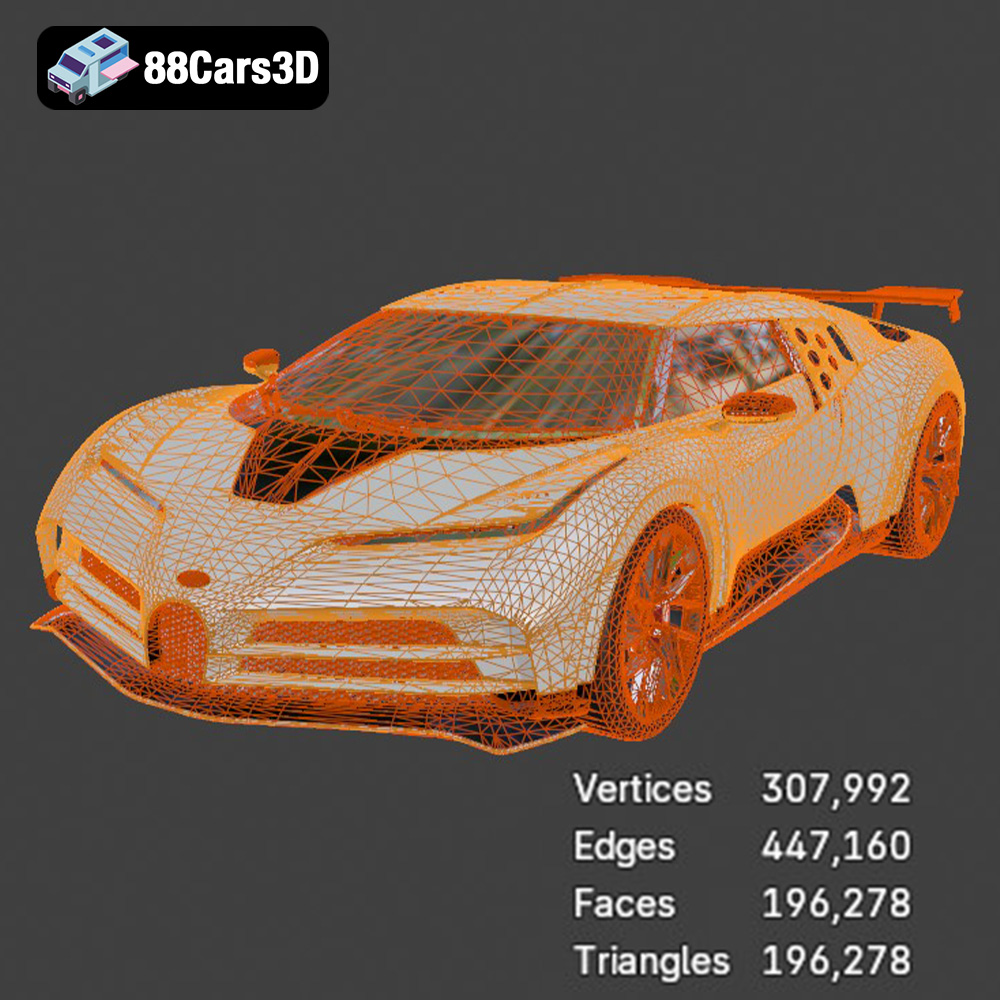
The .stl (stereolithography) format is the industry standard and most widely supported file type for 3D printing. It represents the surface geometry of a 3D object as a collection of interconnected triangles. Each triangle defines a facet of the model’s surface, and the density of these triangles (or mesh resolution) dictates the smoothness and detail of the final print. For a complex model like the Bugatti Centodieci, a high-resolution .stl file is essential to capture the aggressive aerodynamic bodywork, the intricate headlight design, and the subtle curves of the chassis. When working with .stl files, ensure the mesh is “watertight” – meaning it has no holes or gaps in its surface. Slicing software needs a fully enclosed volume to generate toolpaths correctly. Most quality models, including those from 88cars3d.com, are meticulously prepared to be watertight, but it’s always good practice to check using your slicer’s repair tools if any issues arise.
While .stl is the workhorse, other formats offer unique advantages. The .obj (Wavefront OBJ) format is an alternative that can store not only geometric data but also color and texture information. For the Bugatti Centodieci, if you were planning a multi-material print or wanted to assign specific material properties to different parts (though this is less common for typical FDM/SLA hobby prints), .obj could be beneficial. However, for a single-color physical print that will be post-processed with paint, its texture capabilities are often overlooked. The .ply (Polygon File Format or Stanford Triangle Format) is another precision mesh format often used for scanned data or high-detail models. It can store various properties, including color, transparency, and even material properties per vertex. For capturing extremely fine details of a hypercar’s design, a high-quality .ply file can sometimes offer an even more accurate representation of the original CAD model’s intricate surfaces compared to a lower-resolution .stl.
The .3mf (3D Manufacturing Format) is a newer, more advanced file format designed to overcome the limitations of .stl. It’s an XML-based format that encapsulates all relevant information for a 3D print in a single archive. This includes not just the model’s geometry but also color, materials, texture, support structures, and even print settings. For a sophisticated model like the Bugatti Centodieci, a .3mf file offers a complete package. It minimizes errors by keeping all data together, reduces file size compared to equivalent .stl files with separate texture maps, and is gaining wider support in modern slicing software. While perhaps not as universally supported as .stl yet, .3mf is undoubtedly the future for more robust and comprehensive 3D printing file formats, especially for models with complex material and color assignments. Regardless of the format, ensuring your model has a clean, manifold (watertight) mesh with optimized polygon flow is paramount for a successful and visually stunning automotive 3D printing project.
The initial decisions you make about your 3D printer and the filament or resin you use will profoundly impact the final quality and aesthetic of your Bugatti Centodieci 2020 3D Model. Each technology and material has its strengths and ideal applications.
For 3D printing car models, particularly highly detailed hypercars like the Centodieci, the choice between FDM (Fused Deposition Modeling) and resin (SLA/DLP/LCD) printing is significant. FDM printers, which extrude molten plastic layer by layer, are generally more affordable, have larger build volumes, and use a wider variety of durable materials. However, they inherently produce visible layer lines, which can detract from the smooth, glossy finish desired for a car model. Resin printers, on the other hand, cure liquid resin with UV light, achieving incredibly fine details, ultra-smooth surfaces, and exceptionally thin layer heights (as low as 0.01mm). This makes resin printing highly recommended for smaller scales (1:32, 1:43) or for capturing the intricate features of the Bugatti Centodieci’s aerodynamics and interior, where precision is paramount.
Once you have your Bugatti Centodieci 2020 3D Model file and have chosen your printer and material, the next crucial step is preparing it in a slicing software. This digital wizardry transforms the 3D model into a series of thin layers and specific instructions (G-code) that your 3D printer can understand.
Popular slicing software like Ultimaker Cura and PrusaSlicer are powerful tools that offer extensive control over your print. Both are free, widely supported, and come with pre-configured profiles for many printers and materials. It’s recommended to start with a profile tuned for your specific printer and material, then fine-tune it based on the recommendations for the Bugatti Centodieci model. Familiarize yourself with settings such as layer height, infill density, print speed, support generation, and retraction settings.
The product description for the Bugatti Centodieci suggests recommended scales: 1:32, 1:24, 1:18, and 1:12. The chosen scale will dictate the overall size and the level of detail that can be resolved. For intricate models like this hypercar, printing at a larger scale (e.g., 1:18 or 1:12) on an FDM printer will help capture more detail and make post-processing easier. For smaller scales (1:32, 1:24), resin printing is often preferred to maintain fidelity. The model is designed with separate wheels and steering components, indicating a multi-part printing strategy. This is beneficial as it allows you to print parts with different optimal orientations and print settings. For example, print the main body, wheels, and interior components separately. This not only improves detail but also simplifies painting and assembly.
The orientation of your model on the build plate is paramount for success, especially for an automotive 3D printing project with complex geometries. The product description for the Bugatti Centodieci recommends: “Body printed angled for smooth aerodynamic surface finish; wheels printed separately.” This is sound advice. Printing the body at an angle (e.g., 30-45 degrees) can minimize the visibility of layer lines on critical surfaces and distribute overhangs more evenly, reducing the need for heavy supports on highly visible areas. Wheels should always be printed flat or at a slight angle to optimize circularity and minimize distortion. Supports are absolutely essential for the Centodieci, specifically for the rear wing, splitter, mirrors, and various aerodynamic overhangs. These parts feature sharp angles and protruding elements that cannot be printed in thin air. In your slicer, choose tree supports (often found in Cura) or organic supports (PrusaSlicer) as they tend to be easier to remove and leave fewer marks than standard grid supports.
Achieving a high-quality 3D print of your Bugatti Centodieci 2020 3D Model requires meticulous attention to print settings. These parameters, entered into your slicing software, dictate how your printer lays down material and ultimately determine the model’s accuracy, strength, and surface finish.
Layer height is perhaps the most critical setting for visual quality in 3D printing car models. It defines the thickness of each individual layer. For the Bugatti Centodieci, the product description recommends a layer height of 0.08–0.16 mm.
For the best aesthetic outcome, especially for display models, lean towards the finer end of this spectrum (0.08-0.12 mm).
Beyond layer height, several other settings contribute to the print’s success:
One of the biggest challenges in 3D printing car models, especially intricate designs like the Bugatti Centodieci 2020 3D Model, is managing support structures. These temporary scaffolds are essential for printing overhangs and bridges that your printer cannot create in thin air, but they must be removable without damaging the final model.
The product description correctly identifies several key areas where supports are “Required for rear wing, splitter, mirrors, and aerodynamic overhangs.” Let’s break down why these are critical and how to approach them:
Your slicing software offers various support options. The goal is to provide enough structural integrity without making removal impossible or damaging the model’s surface.
Removing supports is a delicate process. Use flush cutters, tweezers, and a hobby knife. Work slowly and carefully to avoid snapping off delicate parts of your Centodieci. For stubborn areas, gently heat the area with a heat gun (on a low setting and from a distance) to slightly soften the plastic, making supports easier to peel away. After removal, expect to have small nubs or rough patches where supports were attached. These will need to be sanded down as part of your post-processing steps. The cleaner the support removal, the less sanding required, and the smoother the final finish of your Bugatti Centodieci 2020 3D Model.
Turning a raw 3D print into a polished, display-worthy Bugatti Centodieci 2020 3D Model is where the magic truly happens. Post-processing can elevate your print from a hobbyist piece to a professional-grade collectible, reflecting the hypercar’s inherent luxury and precision.
The product description for the Bugatti Centodieci recommends “sanding, primer, high-gloss automotive paint.” This is the cornerstone of a professional finish.
The Centodieci demands a stunning paint job. The recommendation for “high-gloss automotive paint, optional carbon fiber detailing” provides a clear path.
Once all parts are painted and fully cured, it’s time for assembly. Since the wheels are printed separately, they can be attached using small metal axles or appropriate adhesives.
Through careful sanding, painting, and detailing, your Bugatti Centodieci 2020 3D Model will become a testament to both automotive 3D printing and your craftsmanship.
Even with the best print settings and preparations, 3D printing can sometimes be unpredictable. Encountering issues is part of the learning process, especially when dealing with complex 3D printing car models like the Bugatti Centodieci. Knowing how to diagnose and fix common problems will save you time and filament.
Warping is when the corners or edges of your print lift from the build plate, often due to uneven cooling or poor bed adhesion. For the Bugatti Centodieci, which has a large footprint, this can be a particular concern.
Layer shifting occurs when one or more layers of the print are misaligned, causing a visible step or offset in the model. Ghosting (or ringing) appears as faint patterns or echoes of features on the surface of the print, often caused by vibrations.
Stringing refers to thin strands of plastic left between different parts of the print, often occurring when the print head moves between separate sections. This can be particularly noticeable on detailed features like the Bugatti’s mirrors or complex grille.
By systematically troubleshooting these common issues, you can improve your success rate and produce consistently high-quality STL files for your automotive 3D printing projects.
Embarking on the journey of 3D printing car models is a rewarding experience that combines technical skill with artistic vision. From selecting the right file format and optimizing your print settings to meticulously post-processing, each step brings you closer to a tangible representation of automotive excellence. The Bugatti Centodieci 2020 3D Model from 88cars3d.com is an exceptional example, offering unparalleled detail and a truly satisfying project for enthusiasts.
We’ve covered everything from understanding the nuances of STL files and other formats, choosing between FDM and resin printing, and preparing your model in slicing software like Cura or PrusaSlicer. We delved into the specifics of layer height, infill, and print speed, and highlighted the critical role of support structures for the Centodieci’s aggressive aerodynamics. Finally, we explored the art of post-processing, from sanding and priming to applying high-gloss automotive paint and intricate detailing. The journey may require patience and attention to detail, but the end result – a stunning, custom-built replica of an ultra-exclusive hypercar – is truly worth it.
Whether you’re creating a collectible, a display piece, or a prototype, the principles of automotive 3D printing empower you to bring these digital dreams into the physical world. Your newly printed Bugatti Centodieci will not just be a model; it will be a testament to your passion for cars and the incredible capabilities of modern additive manufacturing. Head over to 88cars3d.com to find this and many other incredible STL files to start your next project!
The Bugatti Centodieci 2020 3D Model is a high-detail digital recreation of the ultra-exclusive hypercar inspired by the legendary EB110. Limited to only a handful of units worldwide, the Centodieci combines modern Bugatti engineering with 1990s design heritage, delivering extreme performance and rare collector prestige. This 3D model accurately represents the aggressive aerodynamic bodywork, sharp front fascia with ultra-slim LED headlights, large side air intakes, sculpted rear with stacked exhaust outlets, fixed rear wing, and distinctive multi-spoke wheel design. Built with clean topology and real-world scale accuracy, it is ideal for 3D printing collectible hypercar miniatures and display models. Includes .stl, .obj, .ply, and other formats for versatile use.
$9.99
.2020hypercar
.arvr
.automotive
.blend
.bugatti
.car3dmodel
.centodieci
.exoticcar
.fbx
.gameasset
.glb
.luxurycar
.max
.obj
.ply
.rendering
.simulation
.stl
.supercar
.unreal