Get 50% OFF All Premium 3D & STL Models!

In the vast landscape of 3D modeling, few vehicles hold as much enduring charm and cultural significance as the Volkswagen Bus. More than just a mode of transport, it’s a symbol of freedom, adventure, and a bygone era that continues to resonate with audiences worldwide. For 3D artists, game developers, architects, and product designers, acquiring a high-quality 3D car model of such an icon is invaluable. It’s not merely about having a model; it’s about owning a meticulously crafted digital asset that can breathe life into a myriad of projects, from nostalgic advertisements to immersive virtual experiences.
The demand for premium 3D car models is constantly growing, driven by advancements in rendering technology, the burgeoning world of AR/VR, and the ever-present need for realistic game assets. A truly professional model, like the Volkswagen Bus 3D Model available on 88cars3d.com, offers more than just visual accuracy; it provides a robust foundation for complex workflows, ensuring compatibility and efficiency across diverse software environments. This article delves into the technical intricacies and creative potential unlocked by such a versatile asset, exploring its applications in various professional domains.
The Volkswagen Bus transcends its origin as a utility vehicle, having etched itself into the global consciousness as an emblem of counterculture, road trips, and carefree living. This universal recognition makes it a powerful storytelling tool in any visual medium. For artists and developers, leveraging such an iconic piece of history in their projects instantly adds character, nostalgia, and a touch of authenticity that generic models simply cannot achieve.
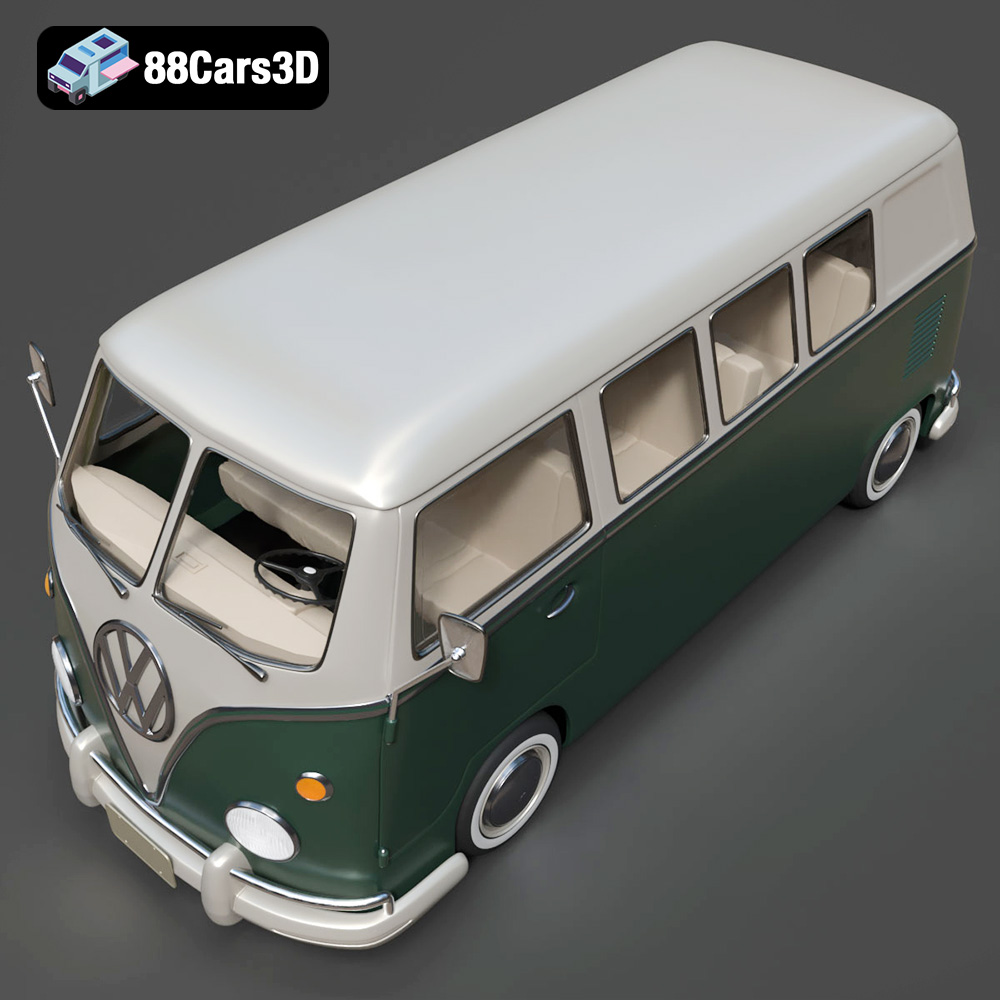
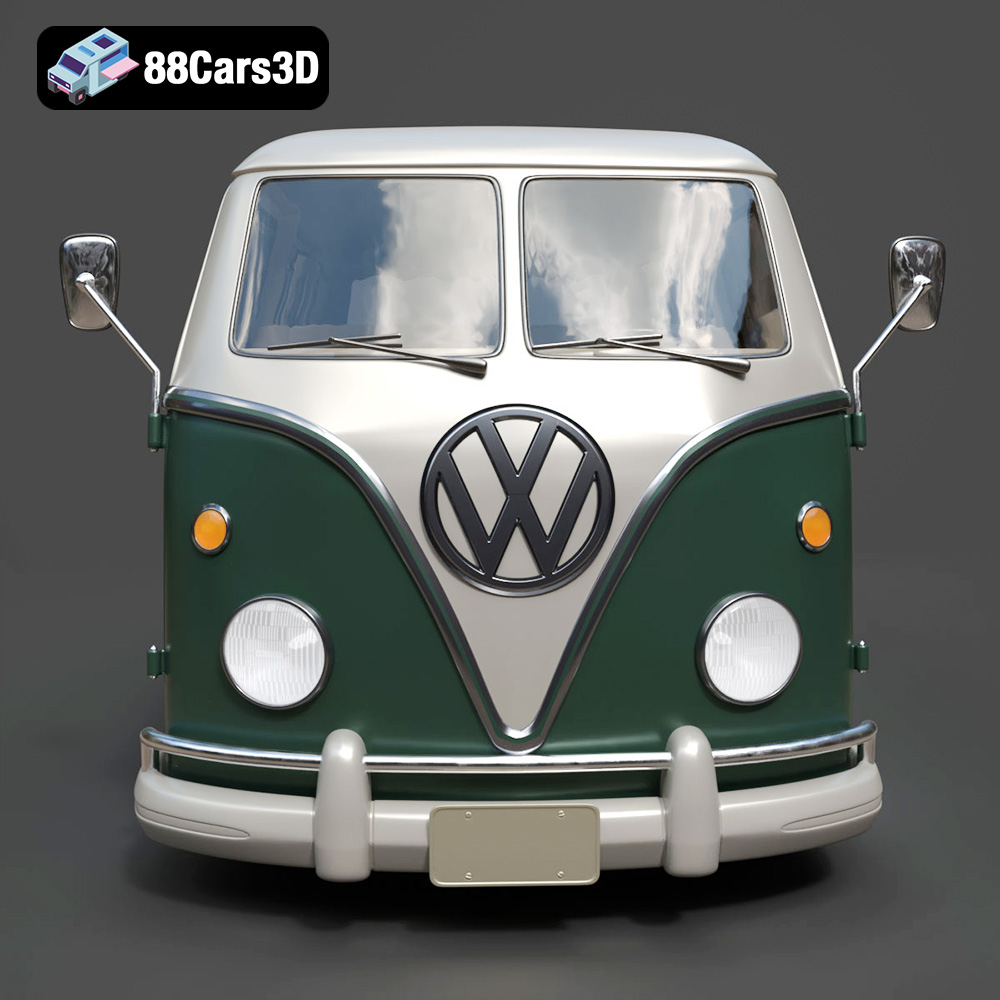
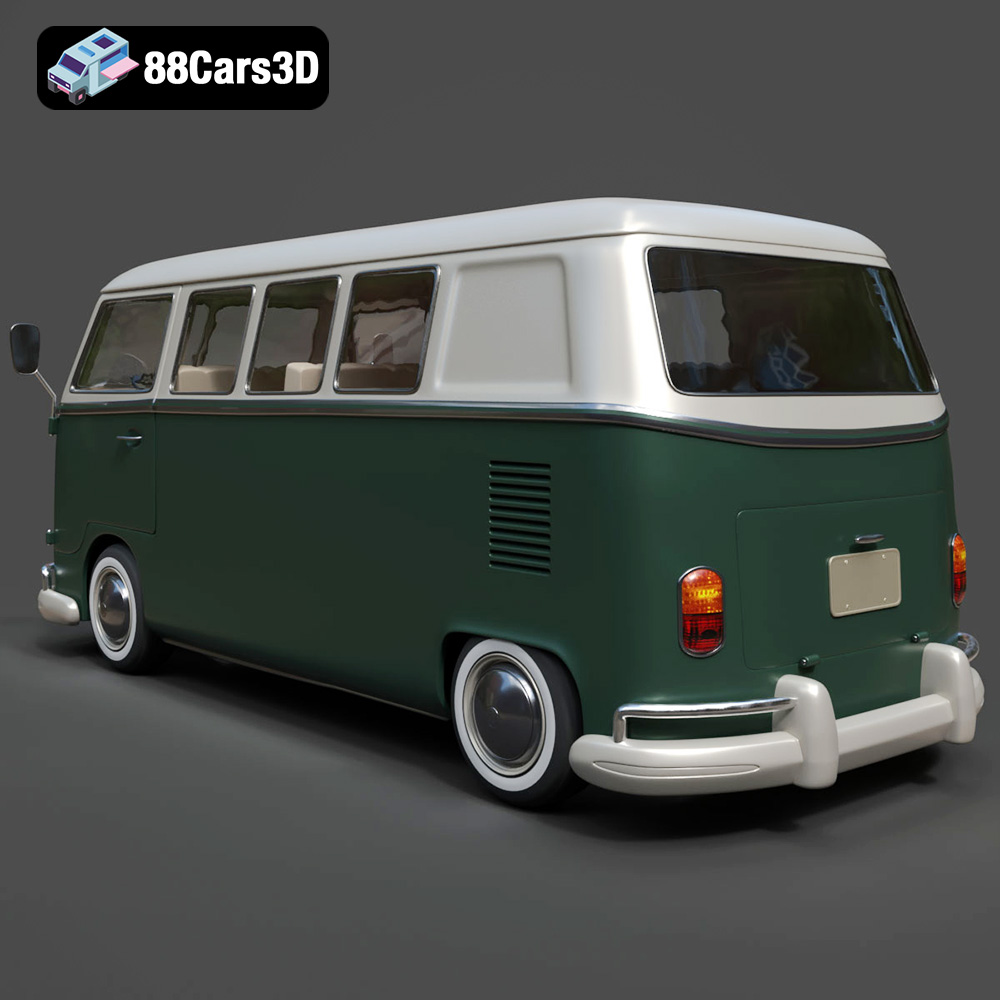
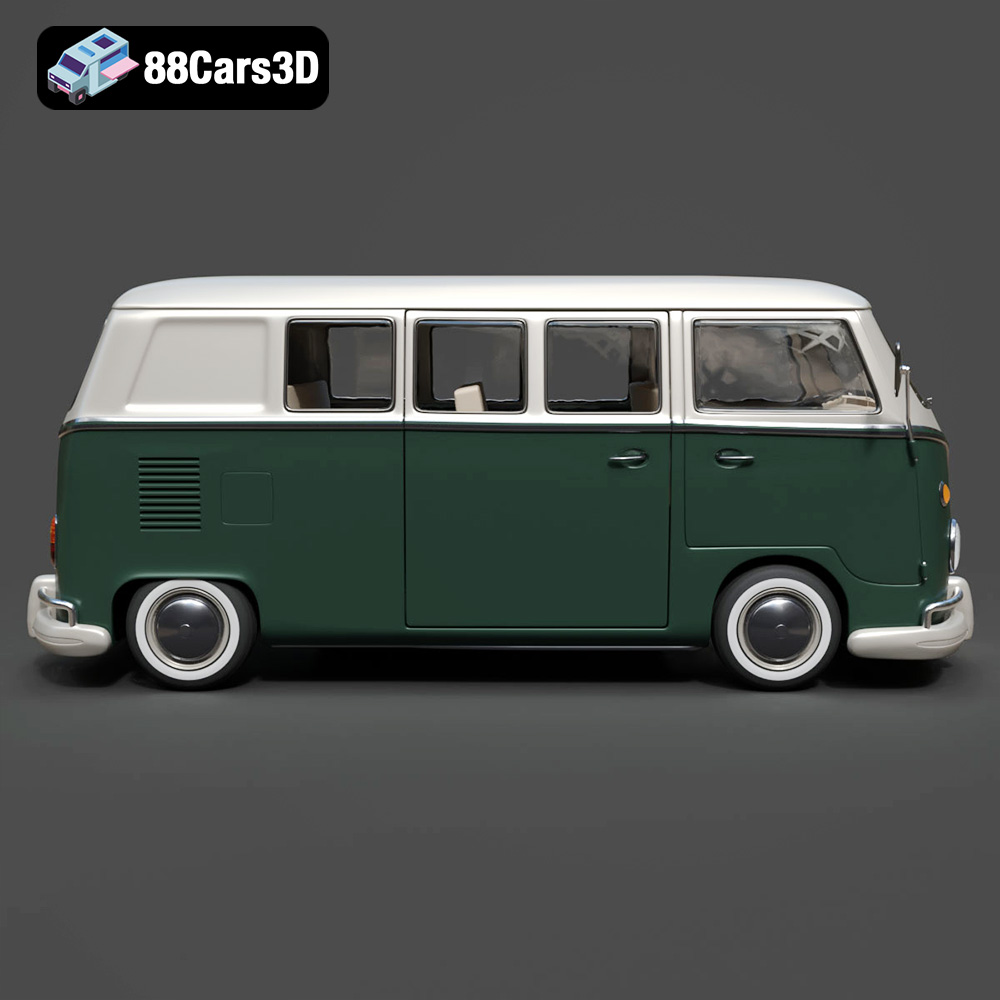
A successful 3D model of an iconic vehicle like the Volkswagen Bus isn’t just a collection of polygons; it’s a digital artifact that encapsulates history and emotion. The Volkswagen Bus 3D Model from 88cars3d.com meticulously recreates the signature rounded body, the distinctive front V-shaped panel, circular headlights, and the classic interior layout with analog gauges. These details are crucial for projects aiming for historical accuracy or nostalgic appeal. Whether it’s for a film set in the 60s, a game exploring a retro California beach scene, or an architectural visualization requiring a period-correct vehicle, this model provides an authentic touch point.
The adaptability of a well-made 3D car model is paramount. The Volkswagen Bus, with its unique aesthetic, finds utility across an impressive range of industries. In automotive rendering, it can serve as a centerpiece for lifestyle marketing or vintage branding. For game development, its clean topology makes it an excellent candidate for open-world exploration games or driving simulators, allowing players to interact with a piece of automotive history. Beyond this, its charm extends to AR/VR experiences, where users can explore an interactive classic vehicle, and even 3D printing, enabling the creation of tangible collectibles and display miniatures. This broad appeal underscores the value of investing in a technically sound and visually compelling asset.
One of the critical aspects of professional 3D workflow is understanding the various file formats and their specific applications. The Volkswagen Bus 3D Model from 88cars3d.com comes with a comprehensive suite of formats, each tailored for different software, engines, and project requirements. Knowing when and why to use each format is fundamental for efficient and successful project execution.
The .blend format is Blender’s native file type. It encapsulates an entire Blender scene, including not just the mesh data but also materials, textures, lighting, cameras, animation data, and even modifiers. For users entrenched in the Blender ecosystem, a .blend file offers maximum flexibility. You can open it and immediately have access to the model in its native environment, ready for further sculpting, rigging, animation, or rendering with Cycles or Eevee. This is ideal for those who wish to deeply customize the Volkswagen Bus, perhaps adding specific roof racks, modifying interior layouts for a camper setup, or retexturing for a unique vintage look.
The .fbx (Filmbox) format is an industry-standard proprietary file format developed by Autodesk, widely used for exchanging 3D data between different software applications like 3ds Max, Maya, Cinema 4D, and game engines like Unreal and Unity. It supports geometry, materials, textures, animations, and skeletal rigs, making it highly versatile for complex animated scenes. When moving the Volkswagen Bus 3D Model into a real-time game engine, .fbx is often the go-to choice due to its robust support for animations and hierarchical structures. The .obj (Wavefront Object) format is another universal exchange format, revered for its simplicity and wide compatibility. It primarily stores geometry (vertices, normals, texture coordinates, and faces) and can reference external material files (.mtl). While it doesn’t support animation or rigging, its widespread support makes it an excellent choice for static mesh exchange and ensuring cross-software compatibility for the Volkswagen Bus 3D Model’s core geometry.
The .glb (GLB format, an evolution of glTF) is quickly becoming the standard for web-based 3D, AR, and VR applications. It’s a self-contained single-file format that includes geometry, materials, textures, and animation, making it incredibly efficient for streaming and display in web browsers or mobile AR apps. For showcasing the Volkswagen Bus in an interactive web viewer or an augmented reality experience, .glb offers an optimized, lightweight solution. The .unreal format, or more accurately, assets imported and packaged within an Unreal Engine project, refers to engine-ready files. While not a singular file format for external distribution, having a model prepared for Unreal implies optimized meshes, correct material setups, and often collision data already configured, streamlining integration into real-time environments. This significantly reduces setup time for developers using the Volkswagen Bus 3D Model in game development.
For tangible output, the .stl (STereoLithography) format is the cornerstone of 3D printing. It represents a 3D model as a series of connected triangles, defining its surface geometry without color or texture information. The Volkswagen Bus 3D Model provided in .stl format is ready for direct slicing and printing, making it perfect for creating physical scale models. The product description highlights specific print settings like recommended scales (1:32 / 1:24 / 1:18 / 1:12), layer height, and support requirements, which are crucial for a successful print. The .ply (Polygon File Format) is another precision mesh format often used for storing 3D scanner data and CAD models. It can store not only geometry but also color, transparency, and other attributes per vertex or face. While less common for general animation, it’s valuable for applications requiring high precision or complex data representation, such as digital archiving or advanced analytical visualization of the Volkswagen Bus’s form.
The .max format is Autodesk 3ds Max’s native file type. Similar to .blend for Blender, it contains all scene data within 3ds Max, including geometry, materials, textures, lights, cameras, and animation. For professionals working within the 3ds Max ecosystem, the .max file provides the most complete and editable version of the Volkswagen Bus 3D Model, allowing for complex scene setups, advanced rendering with V-Ray or Corona, and seamless integration into professional animation pipelines. Its inclusion ensures that artists who rely on 3ds Max have full control over every aspect of the model.
High-fidelity automotive rendering demands meticulous attention to detail, from the geometry of the vehicle itself to the nuanced interplay of light and materials. The Volkswagen Bus 3D Model provides an exceptional foundation for creating stunning photorealistic visuals, whether for advertising, film, or architectural presentations.
Utilizing the .max format, artists working in Autodesk 3ds Max can immediately access the Volkswagen Bus 3D Model with its clean mesh structure and proper pivot setups. The first step typically involves setting up a suitable environment and lighting rig. For exterior shots, an HDRI (High Dynamic Range Image) environment combined with targeted area lights can simulate realistic outdoor conditions, highlighting the vehicle’s chrome bumpers and smooth body panels. For interior shots, careful placement of subtle lights can illuminate the classic dashboard layout and passenger seating configuration, emphasizing the model’s detailed interior features. Assigning realistic shaders, often PBR (Physically Based Rendering) materials, is crucial. This involves setting up diffuse, roughness, metallic, and normal maps to accurately represent painted metal, glass, rubber, and vintage upholstery, ensuring the Volkswagen Bus appears authentic under any lighting condition.
The key to photorealism lies in how light interacts with surfaces. For the Volkswagen Bus, special attention should be paid to the reflective qualities of its paintwork and chrome. A metallic car paint shader, with adjustable flake and clear coat properties, will bring out the characteristic sheen. Glass materials for the large windows and windshield need accurate refraction and reflection values. The model’s “period-correct wheels and tire dimensions” lend themselves to detailed tire rubber shaders with subtle wear. Furthermore, the interior details, like the “classic dashboard layout with analog gauges,” benefit from subtle material variations to mimic aged plastics, painted metal, and textile finishes. The “separate wheels and steering components for animation” also allow for precise adjustments if a scene involves vehicle movement, ensuring realistic deformation or rotation during rendering sequences.
Imagine a marketing campaign for a vintage-inspired surf brand. The Volkswagen Bus 3D Model becomes the central hero. A scene could be set on a sun-drenched beach at sunset, with the bus parked strategically, surfboards strapped to a custom roof rack (a customization option mentioned in the product description). The exterior could feature a vibrant two-tone paint scheme, reflecting the golden hour light. The camera could pan around, showcasing the “rounded front fascia with signature V-panel styling,” then move to an interior shot revealing the “passenger seating configuration” and “vintage control panel,” perhaps with a guitar resting on a seat. This entire visual narrative can be constructed efficiently thanks to the pre-modeled details and optimized geometry of the asset, drastically cutting production time compared to modeling from scratch.
Game engines like Unreal Engine and Unity demand highly optimized assets that maintain visual fidelity while performing efficiently. The Volkswagen Bus 3D Model is designed with “optimized polygon flow” and “real-world scale accuracy,” making it an ideal candidate for real-time applications.
For game development, performance is paramount. While the Volkswagen Bus 3D Model boasts high detail, its “optimized geometry” and “clean and well-organized mesh structure” are crucial. Upon importing the .fbx or .unreal format into Unreal Engine, developers would typically generate LODs (Levels of Detail) to ensure the model scales gracefully with distance, reducing poly count for distant views. Collision meshes are also essential, allowing players to interact physically with the bus. The provided “proper pivot setup for steering and wheel rotation” is a massive time-saver, simplifying the rigging process for interactive vehicle physics and animation within the engine. Materials will be converted to engine-specific PBR shaders, taking advantage of texture maps for diffuse, normal, roughness, and metallic properties, ensuring that the iconic look is maintained even with real-time lighting.
The separate components like “wheels and steering components for animation” are a significant advantage for game development. This allows developers to easily rig the vehicle for driving mechanics, including accurate wheel rotation, steering, and suspension. A simple skeletal mesh can be created, linking these components to a main chassis bone. Furthermore, features like the “sliding side door setup” can be animated for player interaction, such as entering or exiting the vehicle, or even for environmental storytelling in a cutscene. Integrating the Volkswagen Bus into a game requires robust animation controllers and physics setups, all made significantly easier when starting with a well-prepared 3D model like this one from 88cars3d.com.
Augmented Reality (AR) and Virtual Reality (VR) offer new frontiers for experiencing iconic vehicles. The .glb format is particularly well-suited for these platforms. Imagine an AR application where users can place a life-sized Volkswagen Bus 3D Model in their driveway, walk around it, and even peer inside at the “classic dashboard layout.” In VR, users could “drive” the bus through virtual environments, experiencing the freedom of the open road from a first-person perspective. The optimized geometry ensures smooth frame rates, preventing motion sickness and enhancing immersion. The accurate representation of exterior features like “circular headlights and chrome bumper detailing” and interior elements allows for a truly captivating and realistic interactive experience, fulfilling the promise of “immersive classic vehicle showcases.”
Beyond digital screens, 3D printing offers a unique way to bring the Volkswagen Bus 3D Model into the physical world. Creating a tangible collectible or a scale model requires careful preparation and an understanding of additive manufacturing principles.
The provision of the .stl format is crucial for 3D printing. This format simplifies the geometry into a triangulated mesh, which is the universal language for 3D printers. Before printing, the model is typically loaded into a slicer software (e.g., Cura, PrusaSlicer). Here, the user can verify the model’s integrity, ensure it is “manifold geometry” (watertight), and prepare it for printing. The product description’s specific print settings are invaluable. For instance, recommending a scale of “1:32 / 1:24 / 1:18 / 1:12” guides users toward optimal sizing, balancing detail retention with printability. Understanding the “Print orientation: Body printed upright for best surface detail; wheels printed separately” is key to minimizing support structures and maximizing visual quality for complex parts like the “rounded front fascia.”
The provided print settings are a fantastic starting point for any maker. A “layer height” of “0.12–0.20 mm” strikes a good balance between speed and detail for FDM printers, ensuring smooth curves on the bus body. A “wall thickness” of “1.5–2.5 mm” provides sufficient structural integrity for the printed model. “Infill: 15–30%” offers a good compromise between strength and material usage. The explicit mention of “Supports: Required for mirrors, bumpers, and window overhangs” saves users from common printing failures, guiding them to support areas prone to sagging. Post-processing, including “sanding, primer, two-tone paint finish, optional decals and chrome accents,” transforms the raw print into a professional-looking display piece. This attention to detail in the product’s 3D print settings makes the Volkswagen Bus 3D Model exceptionally user-friendly for physical creation.
The ability to 3D print the Volkswagen Bus opens up immense customization opportunities. Hobbyists can experiment with different filament colors, scale variations, and unique post-processing techniques. Beyond just painting, the model can be modified in 3D software before printing to add personalized elements like miniature roof racks, custom decals, or even internal camper van furniture. This capability allows for the creation of truly unique “collectible scale van models and display miniatures,” turning a digital asset into a cherished physical object that reflects individual creativity and passion for classic vehicles.
In the professional world, the quality of a 3D asset directly impacts project efficiency, visual fidelity, and long-term utility. The Volkswagen Bus 3D Model embodies technical excellence, setting it apart from generic alternatives.
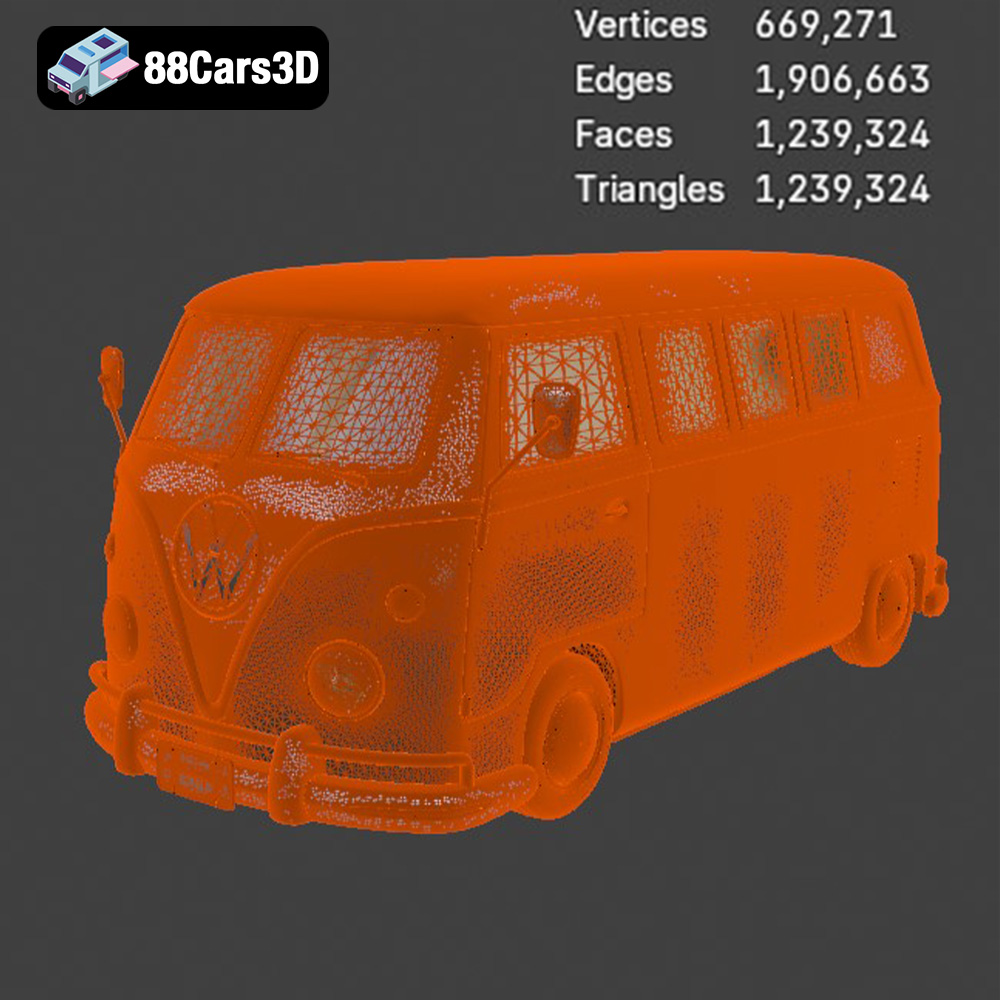
The product description proudly states “Clean and well-organized mesh structure” and “Optimized polygon flow for performance and realism.” These are not merely buzzwords; they represent fundamental aspects of a professional 3D model. Clean topology means the polygons are evenly distributed, avoiding stretched or pinched areas, which is critical for smooth deformations during animation and seamless subdivision for high-detail renders. Good topology also simplifies UV mapping. While not explicitly detailed, “clean topology” inherently implies well-executed UVs, which are essential for applying textures without distortion. This ensures that the two-tone paint schemes, retro decals, or detailed grime maps can be applied perfectly, contributing to truly “high-detail digital recreation.”
“Real-world scale accuracy” is paramount for integration into diverse scenes, whether for architectural visualization, game environments, or film productions. A correctly scaled model avoids proportionality issues when placed alongside other assets or in a real-world context. Furthermore, the “Proper pivot setup for steering and wheel rotation” signifies thoughtful preparation for animation and simulation. Having correctly positioned pivot points for movable parts saves countless hours of tedious manual adjustment, allowing animators and developers to focus on creative tasks rather than technical troubleshooting. This level of articulation is what distinguishes a professional-grade asset from a basic model.
Investing in a high-quality 3D car model like the Volkswagen Bus 3D Model from 88cars3d.com is an investment in long-term project success. Its compatibility with “major 3D software platforms and engines” ensures it can be reused across multiple projects and withstand future software updates. The detailed modeling, coupled with optimization for various applications (rendering, game dev, AR/VR, 3D printing), means this single asset can serve many purposes throughout its lifecycle. This adaptability reduces the need to purchase or create new models for each specific project, offering significant cost and time savings for studios and individual artists alike. It truly represents a versatile tool in any digital artist’s arsenal.
The iconic Volkswagen Bus has transcended its origins to become a beloved cultural symbol, and its digital counterpart, the Volkswagen Bus 3D Model, offers an equally versatile and powerful asset for today’s creative professionals. From generating stunning photorealistic renders for advertising to integrating seamlessly into immersive game worlds and producing tangible 3D prints, this model stands out for its exceptional detail, technical precision, and broad compatibility.
Its meticulously crafted exterior and interior features, combined with optimized geometry and a comprehensive range of file formats including .blend, .fbx, .obj, .glb, .stl, .ply, .unreal, and .max, ensure it’s ready for any challenge. Whether you’re a seasoned 3D artist aiming for cinematic quality, a game developer building a retro-themed environment, or a hobbyist looking to 3D print a unique collectible, this Volkswagen Bus 3D Model delivers the quality and flexibility required. Explore the full potential of this exceptional asset and many other high-quality 3D car models by visiting 88cars3d.com today.
The Volkswagen Bus 3D Model is a high-detail digital recreation of the iconic rear-engine van that became a cultural symbol of freedom, travel, and 1960s counterculture. Known for its rounded body shape, split or panoramic windshield variants, and practical interior space, the Volkswagen Bus remains one of the most recognizable classic vehicles in automotive history. This 3D model accurately represents the signature front V-shaped panel, circular headlights, large windows, sliding side door configuration, rear engine layout, chrome bumpers, and vintage wheel styling. Designed with clean topology and real-world scale accuracy, it is ideal for rendering, animation, simulation, game development, and AR/VR experiences. Perfect for retro road trips, beach environments, festival scenes, vintage urban streets, and cinematic productions.
$9.99
.arvr
.automotive
.blend
.campervan
.car3dmodel
.classicvan
.fbx
.gameasset
.glb
.max
.obj
.ply
.rendering
.retrovehicle
.simulation
.stl
.unreal
.vintagecar
.volkswagen
.vwbus