Get 20% OFF All Premium 3D & STL Models!

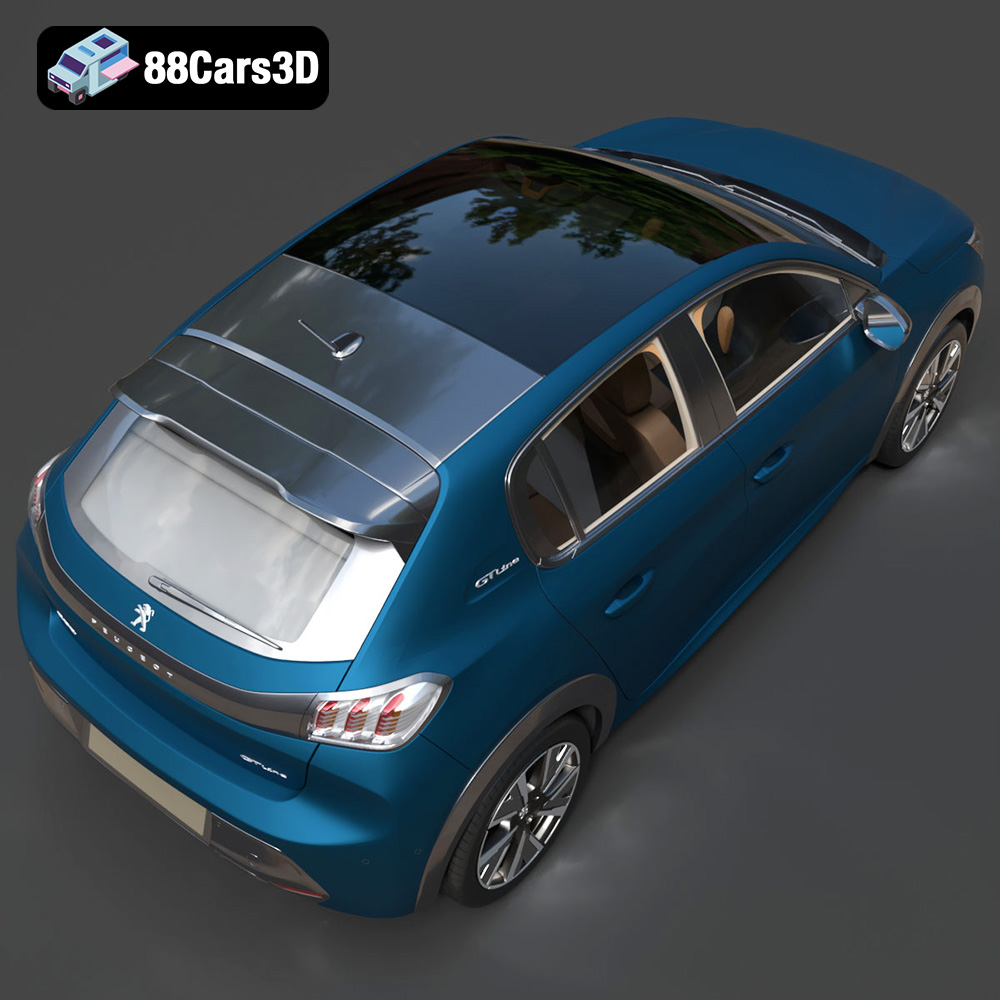
The Peugeot 208 2020 is a stunning example of modern automotive design, and now, thanks to 88cars3d.com, you can bring this iconic hatchback to life through the power of 3D printing. Whether you’re a seasoned 3D printing enthusiast or just starting out, this guide will provide you with the technical knowledge and practical tips necessary to successfully print a high-quality replica of the Peugeot 208 2020. We’ll cover everything from selecting the right materials and printer settings to pre-print preparation and post-processing techniques. Let’s dive in!
The Peugeot 208 2020 model from 88cars3d.com is designed to be versatile, allowing you to choose from various 3D printing technologies. However, the best results will depend on the level of detail you desire and your budget. The two most common technologies are Fused Deposition Modeling (FDM) and Stereolithography (SLA) or resin printing.
FDM printing involves extruding a thermoplastic filament layer by layer to build the model. It’s an affordable and accessible option, making it suitable for larger prints or beginners. For the Peugeot 208, FDM is ideal for printing the main body, chassis, and larger components.
* Pros: Affordable, wide range of materials, larger build volumes.
* Cons: Lower resolution compared to SLA, visible layer lines, requires more post-processing.
SLA printing uses a UV laser to cure liquid resin layer by layer, resulting in incredibly detailed prints. This technology is perfect for smaller, intricate parts of the Peugeot 208, such as the wheels, interior details, and finer exterior features like the grille and lighting elements.
* Pros: High resolution, smooth surfaces, excellent detail capture.
* Cons: More expensive than FDM, smaller build volumes, requires careful handling of resin, more brittle parts.
When working with 3D models for printing, understanding the various file formats and their implications is crucial. The Peugeot 208 2020 3D model is available in several formats, each suited for different purposes. Let’s explore these formats and their relevance to 3D printing:
STL (Stereolithography) is the most ubiquitous file format in 3D printing. It represents the surface geometry of a 3D object using a mesh of triangles. This simplicity makes it universally compatible with slicing software, the programs that convert 3D models into instructions for your 3D printer. When you download the STL file for the Peugeot 208 from 88cars3d.com, you are essentially getting a blueprint specifically designed for additive manufacturing.
The quality of an STL file is directly related to the number of triangles used to represent the model. More triangles result in a smoother surface and greater detail, but also a larger file size and potentially longer processing times. When preparing the Peugeot 208 STL file for printing, you can adjust the mesh resolution in your slicing software to balance detail and performance. Aim for a resolution that captures the car’s curves and features accurately without overwhelming your printer’s processing capabilities.
OBJ (Object) is another common 3D file format. Unlike STL, OBJ can store color and texture information, making it suitable for 3D prints where you want to incorporate these visual elements directly. However, most desktop 3D printers are single-color, so this is more relevant for industrial printers capable of multi-material and multi-color printing or for using the OBJ as a reference for painting after printing.
PLY (Polygon File Format) is designed for storing 3D data acquired from scanning devices. It can represent color, normals, and other properties, making it a versatile format for high-detail models. While not as universally supported as STL, some advanced slicing software can handle PLY files, potentially allowing for more accurate reproduction of complex geometries in the Peugeot 208 model.
BLEND files are native to Blender, a powerful open-source 3D creation suite. This format allows you to directly edit the Peugeot 208 model before exporting it to a printable format like STL. You can modify the geometry, add details, or even create variations of the design. If you are comfortable with Blender, this format provides the most flexibility for customization.
FBX (Filmbox) is a proprietary format developed by Autodesk for interoperability between 3D software. While primarily used in game development and animation, it can sometimes carry material information into slicing software. However, compatibility varies, and it’s not always guaranteed that materials will be correctly interpreted for 3D printing. Usually, the FBX is useful for reference to recreate the colors and materials in post-processing after the model has been printed.
GLB (GL Transmission Format Binary) is designed for efficient transmission and loading of 3D models, particularly in web and AR/VR applications. While not directly used for 3D printing, you can use GLB to preview the Peugeot 208 model in augmented reality before printing, giving you a better sense of its scale and appearance in the real world.
MAX files are native to Autodesk 3ds Max, another industry-standard 3D modeling and animation software. Similar to BLEND files, MAX files provide the opportunity for extensive customization of the Peugeot 208 model before exporting it to a printable format.
For most 3D printing applications, the STL format is the go-to choice due to its simplicity and universal compatibility. Ensure that the STL file you use is of high quality and that the mesh resolution is appropriate for your desired level of detail. Remember to check and repair any mesh errors in your slicing software before printing to avoid potential issues during the printing process.
Before you can start printing the Peugeot 208, you’ll need to prepare the model using slicing software. This process involves converting the 3D model into a series of instructions that your 3D printer can understand. Popular slicing software options include Cura, Simplify3D, PrusaSlicer, and others.
* Layer Height: The 3D Print Settings included with the product recommend 0.04–0.12 mm. A lower layer height results in smoother surfaces but increases print time. Start with 0.1 mm for the body and decrease for smaller, detail-oriented parts.
* Infill Density: A recommended infill density is 20-30%. This setting determines the internal structure of the print. Higher infill provides greater strength but increases material consumption and print time.
* Wall Thickness: The recommended wall thickness is 1.2–2.0 mm. This affects the strength and durability of the outer shell of the print. Aim for at least 2-3 perimeters for good rigidity.
* Supports: The Peugeot 208 model will require supports for overhanging features like side mirrors, the steering wheel, and potentially the exhaust tips. Experiment with support placement and density to minimize material usage and post-processing effort.
* Adhesion: Use a brim or raft to improve bed adhesion, especially for larger parts. This prevents warping and ensures that the print sticks firmly to the build plate.
* Orientation: Print the main body angled to minimize the need for supports and enhance structural integrity. Wheels should be printed separately, ideally with the flat side down for optimal bed adhesion.
* Scaling: The product description recommends scales of 1:12, 1:18, or 1:24. Choose a scale that suits your printer’s build volume and desired level of detail. Larger scales will reveal more intricate features but require more material and time.
* Mesh Repair: Before slicing, use the mesh repair tools in your slicing software to fix any errors in the STL file. This ensures a smooth and error-free printing process.
The choice of material significantly impacts the final appearance, strength, and durability of your 3D printed Peugeot 208. Here are some recommendations based on the desired outcome:
PLA is a biodegradable thermoplastic that’s easy to print and widely available. It’s a great option for beginners and for printing display models. PLA is not ideal for parts that will be subjected to high temperatures or stress.
* Pros: Easy to print, low odor, biodegradable, wide range of colors.
* Cons: Lower strength and heat resistance compared to other materials.
PETG offers a good balance of strength, flexibility, and ease of printing. It’s more durable and heat-resistant than PLA, making it suitable for parts that need to withstand some wear and tear.
* Pros: Good strength and flexibility, heat resistance, easy to print.
* Cons: Can be more prone to stringing than PLA, requires slightly higher printing temperatures.
As previously mentioned, resin is the ideal choice for capturing the finer details of the Peugeot 208 model. Use standard resin for general purposes or experiment with specialty resins for enhanced properties like toughness or flexibility.
* Pros: Exceptional detail, smooth surfaces.
* Cons: More expensive, requires careful handling, limited build volume, parts can be brittle.
Achieving a high-quality 3D print of the Peugeot 208 requires careful calibration of your printer settings. Here are some guidelines to help you dial in your parameters:
* Nozzle Temperature: 200-220°C for PLA, 230-250°C for PETG.
* Bed Temperature: 60°C for PLA, 70-80°C for PETG.
* Print Speed: 40-60 mm/s for the main body, 20-30 mm/s for intricate details.
* Retraction: Adjust retraction settings to minimize stringing, especially with PETG.
* Layer Exposure Time: Consult your resin manufacturer’s recommendations.
* Lift Speed: Adjust lift speed to prevent layer separation.
* Support Settings: Optimize support placement and thickness to minimize damage during removal.
Once the printing is complete, post-processing is essential to achieve a professional-looking result.
Carefully remove supports using pliers or a sharp knife. Sand the surfaces to remove any imperfections and layer lines, starting with coarse grit sandpaper and gradually moving to finer grits.
Apply a primer coat to create a smooth surface for painting. Use automotive-grade paints to replicate the authentic colors of the Peugeot 208, such as Faro Yellow, Vertigo Blue, or Elixir Red. Consider using metallic finishes for added realism.
If you printed the model in multiple parts, carefully assemble them using glue or fasteners. Ensure proper alignment and secure connections.
Even with careful preparation, you may encounter some challenges during the 3D printing process. Here are some common issues and their solutions:
* Warping: Use a heated bed and proper bed adhesion techniques.
* Stringing: Adjust retraction settings and lower printing temperature.
* Layer Separation: Increase layer exposure time (resin printing) or increase printing temperature (FDM printing).
* Poor Detail: Reduce layer height and print speed.
By following this comprehensive guide, you’ll be well-equipped to 3D print a stunning replica of the Peugeot 208 2020. Remember to experiment with different settings and materials to achieve the best possible results. Have fun and enjoy the process of bringing this iconic car to life! You can find this model and many more on 88cars3d.com.
The 2020 Peugeot 208 redefined the modern compact hatchback segment with its bold, aggressive styling and sporty proportions. Featuring the striking ‘saber-tooth’ LED daytime running lights, a muscular sculpted hood, and an elegant gloss-black rear light cluster fascia, this vehicle stands out in any urban setting. Its dynamic stance and streamlined profile perfectly capture the essence of contemporary European car design. This meticulously crafted 3D model boasts an optimized topology of approximately 120k triangles, ensuring flawless game-ready performance without compromising visual fidelity.
$39.99
.2020
.208
.blend
.fbx
.glb
.hatchback
.max
.obj
.peugeot
.ply
.rendering
.stl
.unreal
car-3d-model
city-car
compact-car
game asset
game-ready
low-poly
optimized
VR/AR