Get 20% OFF All Premium 3D & STL Models!

In the dynamic world of digital content creation, the foundation of any stunning visual or interactive experience lies in the quality of its 3D assets. Whether you’re a seasoned professional crafting photorealistic automotive renders, a game developer building an immersive open world, or an innovator venturing into augmented and virtual reality, the demand for meticulously detailed and technically sound 3D car models is constant. These aren’t just mere shapes; they are complex digital blueprints that define aesthetics, performance, and the very believability of a virtual environment.
Today, the focus is not just on quantity but on the intrinsic value that a well-engineered 3D model brings to a project. A high-fidelity asset saves invaluable production time, eliminates the need for extensive rework, and provides a robust starting point for diverse applications. It empowers creators to push boundaries without getting bogged down by foundational issues. This philosophy is at the core of offerings found on platforms like 88cars3d.com, which specializes in providing premium 3D models tailored for professional use across various industries.
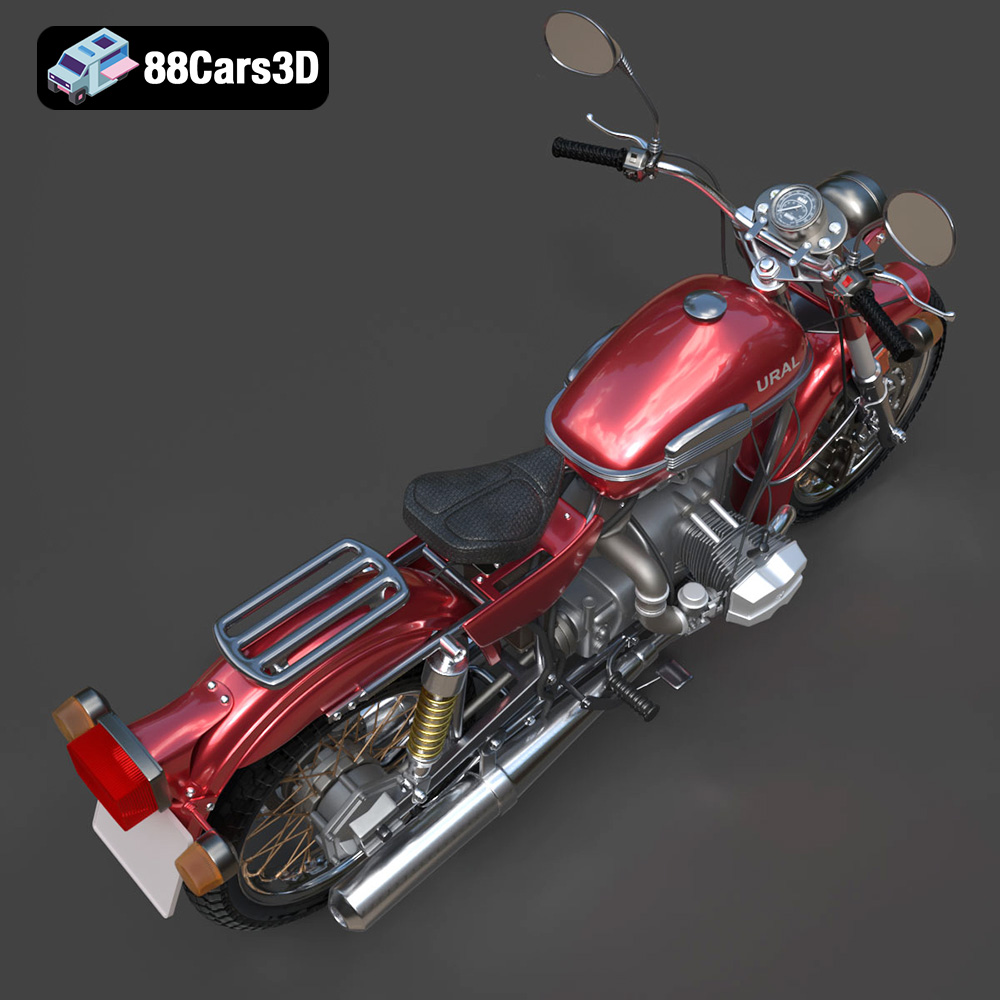
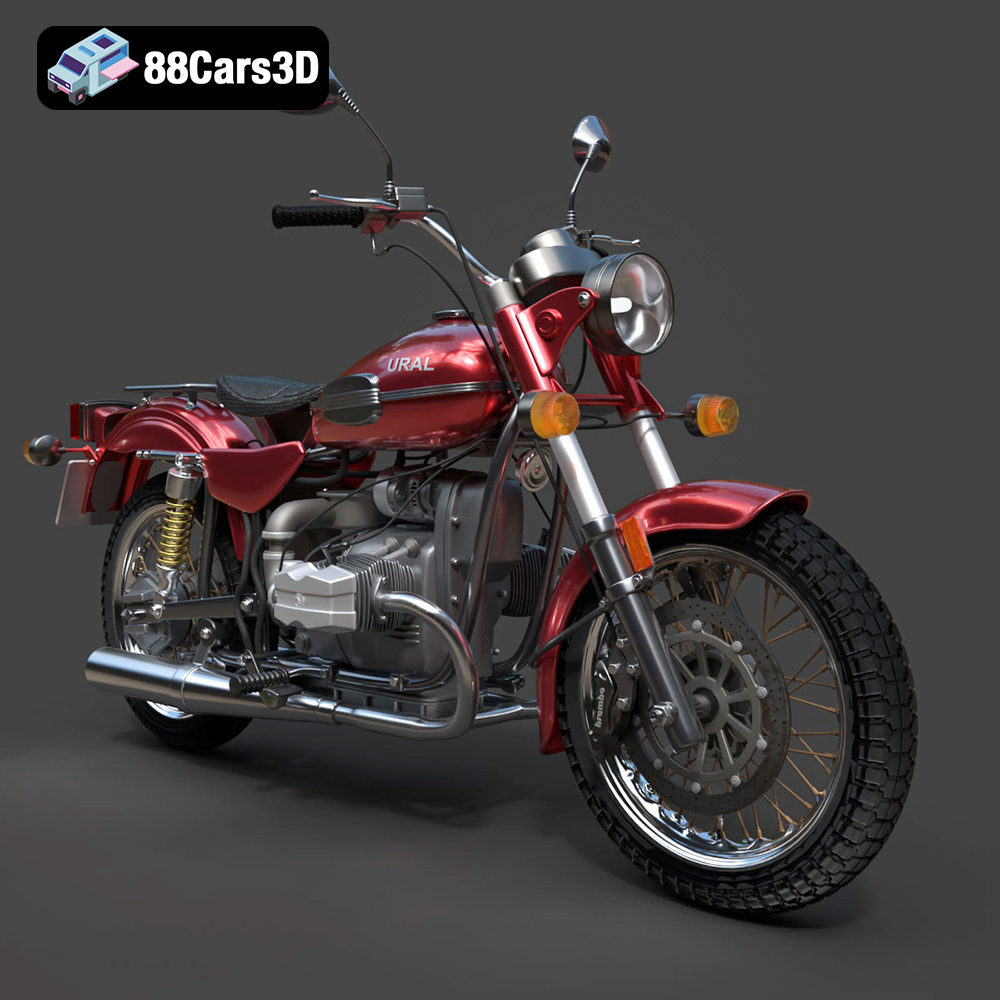
One such exemplary asset is the Ural Solo sT 3D Model. This carefully crafted digital asset captures the rugged design and iconic presence of the Ural Solo sT, delivering exceptional detail for your projects. Its authenticity makes it ideal for both close-up shots in high-end automotive rendering and as a compelling element within expansive game environments or simulations. Its clean geometry, accurate proportions, and realistic materials are a testament to the dedication required to produce assets that genuinely elevate a project.
Navigating the landscape of 3D production often means grappling with a multitude of file formats, each designed with specific purposes and workflows in mind. Understanding when and why to use a particular format is crucial for maintaining data integrity, optimizing performance, and ensuring seamless integration into your preferred software or engine. The Ural Solo sT 3D Model, like many professional assets from 88cars3d.com, is offered in a comprehensive range of formats, making it incredibly versatile.
The .blend format is Blender’s native file type, encompassing not just the raw mesh data but also materials, textures, lighting setups, animation data, camera settings, and even full scene configurations. When you download the Ural Solo sT in .blend format, you gain access to a fully editable Blender scene, complete with pre-configured materials and potentially a lighting setup. This is ideal for Blender users who want to dive straight into modifying, animating, or rendering the model within their familiar environment, leveraging Blender’s powerful Cycles or Eevee renderers. Technical benefits include maintaining node-based materials, custom properties, and Modifier Stack information, allowing for non-destructive workflows.
Autodesk’s .fbx (Filmbox) format has become an industry standard for exchanging 3D data between various software applications, particularly in game development. It is highly robust and supports geometry, materials (with some limitations in translation across software), textures, animation, and even skeletal data. For the Ural Solo sT, the .fbx version is “game-engine ready,” meaning it’s optimized for import into engines like Unreal Engine and Unity. Its binary nature makes it efficient for real-time pipelines, though careful attention to material setup post-import is often necessary, as PBR shaders may not translate perfectly across all platforms.
The .obj (Wavefront OBJ) format is one of the oldest and most widely supported 3D file formats. It’s a universal standard for transmitting mesh data (vertices, normals, UVs, faces) and can link to external .mtl (material) files for basic material properties like diffuse color and texture maps. While it doesn’t support advanced features like animation or complex PBR materials directly within the file, its broad compatibility makes it excellent for cross-software integration. If you need to import the Ural Solo sT into less common 3D applications or legacy systems, .obj is a reliable choice for the core geometry.
The .glb (GLB format, a binary form of glTF) is a relatively newer, yet rapidly adopted, format specifically designed for efficient transmission of 3D scenes and models for web, AR, and VR applications. It encapsulates geometry, materials (PBR support), textures, animations, and scene hierarchy into a single, self-contained file. The Ural Solo sT 3D Model in .glb format is optimized for these interactive environments, offering compact file sizes and fast loading times, which are critical for smooth experiences on diverse hardware, from smartphones to dedicated VR headsets.
The .stl (Stereolithography) format is almost exclusively used for 3D printing and rapid prototyping. It describes only the surface geometry of a 3D object using a tessellated mesh of triangular faces. It lacks color, texture, or material information. When preparing the Ural Solo sT for 3D printing, the .stl version ensures a watertight, manifold mesh, which is essential for accurate physical production. Users can easily scale and prepare this version for printing on various FDM, SLA, or SLS machines.
The .ply (Polygon File Format) is often used for storing 3D data from 3D scanners, CAD software, and scientific applications. It supports polygon meshes with additional properties per vertex or face, such as color, normals, and transparency. While less common in artistic rendering workflows, the .ply format for the Ural Solo sT offers a “detailed polygon mesh for analysis and visualization,” making it suitable for applications requiring high precision or direct integration with engineering software.
The .unreal format, or more accurately, assets pre-configured for Unreal Engine, implies a highly optimized and streamlined integration. While not a standalone file format in the same way .fbx is, an “.unreal” offering typically means the model has been specifically prepared and possibly packaged within an Unreal Engine project structure (e.g., a .uasset file or a content pack). This includes correct material setup (often using Unreal’s physically based material system), optimized LODs (Levels of Detail), and potentially collision meshes, offering a true plug-and-play experience for Unreal Engine developers with the Ural Solo sT.
The .max format is the native file type for Autodesk 3ds Max, a powerful 3D modeling, animation, and rendering software. Similar to .blend, a .max file includes all scene data: geometry, materials, lighting, cameras, animation, and modifiers. The editable 3ds Max file for the Ural Solo sT allows professionals working in 3ds Max to fully manipulate the model, create custom animations, or render it using high-end renderers like V-Ray or Corona, leveraging all the intricate details and clean topology. This format provides the most comprehensive control for 3ds Max users.
By offering the Ural Solo sT 3D Model in such a diverse array of formats, 88cars3d.com ensures that creators are equipped with the right tools, regardless of their specific software, engine, or end-use application.
Automotive rendering demands nothing less than perfection. From glossy paint finishes to intricate chrome details and realistic tire treads, every element must contribute to an illusion of reality. High-quality 3D car models are the bedrock of achieving this photorealism, providing the accurate geometry and robust topology needed for stunning visuals. The Ural Solo sT 3D Model is engineered precisely for this purpose, offering the structural precision essential for captivating automotive rendering.
Achieving photorealism extends beyond just a good model; it’s about how light interacts with its surfaces. Physically Based Rendering (PBR) materials are crucial here, accurately simulating how light behaves on different material types. For the Ural Solo sT, this means meticulously crafted PBR textures for its metallic frame, rubber tires, leather seat, and glass components. In professional workflows using renderers like V-Ray, Corona Renderer, or Cycles in Blender, artists utilize HDRI (High Dynamic Range Image) lighting to simulate real-world illumination, casting accurate reflections and shadows. The clean UV mapping on the Ural Solo sT ensures that these high-resolution textures align perfectly, preventing distortion and delivering a flawless appearance.
Imagine a scenario where a marketing agency needs to create a stunning promotional image for the Ural Solo sT. Using the provided .max file, a 3D artist can import the model directly into 3ds Max. The “clean geometry, accurate proportions, and realistic materials” of the Ural Solo sT 3D Model mean less time spent on cleaning up the mesh or rebuilding shaders. The artist would then set up a virtual studio environment, perhaps with an HDRI of an open road or a dramatic landscape, complemented by area lights to emphasize its rugged features. V-Ray’s powerful rendering engine, combined with the model’s well-structured topology, allows for rapid iteration and stunning output, capturing every nuance from the gleam of its chrome to the subtle texture of its exhaust pipes. The model’s quality ensures that even under intense close-up shots, details remain crisp and believable.
No render is complete without a touch of post-production. Once the raw image of the Ural Solo sT is rendered, artists employ software like Adobe Photoshop or Affinity Photo to enhance the visuals further. This can involve color grading to set the mood, adding subtle atmospheric effects like dust or lens flares, and sharpening details to make the vehicle truly pop. The high quality and detail of the base Ural Solo sT render provide an excellent foundation, allowing post-production to focus on artistic embellishment rather than fixing inherent model flaws. This holistic approach ensures that the final image is not just realistic, but also visually arresting and emotionally resonant.
In game development, 3D car models are more than just visual elements; they are interactive components that must perform flawlessly in real-time environments. Developers face the challenge of balancing visual fidelity with performance optimization. The Ural Solo sT 3D Model, designed with professional quality in mind, addresses these challenges directly, making it an excellent choice for a variety of demanding digital pipelines.
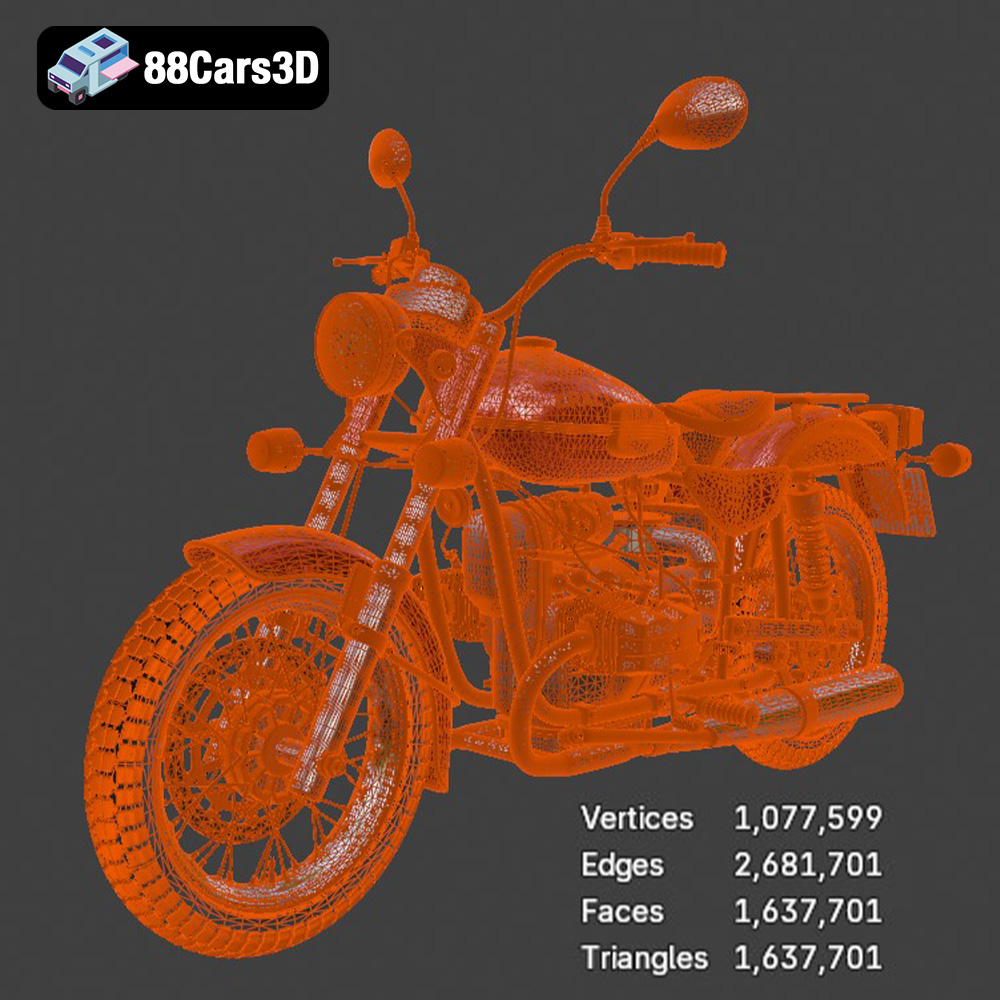
A high poly count can cripple game performance. While the Ural Solo sT 3D Model offers exceptional detail, a game-ready asset often requires careful optimization. This involves creating Levels of Detail (LODs) – multiple versions of the model at varying poly counts. The highest poly version is used for close-up views, while progressively lower poly versions are swapped in as the player moves further away. The “well-structured topology” of the Ural Solo sT is critical here, as it allows for efficient mesh decimation without sacrificing essential silhouette details. Additionally, meticulous UV mapping is vital for baking high-resolution details from the high-poly model onto normal maps for the low-poly versions, preserving visual quality without the performance hit.
Game engines like Unreal Engine and Unity rely on robust asset pipelines. The Ural Solo sT 3D Model’s availability in .fbx and .unreal formats streamlines this process. For Unreal Engine, the .unreal file provides a pre-configured, engine-ready asset, meaning materials are likely set up using Unreal’s PBR system, and LODs might already be configured. If using the .fbx, developers can import the model, apply PBR materials (base color, normal, metallic, roughness, ambient occlusion maps), set up collision meshes, and configure LODs within the engine. The clean geometry of the Ural Solo sT minimizes import errors and ensures correct lightmap UV generation, crucial for static lighting scenarios.
Imagine integrating the Ural Solo sT into an open-world adventure game, perhaps as a customizable vehicle for a protagonist or an environmental prop in a post-apocalyptic setting. The model’s “rugged design and iconic presence” lend themselves perfectly to such narratives. Its “authentic structural precision” allows for realistic physics simulations, from suspension movement to damage modeling. Furthermore, the ability to easily integrate and customize its materials means artists can create variations – from pristine showroom condition to battle-hardened and rusty – adding depth and realism to the game world. The quality of the base asset from 88cars3d.com provides a strong foundation for these creative expansions, ensuring the motorcycle stands out as a compelling visual and interactive element.
Augmented Reality (AR), Virtual Reality (VR), and advanced simulation platforms are transforming industries, from training and education to product design and entertainment. In these interactive environments, low latency, efficient rendering, and accurate representations are paramount. The Ural Solo sT 3D Model is perfectly suited for these emerging applications, especially with its optimized .glb format.
Interactive AR/VR experiences demand highly optimized assets. Every polygon, every texture map, and every draw call impacts performance. Models must be lightweight yet visually convincing. The “clean geometry” and “well-structured topology” of the Ural Solo sT 3D Model provide an excellent starting point for this optimization. For AR/VR, models often undergo a further process of poly reduction, merging materials, and optimizing texture atlases. The .glb format, in particular, is designed for this, bundling all necessary assets (geometry, PBR materials, textures) into a single, compact file, reducing load times and simplifying distribution across web and mobile platforms.
Consider a scenario in military or industrial training, where maintenance technicians need to learn the intricacies of a complex vehicle. A highly detailed 3D model like the Ural Solo sT can be used in a VR simulation to provide an immersive, hands-on training experience without the need for a physical prototype. Technicians could “disassemble” and “reassemble” components, identifying parts and understanding their function in a safe, virtual environment. For architectural visualization, a photorealistic motorcycle might be placed within a virtual showroom to enhance the realism of an unbuilt space, allowing clients to virtually walk through and interact with the scene. The “authentic structural precision” of the Ural Solo sT ensures that these visualizations are not only compelling but also functionally accurate.
The rise of web-based AR/VR is making interactive 3D content accessible through standard web browsers. Here, the .glb format shines. Imagine a motorcycle manufacturer wanting to allow customers to configure and view the Ural Solo sT in 3D directly on their website, or even place it in their driveway using smartphone AR. The .glb format facilitates this by being highly efficient for streaming and rendering in web browsers, including support for PBR materials, ensuring consistent visual quality across devices. This capability is invaluable for e-commerce, marketing, and creating engaging, immersive digital experiences, directly leveraging assets like the Ural Solo sT 3D Model from 88cars3d.com.
The bridge between the digital and physical realms is nowhere more apparent than in 3D printing. What begins as a meticulously crafted 3D model can be transformed into a tangible object, used for prototyping, scale models, or even functional parts. The Ural Solo sT 3D Model, with its .stl format, is ready to make this leap.
For a 3D model to be successfully printed, it must be “manifold” or “watertight” – meaning it has no holes, self-intersections, or inverted normals that would confuse the 3D printer’s slicer software. The .stl format, specifically designed for this purpose, represents the model’s surface as a collection of triangles, eliminating extraneous data like materials or animation. When acquiring the Ural Solo sT in .stl format, users are getting a model specifically prepared to meet these geometric requirements, significantly reducing the prep time usually associated with converting complex visual models for additive manufacturing. This ensures a clean translation from digital design to physical prototype.
The “clean geometry” and “well-structured topology” that make the Ural Solo sT 3D Model excellent for rendering and gaming also make it ideal for 3D printing. A model with poor mesh integrity – gaps, non-manifold edges, or intersecting geometry – will lead to printing errors, requiring extensive repair. The inherent quality of the Ural Solo sT model ensures that its .stl version is robust and ready for slicing, whether for FDM, SLA, or industrial 3D printing processes. This attention to underlying mesh quality is a hallmark of professional-grade 3D assets.
While often used for aesthetic scale models, the precision of the Ural Solo sT 3D Model could extend to functional prototyping. Imagine an engineer needing to test the ergonomics of a specific handlebar design or the fit of a custom luggage rack for the Ural Solo sT. By utilizing sections of the 3D model and printing them, quick, iterative physical prototypes can be created, allowing for real-world testing and validation before committing to expensive manufacturing tooling. This iterative design process, powered by accurate digital assets like those available on 88cars3d.com, significantly accelerates product development cycles and reduces costs.
In every facet of modern digital production – from the breathtaking realism of automotive rendering to the interactive immersion of game development, the cutting-edge experiences of AR/VR, and the tangible results of 3D printing – the quality of your foundational 3D models is paramount. Investing in expertly crafted assets like the Ural Solo sT 3D Model is not merely a purchase; it’s an investment in efficiency, fidelity, and creative freedom.
The Ural Solo sT 3D Model stands as a prime example of what professional-grade assets can offer: “clean geometry, accurate proportions, realistic materials,” and “well-structured topology” that ensure seamless integration and exceptional performance across a myriad of workflows. Its availability in diverse formats – from .blend and .max for native software users, to .fbx and .unreal for game developers, .glb for AR/VR pioneers, and .stl for 3D printing enthusiasts – underscores its versatility and value.
By providing such comprehensive solutions, platforms like 88cars3d.com empower artists, designers, and developers to bring their visions to life with unparalleled realism and efficiency. Whether your goal is a cinematic render, an immersive game world, or a physical prototype, starting with a high-fidelity 3D car model like the Ural Solo sT ensures that your project not only meets but exceeds expectations, setting a new standard for excellence in digital content creation.
Experience true realism with the Ural Solo sT 3D Model. This carefully crafted digital asset captures the rugged design and iconic presence of the Ural Solo sT, delivering exceptional detail for your projects. Ideal for both close-up shots and expansive environments, this model brings authentic structural precision to any scene. Built with professional quality in mind, the model features clean geometry, accurate proportions, and realistic materials. The well-structured topology ensures smooth performance and flawless subdivision, making it an excellent choice for a variety of demanding digital pipelines and rendering setups. This versatile 3D model is perfect for diverse applications, including game development, automotive rendering, AR/VR experiences, and simulation visualization. It integrates seamlessly into your workflow, providing a ready-to-use solution for creators, designers, and developers alike.
$39.99
.arvr
.blend
.car3dmodel
.cruiser
.fbx
.gameasset
.glb
.max
.motorcycle
.obj
.ply
.rendering
.simulation
.solost
.stl
.unreal
.ural