Get 20% OFF All Premium 3D & STL Models!

In the rapidly evolving landscape of digital visualization, the demand for incredibly realistic and performant 3D assets has never been higher. From blockbuster video games to cutting-edge architectural walkthroughs, and from immersive virtual reality experiences to stunning product advertisements, the quality of a 3D model can make or break a project. Automotive models, in particular, stand at the pinnacle of this challenge, requiring an intricate balance of aesthetic accuracy, technical precision, and optimization for diverse platforms. Capturing the essence of a real-world vehicle, down to the subtle curves and mechanical intricacies, demands a deep understanding of both design principles and 3D software workflows.
For professionals in game development, automotive rendering, and visualization, sourcing high-quality, pre-made 3D car models is a strategic advantage. It allows artists and developers to bypass the hundreds, if not thousands, of hours required for meticulous modeling and texturing, enabling them to focus on creative direction, scene assembly, and final polish. This is where specialized marketplaces like 88cars3d.com become invaluable resources, offering expertly crafted assets that meet industry standards. Among their impressive collection, a standout example is the Kawasaki Ninja 3D Model, an asset that perfectly exemplifies the fusion of detailed craftsmanship and technical readiness.
Navigating the world of 3D modeling requires a fundamental understanding of the various file formats available. Each format serves specific purposes, optimized for different software environments, use cases, and levels of data retention. Choosing the correct format is crucial for workflow efficiency, compatibility, and ensuring that your 3D assets perform as intended across diverse applications.
The .blend format is the native file type for Blender, the powerful open-source 3D creation suite. A .blend file is a comprehensive package, containing not just the mesh data but also all scene information: materials, textures, lighting setups, cameras, animations, physics simulations, and even custom scripts. This makes it ideal for users who primarily work within Blender, offering full editability and easy project sharing among Blender artists. For the Kawasaki Ninja 3D Model, the .blend file provides an uncompressed, fully editable scene, allowing artists to delve into every nuance of its construction, from modifying shader networks to repositioning scene elements or even re-rigging components with full control.
.fbx (Filmbox) is arguably the most widely adopted interchange format in the 3D industry, particularly popular in game development (Unreal, Unity) and animation pipelines. Developed by Autodesk, FBX supports geometry, materials, textures, animations, rigging, and even blend shapes, making it incredibly versatile. Its robust support across major 3D software (3ds Max, Maya, Blender, Cinema 4D) ensures seamless asset transfer. For the Kawasaki Ninja 3D Model, the .fbx version is often the go-to for importing into game engines or complex animation software, retaining pivot points for animation, UV mapping, and basic material assignments for quick setup.
.obj (Wavefront OBJ) is one of the oldest and most universally compatible 3D file formats. It primarily stores geometric data—vertices, normals, texture coordinates, and faces—and can link to external .mtl (material) files for basic material properties. While it doesn’t support animation or rigging, its simplicity and widespread support make it excellent for transferring static mesh data between almost any 3D application. When working with the Kawasaki Ninja, the .obj version is perfect for scenarios where you need raw mesh data to apply your own advanced materials or integrate it into a unique pipeline where animation is handled separately.
.glb (GL Transmission Format Binary) is the binary version of glTF, a modern, open-standard format designed for efficient transmission and loading of 3D scenes and models by applications. It’s particularly optimized for augmented reality (AR), virtual reality (VR), and browser-based display, consolidating all necessary assets (geometry, materials, textures, animations) into a single, self-contained file. Its efficiency and small file size make it perfect for mobile AR apps or interactive web viewers. The Kawasaki Ninja 3D Model in .glb format would be ideal for a virtual showroom on a website or an AR experience on a smartphone, providing immediate visual feedback with minimal load times.
.stl (Stereolithography) is the de facto standard file format for 3D printing. It describes only the surface geometry of a 3D object using a collection of triangular facets, without color, texture, or other CAD attributes. While simple, its ubiquity ensures compatibility with virtually all 3D printers and slicing software. The Kawasaki Ninja 3D Model’s availability in .stl format means hobbyists and professionals can readily prepare it for physical production, creating display-scale replicas or prototypes with specific print settings for optimal detail and structural integrity.
.ply (Polygon File Format, or Stanford Triangle Format) is another format for storing 3D data, particularly useful for scanned data, CAD applications, and scientific analysis. Like .obj, it primarily describes geometry, but it can also store properties like color, transparency, and normal information per vertex or face. It’s often used where precision and detailed vertex attribute storage are critical. For the Kawasaki Ninja, the .ply format could be utilized in specialized engineering or design review processes where analyzing the mesh structure beyond basic visualization is necessary.
While not a universal file extension in the same vein as .fbx or .obj, the inclusion of .unreal often signifies an asset specifically optimized and prepared for direct import into Unreal Engine. This typically means the model has been rigorously checked for topology, UV mapping, material assignments, and often comes with pre-built textures and sometimes even basic Unreal blueprints or material instances. Such assets are designed to be “drag-and-drop” ready, minimizing setup time for developers. For the Kawasaki Ninja 3D Model, an .unreal asset would imply it’s been tested and tuned for optimal performance within the engine, with its ~150,000 triangle count striking a perfect balance for real-time fidelity.
Finally, the .max format is the native file type for Autodesk 3ds Max, one of the leading 3D modeling, animation, and rendering software packages. Similar to .blend, a .max file encapsulates an entire scene, including geometry, modifiers, materials, lighting, cameras, and animation data. It provides the highest level of editability for users working in 3ds Max, allowing for complex scene setups, advanced rendering techniques with V-Ray or Corona, and intricate animation sequences. The .max version of the Kawasaki Ninja 3D Model offers 3ds Max users complete freedom to integrate it into their professional visualization and animation projects, leveraging all the powerful features of the software.
The true value of a premium 3D asset lies in its meticulous attention to detail combined with intelligent optimization. The Kawasaki Ninja 3D Model from 88cars3d.com stands as a prime example of this philosophy, engineered to meet the demanding requirements of various professional applications. It’s not merely a surface representation but a comprehensive digital recreation.
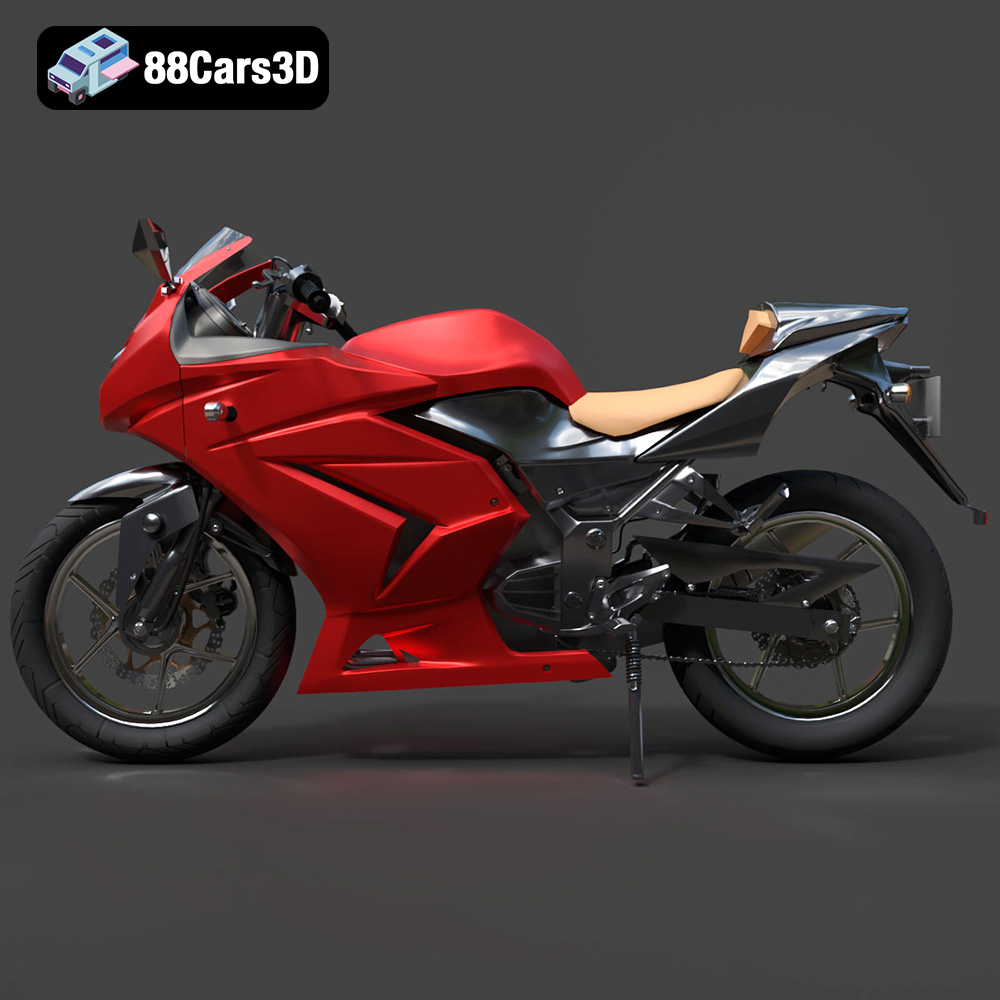
The Kawasaki Ninja is synonymous with aggressive styling and high-performance engineering. This 3D model faithfully translates those real-world attributes into the digital realm. Every curve of the sleek profile, the distinctive dual-headlight fascia, and the muscular fairings that define the Ninja’s iconic silhouette have been accurately captured. Beyond the exterior, the model delves into the mechanical heart, detailing the inline-four engine block, the sport-tuned upswept exhaust system with realistic metallic shading, and the telescopic front forks alongside the rear monoshock suspension. This level of detail ensures that whether rendered up close or viewed from a distance, the model conveys the authenticity and power of the legendary sportbike.
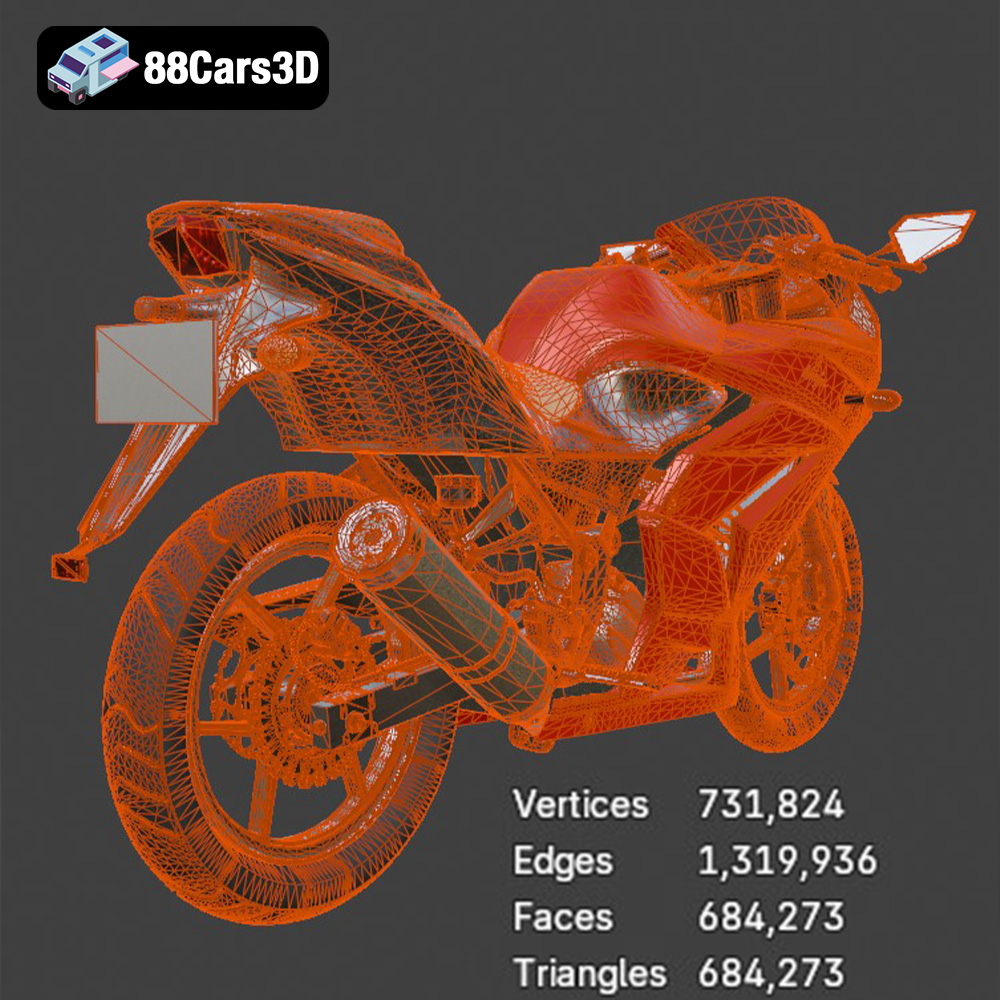
A common challenge in 3D asset creation is balancing visual realism with performance, especially for real-time applications like games and AR/VR. The Kawasaki Ninja 3D Model tackles this head-on with its optimized topology and a game-ready triangle count of approximately 150,000. This polycount is a “sweet spot” that delivers exceptional visual fidelity without bogging down real-time engines like Unreal or Unity. The model maintains its high-end visual realism while being perfectly suitable for dynamic environments and interactive experiences.
The versatility of the Kawasaki Ninja 3D Model truly shines when integrated into various professional 3D workflows. Its inclusion of multiple file formats (like .max, .blend, .fbx, .unreal) ensures compatibility with leading industry software, allowing artists and developers to leverage their preferred tools.
For high-end automotive rendering and animation, Autodesk 3ds Max remains a dominant force. The provided .max file offers native access to all model data, including its separated components and material assignments. Artists can import the Kawasaki Ninja 3D Model and immediately begin setting up complex lighting scenarios, advanced V-Ray or Corona renders, and intricate camera animations. The proper pivot setup for wheels and steering means artists can quickly rig the bike for dynamic shots, showcasing its suspension travel or leaning into a turn. This makes it ideal for promotional videos, cinematic cutscenes, or detailed product visualizations where absolute visual fidelity is paramount.
Blender users benefit immensely from the native .blend file, which provides a complete scene with materials already configured. This allows for immediate rendering using Cycles or Eevee, Blender’s powerful render engines. For game developers or indie artists using Blender, the optimized mesh and separated parts facilitate easy integration into their projects. They can quickly pose the bike, set up dynamic camera movements, or even export it to other formats after applying additional modifiers or animations specific to their project needs. The open-source nature of Blender, combined with a high-quality asset like the Ninja, empowers creators with unparalleled flexibility.
The “game-ready” nature and the inclusion of an .fbx or .unreal format make the Kawasaki Ninja 3D Model exceptionally well-suited for Unreal Engine. Importing the model is straightforward, and its optimized polycount of ~150,000 triangles ensures excellent performance within a real-time environment. Developers can set up vehicle physics, integrate it into racing mechanics, or use it as a striking centerpiece in a virtual showroom or open-world game. The separated parts and proper pivot points are crucial for setting up skeletal meshes for animation and physics interactions within Unreal’s robust vehicle systems, creating truly immersive user experiences.
The utility of a meticulously crafted 3D asset like the Kawasaki Ninja extends far beyond static renders. Its versatile design and multiple file formats open doors to a broad spectrum of applications, catering to diverse industry needs.
The Kawasaki Ninja 3D Model is an ideal asset for game development, particularly for racing titles, open-world adventures, and simulation games. Its optimized polycount ensures smooth performance, even when multiple bikes are on screen or in complex environments. The separate wheels, suspension, and steering components are critical for setting up realistic physics and animation in game engines like Unreal and Unity. Imagine high-speed chases, urban exploration, or competitive track races, all powered by this visually stunning and technically sound model. The attention to cockpit details also makes it perfect for first-person camera views, immersing players directly into the action.
The burgeoning fields of Augmented Reality (AR) and Virtual Reality (VR) demand highly optimized yet detailed 3D assets. The Kawasaki Ninja 3D Model is perfectly suited for these platforms, especially with its .glb format. Brands can create immersive virtual showrooms where potential customers can explore the bike from every angle, customize its colors and features in real-time, or even place it in their own driveway using AR on a smartphone. For training simulations or virtual tours, the model offers an unparalleled level of realism, allowing users to interact with a digital representation that mirrors its physical counterpart.
Beyond digital displays, the Kawasaki Ninja 3D Model can transcend the screen and become a tangible object. Its availability in .stl format makes it ready for 3D printing, catering to hobbyists, collectors, and design professionals. The detailed geometry ensures that even at smaller scales (recommended 1:12 / 1:18 / 1:24), the intricate features of the bike are preserved. While post-processing, such as sanding and painting with authentic factory colors, is recommended, the foundation for a high-quality physical replica is firmly laid. This opens avenues for creating display models, custom prototypes, or even personalized collectibles.
While the Kawasaki Ninja 3D Model arrives in a highly polished state, its true power lies in the extensive customization options it offers. Professional workflows rarely involve simply dropping an asset into a scene; rather, they involve tailoring it to specific project requirements, branding guidelines, or creative visions. The inherent structure of the Ninja model, with its separated parts and high-quality materials, is designed to facilitate this iterative process.
The ability to easily modify the model’s aesthetic properties is crucial. Artists can quickly experiment with different looks, from factory-standard finishes to wild custom designs. This flexibility is invaluable for marketing campaigns, diverse game environments, or personalized AR experiences.
A 3D model doesn’t exist in a vacuum; its appearance is heavily influenced by the lighting and environment it’s placed in. The Kawasaki Ninja model is built to react realistically to various lighting conditions, making it adaptable to any scene.
In the vast ocean of 3D assets available online, distinguishing between mediocre and truly professional-grade models is paramount. The difference often lies in the balance of detail, optimization, and versatility, qualities exemplified by products found on platforms like 88cars3d.com. Investing in high-quality 3D car models or motorcycle models saves significant time and resources in the long run, ensuring project success and delivering impactful visual results.
When considering a 3D model for your project, look beyond the initial visual appeal. Technical specifications, file format support, and the level of optimization are critical. A premium asset, like the Kawasaki Ninja 3D Model, is not just a collection of polygons; it’s a carefully engineered digital product designed for performance and flexibility across multiple pipelines. It comes with:
For any professional undertaking in automotive rendering, game asset development, or advanced visualization, the choice of assets directly impacts the final product’s quality and the project’s efficiency. 88cars3d.com provides a curated selection of such high-caliber 3D models, ensuring that creators have access to the best tools to bring their visions to life.
The world of 3D visualization and interactive experiences is continuously pushing the boundaries of realism and immersion. At the core of this evolution lies the demand for exceptionally crafted 3D assets. As we’ve explored, the Kawasaki Ninja 3D Model serves as a prime example of an asset engineered for excellence, balancing intricate detail with critical optimization. From its meticulous recreation of the iconic sportbike’s design and engineering to its adaptability across diverse professional workflows—be it high-end rendering in 3ds Max, creative freedom in Blender, or real-time integration in Unreal Engine—this model is a testament to quality asset development.
Furthermore, its utility extends into rapidly growing fields like AR/VR for immersive showrooms and 3D printing for tangible replicas, demonstrating the far-reaching impact of a well-designed digital product. The comprehensive support for various file formats ensures seamless integration into almost any pipeline, empowering artists and developers to focus on their creative endeavors rather than technical hurdles. For professionals seeking top-tier 3D car models and game assets, resources like 88cars3d.com are indispensable, offering a gateway to accelerating projects and achieving unparalleled visual fidelity. The Kawasaki Ninja 3D Model is more than just a model; it’s a foundation for innovation in digital automotive design and interactive media.
The Kawasaki Ninja is a legendary nameplate in the world of sportbikes, known for its aggressive styling, track-focused performance, and cutting-edge aerodynamics. This 3D model accurately captures the sleek profile, dual-headlight fascia, and muscular fairings that define the Ninja’s iconic silhouette. From the detailed inline-four engine to the upswept exhaust system, every element has been faithfully recreated to showcase its racing heritage. This 3D model boasts optimized topology and a game-ready triangle count, delivering exceptional visual fidelity without compromising real-time performance. Designed for maximum versatility, it features high-quality materials and distinct separated parts, making it an ideal asset for game development, AR/VR experiences, high-end animation, and product visualization. Perfect for high-speed racing simulations, urban environment renders, virtual showrooms, and promotional videos.
$39.99
.blend
.fbx
.glb
.kawasaki
.max
.ninja
.obj
.ply
.rendering
.stl
.superbike
.unreal
game asset
game-ready
low-poly
motorcycle-3d-model
optimized
sports-bike
VR/AR