Get 20% OFF All Premium 3D & STL Models!

In the fast-evolving landscape of digital content creation, the demand for photorealistic and highly optimized 3D assets is at an all-time high. From blockbuster video games and immersive AR/VR experiences to stunning automotive marketing campaigns and crucial engineering simulations, the quality of your 3D models directly impacts the final output’s realism, performance, and overall impact. Professional artists, developers, and designers understand that starting with a meticulously crafted model is not just a convenience, but a fundamental requirement for success.
Imagine being able to integrate a vehicle into your project that not only looks authentic but is also built with a clean, efficient topology, ready for any challenge you throw at it. This is where premium assets, such as the Ural Solo sT 3D Model, truly shine. Sourced from expert platforms like 88cars3d.com, these models are designed to be more than just pretty faces; they are robust, versatile tools engineered to seamlessly integrate into diverse professional workflows, saving countless hours in modeling and optimization while elevating the fidelity of your work to new heights.
The versatility of a 3D model often hinges on the file formats it supports, as each format serves specific purposes and excels in different applications. Understanding these formats is crucial for any professional working with 3D assets, ensuring smooth integration and optimal performance across various software and platforms. The Ural Solo sT 3D Model, for instance, is a prime example of an asset that caters to a broad spectrum of needs by offering a comprehensive suite of file types.
The .blend format is the native file type for Blender, a powerful and increasingly popular open-source 3D creation suite. When you receive a .blend file, you’re getting a fully editable Blender scene, often complete with materials, textures, lighting setups, and even basic animation rigs. This format is ideal for artists who primarily work in Blender and require maximum flexibility to modify the model, adjust shaders, or integrate it into a pre-existing Blender project. It offers the most comprehensive control over the asset’s properties within the Blender ecosystem.
.fbx (Filmbox) is arguably one of the most widely used and supported 3D file formats in the industry. Developed by Autodesk, it’s designed for excellent interoperability between different 3D software packages like 3ds Max, Maya, Blender, Cinema 4D, and critically, game engines like Unreal Engine and Unity. An .fbx file can encapsulate not just geometry, but also materials, textures, animations, skinning, and camera data. This makes it an ideal choice for complex assets like the Ural Solo sT when moving between modeling software and real-time pipelines, ensuring a consistent transfer of data.
.obj (Wavefront OBJ) is a universal 3D model format renowned for its simplicity and wide compatibility. It’s an excellent choice for basic mesh data exchange, as almost every 3D software can import and export .obj files. While it’s highly compatible, .obj typically stores only geometry (vertices, normals, UVs, and faces) and material references (via an accompanying .mtl file), but not advanced features like animation or rigging. For the Ural Solo sT, the .obj format provides a robust, universally accessible mesh that can be easily brought into any 3D application for further texturing and setup.
.glb (GLB format) is the binary version of glTF (GL Transmission Format), an open standard for 3D scenes and models. It’s specifically optimized for efficient transmission and loading of 3D content in web-based applications, AR (Augmented Reality), and VR (Virtual Reality) experiences. A .glb file packages all necessary data—geometry, materials, textures, and animations—into a single file, making it incredibly streamlined for distribution. The Ural Solo sT 3D Model in .glb format would be perfect for deploying interactive 3D visualizations directly on a website or integrating it into mobile AR applications.
.stl (STereoLithography) is the de facto standard file format for 3D printing. It represents a 3D model as a series of connected triangles (a tessellated surface) and primarily conveys surface geometry without color, texture, or material information. For designers looking to transform the digital Ural Solo sT into a physical prototype or collectible, the .stl format ensures a clean, manifold mesh ready for additive manufacturing processes.
.ply (Polygon File Format) is a versatile format for storing 3D data from 3D scanners, CAD software, and other precision modeling tools. It can store a wider range of properties than .obj, including color, transparency, and sometimes even surface normals or confidence values for each vertex. This makes .ply particularly useful for scientific data, reverse engineering, or detailed analysis where preserving intricate mesh information, like that found in the Ural Solo sT, is critical.
The inclusion of a .unreal file format means the asset is pre-configured and optimized specifically for use within Unreal Engine. This often implies that the model has been imported, has its materials set up using Unreal’s PBR workflow, potentially includes LODs (Level of Detail), and might even have collision meshes or basic physics assets ready to go. For game developers or real-time visualization specialists using Unreal Engine, this format saves significant setup time and ensures the Ural Solo sT is ready for immediate deployment.
Like .blend for Blender, .max is the native file format for Autodesk 3ds Max, a leading software for 3D modeling, animation, and rendering. A .max file provides a complete, editable 3ds Max scene, allowing users to access all modifiers, materials, lighting, and animation data within the software. For those entrenched in the 3ds Max ecosystem, the Ural Solo sT in .max format offers the ultimate flexibility for advanced rendering, animation, and customization within their preferred environment.
The availability of such a diverse array of formats for the Ural Solo sT 3D Model underscores its professional-grade quality and adaptability, making it an invaluable asset for any creative pipeline, whether for game development, high-end rendering, or prototyping, accessible via 88cars3d.com.
Automotive rendering demands an unparalleled level of detail and realism. Whether for advertising, design visualization, or cinematic sequences, the visual fidelity of a vehicle can make or break a project. High-quality 3D car models are the foundation upon which breathtaking renders are built, providing the intricate geometry and accurate proportions necessary for photorealistic results. The Ural Solo sT 3D Model, with its “authentic structural precision,” is an ideal candidate for such demanding rendering tasks.
For many professionals in the architectural visualization (arch-viz) and automotive design sectors, Autodesk 3ds Max coupled with rendering engines like V-Ray or Corona Renderer remains a gold standard. The workflow with a model like the Ural Solo sT typically begins with importing the .max file or a robust .fbx file. The clean geometry and well-structured topology of a professional model are immediately evident, allowing for smooth subdivision without artifacts and efficient UV mapping for texture application.
Once imported, the focus shifts to material and lighting setup. For automotive rendering, Physically Based Rendering (PBR) materials are essential. This involves carefully crafting shaders for paint, chrome, rubber, glass, and plastics, utilizing maps for diffuse color, roughness, metallicness, normal details, and sometimes displacement for subtle surface imperfections. The clean UVs of a model from 88cars3d.com significantly streamline this process. Lighting is equally critical, often involving HDRI (High Dynamic Range Image) environments for realistic global illumination and reflections, supplemented by targeted physical lights to accentuate specific features or add highlights. Post-production in software like Photoshop then refines the render, adding lens effects, color grading, and minor adjustments to achieve that final, glossy magazine-quality look. The Ural Solo sT’s inherent detail minimizes the need for extensive post-processing to achieve stunning results.
Blender has emerged as a formidable contender in the rendering arena, offering powerful tools like Cycles and Eevee renderers. Artists opting for the .blend file of the Ural Solo sT benefit from a pre-configured scene, often with materials and lighting already set up, serving as an excellent starting point. The node-based material system in Blender allows for incredibly sophisticated and realistic shader creation, from complex car paint with flakes and clear coat layers to intricate tire textures and brushed metal finishes.
Cycles, Blender’s path tracer, excels at producing photorealistic images with accurate global illumination, while Eevee, a real-time renderer, offers rapid previews and impressive final outputs suitable for animations or quick iterations. The clean topology of the Ural Solo sT ensures that both renderers perform optimally, producing crisp details without excessive render times or visual glitches. Furthermore, Blender’s comprehensive animation toolset allows for dynamic automotive showcases, from turntable renders to complex driving simulations, showcasing the Ural Solo sT in various scenarios.
In game development, the challenge lies in balancing visual realism with real-time performance. Game assets must be meticulously optimized to run smoothly on diverse hardware while still contributing to an immersive experience. High-quality 3D car models, like the Ural Solo sT, are designed with this balance in mind, making them invaluable for creating believable virtual worlds and engaging gameplay.
Unreal Engine is a powerhouse for creating high-fidelity interactive experiences, and integrating a vehicle like the Ural Solo sT is a streamlined process. Developers typically import the .fbx file, which carries not only the mesh but also crucial data like UVs for texturing. Alternatively, the specialized .unreal format provides a pre-configured asset, saving significant setup time by having materials, collisions, and possibly LODs (Level of Detail) already established. For the Ural Solo sT, this means a swift transition from asset creation to in-engine deployment.
Once in Unreal, the PBR material workflow is paramount. Textures for diffuse color, normal maps (for surface detail), roughness, and metallicness are applied to create realistic surfaces. For game optimization, implementing LODs is critical. Lower poly versions of the Ural Solo sT automatically swap in when the vehicle is far from the camera, dramatically improving performance without a noticeable drop in visual quality. Collision meshes are created to define the physical boundaries for physics simulations, and blueprint integration allows for interactive elements, such as working lights, customizable paint jobs, or even a full driving mechanic, making the Ural Solo sT a fully functional game asset.
Unity is another widely adopted game engine, particularly popular for mobile games, VR/AR, and indie development. Importing the .fbx file of the Ural Solo sT into Unity is straightforward. Unity’s material system, also PBR-based, allows for easy setup of realistic shaders. Developers can utilize Unity’s Shader Graph to create custom, optimized shaders that balance visual quality with performance for specific platforms.
Like Unreal, careful attention to asset optimization, including LODs and efficient texture management, is crucial. Unity’s robust physics engine can be utilized to implement realistic vehicle dynamics for the Ural Solo sT, making it controllable within a game environment. Whether it’s for a racing game, an open-world exploration title, or a serious game simulation, a well-built model like the Ural Solo sT provides a solid foundation for rich, interactive experiences.
Augmented Reality (AR), Virtual Reality (VR), and professional simulations demand models that are not only visually accurate but also highly optimized for real-time performance and seamless interaction. The unique requirements of these platforms necessitate models built for efficiency without compromising detail, a balance expertly struck by professional 3D car models found on platforms like 88cars3d.com.
AR and VR experiences often run on less powerful hardware (smartphones, standalone VR headsets) compared to high-end PCs, making lightweight and efficient models absolutely essential. The .glb format shines in this context. Its single-file packaging of geometry, materials, and textures makes it incredibly efficient for streaming and loading in web-based AR/VR applications, such as those leveraging WebXR, or integration into mobile AR frameworks like ARCore and ARKit. For the Ural Solo sT, a .glb version allows users to place a realistic, interactive motorcycle directly into their real-world environment via a phone camera or experience it in a virtual showroom.
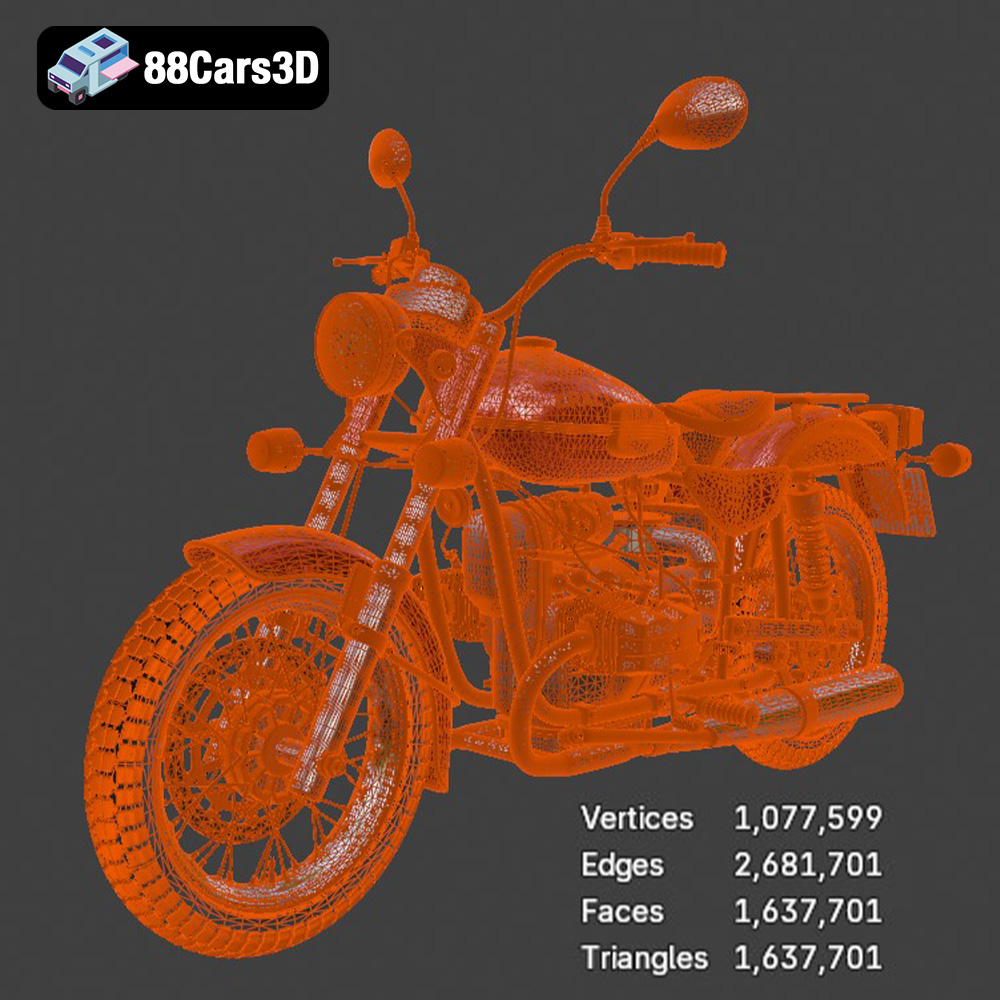
Key considerations include poly count and texture resolution. While the Ural Solo sT 3D Model delivers “exceptional detail,” its “clean geometry” ensures it can be optimized effectively for real-time AR/VR environments, potentially through LODs or by carefully managing material complexity. This balance ensures a smooth, high-frame-rate experience, crucial for preventing motion sickness and maintaining immersion.
Beyond entertainment, 3D models are critical components in serious simulations for training, engineering analysis, and scientific visualization. For these applications, geometric accuracy and structural precision are paramount. The Ural Solo sT’s authentic structural precision makes it an excellent candidate for such uses.
Formats like .fbx or the detailed .ply can be integrated into specialized simulation software. For instance, the Ural Solo sT could be used in a vehicle dynamics simulator to train drivers, allowing engineers to test different driving conditions or component interactions in a virtual environment. The accurate proportions and clean topology facilitate precise calculations, enabling realistic feedback and data collection. From virtual maintenance training to scenario planning for emergency services, high-fidelity 3D models provide the immersive and accurate visual context necessary for effective learning and analysis.
The convergence of digital design and physical manufacturing has opened up exciting possibilities, with 3D printing leading the charge in rapid prototyping and custom fabrication. High-quality 3D models are the cornerstone of this process, requiring specific technical attributes to ensure successful translation from screen to solid object. The Ural Solo sT 3D Model, with its robust structure and clean mesh, offers significant advantages for physical output.
The .stl format is the industry standard for 3D printing, representing a model’s surface as a tessellated mesh of triangles. For the Ural Solo sT to be successfully 3D printed, the .stl file must adhere to specific criteria. Primarily, the mesh needs to be “manifold,” meaning it has no holes, self-intersecting geometry, or flipped normals. A professional-grade model like the Ural Solo sT is typically built with this in mind, requiring minimal cleanup before export to .stl. Its “clean geometry” directly translates to a more reliable 3D print.
Once exported, the model is prepared in a slicer software, where parameters like scale, layer height, infill density, and support structures are defined. The accuracy of the digital model’s proportions and details directly influences the quality of the final physical print, whether it’s a small-scale collectible, a detailed prototype for design review, or a component for a larger assembly. The Ural Solo sT could easily become a desk ornament or a detailed prop thanks to its precise digital construction.
While .stl is excellent for basic printing, the .ply format offers a richer dataset suitable for more advanced applications like reverse engineering or quality control. A .ply file can store a higher density of polygonal information, including vertex colors or even normal data for each face, which can be critical for detailed analysis. For the Ural Solo sT, a .ply export could be used in conjunction with CAD software to analyze surface curvature, measure precise dimensions, or even compare a manufactured part against the original digital design for quality assurance.
This level of precision is invaluable in fields requiring meticulous examination of physical forms, ensuring that the transition from digital design to physical prototype (and vice-versa) is as accurate as possible. The “authentic structural precision” of the Ural Solo sT 3D Model ensures that any analysis derived from its .ply representation would be highly reliable and valuable for engineering or design validation.
In the competitive digital landscape, the foundation of any successful project, whether it’s an immersive game, a stunning automotive render, a practical simulation, or a tangible 3D print, lies in the quality of its core assets. The journey from concept to final product is significantly smoothed and elevated when starting with a meticulously crafted, technically robust 3D model.
The Ural Solo sT 3D Model exemplifies what a truly professional asset should be: versatile, detailed, optimized, and compatible across a multitude of platforms and workflows. Its availability in a diverse array of formats—from .blend and .max for comprehensive editing to .fbx and .unreal for game engines, .glb for AR/VR, and .stl for 3D printing—underscores its adaptability and the foresight in its creation. This model isn’t just a static object; it’s a dynamic tool ready to be integrated into any demanding digital pipeline, saving countless hours and ensuring top-tier results.
For artists, developers, and designers seeking to push the boundaries of realism and performance, investing in high-quality 3D car models is a strategic decision. Websites like 88cars3d.com serve as invaluable resources, providing access to such meticulously crafted assets that empower creators to bring their visions to life with unparalleled fidelity and efficiency. Elevate your projects and streamline your workflows by choosing assets built with professional quality and versatility at their core.
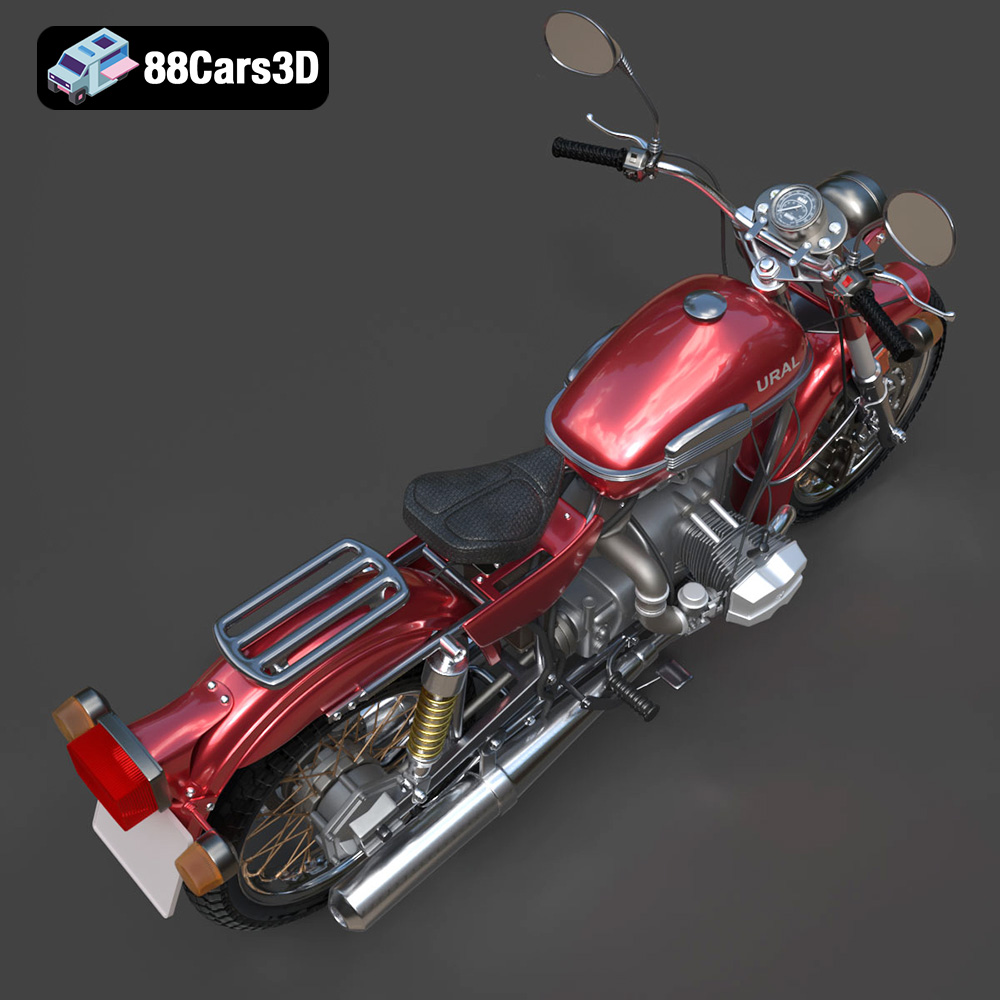
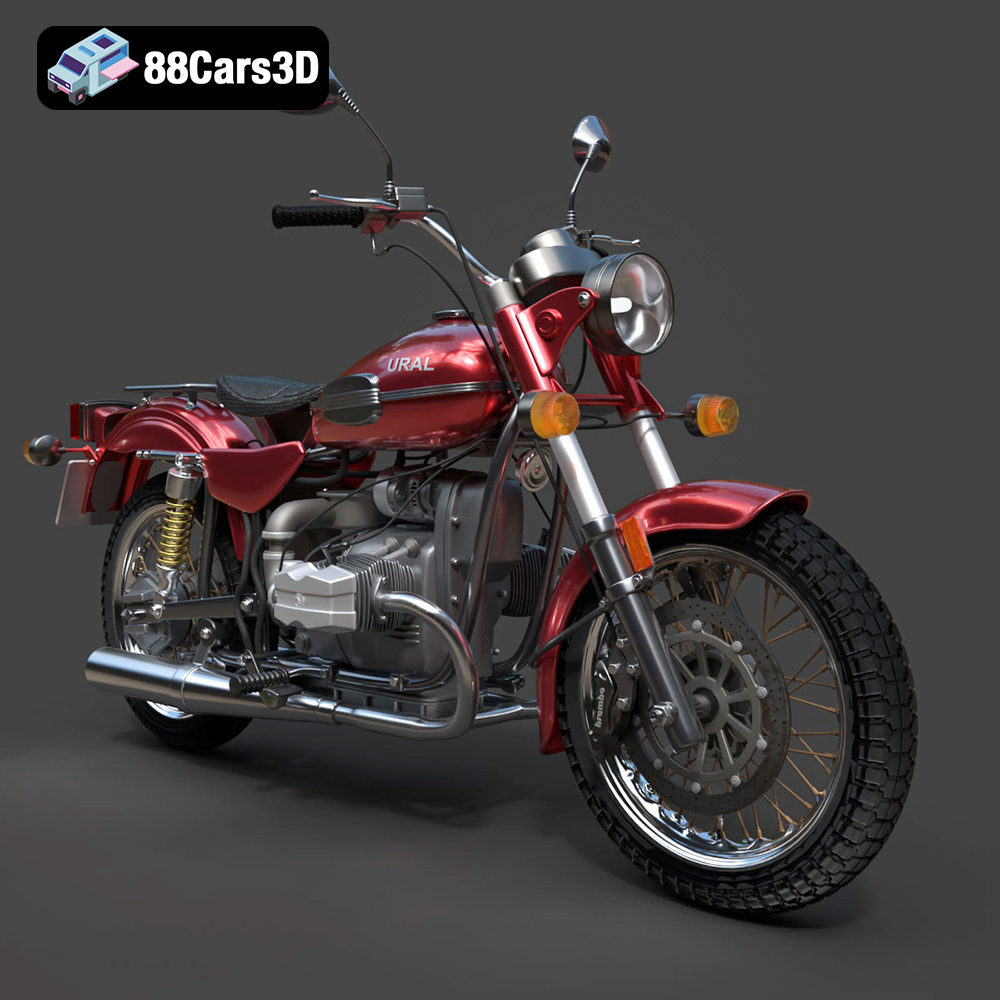
Experience true realism with the Ural Solo sT 3D Model. This carefully crafted digital asset captures the rugged design and iconic presence of the Ural Solo sT, delivering exceptional detail for your projects. Ideal for both close-up shots and expansive environments, this model brings authentic structural precision to any scene.
Built with professional quality in mind, the model features clean geometry, accurate proportions, and realistic materials. The well-structured topology ensures smooth performance and flawless subdivision, making it an excellent choice for a variety of demanding digital pipelines and rendering setups.
This versatile 3D model is perfect for diverse applications, including game development, automotive rendering, AR/VR experiences, and simulation visualization. It integrates seamlessly into your workflow, providing a ready-to-use solution for creators, designers, and developers alike.
Available File Formats:
Tags: .ural, .solost, .motorcycle, .cruiser, .car3dmodel, .rendering, .simulation, .gameasset, .arvr, .blend, .fbx, .obj, .glb, .stl, .ply, .unreal, .max
Tags:
.ural, .solost, .motorcycle, .cruiser, .car3dmodel, .rendering, .simulation, .gameasset, .arvr, .blend, .fbx, .obj, .glb, .stl, .ply, .unreal, .maxMercedes Benz CLS 500 3D Model 3D Printable STL
$39.99
.arvr
.blend
.car3dmodel
.cruiser
.fbx
.gameasset
.glb
.max
.motorcycle
.obj
.ply
.rendering
.simulation
.solost
.stl
.unreal
.ural