Get 20% OFF All Premium 3D & STL Models!

In the vast landscape of 3D artistry and digital development, few subjects capture the imagination quite like the classic American muscle car. These machines are more than just vehicles; they are rolling sculptures, encapsulating eras of design, power, and cultural identity. For 3D artists, game developers, architectural visualizers, and VR/AR creators, bringing such an icon to life in the digital realm presents a unique blend of challenge and opportunity. The pursuit of authenticity, from the roar of the engine to the gleam of chrome, demands a meticulous eye for detail and a profound understanding of technical optimization.
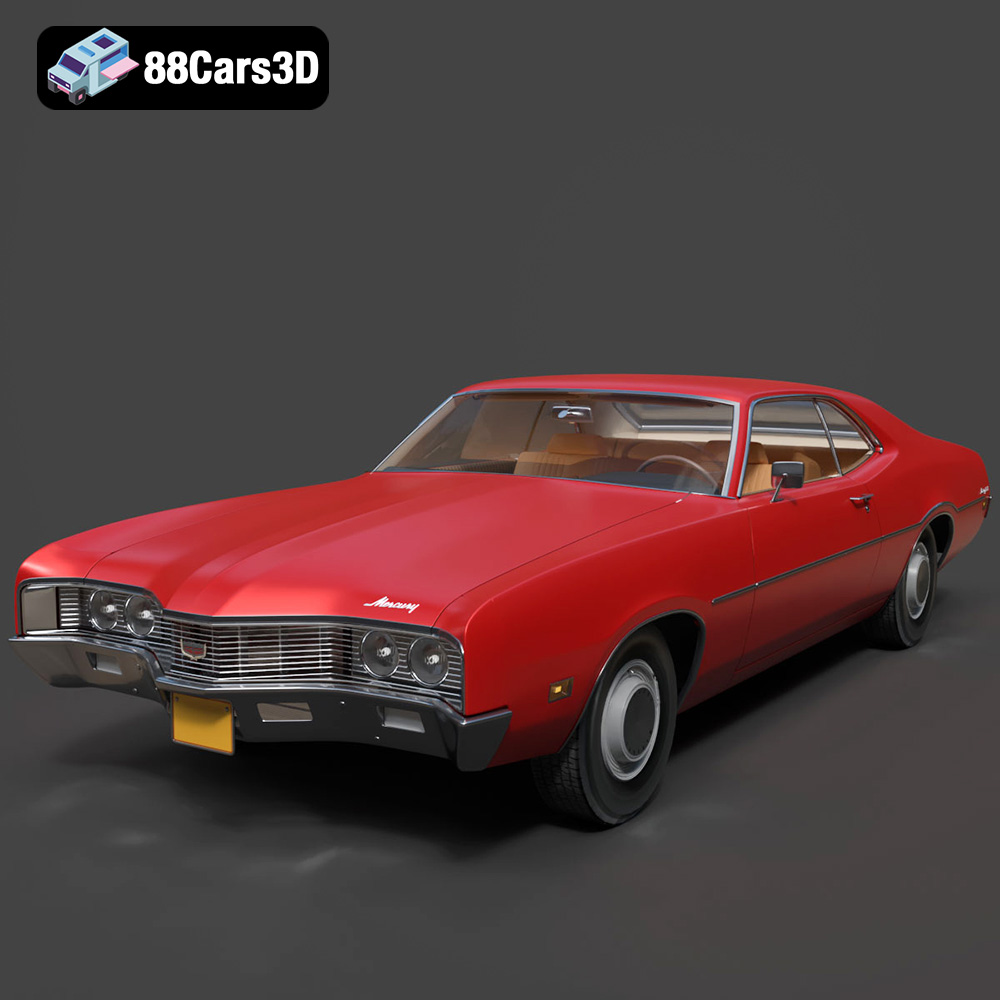
Imagine the imposing presence of a 1970 Mercury Montego, a true beast of its time, renowned for its distinct pronounced front grille, powerful stance, and sweeping lines that defined the essence of 70s performance. Recreating such a classic, with every curve, every rivet, and every material finish accurately represented, is a monumental task. This is where expertly crafted 3D car models become indispensable assets. They are not merely digital replicas but finely tuned instruments, ready to be deployed across a spectrum of professional applications. Today, we delve into the intricate world of premium 3D vehicle assets, highlighting how a model like the Mercury Montego 1970 3D Model from 88cars3d.com serves as a cornerstone for high-fidelity rendering, immersive game development, and cutting-edge interactive experiences.
This comprehensive guide will explore the technical nuances, workflow advantages, and diverse applications of professional 3D car models, ensuring you understand how to leverage these assets to elevate your digital projects to new heights of realism and performance.
The versatility of a 3D model often hinges on the file formats it supports. Each format is engineered for specific purposes, carrying unique advantages and limitations. For professionals working with 3D car models, understanding these distinctions is critical for efficient workflow and optimal integration into various software and engines. The Mercury Montego 1970 3D Model exemplifies this versatility by offering a comprehensive suite of file formats, ensuring broad compatibility.
The .blend format is native to Blender, the powerful open-source 3D creation suite. A .blend file is a complete scene package, containing not just the mesh data but also materials, textures (packed within the file or linked), lighting setups, camera positions, animations, modifiers, and even custom scripts. It’s fully editable, allowing artists to delve deep into the model’s construction, adjust topology, refine materials using Blender’s node-based shader editor (Cycles/Eevee), or modify any aspect of the scene. For Blender users, this format offers the most flexibility and direct access to the original project’s intricacies, making it ideal for customization, advanced rendering, and animation within Blender’s ecosystem.
.fbx (Filmbox) is a proprietary file format developed by Autodesk, serving as an industry-standard format for 3D data exchange. Its strength lies in its ability to store comprehensive scene information, including geometry, materials (with PBR maps), textures, rigging, and animation data, all within a single file. This makes .fbx invaluable for transferring complex 3D car models between different software applications like 3ds Max, Maya, Blender, and directly into real-time engines such as Unreal Engine and Unity. For game developers and animators, .fbx is often the go-to choice due to its robust support for animation and consistent import results across platforms, making it ideal for dynamic game assets.
.obj (Wavefront OBJ) is one of the most widely supported and simplest 3D geometry formats. It primarily stores vertex positions, UV coordinates, normals, and polygon faces. While it can reference external material files (.mtl) for basic color and texture information, it doesn’t support advanced material properties, animation, or scene hierarchy. Its universal compatibility, however, makes it an excellent choice for basic mesh transfer between virtually any 3D software. For static renders or base meshes that will be textured and rigged in a target application, .obj provides a clean, reliable foundation.
.glb (GL Transmission Format Binary) is the binary version of glTF (GL Transmission Format), designed for efficient transmission and loading of 3D scenes and models by engines and applications. It’s highly optimized for web-based 3D, augmented reality (AR), and virtual reality (VR) experiences, making it perfect for virtual showrooms, online configurators, and mobile AR apps. A .glb file packages all necessary data—geometry, materials, textures, and animation—into a single, self-contained file, resulting in faster loading times and simpler integration into web browsers or lightweight AR/VR viewers. For showcasing the Montego in an interactive web environment or an AR experience, .glb is the superior choice.
.stl (Stereolithography) is the de facto standard file format for 3D printing. Unlike other formats that describe surfaces, .stl represents a 3D model as a series of connected triangles (a triangulated mesh) that define the object’s outer surface geometry. It contains no color, texture, or material information, focusing solely on the shape for physical fabrication. For hobbyists or professionals looking to bring the Mercury Montego into the physical world as a scale model, an .stl file is essential. It requires careful preparation of the mesh to ensure printability, as highlighted by the specific 3D print settings provided for the Montego model.
.ply (Polygon File Format) is another popular format for storing 3D data, particularly useful for scanned data, CAD models, and meshes that require vertex color or specific property information. While similar to .obj in storing geometry, .ply can also include more complex attributes like color per vertex, surface normals, transparency, and range data. It’s often used in scientific visualization, reverse engineering, and applications where precise mesh data and additional per-vertex information are crucial for analysis or high-fidelity CAD work.
The inclusion of .unreal likely refers to an asset specifically optimized and prepared for direct import or even as a packaged asset for Unreal Engine. While .fbx is the primary import format, an “Unreal-ready” asset implies that it has undergone specific preparation—proper scaling, pivot setup, material assignments compatible with Unreal’s PBR workflow, and potentially LODs (Levels of Detail)—to ensure seamless integration and optimal performance within the engine. This saves considerable time and effort for developers, allowing them to drop the Mercury Montego 1970 3D Model straight into their virtual worlds with minimal adjustments, accelerating game development and real-time visualization projects.
Finally, the .max format is the native scene file for Autodesk 3ds Max, a leading software for 3D modeling, animation, and rendering. Like .blend, a .max file contains the complete scene, including geometry, materials (especially V-Ray or Corona setups), lighting, cameras, animation, and modifiers. It provides full editability within 3ds Max, making it the ideal choice for artists who use this software for high-end automotive rendering, detailed animation sequences, or integrating the Montego into complex architectural visualizations where precise control over every element is paramount.
The availability of such a diverse array of file formats for the Mercury Montego 1970 3D Model underscores its professional-grade quality and adaptability, making it a truly versatile asset for any digital creator.
Creating a high-fidelity 3D car model is an intricate process that marries artistic sensibility with technical precision. It demands extensive research, skilled craftsmanship, and a deep understanding of automotive design. The Mercury Montego 1970 3D Model stands as a testament to this craft, meticulously reproducing an automotive icon for the digital age.
The foundation of any compelling 3D car model lies in its accuracy. For the 1970 Mercury Montego, this meant going beyond simple approximations. Artists meticulously studied blueprints, archival photographs, and real-world examples to capture its exact dimensions, its unique stance, and the subtle curvatures that define its era. The model boasts “Accurate 1970 Mercury Montego frame geometry and classic muscle car proportions,” which is crucial for evoking the genuine feel of the vehicle. From the iconic split front grille to the accurately modeled quad headlights and taillights, every element is designed to resonate with enthusiasts and purists alike. This attention to detail ensures that whether viewed up close in a VR experience or from a distance in a racing game, the Montego maintains its authentic character.
A classic muscle car is defined not just by its exterior shell but also by the formidable machinery beneath. The Montego model elevates realism by including a “highly detailed V8 engine block” and an “authentic dual exhaust system with chrome tips.” These components are not merely decorative; they feature “classic V8 architectural elements” that can stand up to close inspection. Furthermore, the “accurate suspension and undercarriage detailing” speaks volumes about the model’s comprehensive design. For cinematic renders or detailed simulations, having these intricate components fully modeled adds an unparalleled layer of immersion, allowing for realistic camera angles that showcase the car’s engineering prowess from every perspective.
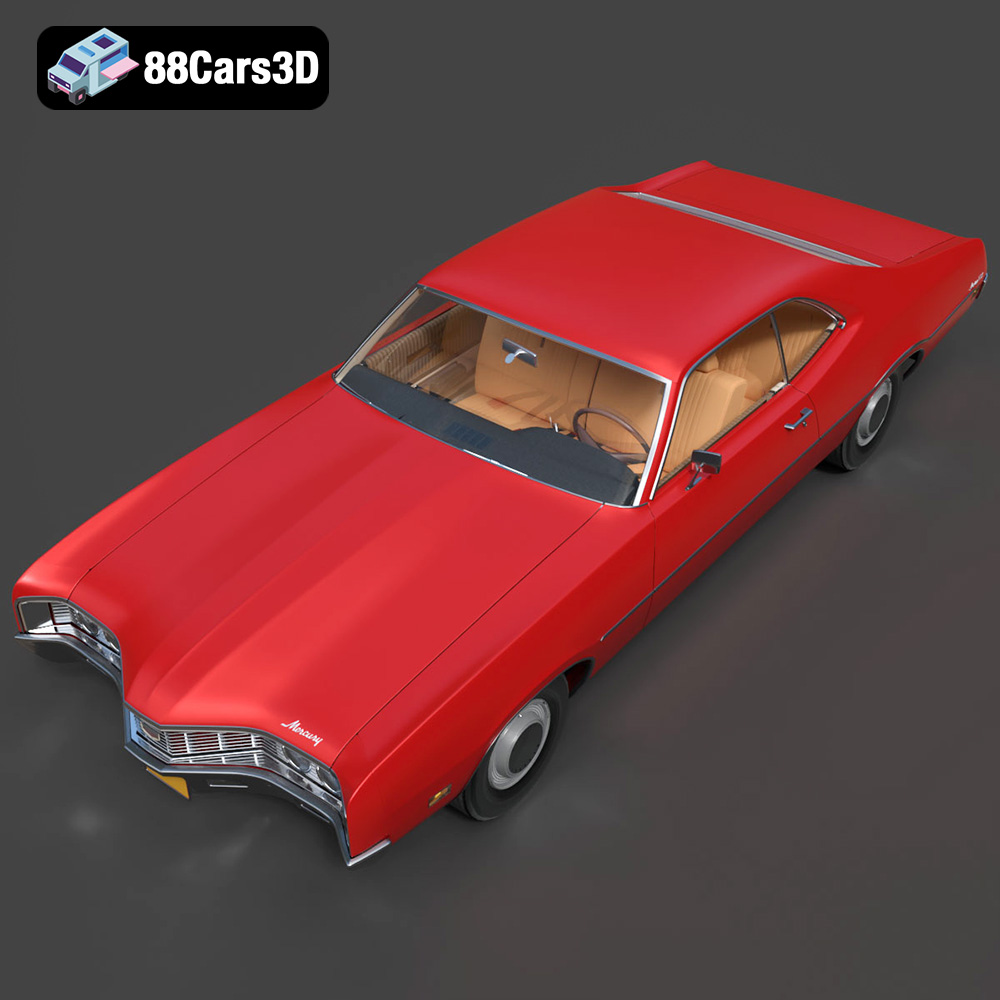
The experience of a car is often most personal from within. The Montego’s interior features are crafted to deliver a truly immersive cockpit experience, essential for applications like driving simulators and first-person gaming perspectives. “Detailed vintage vinyl seating with accurate stitch patterns” provides tactile realism, while the “classic deep-dish steering wheel with period-correct badging” instantly transports the user back to the 70s. The “authentic dashboard with detailed vintage instrument cluster and dials,” along with “accurate interior controls including pedals, window cranks, and gear shifter,” ensures that every interaction feels genuine. This level of interior detail is critical for creating believable virtual environments where users can truly feel connected to the classic machine.
In the world of interactive media and high-speed rendering, stunning visuals must coexist with optimal performance. A beautifully detailed 3D car model is only truly valuable if it can perform efficiently across various platforms and engines. This is where the engineering of game-ready assets comes into play, a core strength of the Mercury Montego 1970 3D Model.
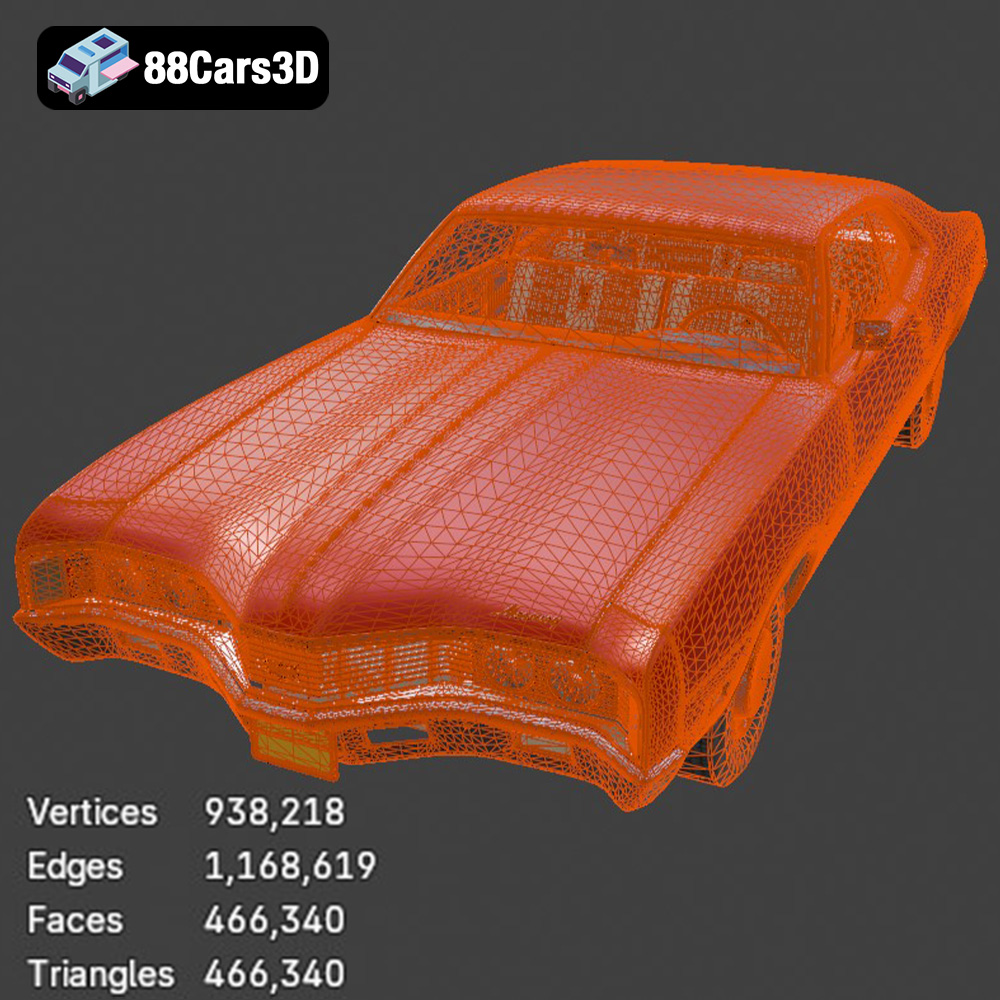
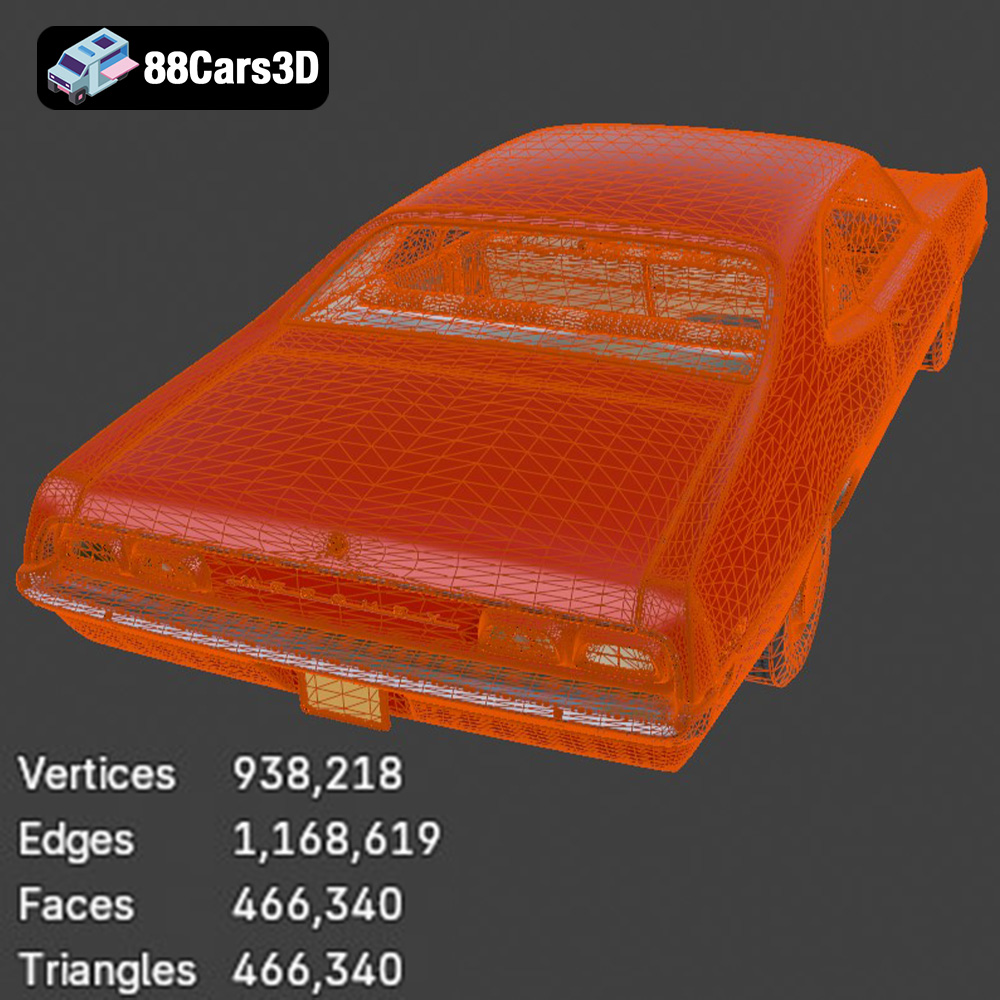
Polycount, or the number of triangles (polygons) that make up a 3D model, is a critical factor in performance. While higher polycounts allow for greater detail, they also demand more computational power. The Montego model strikes an impressive balance with “466,340 triangles,” a figure that ensures “high-end visual fidelity and game-ready performance.” This optimized topology means that the model can be seamlessly integrated into real-time engines like Unreal Engine and Unity without causing significant frame rate drops, while still maintaining the intricate details of its classic design. This careful optimization saves developers countless hours of rework, allowing them to focus on game logic and interaction rather than asset cleanup. For demanding environments such as open-world games or racing titles, this balance is paramount.
For any vehicle asset, the ability to animate its components realistically is non-negotiable. The Montego model is engineered with animation in mind, featuring “separate wheels, suspension, and steering components for seamless animation.” Crucially, it includes “proper pivot setup for steering, wheel rotation, and suspension travel.” This technical detail ensures that the model can be easily integrated into vehicle physics systems within game engines. Developers can quickly set up realistic driving mechanics, where wheels turn correctly, suspension compresses under load, and steering responds authentically, providing a believable and engaging driving experience.
While the product description focuses on geometry, the mention of “high-end visual fidelity” and “game-ready performance” implicitly points to the crucial role of Physically Based Rendering (PBR) materials and optimized texturing. A professional 3D car model, especially one intended for real-time engines and high-quality rendering, relies on a well-defined PBR workflow. This involves carefully unwrapped UVs (coordinates that map 2D textures onto the 3D surface) and a suite of texture maps (Albedo/Base Color, Metallic, Roughness, Normal, Ambient Occlusion, etc.). These maps ensure that the model reacts accurately to light, producing realistic reflections, shadows, and surface qualities consistent across different lighting conditions and rendering engines. The ability to customize material finishes, from “matte, gloss, metallic, heavy chrome” to “vintage factory colors,” indicates a robust material setup ready for PBR integration, allowing artists to achieve stunning visual realism with minimal effort.
The true power of a high-quality 3D asset lies in its adaptability across diverse professional workflows. Whether you’re a cinematic rendering artist, a game developer, or an AR/VR innovator, the Mercury Montego 1970 3D Model from 88cars3d.com provides a robust foundation for your creative endeavors.
For those specializing in high-end visualization, the .max and .blend formats offer unparalleled flexibility. In 3ds Max, artists can leverage industry-leading renderers like V-Ray or Corona to produce photorealistic automotive rendering. The complete scene data, including advanced material setups, allows for immediate integration into studio lighting setups. Imagine showcasing the Montego in a luxurious showroom, bathed in dynamic volumetric lights, with every gleam of chrome and every reflection on its vintage paint meticulously rendered. Similarly, Blender users can harness Cycles or Eevee, utilizing the fully editable .blend file to create stunning visuals for brand campaigns, lifestyle scenes, or detailed product shots. The model’s customization options, such as changing body colors to “vintage factory colors” or modifying tire textures for “classic whitewalls vs. street performance variants,” provide the creative freedom to adapt the Montego to any artistic vision or client brief.
Game developers and real-time visualization specialists will find the .fbx and .unreal formats to be indispensable. Importing the optimized Mercury Montego 1970 3D Model into Unreal Engine or Unity is a streamlined process thanks to its game-ready topology and proper pivot setups. Once imported, the model can become a centerpiece in open-world games, a formidable opponent in racing titles, or a hero vehicle in driving simulators. Its balanced polycount ensures smooth performance even in complex environments. Consider a scenario where a game studio needs to populate a 1970s urban environment; having a meticulously detailed and optimized game asset like this significantly cuts down production time. Developers can focus on building immersive gameplay, knowing the vehicle assets are already optimized for their real-time environments.
The versatility of the Montego model extends beyond traditional screen-based rendering. With the .glb format, it’s perfectly suited for AR/VR experiences. Imagine a virtual showroom where customers can walk around, interact with, and even configure their dream classic car in an immersive VR environment. Or an AR application that places the Montego directly onto a user’s driveway via their smartphone, allowing them to visualize its scale and presence in a real-world context. For those who appreciate tangible craftsmanship, the .stl format enables 3D printing. Hobbyists can bring the Montego to life as a physical display model. The provided 3D print settings, including recommended scales (1:12 / 1:18 / 1:24) and detailed guidelines for layer height, supports, and post-processing, ensure that even intricate details like the “exhaust, mirrors, classic bumpers, and steering wheel” are accurately reproduced, allowing for a museum-quality miniature.
To truly appreciate the value of a premium 3D asset, it helps to envision it within real-world project scenarios. The Mercury Montego 1970 3D Model offers a wealth of possibilities across various industries.
A burgeoning indie game studio is developing a new retro racing game, aiming for authentic 70s aesthetics. They need a diverse fleet of iconic American muscle cars but have limited time and resources for modeling each from scratch. By integrating the Mercury Montego 1970 3D Model from 88cars3d.com, they instantly acquire a highly detailed, game-ready asset with optimized topology and pre-set pivots for animation. This significantly accelerates their development cycle, allowing their artists to focus on environmental design and special effects, while their programmers can quickly integrate the car into the physics engine. The result is a richer, more immersive game experience delivered on schedule and within budget.
An automotive marketing agency is tasked with creating an immersive VR experience to showcase classic cars at an exclusive event. They require incredibly detailed models that can be explored up close, with fully interactive interiors and exterior elements. The Montego model, with its “detailed engine block,” “authentic dashboard,” and “optimized interior geometry ideal for first-person POV,” is a perfect fit. Using the .glb format for real-time VR rendering, visitors can virtually sit inside the Montego, open the hood to inspect the V8 engine, and admire the beautifully reproduced chrome work, all within a fluid and realistic virtual environment. This level of detail and optimization creates a memorable and engaging brand experience.
A high-profile advertising firm needs to produce a visually stunning commercial featuring a classic muscle car for a global lifestyle brand. Instead of the logistical complexities and immense costs of sourcing and filming a real 1970 Mercury Montego, they opt for CGI. The .max or .blend version of the Montego model becomes their core asset. Artists can render the car in various fantastical or hyper-realistic settings, using advanced rendering engines to create breathtaking cinematics. They can customize the paint finishes to match brand aesthetics, adjust lighting for dramatic effect, and choreograph complex camera moves impossible with physical vehicles. The result is a premium-quality advertisement that captivates audiences, all while maintaining creative control and cost efficiency.
The world of 3D modeling for automotive design, game development, and visualization is one of relentless pursuit of detail and performance. Creating a truly exceptional 3D car model, such as the Mercury Montego 1970, requires a profound understanding of both the artistic and technical challenges involved. From meticulously accurate geometry and authentic interior details to optimized topology for real-time engines and comprehensive file format support, every aspect is crafted to empower digital creators.
The Mercury Montego 1970 3D Model from 88cars3d.com is more than just a digital asset; it’s a testament to professional craftsmanship and a versatile tool designed to accelerate your projects. Whether you’re aiming for photorealistic automotive rendering, building immersive game worlds, or developing cutting-edge AR/VR experiences, this model provides the quality and flexibility needed to succeed. By leveraging such expertly prepared 3D car models, artists and developers can save invaluable time and resources, allowing them to focus on the creative vision rather than the tedious complexities of asset creation from scratch.
Explore this iconic muscle car and unlock new possibilities for your next digital masterpiece. The golden era of American automobiles awaits its revival in your hands.
Experience the golden era of American muscle with this meticulously crafted 1970 Mercury Montego 3D model. Known for its imposing road presence, distinct pronounced front grille, and sweeping fastback or hardtop styling, the 1970 Montego captures the essence of classic 70s performance. This model highlights key visual elements including a highly detailed V8 engine block, authentic dual exhaust system, and beautifully reproduced chrome bumpers and trim lines that define its vintage character.
$26.00
.blend
.fbx
.glb
.max
.mercury
.obj
.ply
.rendering
.stl
.unreal
car-3d-model
classic-car
game asset
game-ready
low-poly
montego-1970
muscle-car
optimized
VR/AR